
From .NET 10 code to Kubernetes in 8 steps
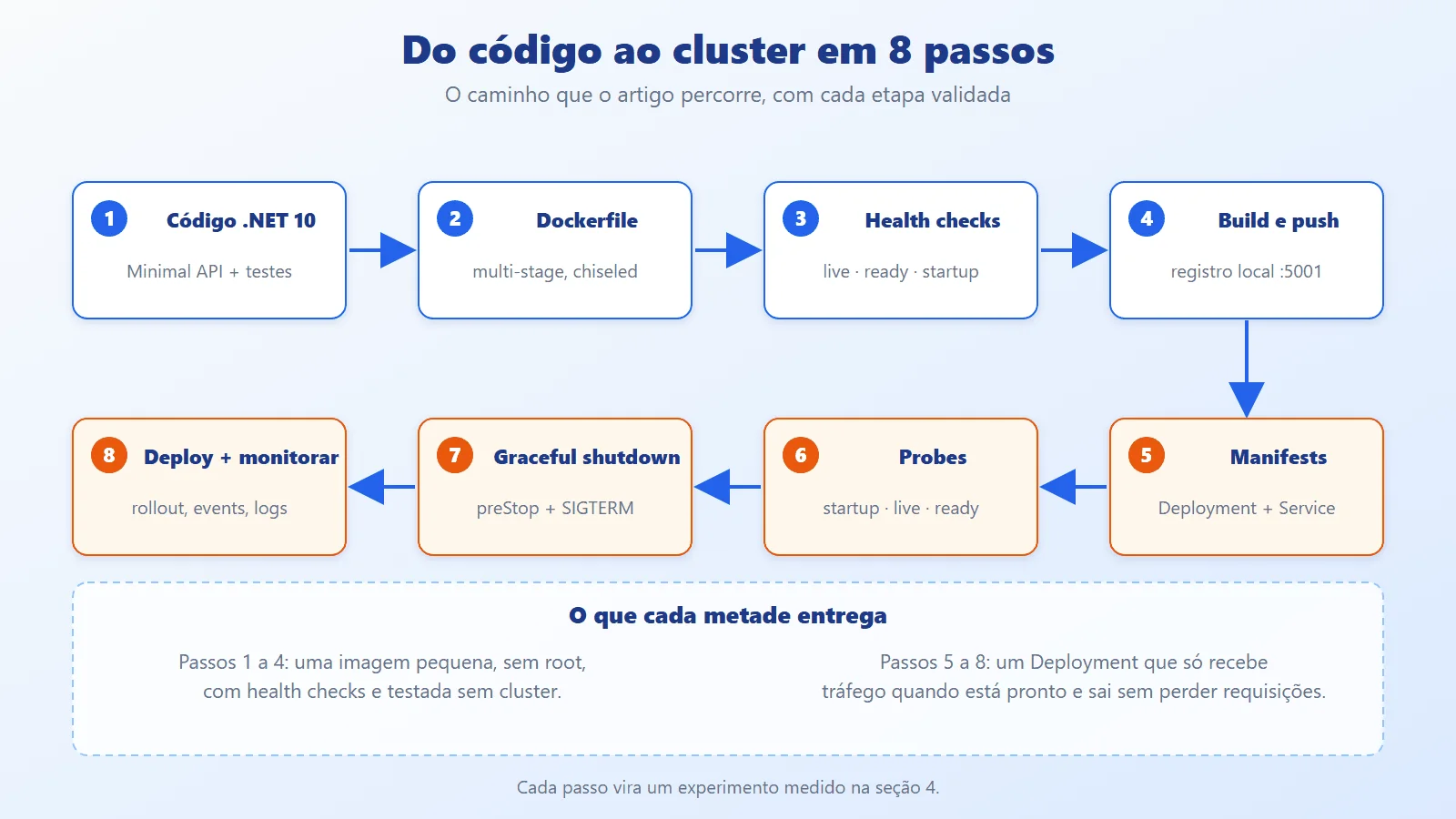
An API that works on the developer's machine is not yet ready for Kubernetes. In production, the orchestrator kills and recreates pods all the time (deploys, scaling, node maintenance), and the application needs to answer three questions that dotnet run never asked: have I finished starting up? Am I still alive? Can I receive traffic now? Without correct answers, a deploy drops requests, a slow dependency restarts all the pods at once, and a 1.3 GB image runs as root.
This article, which continues the series after Fault Tolerance vs Resilience and Rate Limiting, walks the whole path with a real orders API in .NET 10: a multi-stage Dockerfile with a chiseled image and a non-root user, health checks, graceful shutdown, manifests with Kustomize, and a local kind cluster. Everything was executed and measured (times, sizes, restartCount, errors under load); what could not be run is stated in section 4.12.
Kubernetes concepts: pods, probes and lifecycle
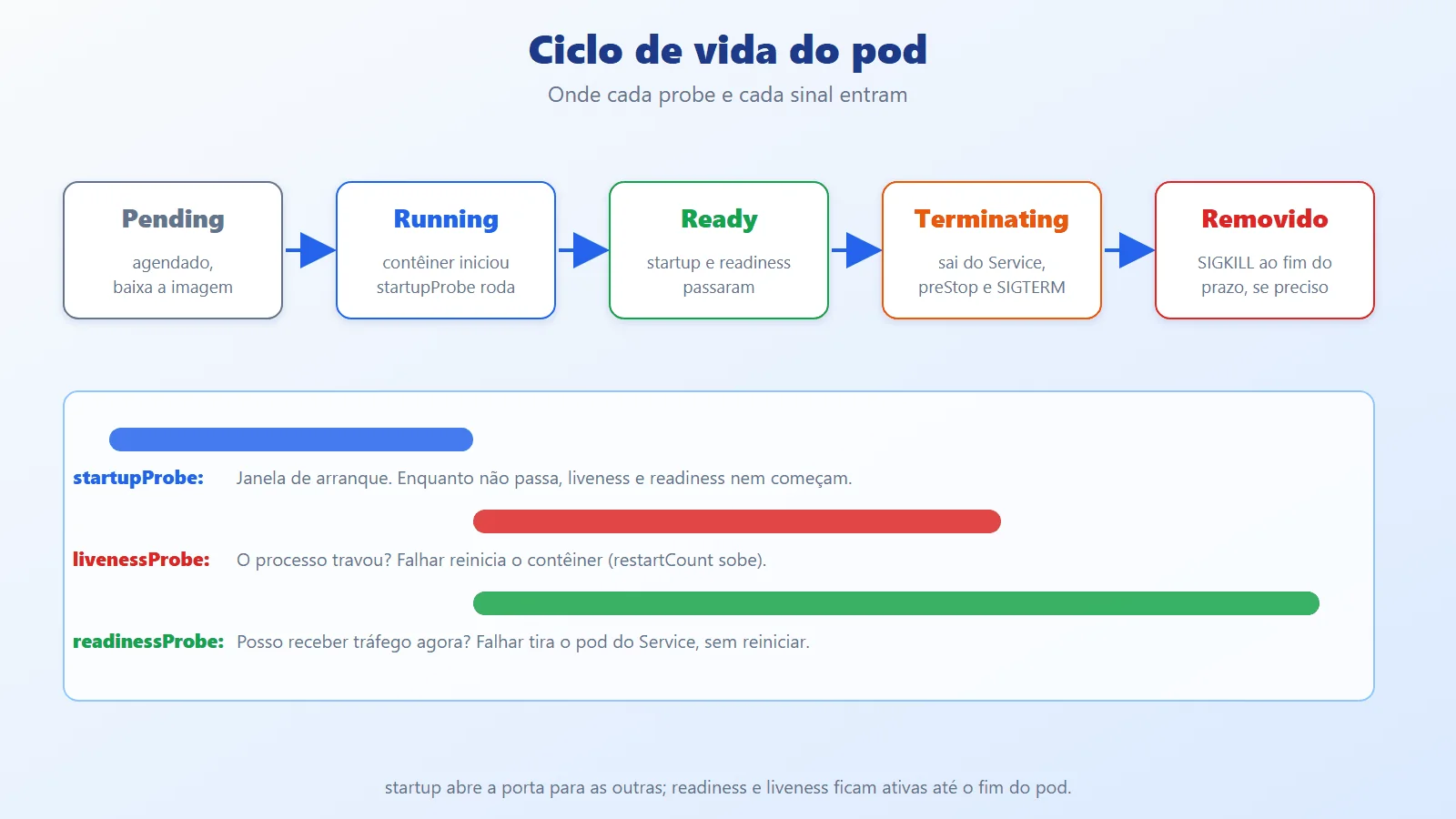
Pod, image, and container. The image is the immutable artifact; the container is an isolated process created from it; the pod is the smallest unit Kubernetes schedules (one or more containers that share a network). What recreates pods is the ReplicaSet, controlled by the Deployment.
The three probes. Each one asks a different question and has a different consequence:
- startupProbe: "have I finished starting up?". Until it passes, the other two do not even start. Failing up to the limit restarts the container.
- livenessProbe: "is the process alive?". Failing restarts the container.
- readinessProbe: "can I receive traffic now?". Failing does not restart: it only takes the pod out of the Service.

Each probe can be httpGet, tcpSocket, grpc, or exec. A chiseled image has no shell, so exec (curl, sh) does not work and httpGet is the natural choice:
livenessProbe:


  httpGet:


    path: /health/live


    port: http


  periodSeconds: 5      # how often to probe


  timeoutSeconds: 2     # how long to wait for the response


  failureThreshold: 3   # consecutive failures before acting
The fields periodSeconds, timeoutSeconds, and failureThreshold define the reaction time: here, three failures of 2 s every 5 s. In the API, each question becomes a route and each route runs only the checks with its tag:
app.MapHealthChecks("/health/live", Saude.Rota("live"));


app.MapHealthChecks("/health/ready", Saude.Rota("ready"));
Saude.Rota returns a HealthCheckOptions with Predicate = r => r.Tags.Contains(tag). That way, /health/live never runs the check that talks to the dependency.
Pod termination. When the pod is removed, Kubernetes marks it as Terminating, takes it out of the endpoints, runs the preStop hook, sends SIGTERM, and, after terminationGracePeriodSeconds, sends SIGKILL. For SIGTERM to reach .NET, the process must be PID 1 of the container, and that depends on how the ENTRYPOINT is written:
# Shell form: /bin/sh becomes PID 1 and does NOT forward SIGTERM


ENTRYPOINT dotnet out/Pedidos.dll


# Exec form: dotnet is PID 1 and receives SIGTERM


ENTRYPOINT ["dotnet", "Pedidos.dll"]
The shell form looks harmless, but section 4.5 shows the measured cost: docker stop waited the whole deadline and ended with SIGKILL (exit code 137).
The chiseled image. These are "chiseled" Ubuntu images from Microsoft: only what is needed to run .NET, with no shell, no package manager, and a non-root user (UID 1654, APP_UID variable). Smaller, with less attack surface.
Resource limits. .NET reads the container's cgroup limits: Environment.ProcessorCount reflects the CPU limit (rounded up) and the GC uses a fraction of the memory limit as a ceiling. The measured numbers are in section 4.11.
A measured summary of the images, which justifies the chosen format (the detail comes in section 3.1):
$ docker images pedidos --format "{{.Tag}} {{.Size}}"


ingenua 1.3GB


noble 340MB


1.0 180MB
Architecture: image, health checks and rolling update
The image: multi-stage, cache, and chiseled
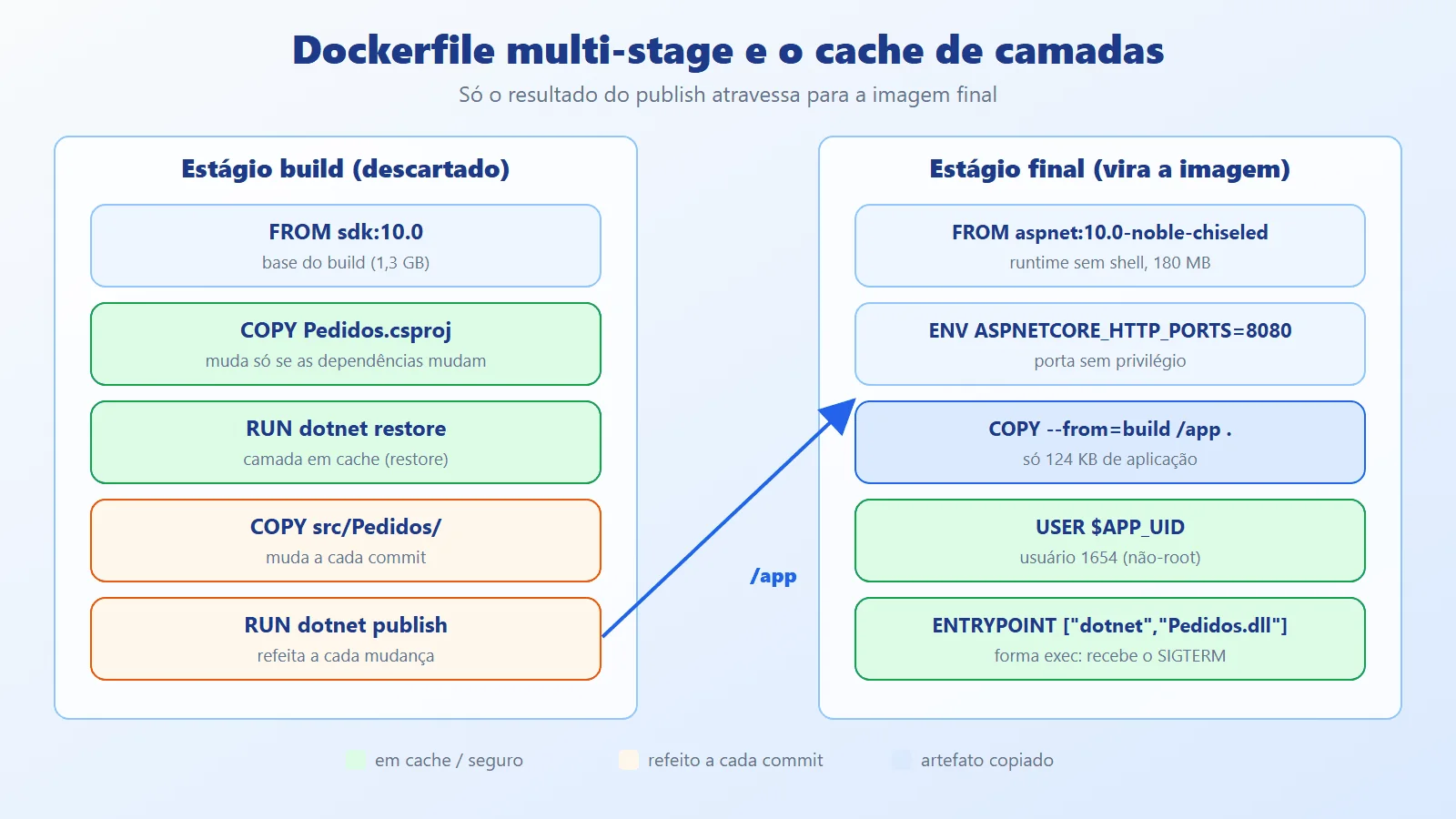
The build uses two stages. The first (sdk:10.0) restores and publishes; the second (aspnet:10.0-noble-chiseled) receives only the publish output. The SDK, the source code, and the NuGet cache are left behind. The order of instructions matters: copying only the .csproj before restore keeps that layer cached as long as the dependencies do not change.
COPY src/Pedidos/Pedidos.csproj src/Pedidos/


RUN dotnet restore src/Pedidos/Pedidos.csproj


COPY src/Pedidos/ src/Pedidos/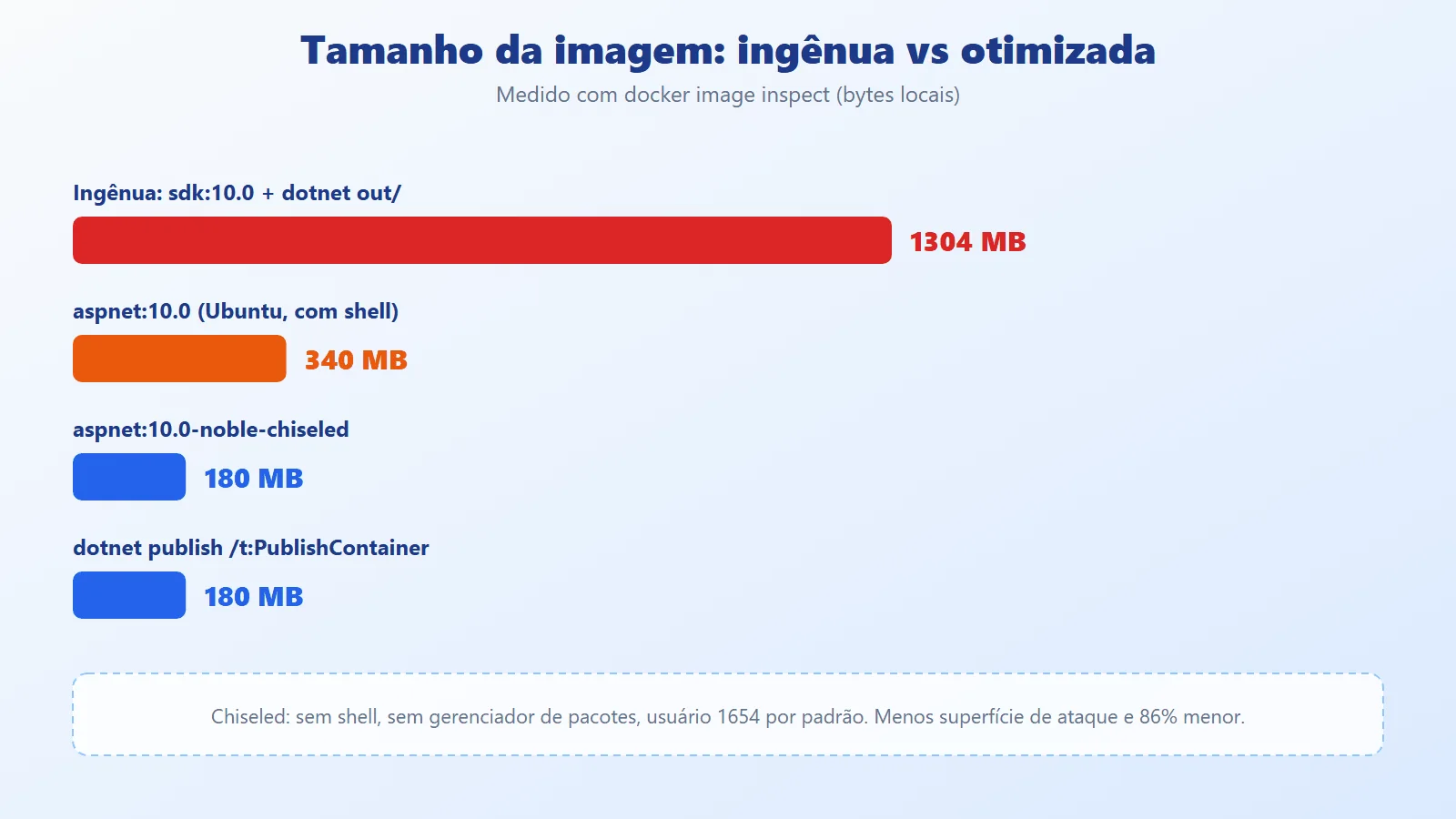
The final stage ends with USER $APP_UID (numeric, so Kubernetes' runAsNonRoot can verify it) and an ENTRYPOINT in exec form. The .dockerignore keeps bin/, obj/, .git/, and k8s/ out of the build context.
Health checks: one question per endpoint
ASP.NET Core separates registering the check (with tags) from exposing the route (with Predicate). Each check is a small class that answers only its own question. /health/ready is the only one that queries the dependency, and with a timeout: a slow dependency must not hang the probe.
using var cts =


    CancellationTokenSource.CreateLinkedTokenSource(ct);


cts.CancelAfter(TimeSpan.FromSeconds(2));
CancelAfter guarantees that, even if the ping never returns, the check responds Unhealthy in 2 s (message "dependencia lenta") instead of letting the probe exceed its own timeoutSeconds.
Graceful shutdown: signal, wait, finish

Closing a pod without losing requests has three phases: (1) the pod leaves the endpoints (this takes a few moments to propagate through the cluster); (2) the process is notified with SIGTERM; (3) in-flight requests finish. The application takes part in two of them. On receiving the signal, it starts answering 503 on readiness and waits a few seconds before Kestrel stops accepting connections. The right hook for this is IHostedLifecycleService.StoppingAsync, which runs before the StopAsync of all services (including the web server):
public async Task StoppingAsync(CancellationToken ct)


{


    var s = config.GetValue("Shutdown:DrenagemSegundos", 3);


    estado.Drenando = true;


    log.LogInformation("2. Drenando (readiness 503) {S}s", s);


    await Task.Delay(TimeSpan.FromSeconds(s), ct);


}
The first version of this code did the waiting in the StopAsync of an IHostedService. It did not work: services stop in reverse order of registration, and Kestrel (registered later) stopped before the draining service, which then waited in vain. StoppingAsync fixes the ordering.
Manifests and the rolling update
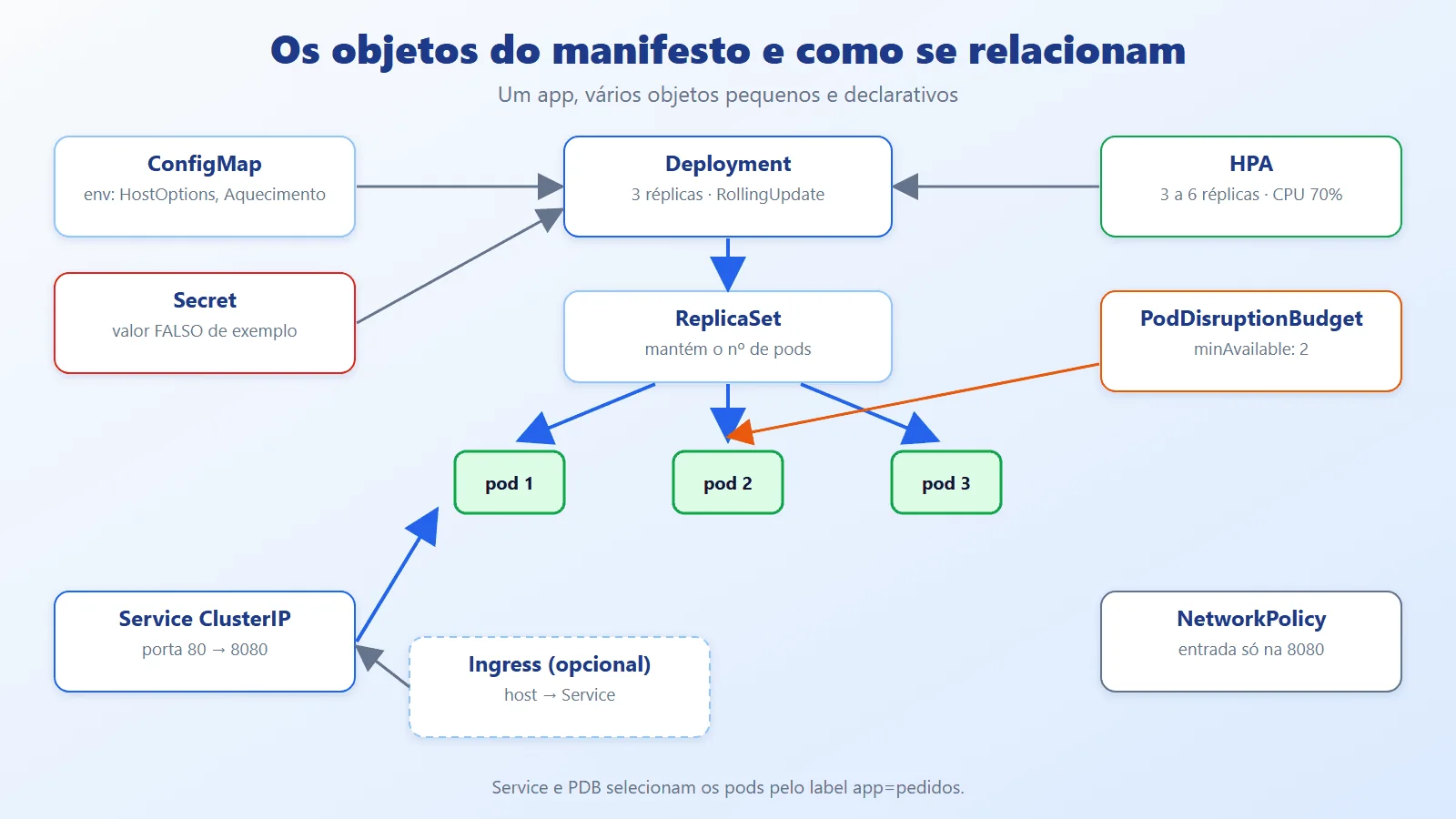
The Deployment describes the desired pod and the replacement strategy; the Service (ClusterIP) provides a stable address and only forwards to Ready pods; ConfigMap and Secret inject configuration through environment variables; the HPA adjusts the replicas; the PodDisruptionBudget limits how many pods can leave at the same time during voluntary maintenance; the NetworkPolicy restricts ingress. The replacement strategy is the piece that protects the deploy:
strategy:


  type: RollingUpdate


  rollingUpdate:


    maxSurge: 1


    maxUnavailable: 0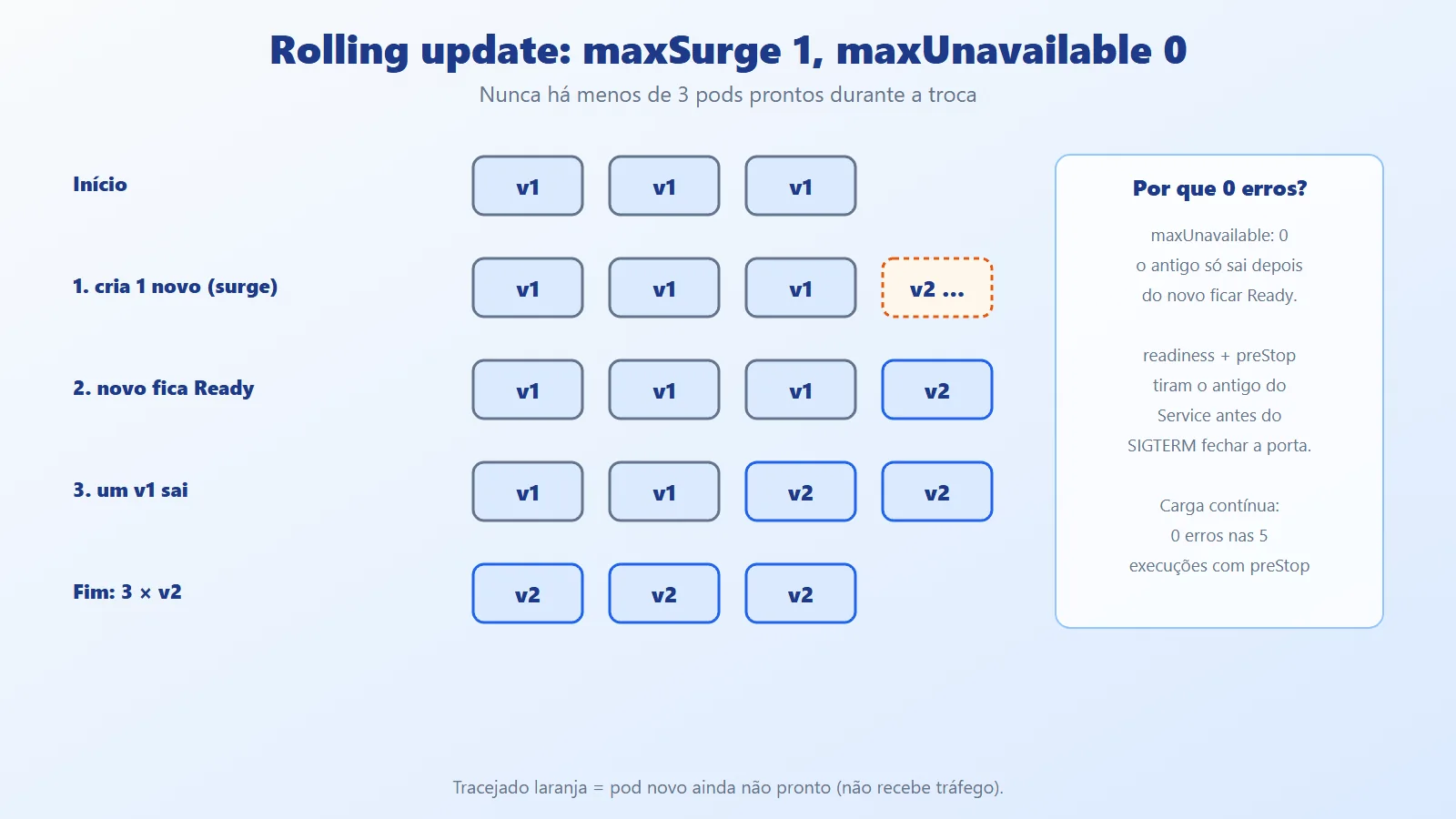
maxSurge: 1 allows creating one extra pod during the swap; maxUnavailable: 0 forbids taking down an old pod before the new one is Ready. Capacity never drops below the 3 replicas.
Kustomize: one base, several environments
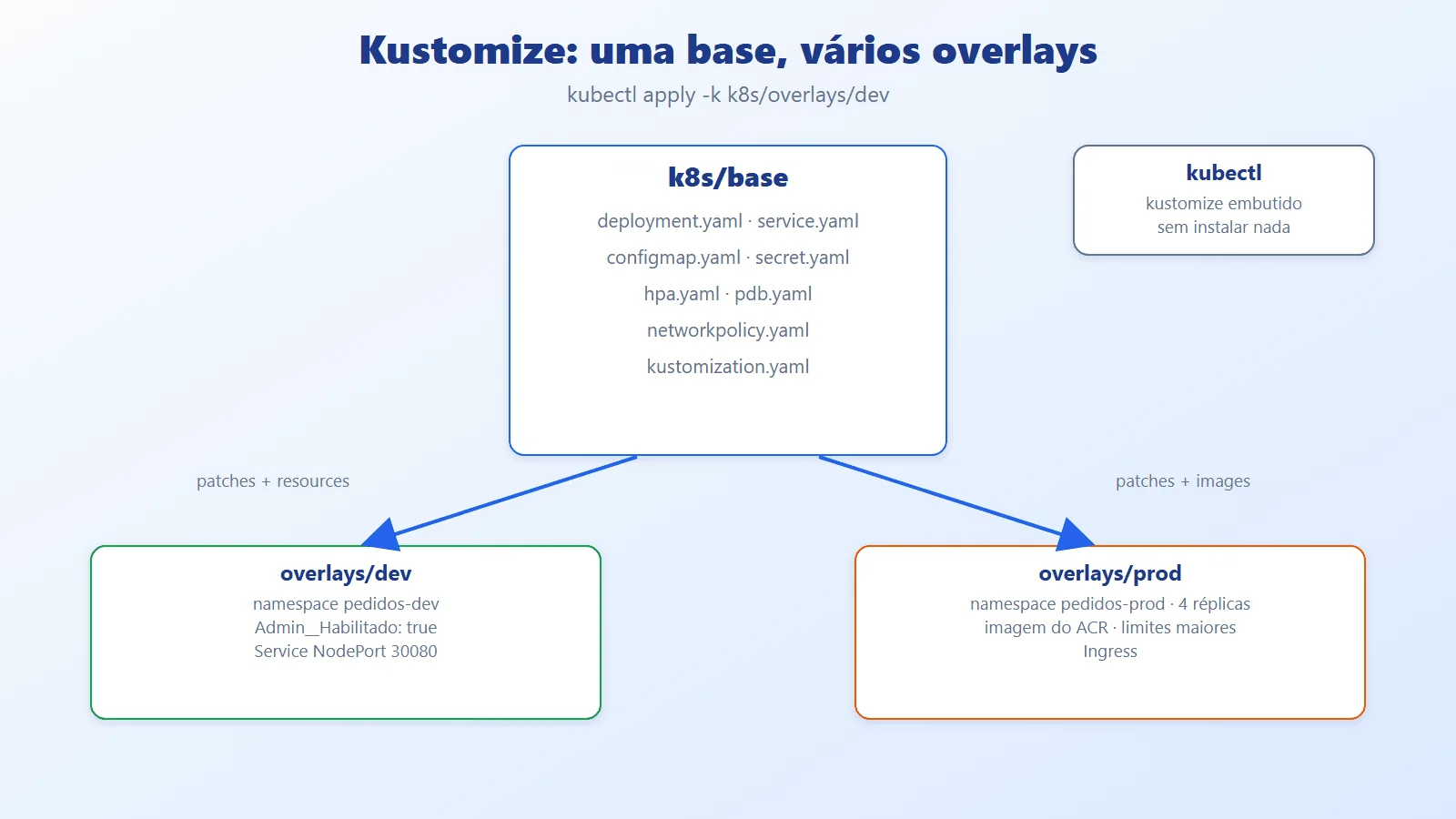
The k8s/base folder describes the app once; each overlay (dev, prod) applies patches on top of it: namespace, replica count, image, limits. kubectl already ships with Kustomize built in, so there is nothing to install:
kubectl kustomize k8s/overlays/prod   # only renders


kubectl apply -k k8s/overlays/dev     # renders and applies
Practical example: .NET API on Kubernetes with kind
The kubernetes-dotnet repository has everything shown here, and the blocks in this article are the actual files. The API is a small orders Minimal API; the focus is on the integration points with Kubernetes.
Prerequisites and installation, step by step

Windows is the main environment. Order matters: the .NET 10 SDK is independent; WSL 2 comes first, then Docker Desktop (which uses WSL 2 as its engine), and only then kubectl and kind, which need Docker running. The winget IDs below were checked with winget search; the kind and kubectl binaries I used for validation were downloaded from the official sites, with no global installation.
Step 1: .NET 10 SDK (official download).
winget install Microsoft.DotNet.SDK.10


dotnet --version10.0.401Step 2: WSL 2 (documentation). In a PowerShell as administrator; it requires restarting Windows and virtualization enabled in the BIOS/UEFI.
wsl --install


wsl --status
Step 3: Docker Desktop (installation on Windows). Open the app once, accept the terms, and wait for the Engine running status.
winget install Docker.DockerDesktop


docker version --format "{{.Server.Version}}"29.8.1Step 4: kubectl (official tools). Kustomize already comes inside kubectl.
winget install Kubernetes.kubectl


kubectl version --clientClient Version: v1.36.1
Kustomize Version: v5.8.1Step 5: kind (official guide). Through winget, or by downloading the binary and checking the published checksum (which is what I did, in a local folder, without changing the system PATH):
winget install Kubernetes.kind


kind versionkind v0.33.0 go1.26.7 windows/amd64$u = "https://github.com/kubernetes-sigs/kind/releases"
$u = "$u/download/v0.33.0/kind-windows-amd64"
curl.exe -sLo kind.exe $u
curl.exe -sL "$u.sha256sum"
(Get-FileHash kind.exe).Hash.ToLower()The last two commands must print the same hash (4b22adaa...15c9fc in my validation). The Docker Desktop installation from scratch was not redone on this machine (it was already installed); that step comes from the official documentation.
Linux and macOS. The same tools exist: use the distribution's package manager (or Homebrew) or the download pages linked above. There is no WSL; on Linux, Docker Engine runs directly.
Creating and removing the cluster. The kubectl context changes to the new cluster; always check it before applying anything:
kind create cluster --name artigo-k8s `


  --config k8s/kind-config.yaml


kubectl config get-contexts


kind get clustersCURRENT NAME CLUSTER AUTHINFO
* kind-artigo-k8s kind-artigo-k8s kind-artigo-k8s
artigo-k8sAt the end, removal undoes the cluster and the context:
kind delete cluster --name artigo-k8s


kind get clusters
Common installation problems:
Symptom: "WSL 2 requires an update" / Docker does not start


Cause:   virtualization disabled or outdated WSL


Fix:     enable virtualization in the BIOS; wsl --update


Symptom: error during connect: ... dockerDesktopLinuxEngine


Cause:   Docker Desktop is closed


Fix:     open the app and wait for "Engine running"


Symptom: port is already allocated (30080 or 5001)


Fix:     netstat -ano | findstr :30080 ; change the hostPort


Symptom: kubectl talks to the wrong cluster


Fix:     kubectl config use-context kind-artigo-k8s
All set? A mini checklist, and the command to get the code and run the first build:
dotnet --version && docker version --format "{{.Server.Version}}"


kubectl version --client && kind version


git clone https://github.com/ceseidl/kubernetes-dotnet


cd kubernetes-dotnet


dotnet test Pedidos.slnx
If dotnet test passes (8 tests), the environment is ready. The repository is not yet public at the date of this text; until publication, the code exists only on the author's machine.
The project and the entry point
The API uses the Microsoft.NET.Sdk.Web SDK. InvariantGlobalization avoids depending on ICU, which does not exist in the chiseled image:
<Project Sdk="Microsoft.NET.Sdk.Web">


  <PropertyGroup>


    <TargetFramework>net10.0</TargetFramework>


    <Nullable>enable</Nullable>


    <ImplicitUsings>enable</ImplicitUsings>


    <InvariantGlobalization>true</InvariantGlobalization>


  </PropertyGroup>


</Project>
Program.cs registers the shared state, the dependency (swappable for a fake in tests), the two lifecycle services, and the three health checks with their tags, plus JSON logs on stdout (the format cluster log collectors expect). The middleware returns the pod name in the X-Pod header, used later to prove load distribution:
using Pedidos;


var builder = WebApplication.CreateBuilder(args);


builder.Logging.AddJsonConsole(o =>


    o.TimestampFormat = "HH:mm:ss.fff ");


builder.Services.AddSingleton<EstadoApp>();


builder.Services


    .AddSingleton<IDependencia, DependenciaSimulada>();


builder.Services.AddHostedService<Aquecimento>();


builder.Services.AddHostedService<Drenagem>();


builder.Services.AddHealthChecks()


    .AddCheck<VivoCheck>("vivo", tags: ["live"])


    .AddCheck<ProntoCheck>("dependencia", tags: ["ready"])


    .AddCheck<CacheCheck>("cache", tags: ["startup"]);


var app = builder.Build();


app.Use(async (http, next) =>


{


    http.Response.Headers["X-Pod"] = Environment.MachineName;


    await next();


});


app.MapHealthChecks("/health/live", Saude.Rota("live"));


app.MapHealthChecks("/health/ready", Saude.Rota("ready"));


app.MapHealthChecks("/health/startup", Saude.Rota("startup"));


app.MapPedidos();


app.MapInfo();


app.MapAdmin();


app.Run();


public partial class Program;
Health checks
The shared state and the simulated dependency. The dependency is an interface because, in production, it would be a database or a queue; in tests, it becomes a fake:
namespace Pedidos;


/// Shared state that the health checks query.


public sealed class EstadoApp


{


    public volatile bool CacheAquecido;


    public volatile bool Drenando;


    public volatile bool Travado;


    public volatile bool DependenciaLigada = true;


    public int LatenciaDependenciaMs;


}namespace Pedidos;
/// External dependency (database, queue...). Simulated in the example.
public interface IDependencia
{
Task<bool> PingAsync(CancellationToken ct);
}
public sealed class DependenciaSimulada(EstadoApp estado)
: IDependencia
{
public async Task<bool> PingAsync(CancellationToken ct)
{
await Task.Delay(estado.LatenciaDependenciaMs, ct);
return estado.DependenciaLigada;
}
}The three checks: liveness only looks at the process (and fakes a deadlock when Travado is on), readiness respects draining and the dependency timeout, and startup waits for the cache to warm up:
using Microsoft.Extensions.Diagnostics.HealthChecks;


namespace Pedidos;


using Ctx = HealthCheckContext;


using Res = HealthCheckResult;


/// Liveness: only looks at the process itself. No database.


public sealed class VivoCheck(EstadoApp estado) : IHealthCheck


{


    public async Task<Res> CheckHealthAsync(


        Ctx ctx, CancellationToken ct = default)


    {


        // Simulates a deadlock: the process is alive, but does not respond.


        if (estado.Travado)


            await Task.Delay(Timeout.Infinite, ct);


        return Res.Healthy("processo responde");


    }


}


/// Readiness: ready to receive traffic right now?


public sealed class ProntoCheck(


    EstadoApp estado, IDependencia dependencia) : IHealthCheck


{


    public async Task<Res> CheckHealthAsync(


        Ctx ctx, CancellationToken ct = default)


    {


        if (estado.Drenando)


            return Res.Unhealthy("drenando (SIGTERM recebido)");


        using var cts =


            CancellationTokenSource.CreateLinkedTokenSource(ct);


        cts.CancelAfter(TimeSpan.FromSeconds(2));


        try


        {


            return await dependencia.PingAsync(cts.Token)


                ? Res.Healthy("dependencia ok")


                : Res.Unhealthy("dependencia fora do ar");


        }


        catch (OperationCanceledException)


            when (!ct.IsCancellationRequested)


        {


            return Res.Unhealthy("dependencia lenta (> 2 s)");


        }


    }


}


/// Startup: has the startup cache already been warmed up?


public sealed class CacheCheck(EstadoApp estado) : IHealthCheck


{


    public Task<Res> CheckHealthAsync(


        Ctx ctx, CancellationToken ct = default) =>


        Task.FromResult(estado.CacheAquecido


            ? Res.Healthy("cache aquecido")


            : Res.Unhealthy("cache aquecendo"));


}
Saude.Rota converts a tag into HealthCheckOptions and writes readable JSON (the HTTP codes come from the default: Unhealthy becomes 503):
using Microsoft.AspNetCore.Diagnostics.HealthChecks;


namespace Pedidos;


public static class Saude


{


    /// Each route runs only the checks with its tag.


    public static HealthCheckOptions Rota(string tag) => new()


    {


        Predicate = r => r.Tags.Contains(tag),


        ResponseWriter = (http, rel) =>


            http.Response.WriteAsJsonAsync(new


            {


                status = rel.Status.ToString(),


                checks = rel.Entries.Select(e => new


                {


                    nome = e.Key,


                    status = e.Value.Status.ToString(),


                    detalhe = e.Value.Description


                })


            })


    };


}
Slow startup and graceful shutdown
Aquecimento simulates a slow startup (cache, migrations, JIT). In blocking mode, Kestrel only opens the port after warming up, like an app that migrates the database before listening:
namespace Pedidos;


/// Simulates a slow startup (cache, migrations, JIT).


public sealed class Aquecimento(


    EstadoApp estado,


    IConfiguration config,


    ILogger<Aquecimento> log) : BackgroundService


{


    public override async Task StartAsync(CancellationToken ct)


    {


        // Blocking: Kestrel only opens the port after warming up,


        // like an app that migrates the database before listening.


        if (config.GetValue<bool>("Aquecimento:Bloqueante"))


            await AquecerAsync(ct);


        await base.StartAsync(ct);


    }


    protected override Task ExecuteAsync(CancellationToken ct) =>


        AquecerAsync(ct);


    async Task AquecerAsync(CancellationToken ct)


    {


        if (estado.CacheAquecido) return;


        var s = config.GetValue("Aquecimento:Segundos", 3);


        log.LogInformation("Aquecendo cache por {S}s", s);


        await Task.Delay(TimeSpan.FromSeconds(s), ct);


        estado.CacheAquecido = true;


        log.LogInformation("Cache aquecido");


    }


}
And Drenagem logs the numbered shutdown sequence (1 to 4), which shows up in the experiment logs:
namespace Pedidos;


/// On SIGTERM, tells the load balancer (readiness 503)


/// and waits BEFORE Kestrel stops accepting connections.


public sealed class Drenagem(


    EstadoApp estado,


    IConfiguration config,


    IHostApplicationLifetime vida,


    ILogger<Drenagem> log) : IHostedLifecycleService


{


    public Task StartingAsync(CancellationToken ct)


    {


        vida.ApplicationStopping.Register(() =>


            log.LogInformation("1. Stopping (SIGTERM)"));


        vida.ApplicationStopped.Register(() =>


            log.LogInformation("4. Stopped"));


        return Task.CompletedTask;


    }


    // Runs before the StopAsync of ALL services (including


    // Kestrel), which is why the draining lives here.


    public async Task StoppingAsync(CancellationToken ct)


    {


        var s = config.GetValue("Shutdown:DrenagemSegundos", 3);


        estado.Drenando = true;


        log.LogInformation("2. Drenando (readiness 503) {S}s", s);


        await Task.Delay(TimeSpan.FromSeconds(s), ct);


        log.LogInformation("3. Fim da drenagem, fechando");


    }


    static Task Nada => Task.CompletedTask;


    public Task StartAsync(CancellationToken ct) => Nada;


    public Task StartedAsync(CancellationToken ct) => Nada;


    public Task StopAsync(CancellationToken ct) => Nada;


    public Task StoppedAsync(CancellationToken ct) => Nada;


}
The business and support endpoints live in Endpoints.cs. /lento simulates a long request (to prove the shutdown), /info exposes what .NET sees of the container, and the /admin group only exists with Admin:Habilitado=true:
        // Long request: proves the graceful shutdown.


        app.MapGet("/lento", async (int segundos) =>


        {


            await Task.Delay(TimeSpan.FromSeconds(segundos));


            return new


            {


                concluido = true,


                pod = Environment.MachineName


            };


}); public static void MapAdmin(this WebApplication app)
{
if (!app.Configuration.GetValue<bool>("Admin:Habilitado"))
return;
var adm = app.MapGroup("/admin");
var e = app.Services.GetRequiredService<EstadoApp>();
adm.MapPost("/dependencia/{ligada:bool}", (bool ligada) =>
e.DependenciaLigada = ligada);
adm.MapPost("/latencia/{ms:int}", (int ms) =>
e.LatenciaDependenciaMs = ms);
adm.MapPost("/travar", () => e.Travado = true);
}The Dockerfile, the image, and docker stop
Final Dockerfile (multi-stage, chiseled, non-root, port 8080):
# syntax=docker/dockerfile:1


FROM mcr.microsoft.com/dotnet/sdk:10.0 AS build


WORKDIR /src


# Restore layer: only changes when the .csproj changes.


COPY src/Pedidos/Pedidos.csproj src/Pedidos/


RUN dotnet restore src/Pedidos/Pedidos.csproj


COPY src/Pedidos/ src/Pedidos/


RUN dotnet publish src/Pedidos/Pedidos.csproj \


    -c Release --no-restore -o /app /p:UseAppHost=false


FROM mcr.microsoft.com/dotnet/aspnet:10.0-noble-chiseled


WORKDIR /app


ENV ASPNETCORE_HTTP_PORTS=8080


EXPOSE 8080


COPY --from=build /app .


USER $APP_UID


ENTRYPOINT ["dotnet", "Pedidos.dll"]
For comparison, the naive version: a single stage, SDK as the base, COPY . ., root, and ENTRYPOINT in shell form:
# NAIVE version, only to compare size and shutdown.


FROM mcr.microsoft.com/dotnet/sdk:10.0


WORKDIR /app


COPY . .


RUN dotnet publish src/Pedidos/Pedidos.csproj -c Release -o out


ENV ASPNETCORE_URLS=http://+:8080


ENTRYPOINT dotnet out/Pedidos.dll
Measurements (docker image inspect, local bytes from Docker 29.8.1):
pedidos:ingenua                               1.304 MB


aspnet:10.0 (Ubuntu, with shell)                340 MB


aspnet:10.0-noble-chiseled                      180 MB


pedidos:1.0 (chiseled + app, 124 KB of app)     180 MB


dotnet publish -t:PublishContainer              180 MB
The naive image is 7 times larger. The optimized build took 16.2 s from scratch (--no-cache) and 10 to 12 s after changing a file, with the restore layer as CACHED. Mind an honest limitation of the measurement: this API has no NuGet packages, so restore is nearly instantaneous and the gain from layer caching did not show up in seconds (the naive version rebuilt in 9.4 s). Caching pays off when there are real dependencies.
The alternative without a Dockerfile is the .NET container SDK, which produced an equivalent image (180 MB, user 1654, ENTRYPOINT dotnet /app/Pedidos.dll):
dotnet publish src/Pedidos -c Release -t:PublishContainer \


  -p:ContainerRepository=pedidos-sdk -p:ContainerImageTag=1.0 \


  -p:ContainerFamily=noble-chiseled
Experiment (a): docker stop with a 20 s request in flight. The script starts the container, fires /lento?segundos=20, waits 2 s, and stops the container:
#!/usr/bin/env bash


# Experiment (a): docker stop with a request in flight.


# Usage: scripts/exp-a-docker-stop.sh <image> <stop-timeout>


IMG=${1:-pedidos:1.0}; T=${2:-30}


SED='s/.*mp":"([^"]*)".*ge":"([^"]*)".*/\1 \2/'


docker rm -f pedidos-a >/dev/null 2>&1


docker run -d --name pedidos-a -p 8081:8080 "$IMG" >/dev/null


until curl -sf localhost:8081/health/startup >/dev/null; do


  sleep 1


done


curl -s -m 60 -w ' http=%{http_code} em %{time_total}s\n' \


  'localhost:8081/lento?segundos=20' &


sleep 2


INI=$(date +%s%N)


docker stop -t "$T" pedidos-a >/dev/null


FIM=$(date +%s%N)


wait


echo "docker stop levou $(( (FIM - INI) / 1000000 )) ms"


CODE=$(docker inspect -f '{{.State.ExitCode}}' pedidos-a)


echo "exit code: $CODE"


docker logs pedidos-a 2>&1 \


  | grep -E 'Stopping|Drenando|Fim da|Stopped|lento .* 200' \


  | sed -E "$SED" | cut -c1-60


docker rm -f pedidos-a >/dev/null
Results, running the same script three times:
ingenua, docker stop -t 10:


  request: http=000 (connection cut)


  docker stop levou 11621 ms, exit code 137


  logs: no shutdown lines


pedidos:1.0, docker stop -t 30:


  {"concluido":true,...} http=200 em 20.01s


  docker stop levou 18491 ms, exit code 0


  04:13:10.697 1. Stopping (SIGTERM)


  04:13:10.699 2. Drenando (readiness 503) 3s


  04:13:13.702 3. Fim da drenagem, fechando


  04:13:27.487 4. Stopped


pedidos:1.0, docker stop -t 5:


  request: http=000, docker stop 6679 ms, exit code 137


  logs: up to "3. Fim da drenagem"; the SIGKILL arrived before the end
Reading: in the naive one, /bin/sh was PID 1 and SIGTERM never reached .NET (no stop log); Docker waited the 10 s and killed the container, dropping the request. In the optimized one, SIGTERM arrived, the process drained, waited for the request to finish (HTTP 200 in 20.01 s), and exited with code 0. With -t 5, the deadline was shorter than the request: SIGKILL. It is Kubernetes' terminationGracePeriodSeconds in miniature.
Automated tests
The tests use neither network nor cluster: WebApplicationFactory brings up the API in memory and FakeDependencia replaces the real dependency. The factory:
using Microsoft.AspNetCore.Hosting;


using Microsoft.AspNetCore.Mvc.Testing;


using Microsoft.Extensions.DependencyInjection;


using Microsoft.Extensions.DependencyInjection.Extensions;


using Pedidos;


namespace Pedidos.Tests;


/// Fake dependency: the test decides whether it is up.


public sealed class FakeDependencia : IDependencia


{


    public volatile bool Ligada = true;


    public TimeSpan Atraso = TimeSpan.Zero;


    public async Task<bool> PingAsync(CancellationToken ct)


    {


        await Task.Delay(Atraso, ct);


        return Ligada;


    }


}


public sealed class AppFactory : WebApplicationFactory<Program>


{


    public FakeDependencia Dep { get; } = new();


    public int AquecimentoSegundos { get; init; }


    public bool UsaFake { get; init; } = true;


    protected override void ConfigureWebHost(IWebHostBuilder b)


    {


        b.UseSetting("Admin:Habilitado", "true");


        b.UseSetting("Shutdown:DrenagemSegundos", "0");


        b.UseSetting("Aquecimento:Segundos",


            AquecimentoSegundos.ToString());


        if (!UsaFake) return;


        b.ConfigureServices(s =>


        {


            s.RemoveAll<IDependencia>();


            s.AddSingleton<IDependencia>(Dep);


        });


    }


}
Three of the eight tests (readiness follows the dependency, the timeout, and the shutdown that drains readiness):
    [Fact]


    public async Task Ready_acompanha_a_dependencia()


    {


        _app.Dep.Ligada = true;


        Assert.Equal(Ok, await Status("/health/ready"));


        _app.Dep.Ligada = false;


        Assert.Equal(Fora, await Status("/health/ready"));


        _app.Dep.Ligada = true;


        Assert.Equal(Ok, await Status("/health/ready"));


    }


    [Fact]


    public async Task Ready_tem_timeout_se_a_dependencia_trava()


    {


        _app.Dep.Atraso = TimeSpan.FromSeconds(30);


        var r = await _http.GetAsync("/health/ready");


        _app.Dep.Atraso = TimeSpan.Zero;


        Assert.Equal(Fora, r.StatusCode);


        var corpo = await r.Content.ReadAsStringAsync();


        Assert.Contains("lenta", corpo);


} [Fact]
public async Task Shutdown_drena_a_readiness()
{
using var app = new AppFactory();
var http = app.CreateClient();
Assert.Equal(Ok, (await http.GetAsync("/health/ready"))
.StatusCode);
var drenagem = app.Services.GetServices<IHostedService>()
.OfType<Drenagem>().Single();
await drenagem.StoppingAsync(CancellationToken.None);
Assert.Equal(Fora, (await http.GetAsync("/health/ready"))
.StatusCode);
Assert.Equal(Ok, (await http.GetAsync("/health/live"))
.StatusCode);
}$ dotnet test Pedidos.slnx
Aprovado! - Com falha: 0, Aprovado: 8, Ignorado: 0, Total: 8Local registry, build and push, and the kind cluster
The "build and push" step uses a local registry (the registry:2 container at localhost:5001), with no cloud account. Docker accepts localhost as a registry without TLS:
docker run -d --name registro-local \


  -p 127.0.0.1:5001:5000 registry:2


docker tag pedidos:1.0 localhost:5001/pedidos:1.0


docker push localhost:5001/pedidos:1.0


curl -s localhost:5001/v2/_catalog


curl -s localhost:5001/v2/pedidos/tags/list1.0: digest: sha256:3a0d3276...4dde13 size: 856
{"repositories":["pedidos"]}
{"name":"pedidos","tags":["1.0"]}In a real scenario, the flow is the same with the registry name swapped. I did not run this snippet (it requires an Azure subscription); it is only the reference from the Microsoft and Docker documentation:
az acr login --name meuregistro


docker tag pedidos:1.0 meuregistro.azurecr.io/pedidos:1.0


docker push meuregistro.azurecr.io/pedidos:1.0
The cluster named artigo-k8s exposes port 30080 on localhost (for the load client). The configuration, and loading the image into the node, which avoids the pull from a registry:
kind: Cluster


apiVersion: kind.x-k8s.io/v1alpha4


nodes:


  - role: control-plane


    extraPortMappings:


      - containerPort: 30080


        hostPort: 30080


listenAddress: "127.0.0.1"kind create cluster --name artigo-k8s \
--config k8s/kind-config.yaml
kind load docker-image pedidos:1.0 --name artigo-k8sSet kubectl context to "kind-artigo-k8s" (69 s in total)
NAME STATUS ROLES VERSION
artigo-k8s-control-plane Ready control-plane v1.37.0The manifests
The Deployment, in three parts. First, replicas, strategy, the pod, and configuration injection (the whole ConfigMap through envFrom, and the Secret in a variable):
apiVersion: apps/v1


kind: Deployment


metadata:


  name: pedidos


  labels:


    app: pedidos


spec:


  replicas: 3


  revisionHistoryLimit: 3


  selector:


    matchLabels:


      app: pedidos


  strategy:


    type: RollingUpdate


    rollingUpdate:


      maxSurge: 1


      maxUnavailable: 0


  template:


    metadata:


      labels:


        app: pedidos


    spec:


      terminationGracePeriodSeconds: 40


      securityContext:


        runAsNonRoot: true


        seccompProfile:


          type: RuntimeDefault


      containers:


        - name: pedidos


          image: pedidos:1.0


          imagePullPolicy: IfNotPresent


          ports:


            - name: http


              containerPort: 8080


          envFrom:


            - configMapRef:


                name: pedidos-config


          env:


            - name: Api__Token


              valueFrom:


                secretKeyRef:


                  name: pedidos-segredo


                  key: token
Then, the container's resources and security: requests and limits, no privileges, a read-only root filesystem (the emptyDir at /tmp covers what the runtime needs to write), and drop: ALL:
          resources:


            requests:


              cpu: 100m


              memory: 128Mi


            limits:


              cpu: 500m


              memory: 256Mi


          securityContext:


            allowPrivilegeEscalation: false


            readOnlyRootFilesystem: true


            capabilities:


              drop: ["ALL"]


          volumeMounts:


            - name: tmp


              mountPath: /tmp
Finally, the three probes with the numbers justified below, the preStop, and the volume:
          startupProbe:


            httpGet:


              path: /health/startup


              port: http


            periodSeconds: 2


            timeoutSeconds: 1


            failureThreshold: 30


          readinessProbe:


            httpGet:


              path: /health/ready


              port: http


            periodSeconds: 3


            timeoutSeconds: 3


            failureThreshold: 2


          livenessProbe:


            httpGet:


              path: /health/live


              port: http


            periodSeconds: 5


            timeoutSeconds: 2


            failureThreshold: 3


          lifecycle:


            preStop:


              sleep:


                seconds: 5


      volumes:


        - name: tmp


          emptyDir: {}
Why these numbers.
- startupProbe:
periodSeconds: 2×failureThreshold: 30gives 60 s to start; the measured startup takes 3 s (45 s in the slow experiment). A wide margin, zero cost once it passes. - readinessProbe:
3 s×2 failurestakes the pod out of the Service in about 6 s;timeoutSeconds: 3is larger than the dependency's internal timeout (2 s), so the check respondsUnhealthyinstead of the probe timing out. - livenessProbe:
5 s×3 failureswithtimeoutSeconds: 2restarts a stuck pod in 15 to 20 s. Anything more aggressive restarts pods because of a GC spike. - preStop: Kubernetes' native
sleep(lifecycle.preStop.sleep) gives the pod time to leave the endpoints beforeSIGTERM. A chiseled image does not have thesleepbinary, soexec: sleepwould not work. - terminationGracePeriodSeconds: 40 s, larger than
5 (preStop) + 3 (draining) + 25 (ShutdownTimeout).
The ConfigMap carries the settings through environment variables (__ becomes : in .NET configuration) and includes HostOptions__ShutdownTimeout:
apiVersion: v1


kind: ConfigMap


metadata:


  name: pedidos-config


data:


  ASPNETCORE_ENVIRONMENT: Production


  Aquecimento__Segundos: "3"


  Shutdown__DrenagemSegundos: "3"


  HostOptions__ShutdownTimeout: "00:00:25"


  Admin__Habilitado: "false"
The Secret holds a fake value, only to show the format; in production the value comes from a vault (Key Vault with the CSI provider, External Secrets, etc.) and never from Git:
# FAKE VALUE, for the example only. In production the Secret comes from


# a vault (Key Vault, External Secrets...), never from Git.


apiVersion: v1


kind: Secret


metadata:


  name: pedidos-segredo


type: Opaque


stringData:


  token: "valor-falso-de-exemplo"
ClusterIP Service, HPA, and PodDisruptionBudget:
apiVersion: v1


kind: Service


metadata:


  name: pedidos


  labels:


    app: pedidos


spec:


  type: ClusterIP


  selector:


    app: pedidos


  ports:


    - name: http


      port: 80


targetPort: httpapiVersion: autoscaling/v2
kind: HorizontalPodAutoscaler
metadata:
name: pedidos
spec:
scaleTargetRef:
apiVersion: apps/v1
kind: Deployment
name: pedidos
minReplicas: 3
maxReplicas: 6
metrics:
- type: Resource
resource:
name: cpu
target:
type: Utilization
averageUtilization: 70
behavior:
scaleDown:
stabilizationWindowSeconds: 120apiVersion: policy/v1
kind: PodDisruptionBudget
metadata:
name: pedidos
spec:
minAvailable: 2
selector:
matchLabels:
app: pedidosThe NetworkPolicy accepts ingress only on port 8080, and the base is joined together in kustomization.yaml. The dev overlay adjusts the namespace and configuration and exposes a NodePort:
apiVersion: networking.k8s.io/v1


kind: NetworkPolicy


metadata:


  name: pedidos


spec:


  podSelector:


    matchLabels:


      app: pedidos


  policyTypes: ["Ingress"]


  ingress:


    - ports:


        - port: 8080


protocol: TCPapiVersion: kustomize.config.k8s.io/v1beta1
kind: Kustomization
namespace: pedidos-dev
resources:
- namespace.yaml
- ../../base
- service-nodeport.yaml
patches:
- path: config-dev.yaml
- path: replicas-dev.yaml# k8s/overlays/prod/kustomization.yaml (summary)
namespace: pedidos-prod
resources: [namespace.yaml, ../../base, ingress.yaml]
images:
- name: pedidos
newName: meuregistro.azurecr.io/pedidos
newTag: "1.0"The prod overlay's Ingress and the NetworkPolicy were validated only as YAML (kubectl kustomize rendered them); there is no Ingress Controller in the test cluster.
Deploy and verification (experiment b)
kubectl apply -k k8s/overlays/dev


kubectl -n pedidos-dev rollout status deploy/pedidos


kubectl -n pedidos-dev get pods


kubectl -n pedidos-dev get endpoints pedidosdeployment "pedidos" successfully rolled out
NAME READY STATUS RESTARTS AGE
pedidos-74cb498998-7fzt8 1/1 Running 0 7s
pedidos-74cb498998-8kdjq 1/1 Running 0 7s
pedidos-74cb498998-hn8vc 1/1 Running 0 7s
NAME ENDPOINTS
pedidos 10.244.0.5:8080,10.244.0.6:8080,10.244.0.7:8080The three pods became Ready in about 7 s and the Service now has three endpoints. The JSON log, with the event time, comes straight out of kubectl logs:
{"Timestamp":"04:43:55.747 ","LogLevel":"Information",


 "Category":"Pedidos.Aquecimento",


 "Message":"Aquecendo cache por 3s"}
Resilience experiments
(c) The dependency goes down: readiness fails and the pod leaves the Service. The script does a port-forward to a specific pod, calls the admin endpoint that takes the dependency down, and observes:
#!/usr/bin/env bash


# Experiment (c): dependency goes down -> readiness fails ->


# the pod leaves the Service, without restarting.


NS=pedidos-dev


POD=$(kubectl -n $NS get pod -l app=pedidos \


  -o jsonpath='{.items[0].metadata.name}')


kubectl -n $NS port-forward "pod/$POD" 18080:8080 >/dev/null &


PF=$!; sleep 2


echo "== antes"; kubectl -n $NS get endpoints pedidos


curl -s -XPOST localhost:18080/admin/dependencia/false; echo


sleep 8


echo "== depois (pod alvo: $POD)"


kubectl -n $NS get pods -l app=pedidos


kubectl -n $NS get endpoints pedidos


curl -s localhost:18080/health/ready; echo


curl -s -o /dev/null -w 'live=%{http_code}\n' \


  localhost:18080/health/live


kubectl -n $NS get events --field-selector reason=Unhealthy \


  | tail -3


curl -s -XPOST localhost:18080/admin/dependencia/true; echo


sleep 6


echo "== recuperado"; kubectl -n $NS get endpoints pedidos


kill $PF== antes
pedidos 10.244.0.5:8080,10.244.0.6:8080,10.244.0.7:8080
== depois (pod alvo: pedidos-74cb498998-7fzt8)
pedidos-74cb498998-7fzt8 0/1 Running 0 31s
pedidos-74cb498998-8kdjq 1/1 Running 0 31s
pedidos-74cb498998-hn8vc 1/1 Running 0 31s
pedidos 10.244.0.5:8080,10.244.0.7:8080
{"status":"Unhealthy","checks":[{"nome":"dependencia",
"status":"Unhealthy","detalhe":"dependencia fora do ar"}]}
live=200
== recuperado (6 s after turning it back on)
pedidos 10.244.0.5:8080,10.244.0.6:8080,10.244.0.7:8080
The target pod went 0/1, disappeared from the endpoints (3 IPs down to 2), and did not restart (RESTARTS 0): /health/live kept returning 200. That is the desired behavior: a dependency being down does not justify restarting the process, only taking it out of circulation. When the dependency came back, the IP returned to the endpoints on its own.
(d) The application hangs: liveness restarts the container. POST /admin/travar makes VivoCheck wait forever (a simulated deadlock):
#!/usr/bin/env bash


# Experiment (d): the application hangs -> liveness fails 3x ->


# the kubelet restarts the container (restartCount goes up).


NS=pedidos-dev


POD=$(kubectl -n $NS get pod -l app=pedidos \


  -o jsonpath='{.items[0].metadata.name}')


kubectl -n $NS port-forward "pod/$POD" 18080:8080 >/dev/null &


PF=$!; sleep 2


echo "== travando $POD"


curl -s -XPOST localhost:18080/admin/travar; echo


for i in $(seq 1 9); do


  sleep 4


  kubectl -n $NS get pod "$POD" --no-headers -o custom-columns=\


POD:.metadata.name,\


READY:.status.containerStatuses[0].ready,\


RESTARTS:.status.containerStatuses[0].restartCount


done


kill $PF


kubectl -n $NS describe pod "$POD" | grep -E \


  'Liveness|Last State|Reason|Exit Code|Restart Count'


kubectl -n $NS get events --sort-by=.lastTimestamp \


| grep "$POD" | grep -E 'Unhealthy|Killing|Started' | tail -5POD READY RESTARTS
pedidos-74cb498998-7fzt8 true 0 (5 identical readings)
pedidos-74cb498998-7fzt8 false 1
pedidos-74cb498998-7fzt8 true 1
Warning Unhealthy Liveness probe failed: Get ".../health/live":
context deadline exceeded (Client.Timeout exceeded ...)
Last State: Terminated Reason: Completed Exit Code: 0
restartCount went from 0 to 1 in about 20 s (three failures by 2 s timeout, every 5 s). The previous container ended with exit code 0: the kubelet sends SIGTERM and the graceful shutdown worked even on the restart.
(e) Slow startup: the startupProbe protects. With Aquecimento__Segundos=45 and Aquecimento__Bloqueante=true, Kestrel only opens the port after 45 s. Two variations, running scripts/exp-e-startup.sh com and sem (sem applies the patch k8s/experimentos/sem-startup-probe.yaml, which removes the startupProbe and leaves only initialDelaySeconds: 5 on liveness):
WITH startupProbe (restartCount always 0):


t=40s  pedidos-69679659d5-2plhv  0/1  Running  restarts=0


t=45s  pedidos-69679659d5-2plhv  1/1  Running  restarts=0


       (the old pod only leaves after the new one is Ready)


WITHOUT startupProbe (liveness with initialDelay 5 s):


t=10s  pedidos-57fdf87f99-7p48t  0/1  Running  restarts=0


t=25s  pedidos-57fdf87f99-7p48t  0/1  Running  restarts=1


t=40s  pedidos-57fdf87f99-7p48t  0/1  Running  restarts=2


t=55s  pedidos-57fdf87f99-7p48t  0/1  Running  restarts=3


Warning  Unhealthy  Liveness probe failed ... connection refused


Normal   Killing    Container pedidos failed liveness probe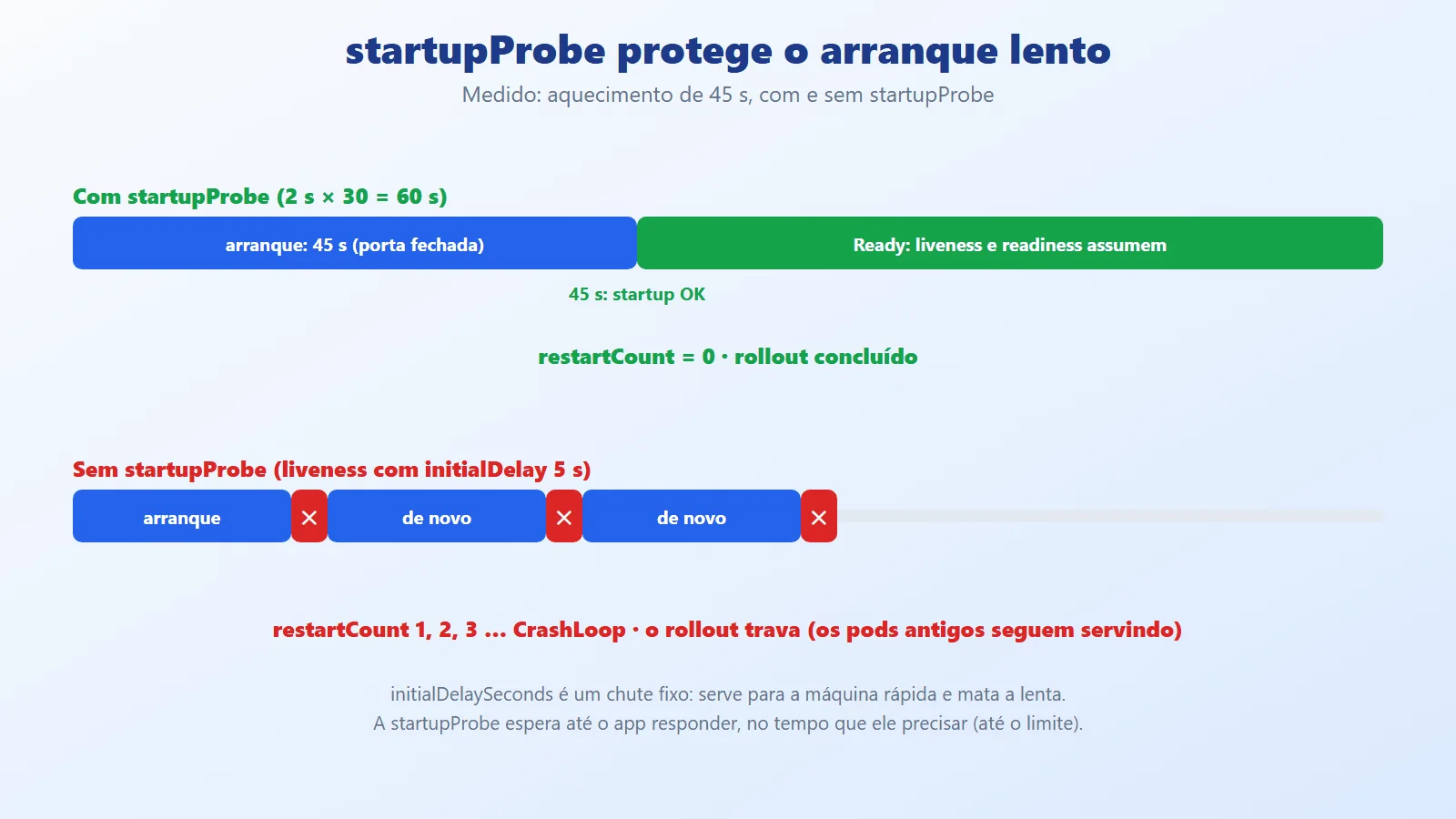
Without the startupProbe, liveness started hitting at 5 s on a port that was still closed and killed the container every ~15 s, in a crash loop; the rollout stalled, but the 3 old pods kept serving (an effect of maxUnavailable: 0). With the startupProbe, Kubernetes waited the 45 s without restarting anything.
(f) Rolling update under continuous load. The tools/Carga client fires 10 loops of GET /info through the NodePort for 45 s and counts statuses and pods; at 8 s the script does rollout restart:
dotnet run -c Release --project tools/Carga -- \


  http://localhost:30080/info 45 &


sleep 8


kubectl -n pedidos-dev rollout restart deploy/pedidosWITH preStop (5 runs, 55.8 thousand requests):
200: 13452 200: 12774 200: 9420 200: 10680 200: 9467
errors: 0 in all
WITHOUT preStop and WITHOUT draining (6 runs, 78 thousand requests):
200: 13375 HttpRequestException: 2 <- 1 run
200: 13167 200: 12702 200: 12591 200: 13273 200: 12908
errors: 0 in the other 5Honest result: in the 5 runs with preStop, zero errors. Without the protection, 5 of the 6 runs also finished with no errors and one had 2 HttpRequestException in 13 thousand requests. A methodological caveat: in 2 of the 5 "with" runs, the draining inherited the value 0 from a previous run (an environment variable that apply -k does not remove); only the preStop was active, and even so there was no error. The error window exists (a request routed to a pod whose Kestrel has already closed), but in a single-node cluster, with endpoint propagation almost instantaneous, it is narrow. In a real cluster, with several nodes and kube-proxy or an Ingress taking longer to update, it is larger. The experiment shows the protection with no errors, but it did not prove it at the frequency of a large cluster; that is why the article does not promise 100%.
(g) kubectl delete pod with a slow request in flight.
curl 'localhost:30080/lento?segundos=25' &     # in flight


kubectl -n pedidos-dev delete pod $ALVO --wait=falsepod with the request in flight: pedidos-86c5644686-d6v5b
{"concluido":true,"pod":"pedidos-86c5644686-d6v5b"}
http=200 em 25.25s
04:35:06.519 1. Stopping (SIGTERM) <- 5 s after the delete
04:35:06.522 2. Drenando (readiness 503) 3s
04:35:09.523 3. Fim da drenagem, fechando
04:35:18.610 4. Stopped <- request completedThe pod was deleted with the 25 s request still running and the response arrived, with HTTP 200 and the name of the pod that served it. SIGTERM came 5 s after the delete (the preStop), the draining lasted 3 s, and the process exited when the last request finished.
(h) The PodDisruptionBudget blocks the second eviction. kubectl drain uses the eviction API, which respects the PDB (minAvailable: 2 with 3 replicas). kind has a single node (emptying it would take down the control plane itself), so I called the eviction API directly:
NAME      MIN AVAILABLE   MAX UNAVAILABLE   ALLOWED DISRUPTIONS


pedidos   2               N/A               1


== evict pedidos-785ffbd8ff-8w2sq


{"kind":"Status",...,"status":"Success","code":201}


pedidos   2     N/A   0


== evict pedidos-785ffbd8ff-c8rt5


Error from server (TooManyRequests): Cannot evict pod as it


would violate the pod's disruption budget.
The first eviction went through (1 disruption allowed) and the second, immediate one was refused with 429 until the replacement pod became Ready. A node maintenance that respects the PDB never leaves the service below 2 pods.
What .NET sees from the container (resource limits)
/info shows what the runtime reads from the cgroup. Running the same image with different limits on Docker, and then in the pod (cpu: 500m, memory: 256Mi):
limits                     cpus  memMb  gcServidor  threads


(none)                       12  15823  true             12


--cpus 2 --memory 512m        2    384  true              2


--cpus 4 --memory 1g          4    768  true              4


--cpus 0.5 --memory 128m      1     96  false             1


pod: 500m / 256Mi             1    192  false             1
The CPU limit rounded up becomes ProcessorCount (and the ThreadPool minimum threads); the memory limit becomes the GC ceiling at 75%. With fewer than 2 CPUs, the server GC is turned off. Two cautions come out of this: a limits.cpu below 1 core makes .NET think it has 1 core (and the cgroup throttling holds back the rest), and a limits.memory that is too tight causes OOMKilled instead of a more aggressive GC.
Measured summary and what was not run
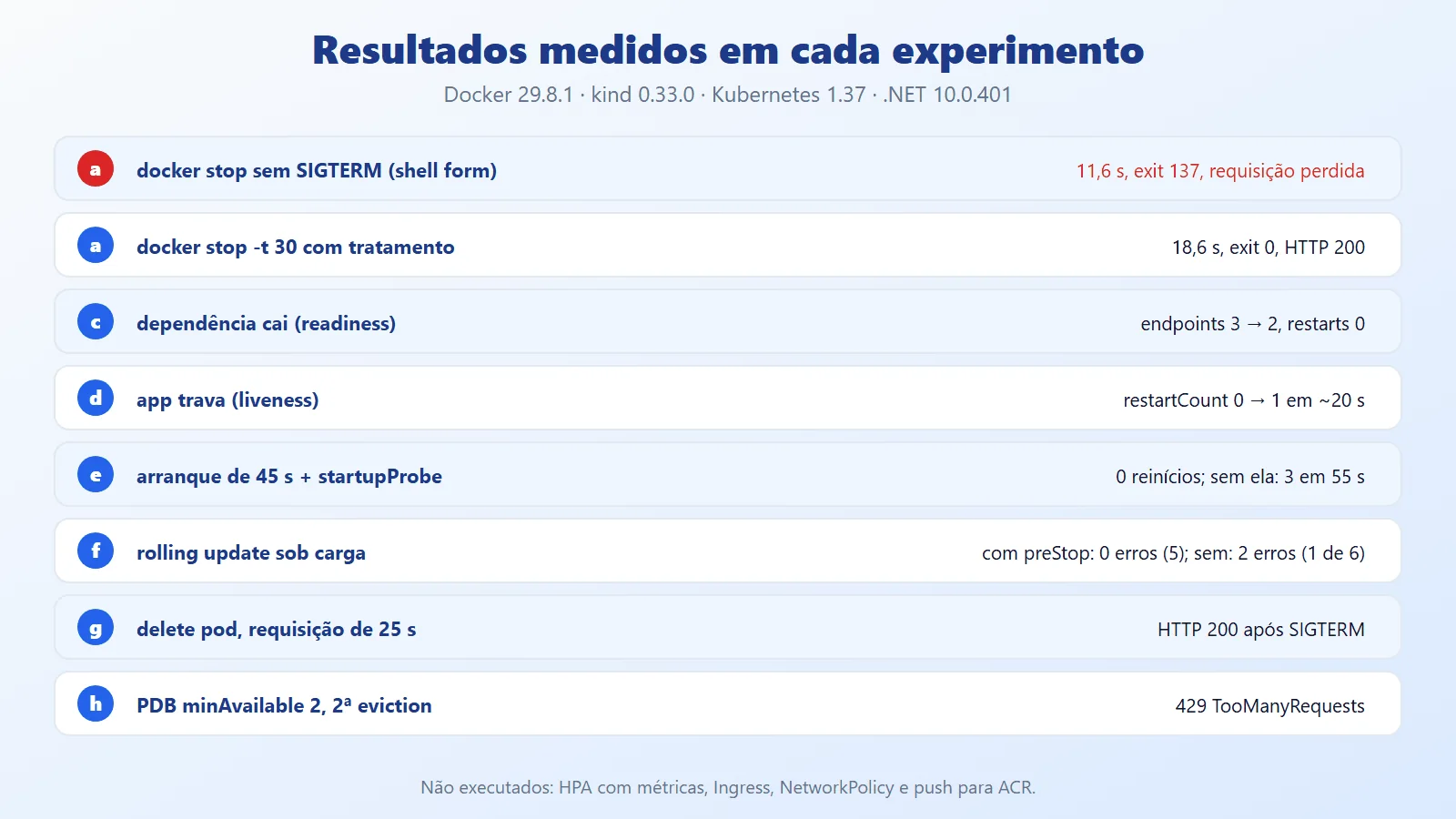
Not run: the HPA was applied, but with cpu: <unknown>/70% because kind does not ship metrics-server (installing it requires downloading another manifest and adjusting TLS, outside what was authorized); autoscaling, therefore, was not observed. The Ingress and the NetworkPolicy were only rendered (no Ingress Controller, and the actual enforcement of the policy was not tested); the push to a real ACR was described, not run; Prometheus/OpenTelemetry metrics were left out to keep the example lean.
Kubernetes best practices for .NET: probes and security

Common probe mistakes (mistake vs fix)
Liveness that checks the database. When the database goes down, liveness fails on all pods at the same time and Kubernetes restarts the entire fleet, solving nothing (the database is still down). Fix: liveness looks only at the process; the dependency goes in readiness.
// WRONG: liveness depends on the database


.AddCheck("banco", () => PingBanco(), tags: ["live"])


// RIGHT: the dependency stays in readiness


.AddCheck<VivoCheck>("vivo", tags: ["live"])


.AddCheck<ProntoCheck>("dependencia", tags: ["ready"])
Readiness without a timeout. If the ping to the dependency has no limit, the probe hangs until timeoutSeconds and the result becomes a generic "probe failure". Fix: a shorter timeout inside the check, with a clear message (the Ready_tem_timeout_se_a_dependencia_trava test covers this):
// WRONG: waits as long as the dependency wants


var ok = await dependencia.PingAsync(ct);


// RIGHT: caps the wait at 2 s


cts.CancelAfter(TimeSpan.FromSeconds(2));


var ok = await dependencia.PingAsync(cts.Token);
initialDelaySeconds instead of the startupProbe. A fixed delay works for the fast machine and kills the slow one (experiment (e)). Fix: the startupProbe with a generous margin; liveness and readiness without initialDelaySeconds:
# WRONG: a fixed guess for the startup


livenessProbe:


  httpGet: { path: /health/live, port: http }


  initialDelaySeconds: 5


# RIGHT: wait for the app to say it is up


startupProbe:


  httpGet: { path: /health/startup, port: http }


  periodSeconds: 2


  failureThreshold: 30
The same route for all three probes. A single /health that checks everything mixes the questions: a slow dependency starts restarting the pod. Fix: one endpoint per question, as in Saude.Rota("live"), ("ready"), and ("startup").
No preStop and no draining. The pod receives SIGTERM and closes the port while it is still in the endpoints of some nodes. Fix: preStop with sleep and readiness returning 503 on receiving the signal:
# WRONG: the pod closes as soon as it receives SIGTERM


terminationGracePeriodSeconds: 30


# RIGHT: leaves the Service, waits, only then terminates


terminationGracePeriodSeconds: 40


lifecycle:


  preStop:


    sleep:


      seconds: 5
Image and security
- Use
USER $APP_UID(numeric) andrunAsNonRoot: true: with a user name (USER app) the kubelet cannot verify the UID and rejects the pod. readOnlyRootFilesystem: truewith anemptyDirat/tmp;allowPrivilegeEscalation: false;capabilities.drop: ["ALL"];seccompProfile: RuntimeDefault. The Pod Security Standards (restricted profile) ask for exactly this.- Port 8080, not 80: an unprivileged user cannot open ports below 1024.
ASPNETCORE_HTTP_PORTS=8080is the adjustment from .NET 8 onward. - A chiseled image has no shell:
kubectl exec ... -- shfails (I tested it). To debug, use logs,kubectl debugwith an ephemeral container, ordotnet-monitor.
$ kubectl -n pedidos-dev exec $POD -- sh


error: ... failed to exec in container: failed to start exec ...
Shutdown: add up the times
The rule is preStop + draining + ShutdownTimeout < terminationGracePeriodSeconds. If the sum exceeds the deadline, SIGKILL cuts requests. HostOptions.ShutdownTimeout (default 30 s) is configurable through an environment variable, and can be shorter than the pod's deadline:
# ConfigMap


HostOptions__ShutdownTimeout: "00:00:25"


Shutdown__DrenagemSegundos: "3"
Requests longer than the ShutdownTimeout are aborted on stop; if your case has long-running work, move it to a queue and process it outside the request lifecycle.
Configuration, secrets, and limits
- ConfigMap for what is not sensitive; Secret for what is. A Kubernetes Secret is only base64: restrict RBAC and prefer an external vault.
- Changing a ConfigMap does not restart the pod. To reload environment variables, run
kubectl rollout restart(or use a content hash in the ConfigMap name, like the KustomizeconfigMapGenerator). requests≈ typical usage;limits≥ peak. Memory with no limit risks taking down the node; CPU with a tight limit causes throttling (see section 4.11).- JSON logs on stdout, one line per event; the cluster collector takes care of the rest. No log files inside the container (the filesystem is read-only).
Production
- HPA needs metrics-server and CPU
requestsdefined; setminReplicas≥ the PDB'sminAvailable. - PDB with
minAvailableequal to the number of replicas blocks all maintenance; leave at least one disruption allowed. - Images by digest (
@sha256:...) or immutable tags; neverlatest. Theprodoverlay'simagePullPolicy: Alwaysonly makes sense with immutable tags. - Resilience inside the app is still necessary: retry, circuit breaker, and timeout live in the client, as in the series (Fault Tolerance vs Resilience). Probes take care of the pod lifecycle, not of the call that failed.
- Admin and health: the example's
/admin/*exist only in thedevoverlay; the/health/*routes must not expose internal details outside the cluster.
When to use Kubernetes for .NET APIs and when to avoid it
When to use this set (probes + graceful shutdown + declarative manifests):
- Stateless HTTP services with more than one replica, frequent deploys, and a zero-downtime goal.
- External dependencies that fluctuate (database, queue, third-party API): readiness absorbs the fluctuation without restarting.
- Teams that need similar environments (dev/staging/production) with small, reviewable differences (Kustomize).
When to avoid or simplify:
- A small app, one replica, no frequent deploys: an App Service or Container Apps (or even a VM) takes less effort than operating a cluster. Kubernetes charges its own maintenance.
- Heavily stateful workloads (database, queue): prefer the managed service;
StatefulSetand volumes add complexity. - Short jobs and batch: use
Job/CronJob; liveness and readiness probes make no sense for a process that runs and ends. - Aggressive liveness "just in case": it restarts healthy pods during spikes. If there is no real hang scenario, a simple liveness (or none, keeping startup and readiness) is safer.
Compared with the alternatives: Azure Container Apps and App Service already bring probes and rollout and hide the YAML; Kubernetes gives full control of the lifecycle (as seen here) in exchange for more responsibility. The choice depends on how much you need that control.
Kubernetes with .NET: probes, lean image and shutdown
A multi-stage chiseled image reduced the container from 1.3 GB to 180 MB, with no shell and no root. Three endpoints, each with one question, gave Kubernetes the right answers: startup protects the slow startup (0 restarts versus 3 in 55 s), readiness takes the pod out of the Service without restarting (3 endpoints down to 2), and liveness restarts only what hung (restartCount 0 to 1 in ~20 s). On shutdown, preStop + draining + ShutdownTimeout within terminationGracePeriodSeconds let a 25 s request finish with HTTP 200 even with the pod deleted, and the PDB blocked the second consecutive eviction.
The practical takeaway: a probe is not a YAML detail, it is part of the contract between the application and the orchestrator. Each number (period, timeout, failureThreshold, the shutdown times) has a measurable consequence; test them the way you test code (the repository ships 8 tests that need no cluster and 7 experiment scripts). And be honest with the measurement: in this single-node cluster, preStop reduced but did not "prove" the elimination of rolling update errors; in production, the difference only shows up under real load. Start with a simple liveness, a readiness with a timeout, and a generous startup; adjust later with data.
References and links on Kubernetes with .NET
- Article code (repository): https://github.com/ceseidl/kubernetes-dotnet
- Microsoft Learn, .NET containers: https://learn.microsoft.com/dotnet/core/docker/introduction
- Microsoft Learn, publish as a container (
PublishContainer): https://learn.microsoft.com/dotnet/core/docker/publish-as-container - Microsoft Learn, health checks in ASP.NET Core: https://learn.microsoft.com/aspnet/core/host-and-deploy/health-checks
- Microsoft Learn, Generic Host and shutdown: https://learn.microsoft.com/aspnet/core/fundamentals/host/generic-host
- Microsoft Learn, GC configuration (container limits): https://learn.microsoft.com/dotnet/core/runtime-config/garbage-collector
- Chiseled images (dotnet-docker documentation): https://github.com/dotnet/dotnet-docker/blob/main/documentation/ubuntu-chiseled.md
- Chiseled images announcement: https://devblogs.microsoft.com/dotnet/announcing-dotnet-chiseled-containers/
- Kubernetes, liveness, readiness, and startup probes: https://kubernetes.io/docs/tasks/configure-pod-container/configure-liveness-readiness-startup-probes/
- Kubernetes, pod lifecycle and termination: https://kubernetes.io/docs/concepts/workloads/pods/pod-lifecycle/
- Kubernetes, lifecycle hooks (
preStop): https://kubernetes.io/docs/concepts/containers/container-lifecycle-hooks/ - Kubernetes, Deployment and rolling update: https://kubernetes.io/docs/concepts/workloads/controllers/deployment/
- Kubernetes, PodDisruptionBudget: https://kubernetes.io/docs/tasks/run-application/configure-pdb/
- Kubernetes, HPA: https://kubernetes.io/docs/tasks/run-application/horizontal-pod-autoscale/
- Kubernetes, Kustomize: https://kubernetes.io/docs/tasks/manage-kubernetes-objects/kustomization/
- Kubernetes, Secrets: https://kubernetes.io/docs/concepts/configuration/secret/
- Kubernetes, Pod Security Standards: https://kubernetes.io/docs/concepts/security/pod-security-standards/
- Kubernetes, NetworkPolicy: https://kubernetes.io/docs/concepts/services-networking/network-policies/
- kind, quick start: https://kind.sigs.k8s.io/docs/user/quick-start/
- kind, local registry: https://kind.sigs.k8s.io/docs/user/local-registry/
- Docker Desktop on Windows: https://docs.docker.com/desktop/setup/install/windows-install/
- WSL: https://learn.microsoft.com/windows/wsl/install
- .NET 10 SDK: https://dotnet.microsoft.com/download/dotnet/10.0
Keep reading
- Fault Tolerance vs Resilience in .NET: goes deeper into timeout, retry and circuit breaker beyond cluster probes.
- Rate Limiting in .NET: protects the API you just put online against traffic spikes.
- Avoid DateTime.Now in .NET 10 Production: time zone and UTC care in containers worth reviewing before deployment.
Want an architecture review of your .NET backend? See the backend and .NET architecture service.