C4, UML or ArchiMate: which notation to choose in software architecture
Architecture teams often debate which is the "best" way to model: C4, UML or ArchiMate. The more useful question is a different one: which decision do we want to support, and who needs to understand it? The three approaches solve different communication problems and operate at different levels of abstraction. Picking a notation first and forcing every problem into it is the most common mistake.
This article compares the three with a .NET 10 example: a small model of a payments platform, written in C#, that generates the C4, UML and ArchiMate views from the same source (diagrams as code). At the end you get a decision rule and the tooling I used. In the previous articles of the series the diagrams were standalone figures; here the idea is for the diagram to live alongside the code, so it can be tested and versioned with it.
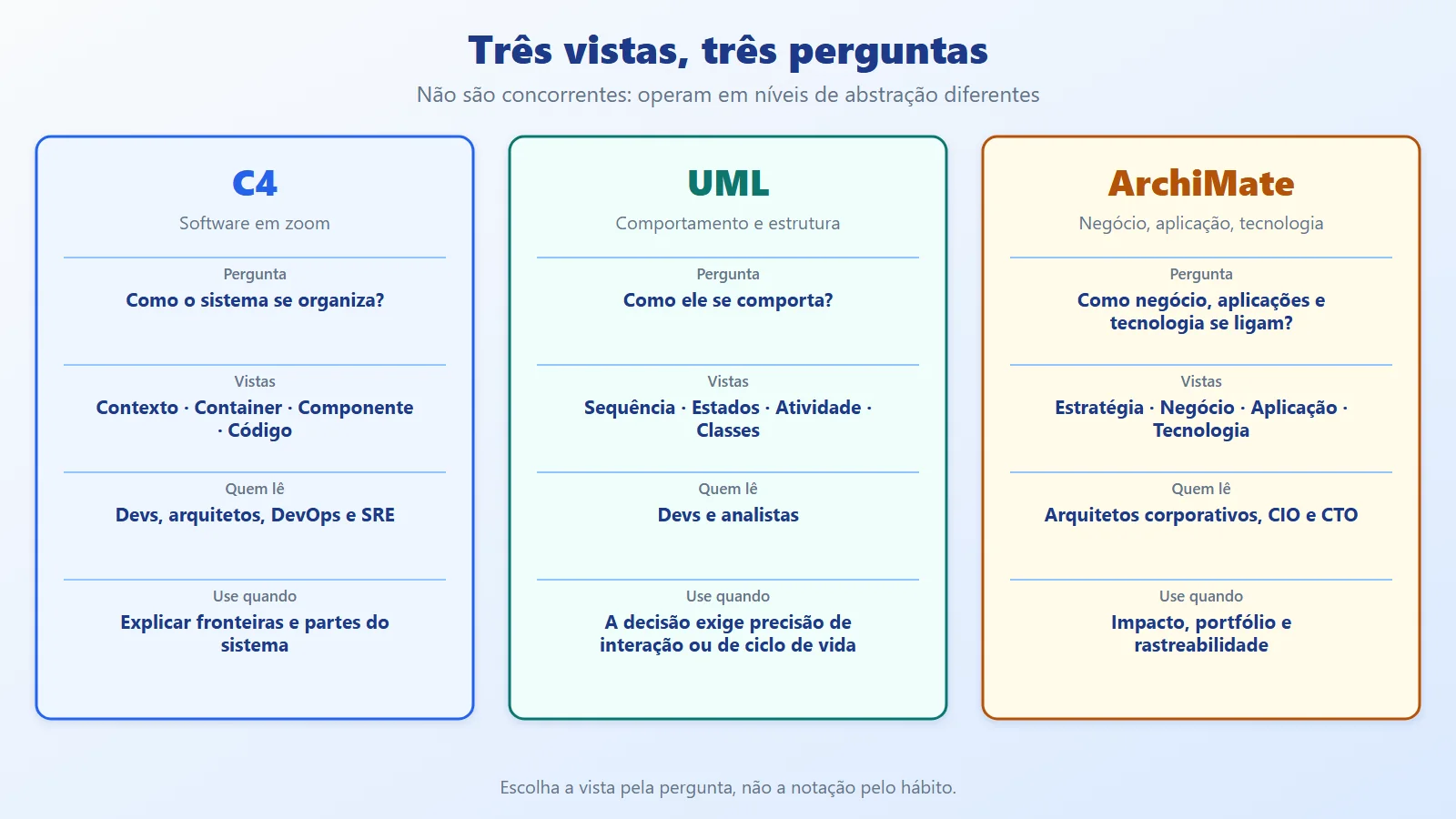
Differences between C4, UML and ArchiMate: the levels and questions of each
C4 (created by Simon Brown) organizes software architecture as a zoom with four levels: Context (the system and who uses it), Containers (applications and data stores that run or hold data), Components (the internal parts of a container) and Code (optional). It is strong for explaining boundaries, microservices and deployment to architects, developers, DevOps and SRE. Note: a "container" in C4 is not necessarily a Docker container.
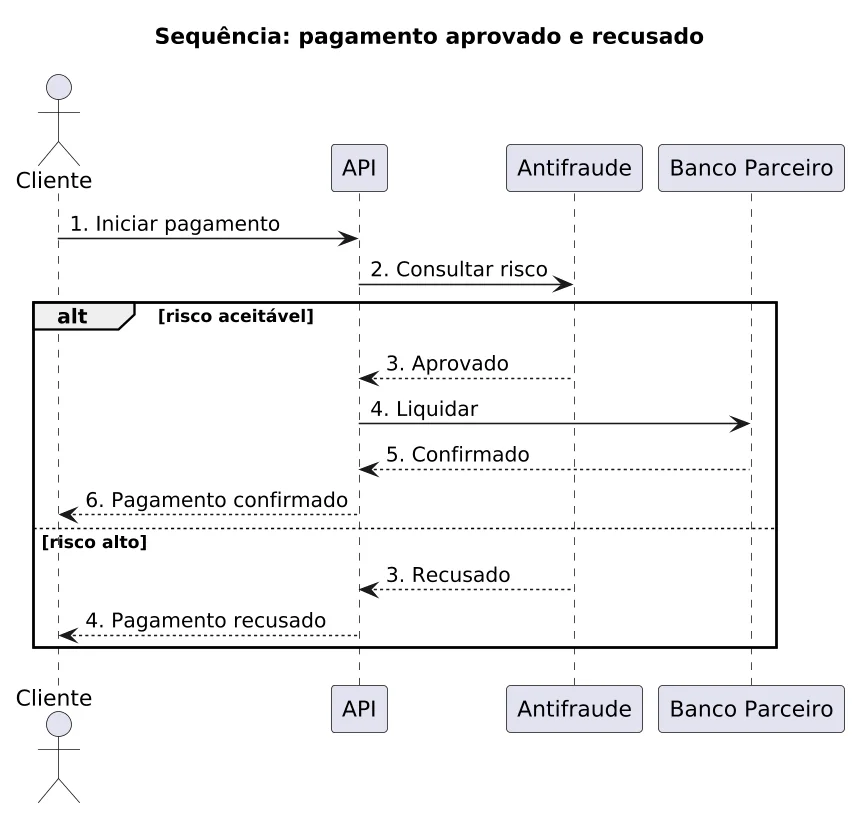
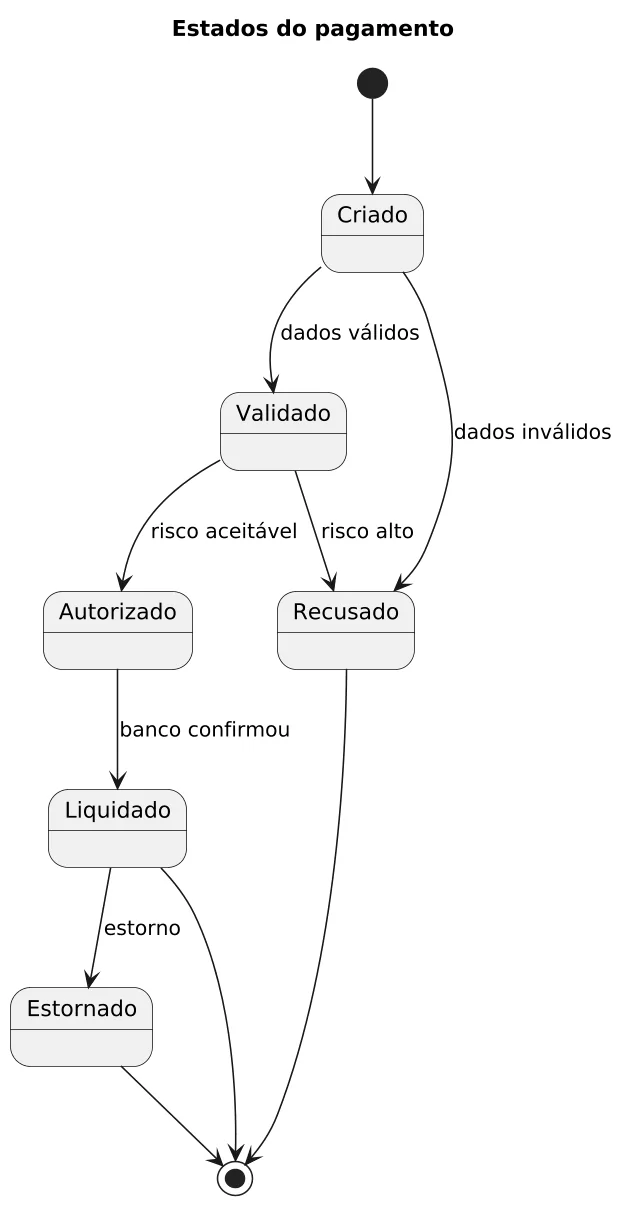
UML is a broad modeling language, with structure and behavior diagrams. The most useful ones day to day: sequence (interactions over time), state (the lifecycle of an object), activity (flows) and class (domain structure). It comes in when the question stops being "what exists?" and becomes "how does it behave?".
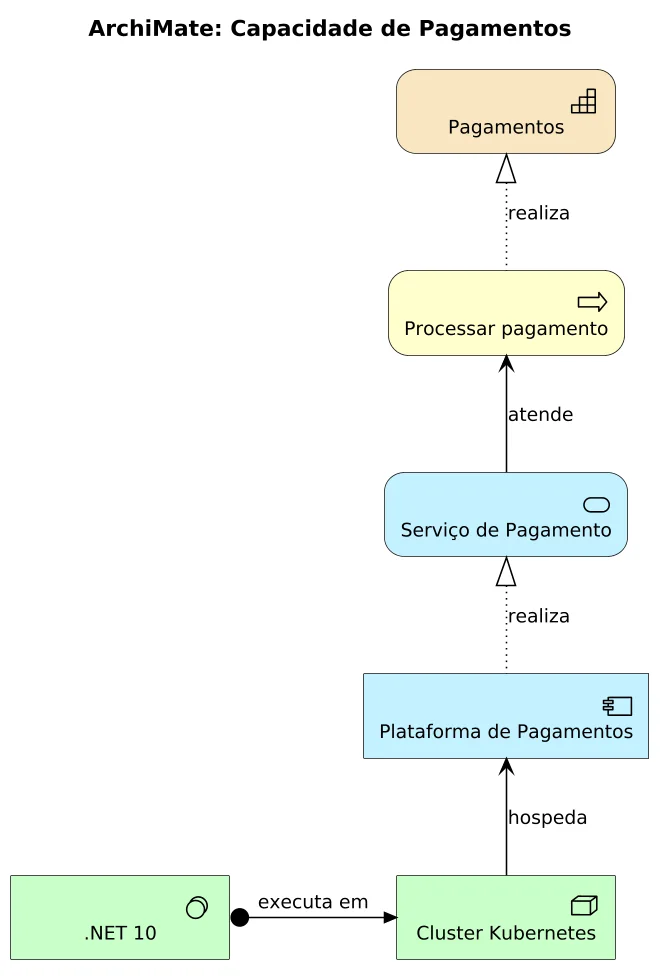
ArchiMate, a standard from The Open Group, sits higher in the architecture stack. It connects strategy, business, application and technology (plus motivation and migration) with relationships such as realization, serving and assignment. It is used for impact analysis, capability maps, portfolio rationalization and traceability from business to technology.
In PlantUML, one line of each looks like this:
' C4: a container and who uses it
Container(api, "API", ".NET 10", "Recebe pedidos")
Rel(cliente, api, "Usa", "HTTPS")

' UML: a message in a sequence
Cliente -> API : 1. Iniciar pagamento

' ArchiMate: a capability realized by a process
Strategy_Capability(cap, "Pagamentos")
Rel_Realization_Up(proc, cap, "realiza")
The rule of thumb:
- Enterprise overview, capability map, portfolio or transformation? ArchiMate.
- Context, containers, components or deployment of a system? C4.
- Detailed interactions, flows, states or domain structure? UML.
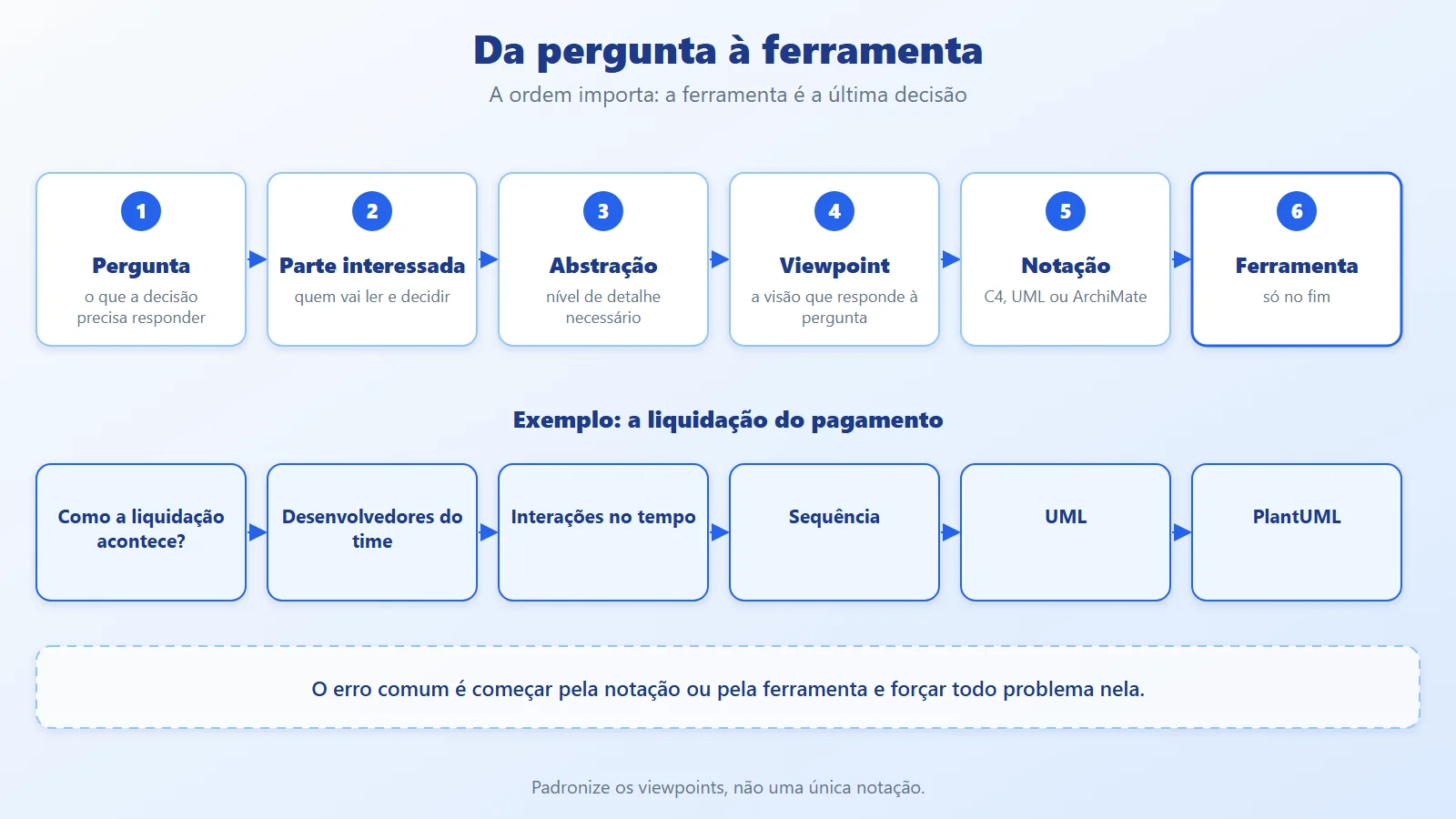
From question to tool: diagrams as code with a single C# model
The approach is a sequence of decisions, and the tool comes last: architecture question, stakeholder, required abstraction, viewpoint, notation and only then the tool.
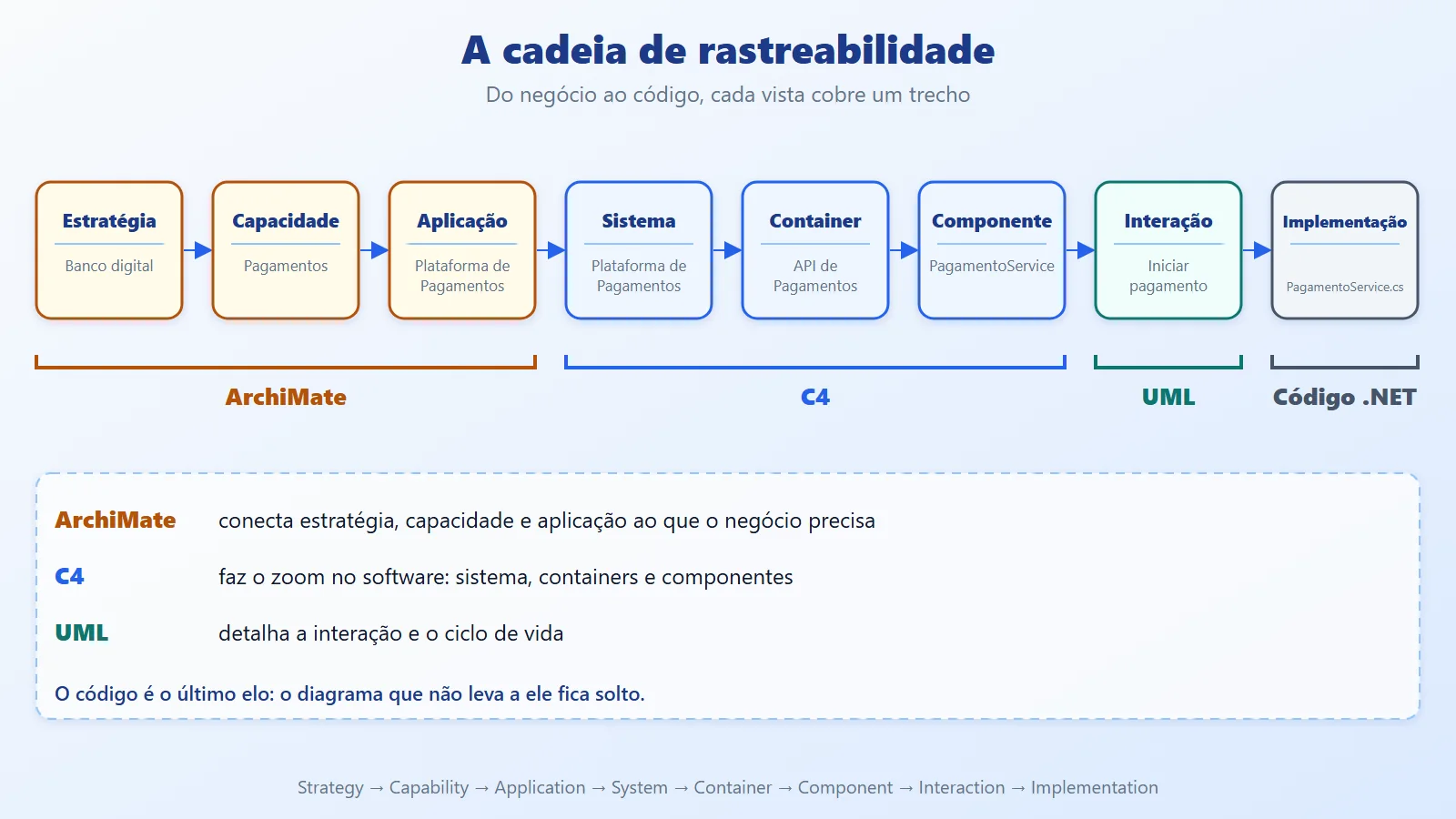
Used together, the three form a traceability chain: strategy, capability, application, system, container, component, interaction and implementation. ArchiMate covers the start of the chain, C4 the middle, UML the detail of an interaction, and the code is the last link.
For the example, the model is a single structure in C#. An element has an identifier, a name and a type; a relationship connects two identifiers:
namespace Diagramas;

public record Elemento(string Id, string Nome, string Tipo,
    string Tecnologia = "", string Descricao = "");

public record Relacao(string De, string Para, string Rotulo,
    string Tecnologia = "", string Tipo = "");
Each view is a generator that takes the model and returns text: PlantUML for C4 and UML, PlantUML and Open Group XML for ArchiMate. PlantUML becomes an image through the PlantUml.Net package, and the XML opens in Archi.
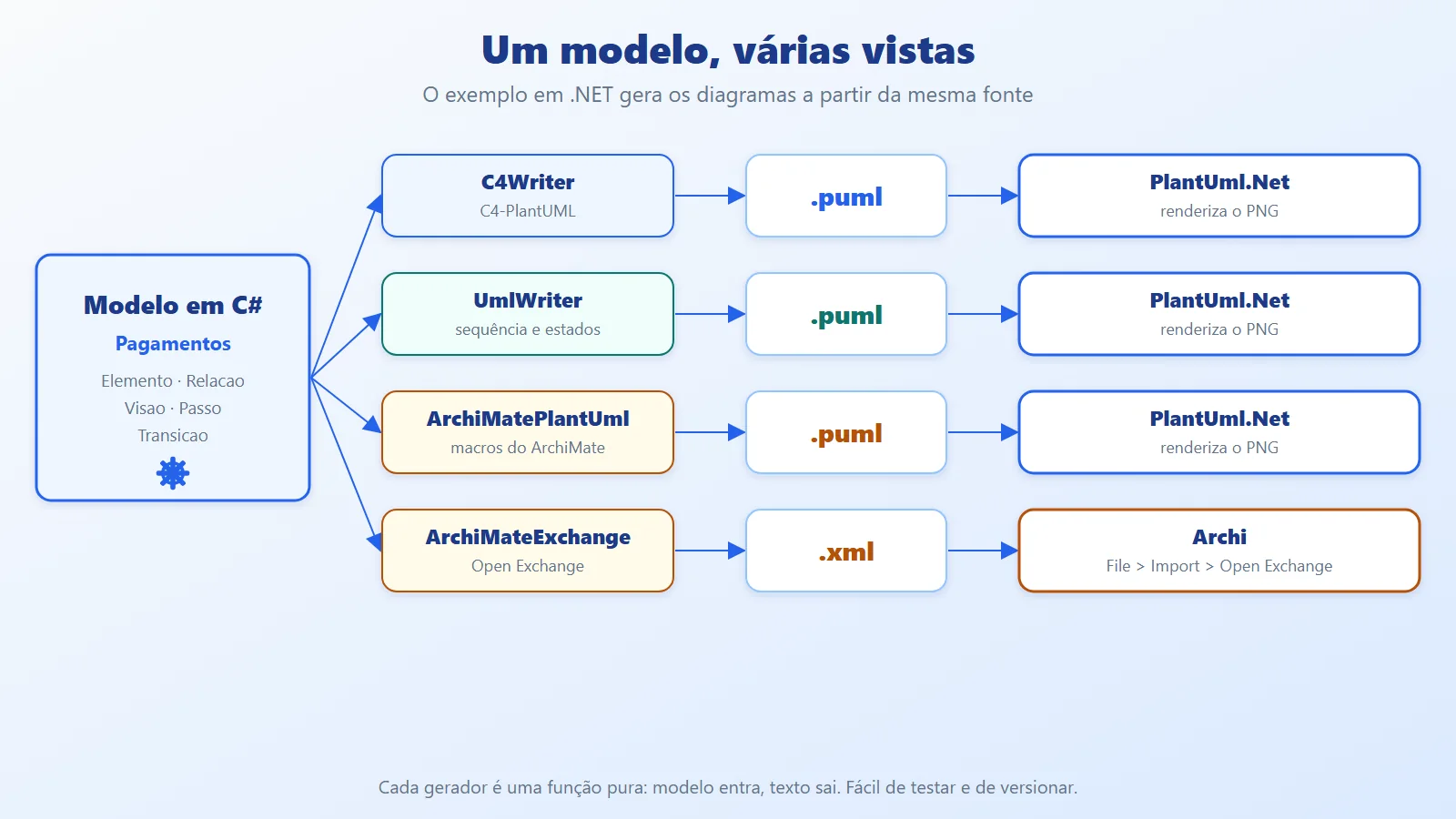
Which tool? What I found, with today's dates:
- PlantUML: text becomes a diagram. Version 1.2026.8 was released in September 2026, and the standard library ships C4 (C4-PlantUML) and ArchiMate; UML is native. The
PlantUml.Netwrapper is at version 1.4.80 (August 2022), but it targets .NET Standard 2.0 and ran on .NET 10. - Structurizr: a single C4 model with multiple views (DSL and Structurizr Lite). The .NET library
Structurizr.Coreis at 1.1.1 (February 2023), with no recent updates; for a new project, prefer the DSL. - Archi: a free ArchiMate editor that imports and exports the Open Exchange File Format; jArchi enables scripting in JavaScript.
- Mermaid: sequence, class and C4 (experimental) directly in Markdown; it does not cover ArchiMate.
The choice for the example: PlantUML for C4 and UML, plus the Open Group exchange format for ArchiMate so it opens in Archi, all generated from one C# model.
Generating C4, UML and ArchiMate from a C# model (.NET 10)
The example is the Payments Platform of a digital bank. The solution has the generator (src/Diagramas) and the tests (tests/Diagramas.Tests).
Step 1: the model. Besides Elemento and Relacao, a Visao groups the elements and relationships of a diagram; Passo and Transicao describe sequences and states:
public record Visao(string Titulo, string Include,
    IReadOnlyList<Elemento> Elementos,
    IReadOnlyList<Relacao> Relacoes,
    string Fronteira = "",
    string MacroFronteira = "System_Boundary");

public record Passo(string De, string Para, string Texto,
    bool Retorno = false, string Ramo = "");

public record Transicao(
    string De, string Para, string Rotulo = "");
Step 2: C4. The generator translates each element type into the matching C4-PlantUML macro and puts the internal elements inside the boundary (the system or container in focus):
using System.Text;

namespace Diagramas;

public static class C4Writer
{
    static readonly Dictionary<string, string> Macros = new()
    {
        ["pessoa"] = "Person",
        ["sistema"] = "System",
        ["externo"] = "System_Ext",
        ["container"] = "Container",
        ["banco"] = "ContainerDb",
        ["fila"] = "ContainerQueue",
        ["componente"] = "Component",
    };

    static readonly HashSet<string> Internos =
        ["container", "banco", "fila", "componente"];

    static readonly HashSet<string> Simples =
        ["pessoa", "sistema", "externo"];

    public static string Escrever(Visao v)
    {
        var sb = new StringBuilder();
        sb.AppendLine("@startuml");
        sb.AppendLine("skinparam dpi 150");
        sb.AppendLine($"!include <C4/{v.Include}>");
        sb.AppendLine($"title {v.Titulo}");

        var dentro = v.Fronteira.Length > 0;
        foreach (var e in v.Elementos)
            if (!(dentro && Internos.Contains(e.Tipo)))
                sb.AppendLine(Linha(e, ""));

        if (dentro)
        {
            sb.AppendLine(
                $"{v.MacroFronteira}(f, {Q(v.Fronteira)}) {{");
            foreach (var e in v.Elementos)
                if (Internos.Contains(e.Tipo))
                    sb.AppendLine(Linha(e, "  "));
            sb.AppendLine("}");
        }

        foreach (var r in v.Relacoes)
            sb.AppendLine(Rel(r));

        sb.AppendLine("@enduml");
        return sb.ToString();
    }

    static string Linha(Elemento e, string recuo)
    {
        string[] args = Simples.Contains(e.Tipo)
            ? [e.Nome, e.Descricao]
            : [e.Nome, e.Tecnologia, e.Descricao];
        var lista = string.Join(", ", args.Select(Q));
        return $"{recuo}{Macros[e.Tipo]}({e.Id}, {lista})";
    }

    static string Rel(Relacao r)
    {
        var tec = r.Tecnologia.Length == 0
            ? "" : $", {Q(r.Tecnologia)}";
        return $"Rel({r.De}, {r.Para}, {Q(r.Rotulo)}{tec})";
    }

    static string Q(string s) => $"\"{s.Replace('"', '\'')}\"";
}
The example data is kept separate from the generators. The same list of elements (Cliente, Antifraude, Db) feeds all three zoom levels:
namespace Diagramas;

public static partial class Pagamentos
{
    static readonly Elemento Cliente = new("cliente", "Cliente",
        "pessoa", Descricao: "Paga pelo app do banco");

    static readonly Elemento Antifraude = new("antifraude",
        "Antifraude", "externo", Descricao: "Pontua o risco");

    static readonly Elemento Parceiro = new("parceiro",
        "Banco Parceiro", "externo",
        Descricao: "Liquida a transação");

    static readonly Elemento Db = new("db",
        "Banco de Pagamentos", "banco", "PostgreSQL",
        "Pagamentos e estados");

    public static Visao Contexto => new(
        "Contexto: Plataforma de Pagamentos", "C4_Context",
        [
            Cliente,
            new("pag", "Plataforma de Pagamentos", "sistema",
                Descricao: "Autoriza e liquida pagamentos"),
            Antifraude,
            Parceiro,
        ],
        [
            new("cliente", "pag", "Inicia pagamento", "HTTPS"),
            new("pag", "antifraude", "Consulta risco", "HTTPS"),
            new("pag", "parceiro", "Liquida", "HTTPS"),
        ]);

    public static Visao Containers => new(
        "Containers: Plataforma de Pagamentos", "C4_Container",
        [
            Cliente,
            Antifraude,
            Parceiro,
            new("api", "API de Pagamentos", "container",
                ".NET 10", "Recebe e valida pedidos"),
            new("worker", "Worker de Liquidação", "container",
                ".NET 10", "Liquida em segundo plano"),
            Db,
            new("fila", "Fila", "fila", "RabbitMQ",
                "Pagamentos autorizados"),
        ],
        [
            new("cliente", "api", "Inicia pagamento", "HTTPS"),
            new("api", "db", "Grava", "SQL"),
            new("api", "antifraude", "Consulta risco", "HTTPS"),
            new("api", "fila", "Publica", "AMQP"),
            new("worker", "fila", "Consome", "AMQP"),
            new("worker", "parceiro", "Liquida", "HTTPS"),
        ],
        "Plataforma de Pagamentos");

    public static Visao Componentes => new(
        "Componentes: API de Pagamentos", "C4_Component",
        [
            Cliente,
            Antifraude,
            Db,
            new("endpoints", "PagamentoEndpoints", "componente",
                "Minimal API", "Rotas HTTP /pagamentos"),
            new("servico", "PagamentoService", "componente",
                "C#", "Regras do pagamento"),
            new("risco", "AntifraudeClient", "componente",
                "HttpClient", "Consulta o antifraude"),
            new("repo", "PagamentoRepositorio", "componente",
                "EF Core", "Persiste pagamentos"),
        ],
        [
            new("cliente", "endpoints", "Chama", "HTTPS"),
            new("endpoints", "servico", "Usa"),
            new("servico", "risco", "Consulta risco"),
            new("servico", "repo", "Grava"),
            new("risco", "antifraude", "Chama", "HTTPS"),
            new("repo", "db", "Lê e grava", "SQL"),
        ],
        "API de Pagamentos", "Container_Boundary");
}
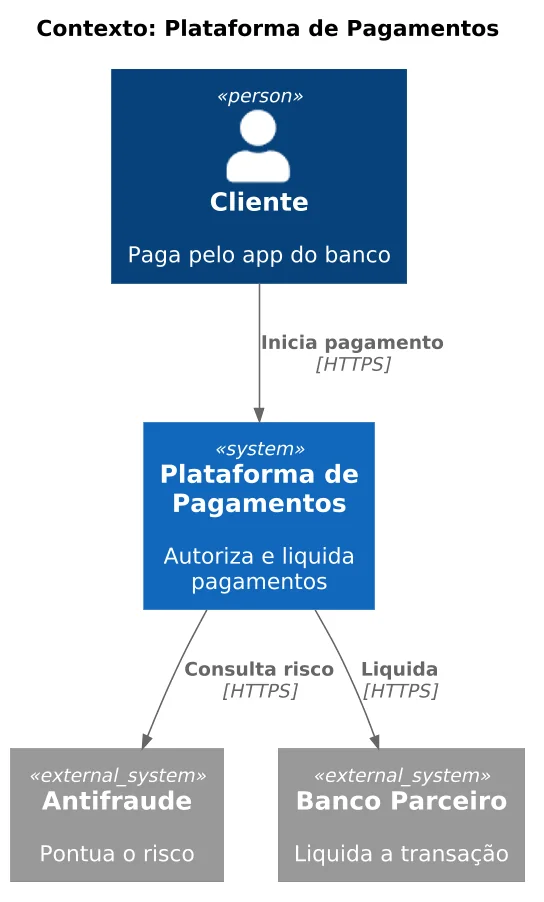
The result is the three levels. First the context: the system, who uses it and what it consumes.
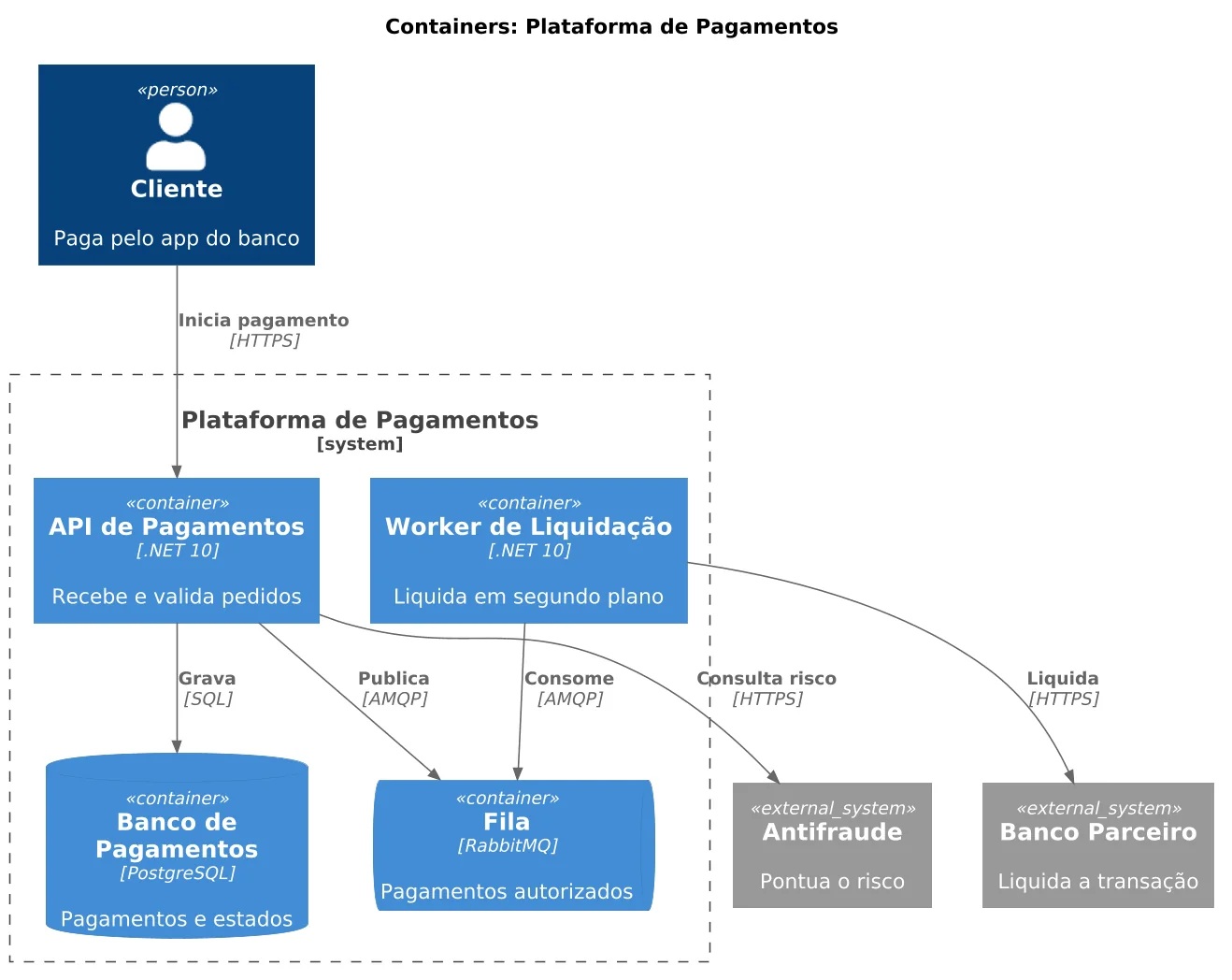
Then the containers: the API, the worker, the database and the queue, with the technology of each.
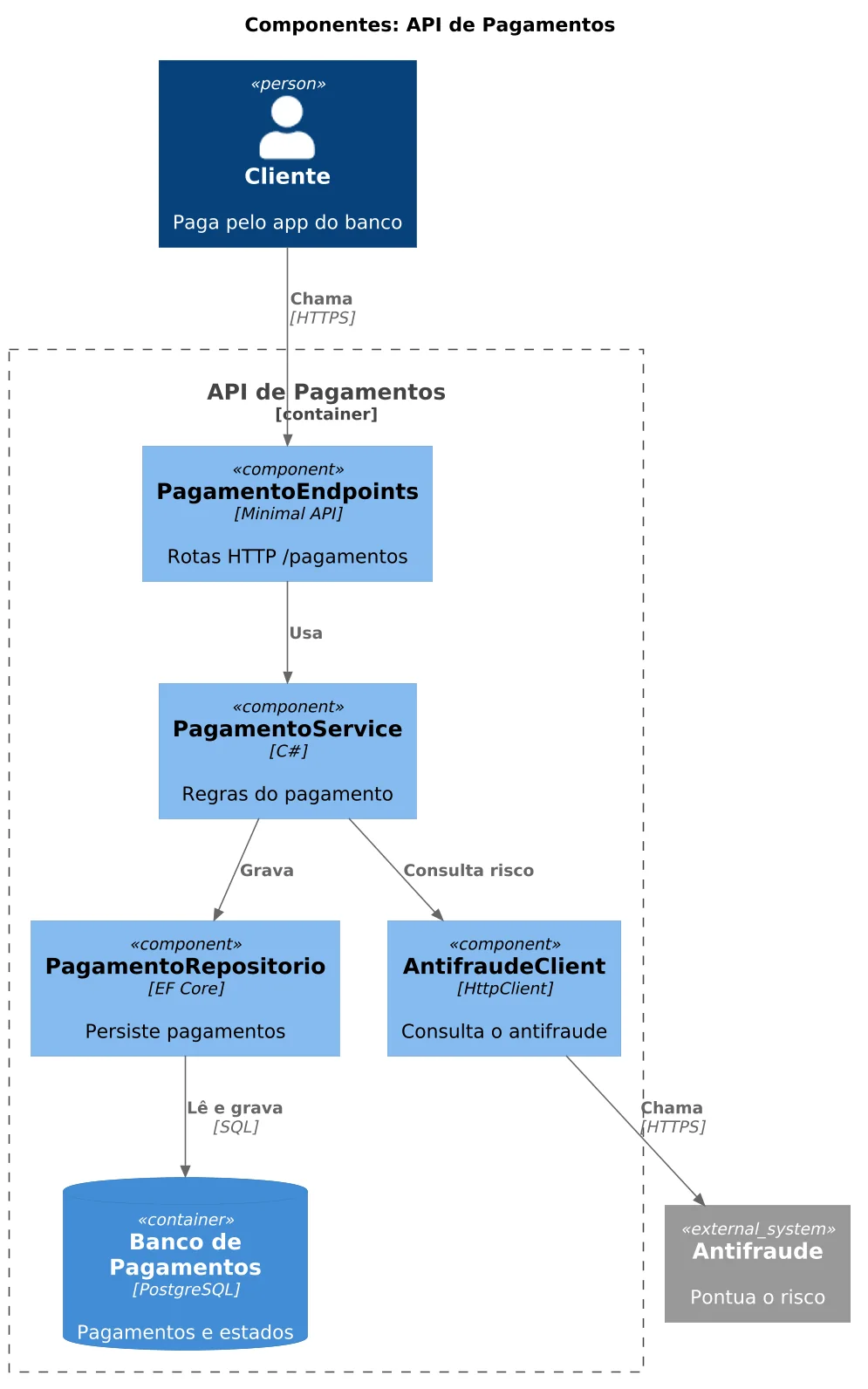
And the API components: endpoints, service, antifraud client and repository.
Step 3: UML. The sequence shows time; the alt branch separates the approved payment from the declined one. The states show the payment lifecycle:
using System.Text;

namespace Diagramas;

public static class UmlWriter
{
    public static string Sequencia(
        string titulo, string ator, IEnumerable<Passo> passos)
    {
        var sb = new StringBuilder();
        sb.AppendLine("@startuml");
        sb.AppendLine("skinparam dpi 150");
        sb.AppendLine($"title {titulo}");
        sb.AppendLine($"actor {Q(ator)}");

        var ramo = "";
        foreach (var p in passos)
        {
            if (p.Ramo != ramo)
            {
                sb.AppendLine(p.Ramo == "" ? "end"
                    : ramo == "" ? $"alt {p.Ramo}"
                    : $"else {p.Ramo}");
                ramo = p.Ramo;
            }
            var seta = p.Retorno ? "-->" : "->";
            sb.AppendLine(
                $"{Q(p.De)} {seta} {Q(p.Para)} : {p.Texto}");
        }
        if (ramo != "") sb.AppendLine("end");

        sb.AppendLine("@enduml");
        return sb.ToString();
    }

    public static string Estados(
        string titulo, IEnumerable<Transicao> transicoes)
    {
        var sb = new StringBuilder();
        sb.AppendLine("@startuml");
        sb.AppendLine("skinparam dpi 150");
        sb.AppendLine($"title {titulo}");
        foreach (var t in transicoes)
        {
            var rotulo = t.Rotulo.Length > 0
                ? $" : {t.Rotulo}" : "";
            sb.AppendLine(
                $"{t.De} --> {t.Para}{rotulo}");
        }
        sb.AppendLine("@enduml");
        return sb.ToString();
    }

    static string Q(string s) => $"\"{s}\"";
}namespace Diagramas;
public static partial class Pagamentos
{
const string Ok = "risco aceitável";
const string Alto = "risco alto";
public static IReadOnlyList<Passo> Passos =>
[
new("Cliente", "API", "1. Iniciar pagamento"),
new("API", "Antifraude", "2. Consultar risco"),
new("Antifraude", "API", "3. Aprovado", true, Ok),
new("API", "Banco Parceiro", "4. Liquidar", false, Ok),
new("Banco Parceiro", "API", "5. Confirmado", true, Ok),
new("API", "Cliente", "6. Pagamento confirmado",
true, Ok),
new("Antifraude", "API", "3. Recusado", true, Alto),
new("API", "Cliente", "4. Pagamento recusado",
true, Alto),
];
public static IReadOnlyList<Transicao> Estados =>
[
new("[*]", "Criado"),
new("Criado", "Validado", "dados válidos"),
new("Criado", "Recusado", "dados inválidos"),
new("Validado", "Autorizado", Ok),
new("Validado", "Recusado", Alto),
new("Autorizado", "Liquidado", "banco confirmou"),
new("Liquidado", "Estornado", "estorno"),
new("Recusado", "[*]"),
new("Liquidado", "[*]"),
new("Estornado", "[*]"),
];
}
Step 4: ArchiMate. Here the same model produces two outputs. The first is PlantUML, which draws the diagram with the layer colors (strategy, business, application and technology):
using System.Text;

namespace Diagramas;

public static class ArchiMatePlantUml
{
    static readonly Dictionary<string, string> Macros = new()
    {
        ["capacidade"] = "Strategy_Capability",
        ["processo"] = "Business_Process",
        ["servico-app"] = "Application_Service",
        ["app"] = "Application_Component",
        ["no"] = "Technology_Node",
        ["software"] = "Technology_SystemSoftware",
    };

    static readonly Dictionary<string, string> Relacoes = new()
    {
        ["realizacao"] = "Rel_Realization_Up",
        ["atendimento"] = "Rel_Serving_Up",
        ["atribuicao"] = "Rel_Assignment_Right",
    };

    public static string Escrever(Visao v)
    {
        var sb = new StringBuilder();
        sb.AppendLine("@startuml");
        sb.AppendLine("skinparam dpi 150");
        sb.AppendLine("!include <archimate/Archimate>");
        sb.AppendLine($"title {v.Titulo}");
        foreach (var e in v.Elementos)
            sb.AppendLine(
                $"{Macros[e.Tipo]}({e.Id}, \"{e.Nome}\")");
        foreach (var r in v.Relacoes)
            sb.AppendLine($"{Relacoes[r.Tipo]}"
                + $"({r.De}, {r.Para}, \"{r.Rotulo}\")");
        sb.AppendLine("@enduml");
        return sb.ToString();
    }
}
The second is the Open Exchange Format file, which Archi imports via File > Import > Open Exchange XML Model. It carries elements, relationships and a view with the nodes positioned:
using System.Xml.Linq;

namespace Diagramas;

public static class ArchiMateExchange
{
    const string Url = "http://www.opengroup.org/xsd/archimate/";

    static readonly Dictionary<string, string> TiposXml = new()
    {
        ["capacidade"] = "Capability",
        ["processo"] = "BusinessProcess",
        ["servico-app"] = "ApplicationService",
        ["app"] = "ApplicationComponent",
        ["no"] = "Node",
        ["software"] = "SystemSoftware",
        ["realizacao"] = "Realization",
        ["atendimento"] = "Serving",
        ["atribuicao"] = "Assignment",
    };

    public static XDocument Escrever(Visao v)
    {
        XNamespace ns = Url + "3.0/";
        XNamespace xsi =
            "http://www.w3.org/2001/XMLSchema-instance";
        XNamespace xml = XNamespace.Xml;
        XElement Nome(string s) => new(ns + "name",
            new XAttribute(xml + "lang", "pt-BR"), s);
        XAttribute Tipo(string t) =>
            new(xsi + "type", TiposXml[t]);

        var elementos = v.Elementos.Select(e => new XElement(
            ns + "element",
            new XAttribute("identifier", $"id-{e.Id}"),
            Tipo(e.Tipo), Nome(e.Nome)));

        var relacoes = v.Relacoes.Select((r, i) => new XElement(
            ns + "relationship",
            new XAttribute("identifier", $"id-rel{i + 1}"),
            new XAttribute("source", $"id-{r.De}"),
            new XAttribute("target", $"id-{r.Para}"),
            Tipo(r.Tipo)));

        var nos = v.Elementos.Select((e, i) => new XElement(
            ns + "node",
            new XAttribute("identifier", $"id-no-{e.Id}"),
            new XAttribute("elementRef", $"id-{e.Id}"),
            new XAttribute(xsi + "type", "Element"),
            new XAttribute("x", 60),
            new XAttribute("y", 40 + i * 110),
            new XAttribute("w", 180),
            new XAttribute("h", 60)));

        var ligacoes = v.Relacoes.Select((r, i) => new XElement(
            ns + "connection",
            new XAttribute("identifier", $"id-lig{i + 1}"),
            new XAttribute("relationshipRef", $"id-rel{i + 1}"),
            new XAttribute(xsi + "type", "Relationship"),
            new XAttribute("source", $"id-no-{r.De}"),
            new XAttribute("target", $"id-no-{r.Para}")));

        var visao = new XElement(ns + "view",
            new XAttribute("identifier", "id-visao"),
            Nome(v.Titulo), nos, ligacoes);

        var modelo = new XElement(ns + "model",
            new XAttribute(XNamespace.Xmlns + "xsi", xsi),
            new XAttribute(xsi + "schemaLocation",
                $"{ns} {Url}3.1/archimate3_Diagram.xsd"),
            new XAttribute("identifier", "id-modelo"),
            Nome(v.Titulo),
            new XElement(ns + "elements", elementos),
            new XElement(ns + "relationships", relacoes),
            new XElement(ns + "views",
                new XElement(ns + "diagrams", visao)));

        return new XDocument(
            new XDeclaration("1.0", "utf-8", null), modelo);
    }
}namespace Diagramas;
public static partial class Pagamentos
{
public static Visao Arquitetura => new(
"ArchiMate: Capacidade de Pagamentos", "",
[
new("cap", "Pagamentos", "capacidade"),
new("proc", "Processar pagamento", "processo"),
new("asv", "Serviço de Pagamento", "servico-app"),
new("app", "Plataforma de Pagamentos", "app"),
new("no", "Cluster Kubernetes", "no"),
new("rt", ".NET 10", "software"),
],
[
new("proc", "cap", "realiza", Tipo: "realizacao"),
new("asv", "proc", "atende", Tipo: "atendimento"),
new("app", "asv", "realiza", Tipo: "realizacao"),
new("no", "app", "hospeda", Tipo: "atendimento"),
new("rt", "no", "executa em", Tipo: "atribuicao"),
]);
}
Step 5: run and render. Program.cs writes the .puml files and the .xml; with --render, the Renderer asks PlantUML for the PNG through PlantUml.Net:
using Diagramas;

var renderizar = args.Contains("--render");
var saida = args.FirstOrDefault(a => !a.StartsWith("--"))
    ?? "saida";
Directory.CreateDirectory(saida);

var diagramas = new Dictionary<string, string>
{
    ["01-contexto"] =
        C4Writer.Escrever(Pagamentos.Contexto),
    ["02-containers"] =
        C4Writer.Escrever(Pagamentos.Containers),
    ["03-componentes"] =
        C4Writer.Escrever(Pagamentos.Componentes),
    ["04-sequencia"] = UmlWriter.Sequencia(
        "Sequência: pagamento aprovado e recusado",
        "Cliente", Pagamentos.Passos),
    ["05-estados"] = UmlWriter.Estados(
        "Estados do pagamento", Pagamentos.Estados),
    ["06-archimate"] =
        ArchiMatePlantUml.Escrever(Pagamentos.Arquitetura),
};

foreach (var (nome, puml) in diagramas)
{
    await File.WriteAllTextAsync($"{saida}/{nome}.puml", puml);
    if (renderizar)
        await Renderer.PngAsync(puml, $"{saida}/{nome}.png");
    var linhas = puml.Split('\n').Length;
    Console.WriteLine($"{nome}: {linhas} linhas");
}

ArchiMateExchange.Escrever(Pagamentos.Arquitetura)
    .Save($"{saida}/07-archimate.xml");
Console.WriteLine("07-archimate.xml: importe no Archi");using PlantUml.Net;
namespace Diagramas;
public static class Renderer
{
public static async Task PngAsync(string puml, string arquivo)
{
var fabrica = new RendererFactory();
var renderer =
fabrica.CreateRenderer(new PlantUmlSettings());
var bytes =
await renderer.RenderAsync(puml, OutputFormat.Png);
await File.WriteAllBytesAsync(arquivo, bytes);
}
}dotnet test
dotnet run --project src/Diagramas -- saida --renderThe run produces seven text files (six .puml and one .xml) and six .png files. The .xml file was validated against the Open Group schema.
Step 6: tests. The tests do not compare images: they check the generated text and the integrity of the ArchiMate model:
using Diagramas;

namespace Diagramas.Tests;

public class DiagramasTests
{
    [Fact]
    public void C4_container_leva_a_tecnologia()
    {
        var puml = C4Writer.Escrever(Pagamentos.Containers);

        Assert.Contains("!include <C4/C4_Container>", puml);
        Assert.Contains(
            "Container(api, \"API de Pagamentos\", \".NET 10\"",
            puml);
        Assert.Contains("ContainerDb(db,", puml);
        Assert.Contains("System_Boundary(f,", puml);
    }

    [Fact]
    public void C4_contexto_nao_tem_fronteira()
    {
        var puml = C4Writer.Escrever(Pagamentos.Contexto);

        Assert.DoesNotContain("_Boundary", puml);
        Assert.Contains("System(pag,", puml);
    }

    [Fact]
    public void C4_componentes_ficam_em_container_boundary()
    {
        var puml = C4Writer.Escrever(Pagamentos.Componentes);

        Assert.Contains("Container_Boundary(f,", puml);
        Assert.Contains("Component(servico,", puml);
    }

    [Fact]
    public void Sequencia_separa_os_ramos_com_alt_else_end()
    {
        var puml = UmlWriter.Sequencia(
            "x", "Cliente", Pagamentos.Passos);

        Assert.Contains("alt risco aceitável", puml);
        Assert.Contains("else risco alto", puml);
        Assert.EndsWith("end\n@enduml\n", puml.Replace("\r", ""));
    }

    [Fact]
    public void Estados_comecam_e_terminam_em_estado_final()
    {
        var puml = UmlWriter.Estados("x", Pagamentos.Estados);

        Assert.Contains("[*] --> Criado", puml);
        Assert.Contains("Liquidado --> [*]", puml);
    }

    [Fact]
    public void ArchiMate_plantuml_usa_as_macros_da_biblioteca()
    {
        var v = Pagamentos.Arquitetura;
        var puml = ArchiMatePlantUml.Escrever(v);

        Assert.Contains("!include <archimate/Archimate>", puml);
        Assert.Contains("Strategy_Capability(cap,", puml);
        Assert.Contains("Rel_Serving_Up(asv, proc,", puml);
    }

    [Fact]
    public void Exchange_tem_ids_unicos_e_relacoes_validas()
    {
        var v = Pagamentos.Arquitetura;
        var doc = ArchiMateExchange.Escrever(v);
        var todos = doc.Descendants().ToList();
        var ids = todos
            .Select(e => (string?)e.Attribute("identifier"))
            .Where(i => i is not null).ToList();
        var elementos = todos
            .Where(e => e.Name.LocalName == "element")
            .Select(e => (string)e.Attribute("identifier")!)
            .ToHashSet();
        var relacoes = todos
            .Where(e => e.Name.LocalName == "relationship");

        Assert.Equal(ids.Count, ids.Distinct().Count());
        foreach (var r in relacoes)
        {
            var de = (string)r.Attribute("source")!;
            var para = (string)r.Attribute("target")!;
            Assert.Contains(de, elementos);
            Assert.Contains(para, elementos);
        }
    }
}
Result: 7 tests passed.
Best practices for diagrams as code and model tests
- Start with the question, not the notation. Before opening the tool, write down the decision the diagram supports and who will read it.
- One source of truth. If the name "Plataforma de Pagamentos" is typed in three diagrams, one of them will drift. In the example, the element is declared once and each generator translates it.
- Test the generator. The ArchiMate model integrity test catches duplicate identifiers and relationships pointing to elements that do not exist:
[Fact]
public void Exchange_tem_ids_unicos_e_relacoes_validas()
{
    var v = Pagamentos.Arquitetura;
    var doc = ArchiMateExchange.Escrever(v);
    var todos = doc.Descendants().ToList();
    var ids = todos
        .Select(e => (string?)e.Attribute("identifier"))
        .Where(i => i is not null).ToList();
    var elementos = todos
        .Where(e => e.Name.LocalName == "element")
        .Select(e => (string)e.Attribute("identifier")!)
        .ToHashSet();
    var relacoes = todos
        .Where(e => e.Name.LocalName == "relationship");

    Assert.Equal(ids.Count, ids.Distinct().Count());
    foreach (var r in relacoes)
    {
        var de = (string)r.Attribute("source")!;
        var para = (string)r.Attribute("target")!;
        Assert.Contains(de, elementos);
        Assert.Contains(para, elementos);
    }
}- Validate the XML against the schema. For files with views, use
archimate3_Diagram.xsd.archimate3_Model.xsdalone does not know theviewselement and rejects the file, even when it is correct. - Beware of remote rendering. By default,
PlantUml.Netuses the public PlantUML server: the diagram text leaves your network. For confidential architectures, render locally (requires Java and Graphviz) or do not use the remote mode. - One diagram, one level, one audience. Mixing context with class-level detail in the same drawing pleases no one.
- Do not version the generated image. Version the model and the tests; the PNG can be rebuilt (the
saida/folder goes in.gitignore). - Check library dates.
PlantUml.NetandStructurizr.Corehave no recent releases; pin the version and have a plan B (PlantUML itself and the Structurizr DSL remain active).
When to use C4, UML or ArchiMate, and when to avoid them
Use C4 when you need to explain the boundaries and parts of a system to mixed audiences. Use UML when the decision depends on a precise interaction, flow or lifecycle (such as the payment declined after the risk analysis). Use ArchiMate when the question crosses business and technology: impact of a change, capability map, application portfolio.
Avoid ArchiMate for documenting a single service: the cost of maintaining the enterprise model does not pay off. Avoid full UML on teams that will not maintain the diagrams; one well-chosen sequence diagram is worth more than ten outdated ones. Avoid C4 as a substitute for behavior: it shows what exists and how it connects, not the order of messages.
And avoid diagrams as code when nobody reviews the text: a C# model with no tests and no owner becomes yet another forgotten artifact. If the team prefers to draw in a visual tool (such as Archi itself), the result works too; what matters is the question, not the format.
How to choose the right view: the question comes before the notation
C4, UML and ArchiMate do not compete: ArchiMate provides the enterprise context, C4 provides the clarity of the software architecture, and UML provides the precision of structure and behavior. The chain strategy, capability, application, system, container, component, interaction and implementation is what turns the three views into a set rather than three loose drawings.
The practical takeaway: standardize viewpoints, not a single notation, and always start with the question. When the diagram is born from a versioned, tested model, it stops being a drawing that ages and becomes part of the system.
References
- C4 model: c4model.com
- PlantUML: ArchiMate diagram and official site
- C4-PlantUML: plantuml-stdlib/C4-PlantUML
- PlantUml.Net: package on NuGet
- The Open Group: ArchiMate Model Exchange File Format (XSD)
- Archi: archimatetool.com
- Structurizr: structurizr.com and Structurizr.Core on NuGet
- Mermaid: C4 diagrams
- Series: Saga Pattern in .NET: Distributed Transactions Across Microservices (ceseidl/saga-pattern-dotnet)