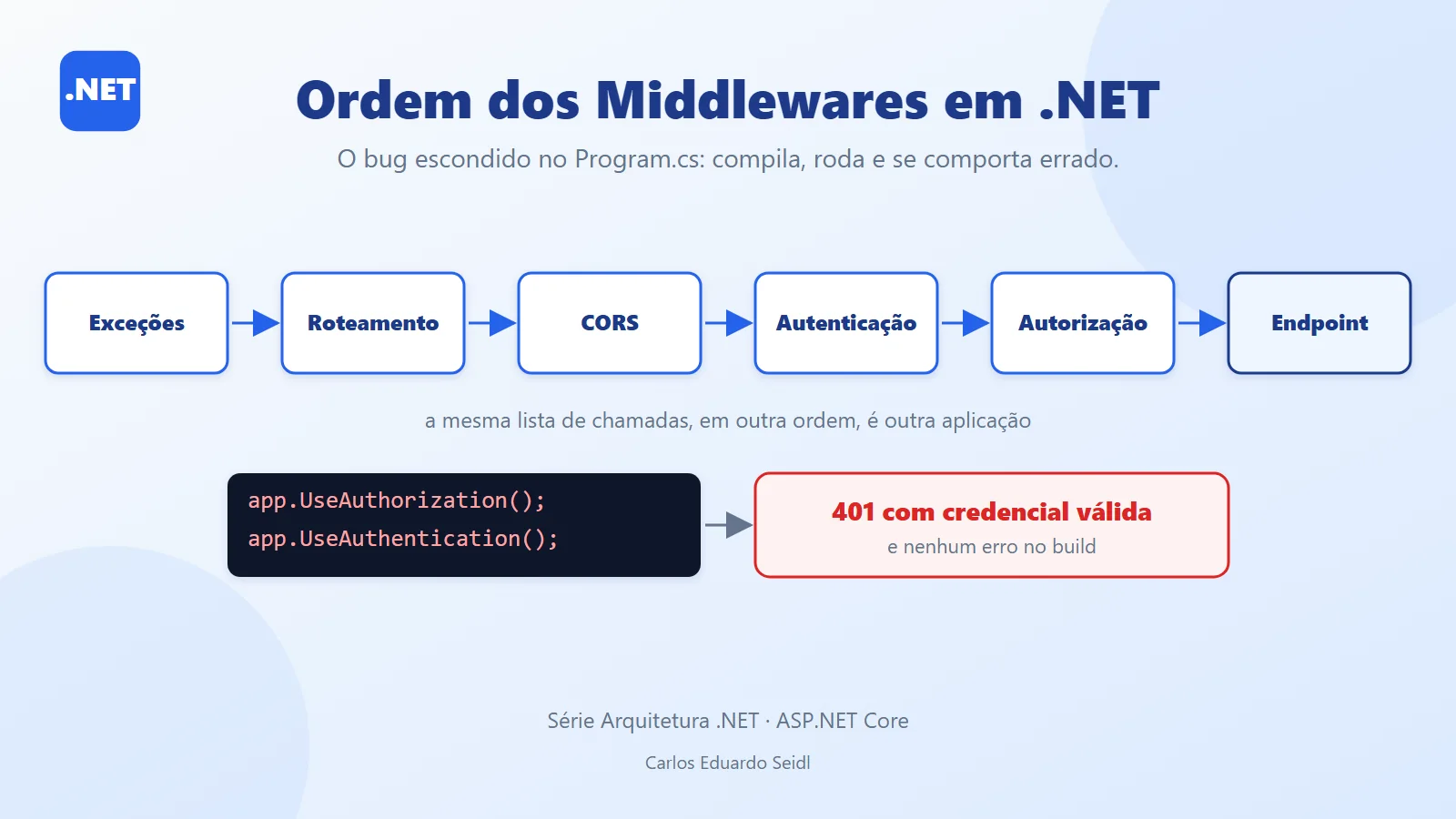
Why middleware order matters in ASP.NET Core
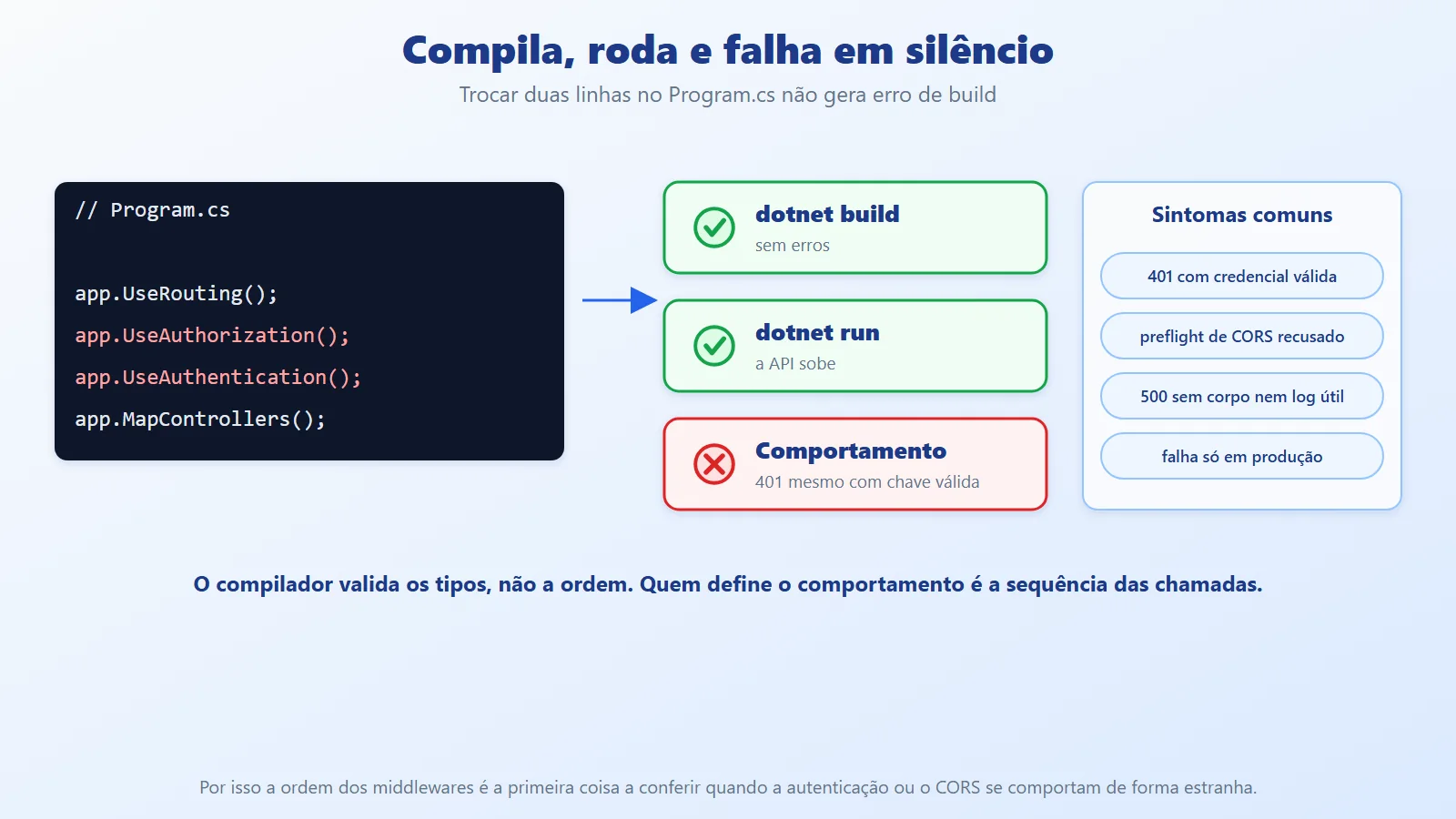
One of the easiest ways to introduce a subtle bug into an ASP.NET Core application is to get the middleware order wrong. The code compiles, the API starts and the unit tests pass, but authentication, authorization, CORS or error handling start behaving incorrectly, with no warning. The symptom usually shows up far from the cause: a 401 for a caller with a valid credential, a preflight rejected by the browser, a 500 with no body in production.
In the previous article (Rate Limiting) we saw that UseRateLimiter must come after UseForwardedHeaders and, when the limit is per user, after authentication. Here we generalize: the order in Program.cs is not formatting, it is the definition of how each request is processed. We cover the mental model of the pipeline, the recommended order, three rules that prevent most problems, and a .NET 10 project that starts the same API five times, once per order, and shows the result of each.
How the ASP.NET Core middleware pipeline works
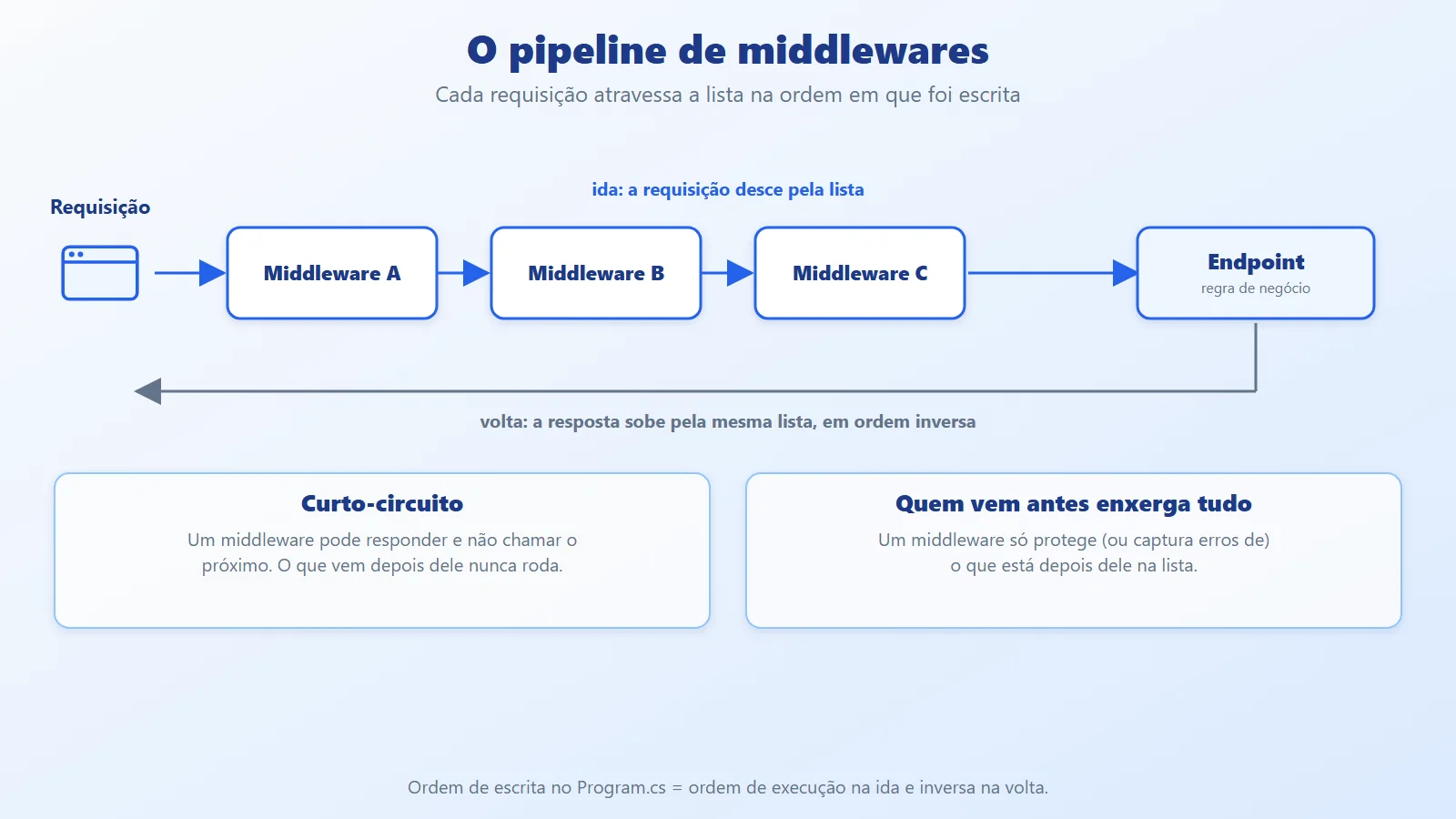
A middleware is a component that receives the request, does something with it and decides whether to call the next one in the list. The pipeline is that list, built by the app.Use... calls in Program.cs. Two ideas explain almost everything:
- The request goes down the list in the order it was written and the response comes back up in reverse order. Whatever comes earlier sees what happens later (including errors); whatever comes later does not affect what came before.
- A middleware can respond without calling the next one (short-circuiting). Anything after it never runs for that request.
A third point is specific to ASP.NET Core: authentication and authorization are different things. UseAuthentication finds out who the user is and fills HttpContext.User. UseAuthorization decides what that user can do, based on the metadata of the selected endpoint ([Authorize], RequireAuthorization). The second depends on the result of the first.
It also helps to know what WebApplication does on its own: it adds routing at the start of the pipeline and runs the endpoints at the end. When you call UseRouting explicitly, you choose the point at which the endpoint is selected, and that is what allows you to place CORS and authorization between endpoint selection and endpoint execution. The example in this article calls UseRouting explicitly, as most projects do.
Three rules that prevent most problems
- Authentication before authorization. First you find out who the user is, then you decide what they can do.
- Exception handler at the start. It only catches failures from the middleware that comes after it.
- CORS before authorization. The browser's preflight (
OPTIONS) carries no credentials; if authorization comes before CORS, it rejects the preflight.
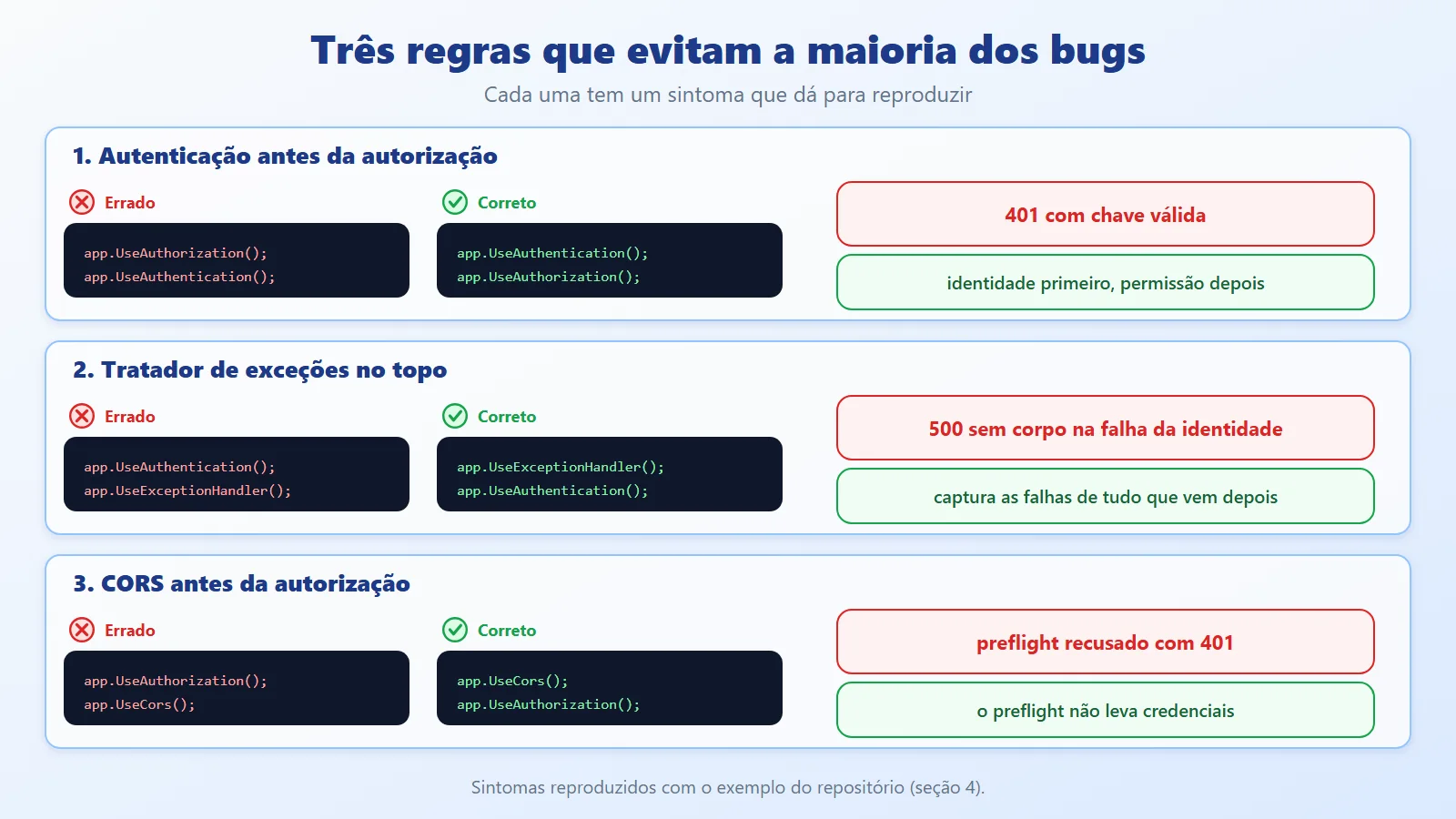
In code, the three look like this (an excerpt from the example's Pipelines.cs, in the right order):
app.UseExceptionHandler(Erro);   // 2. at the top
app.UseRouting();
app.UseCors("Default");          // 3. before authorization
app.UseAuthentication();         // 1. who the user is
app.UseAuthorization();          //    what they can do
Recommended middleware order and the reach of the exception handler
The recommended order goes from the outside in: first whatever protects the whole application, then whatever identifies and authorizes, and finally the endpoint.
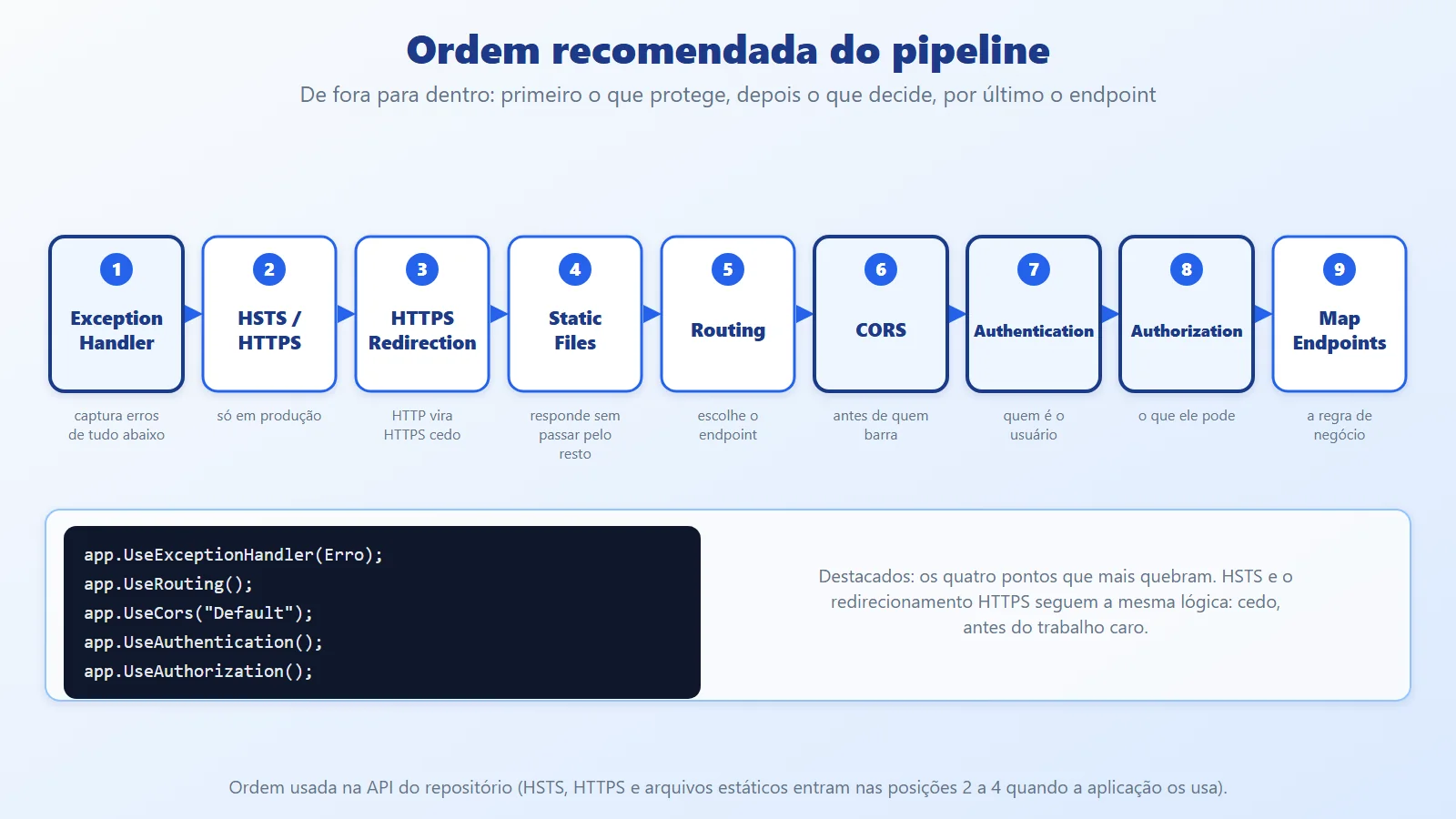
A complete application, with HSTS, HTTPS redirection and static files, looks like this (illustrative excerpt, compiled separately and outside the example project):
var app = builder.Build();

app.UseExceptionHandler("/erro");
if (!app.Environment.IsDevelopment())
    app.UseHsts();
app.UseHttpsRedirection();
app.UseStaticFiles();
app.UseRouting();
app.UseCors("Default");
app.UseAuthentication();
app.UseAuthorization();
app.MapControllers();

app.Run();
The role of each position:
- Exception handler first. So it catches the failure of any middleware below it, including the authentication one.
- HSTS and HTTPS redirection early. Switching from HTTP to HTTPS before any work is done avoids processing the request twice.
UseHstsstays out of development, because the browser caches the rule for a long time (30 days by default). - Static files before routing. They respond and end the request without going through routing, CORS and authentication. Note: this does not protect the file (see the best practices and pitfalls section).
- Routing, CORS, authentication and authorization, in this order. Routing selects the endpoint, so that CORS and authorization can see its metadata.
- Endpoints last. This is where the business logic runs, with the identity already resolved and the permission already checked.
How far the exception handler reaches
The position of UseExceptionHandler defines what it covers. Placed after authentication, it does not see what authentication throws. A failure in the identity provider, for example, becomes a 500 with no body, whereas with the handler at the top the same failure becomes a ProblemDetails response:
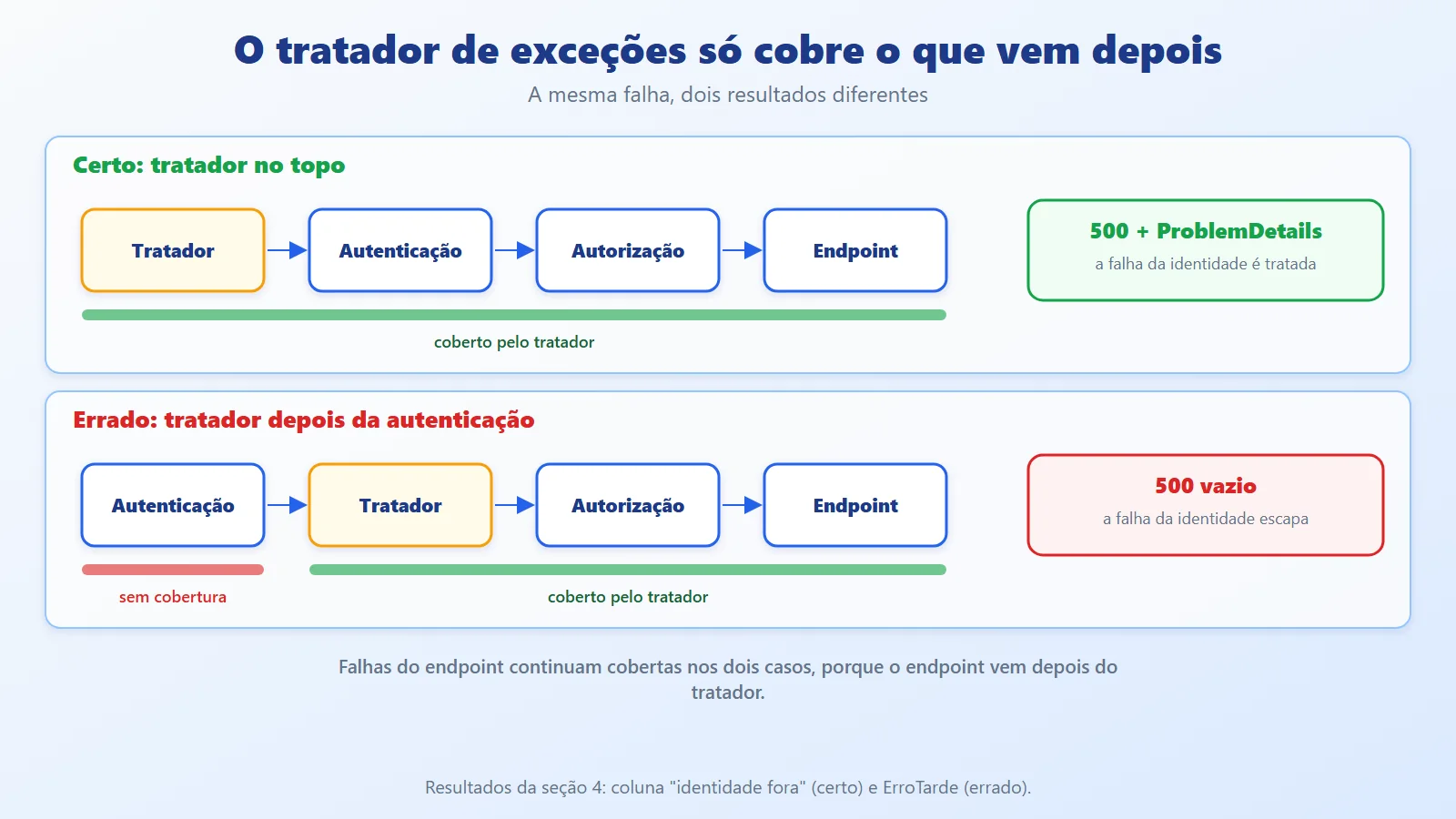
Failures in the endpoint are still covered in both cases, because the endpoint runs at the end of the pipeline, after the handler. That is why the handler ordering mistake goes unnoticed: a test throw in a route works, and only the failure of an earlier middleware escapes.
Demo: five middleware orders on the same API
The example is a single project, MiddlewareOrder: an API with a protected endpoint (/dados), an endpoint that throws an exception (/falha), a CORS policy and an exception handler. It is started five times, each with a different middleware order, and the demo sends the same requests to all of them. Authentication is minimal: the X-Api-Key header identifies the caller, and the expirada key simulates the identity provider being down (the handler throws an exception).
Minimal authentication
ChaveHandler accepts the segredo key, rejects any other and throws an exception when the key is expirada:
using System.Security.Claims;
using System.Text.Encodings.Web;
using Microsoft.AspNetCore.Authentication;
using Microsoft.Extensions.Options;

namespace MiddlewareOrder;

// Minimal scheme: the X-Api-Key header identifies the caller.
public class ChaveHandler(
    IOptionsMonitor<AuthenticationSchemeOptions> opcoes,
    ILoggerFactory log,
    UrlEncoder encoder)
    : AuthenticationHandler<AuthenticationSchemeOptions>(
        opcoes, log, encoder)
{
    protected override Task<AuthenticateResult>
        HandleAuthenticateAsync()
    {
        if (!Request.Headers.TryGetValue(
                "X-Api-Key", out var chave))
            return Task.FromResult(
                AuthenticateResult.NoResult());

        // simulates the identity provider being down
        if (chave == "expirada")
            throw new InvalidOperationException(
                "identity provider unavailable");

        if (chave != "segredo")
            return Task.FromResult(
                AuthenticateResult.Fail("invalid key"));

        var identidade = new ClaimsIdentity(
            [new Claim(ClaimTypes.Name, "ana")], Scheme.Name);
        var ticket = new AuthenticationTicket(
            new ClaimsPrincipal(identidade), Scheme.Name);
        return Task.FromResult(
            AuthenticateResult.Success(ticket));
    }
}
Services
Authentication, authorization and a CORS policy that accepts only the https://app.exemplo.com origin. The environment is Production on purpose, so the developer exception page does not hide the 500 with no body:
using Microsoft.AspNetCore.Authentication;

namespace MiddlewareOrder;

public static class Servidor
{
    public static WebApplication Criar(Ordem ordem, string url)
    {
        var builder = WebApplication.CreateBuilder(
            new WebApplicationOptions
            {
                EnvironmentName = Environments.Production,
            });
        builder.WebHost.UseUrls(url);
        builder.Logging.ClearProviders();

        builder.Services
            .AddAuthentication("Chave")
            .AddScheme<AuthenticationSchemeOptions, ChaveHandler>(
                "Chave", null);
        builder.Services.AddAuthorization();
        builder.Services.AddCors(o => o.AddPolicy("Default",
            p => p.WithOrigins("https://app.exemplo.com")
                .AllowAnyHeader()
                .AllowAnyMethod()));

        var app = builder.Build();
        Pipelines.Configurar(app, ordem);
        return app;
    }
}
The five orders
The central file. Each case is a middleware order; the endpoints are the same. /dados requires authorization and has CORS metadata (RequireCors), and the handler is a function that writes the ProblemDetails directly:
namespace MiddlewareOrder;

public enum Ordem
{
    Certa,
    AuthzAntesDeAuthn,
    ErroTarde,
    CorsAposAuthn,
    CorsTarde,
}

public static class Pipelines
{
    public static void Configurar(WebApplication app, Ordem ordem)
    {
        switch (ordem)
        {
            case Ordem.Certa:
                app.UseExceptionHandler(Erro);
                app.UseRouting();
                app.UseCors("Default");
                app.UseAuthentication();
                app.UseAuthorization();
                break;

            case Ordem.AuthzAntesDeAuthn:
                app.UseExceptionHandler(Erro);
                app.UseRouting();
                app.UseCors("Default");
                app.UseAuthorization();  // before knowing who the user is
                app.UseAuthentication();
                break;

            case Ordem.ErroTarde:
                app.UseRouting();
                app.UseCors("Default");
                app.UseAuthentication();
                app.UseExceptionHandler(Erro);  // too late
                app.UseAuthorization();
                break;

            case Ordem.CorsAposAuthn:
                app.UseExceptionHandler(Erro);
                app.UseRouting();
                app.UseAuthentication();
                app.UseCors("Default");  // between the two
                app.UseAuthorization();
                break;

            case Ordem.CorsTarde:
                app.UseExceptionHandler(Erro);
                app.UseRouting();
                app.UseAuthentication();
                app.UseAuthorization();
                app.UseCors("Default");  // after the one that blocks
                break;
        }

        app.MapGet("/dados", (HttpContext http) =>
                $"hello, {http.User.Identity?.Name}")
            .RequireAuthorization()
            .RequireCors("Default");

        app.MapGet("/falha", Falha).AllowAnonymous();
    }

    static string Falha() =>
        throw new InvalidOperationException("endpoint failure");

    // single error response, in ProblemDetails format
    static void Erro(IApplicationBuilder app) =>
        app.Run(http => Results.Problem(
                title: "Unexpected error", statusCode: 500)
            .ExecuteAsync(http));
}
Demo and entry point
The demo starts each order, sends four requests and prints the result in a table. Program.cs runs the demo by default, or keeps one order running with serve <order>:
namespace MiddlewareOrder;

public static class Demo
{
    const string Linha = "{0,-18} {1,-8} {2,-10} {3,-10} {4}";

    public static async Task ExecutarAsync()
    {
        Console.WriteLine(Linha, "order", "/dados", "preflight",
            "/falha", "identity down");

        foreach (var ordem in Enum.GetValues<Ordem>())
        {
            var url = "http://localhost:5091";
            var app = Servidor.Criar(ordem, url);
            await app.StartAsync();
            using var http = new HttpClient
            {
                BaseAddress = new(url),
            };

            var dados = await Enviar(http, HttpMethod.Get,
                "/dados", ("X-Api-Key", "segredo"));
            var preflight = await Enviar(http, HttpMethod.Options,
                "/dados",
                ("Origin", "https://app.exemplo.com"),
                ("Access-Control-Request-Method", "GET"));
            var falha = await Enviar(http, HttpMethod.Get,
                "/falha");
            var fora = await Enviar(http, HttpMethod.Get,
                "/dados", ("X-Api-Key", "expirada"));

            Console.WriteLine(Linha, ordem, dados, preflight,
                falha, fora);

            await app.StopAsync();
            await app.DisposeAsync();
        }
    }

    static async Task<string> Enviar(
        HttpClient http, HttpMethod metodo, string rota,
        params (string Nome, string Valor)[] cabecalhos)
    {
        using var req = new HttpRequestMessage(metodo, rota);
        foreach (var (nome, valor) in cabecalhos)
            req.Headers.Add(nome, valor);
        using var resp = await http.SendAsync(req);

        var cors = resp.Headers.Contains(
            "Access-Control-Allow-Origin") ? "+CORS" : "";
        var json = resp.Content.Headers.ContentType?.MediaType
            is { } tipo && tipo.Contains("json") ? "+JSON" : "";
        return $"{(int)resp.StatusCode}{cors}{json}";
    }
}using MiddlewareOrder;
// dotnet run -- serve [certa|authz|erro|cors-authn|cors]
if (args is ["serve", ..])
{
var nome = args.Length > 1 ? args[1] : "certa";
var ordem = nome switch
{
"authz" => Ordem.AuthzAntesDeAuthn,
"erro" => Ordem.ErroTarde,
"cors-authn" => Ordem.CorsAposAuthn,
"cors" => Ordem.CorsTarde,
_ => Ordem.Certa,
};
var app = Servidor.Criar(ordem, "http://localhost:5090");
await app.RunAsync();
return;
}
await Demo.ExecutarAsync();How to run
dotnet run --project src/MiddlewareOrderTo keep one order running and call it with curl:
dotnet run --project src/MiddlewareOrder -- serve authz
curl -i -H "X-Api-Key: segredo" http://localhost:5090/dados
Output
order              /dados   preflight  /falha     identity down
Certa              200      204+CORS   500+JSON   500+JSON
AuthzAntesDeAuthn  401      204+CORS   500+JSON   401
ErroTarde          200      204+CORS   500+JSON   500
CorsAposAuthn      200      204+CORS   500+JSON   500+JSON
CorsTarde          200      401        500+JSON   500+JSON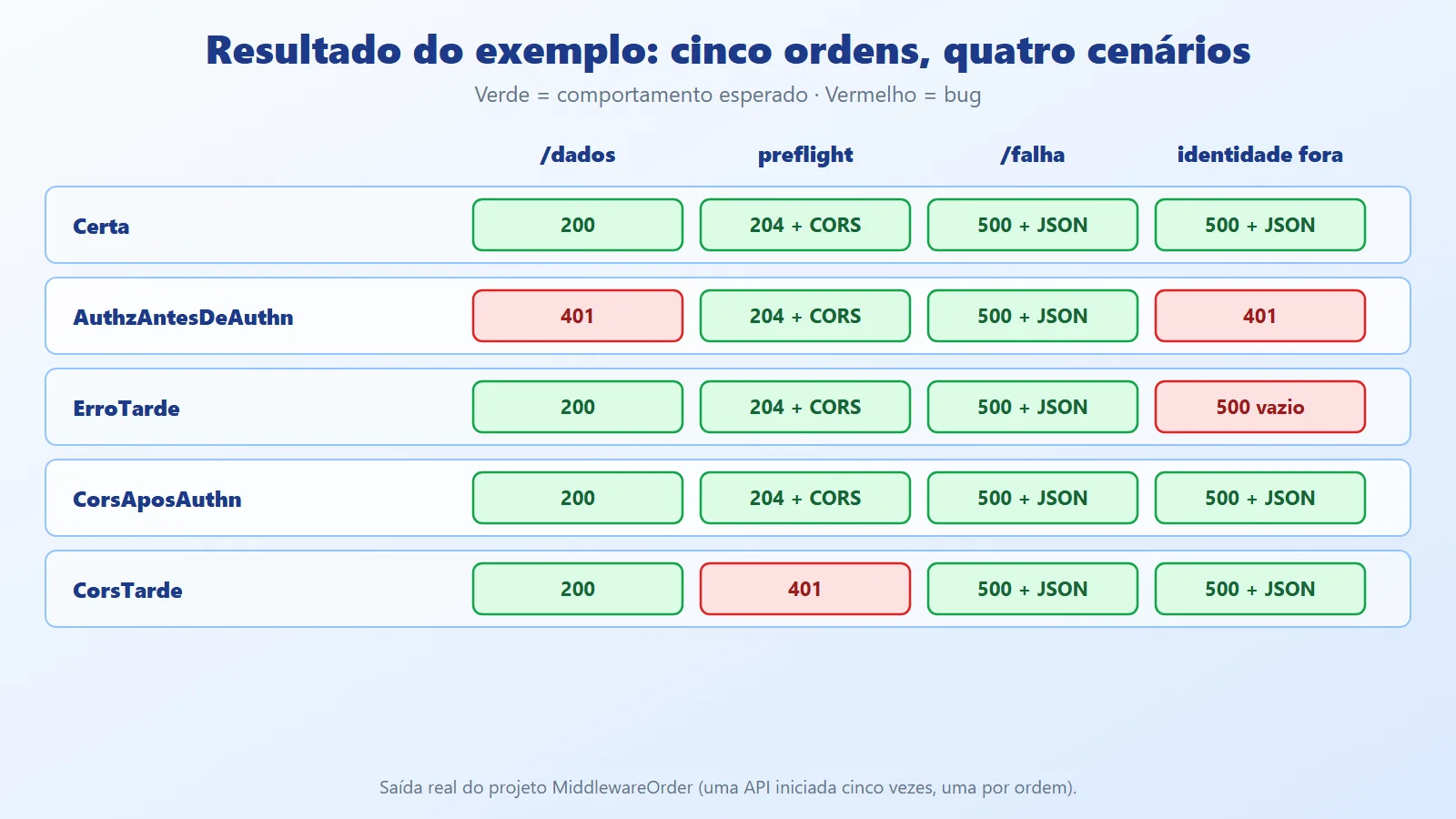
How to read the table:
/dados: aGETwith a valid key. InAuthzAntesDeAuthnit returned401even with the correct key: authorization ran whileHttpContext.Userwas still empty.dotnet builddid not complain about anything.preflight: anOPTIONSrequest from an allowed origin, without credentials. InCorsTardeit returned401, and the browser would block the real call. In the others,204with the CORS headers./falha: the endpoint that throws an exception was handled (500withProblemDetails) in all orders, includingErroTarde. This is the false positive described in the section on the reach of the exception handler.identity down: the exception from the authentication handler was only handled when the exception handler came before it. InErroTardeit became a500with no body. InAuthzAntesDeAuthnit returned401because authorization blocked the request before authentication ran and threw.CorsAposAuthn: CORS between authentication and authorization worked. Authentication alone does not block the preflight; authorization does. That is why the safe rule is "CORS before both".
Best practices for ordering middleware and common pitfalls
Four pitfalls that show up in real projects, all reproduced in test projects (illustrative excerpts, outside the example project).
Forgetting a middleware. When an endpoint has RequireAuthorization and UseAuthorization is not in the pipeline, the first request fails with an explicit exception:
app.UseRouting();
app.UseCors("Default");
app.UseAuthentication();
// app.UseAuthorization(); is missing

app.MapGet("/dados", () => "ok").RequireAuthorization();
The result was a 500 and, in development, InvalidOperationException: Endpoint HTTP: GET /dados contains authorization metadata, but a middleware was not found that supports authorization. This is the best case: the error is loud. Ordering mistakes are worse, because they produce no error at all.
UseExceptionHandler("/erro") re-executes the pipeline. In the form with a path, ASP.NET Core runs the pipeline again for /erro. If the failure comes from a middleware that also runs on that second pass, the second exception ends in a 500 with an empty body:
app.UseExceptionHandler("/erro");   // re-executes at /erro
app.UseRouting();
app.UseAuthentication();            // throws again
app.UseAuthorization();

app.Map("/erro", () => Results.Problem(statusCode: 500));
With the X-Api-Key: expirada header, the result was a 500 with Content-Length: 0, even with the handler at the top. The fix is a handler that writes the response directly, without going through the pipeline, like Erro in Pipelines.cs, or making sure the error path does not depend on whatever failed.
Static files do not go through authorization. UseStaticFiles responds before routing; but even when placed after UseAuthorization, the file was served without credentials (200), because authorization only evaluates endpoints. To protect a file, serve it through an endpoint:
app.MapGet("/privado", () => Results.File(arquivo, "text/plain"))
   .RequireAuthorization();
Without a key, /privado returned 401; with the key, 200; and the same file in wwwroot remained public through UseStaticFiles.
CORS can hide the ordering bug. Without CORS metadata on the endpoint (RequireCors or [EnableCors]), the OPTIONS request does not match an endpoint and authorization does not block it. In the first test, UseCors after UseAuthorization returned 204 with the correct headers, and the bug only appeared once the endpoint started declaring the policy. If CORS "works" in your environment, confirm it with the real, protected endpoint and a real preflight.
Other production tips:
- Test the order.
Demo.csshows the technique: start the application in-process and send the requests that reveal the behavior (valid key, preflight, dependency failure). A test like this catches the regression when someone reorders a line. - Document the reason. A short comment in
Program.cs(// before authorization: the preflight has no credentials) prevents the "tidy-up" that breaks the order. - Custom and third-party middleware follow the same logic. Rate limiters, compression and request correlation also have a correct position; check the documentation of each one and, for rate limiting, the previous article.
When to control middleware order and when not to
Control the order explicitly when:
- The application has its own authentication, authorization, CORS or exception handler.
- You need something to run between endpoint selection and endpoint execution (CORS, authorization, per-user rate limiter).
- There is custom middleware: its position changes what it sees and what it covers.
You can keep the WebApplication default when:
- It is a minimal API with no authentication, only endpoints and no CORS.
- The middleware comes from a project template you have not changed and the application does not depend on any ordering behavior.
Avoid:
- Business logic in middleware. It runs for every request; rules for a single endpoint are better placed in endpoint filters, action filters or in the service itself.
- Many custom middleware without ordering tests. Each one is another position that can be swapped without warning.
- Trusting that the order "looks right". Since it produces no error, only the real request validates it.
Conclusion: middleware order is behavior, not formatting
Middleware order defines the behavior of the application without appearing in any compile error. The three rules solve most cases: authentication before authorization, exception handler at the top and CORS before authorization. The example showed what each violation causes (401 with a valid key, a rejected preflight, an unhandled identity failure) and also what it does not cause: an exception handler after authentication still catches endpoint errors, and CORS between authentication and authorization works, which makes these mistakes easy to miss.
The practical takeaway: when debugging an unexpected authentication, CORS or error-handling problem in ASP.NET Core, Program.cs is the first place to look. Keep the order commented, cover it with a test that sends the right requests and treat any reordering as a change in behavior, not in formatting.
References
- Microsoft Learn: ASP.NET Core Middleware
- Microsoft Learn: Enable Cross-Origin Requests (CORS) in ASP.NET Core
- Microsoft Learn: Handle errors in ASP.NET Core
- Microsoft Learn: Introduction to authorization in ASP.NET Core