
Why use Redis caching in .NET microservices
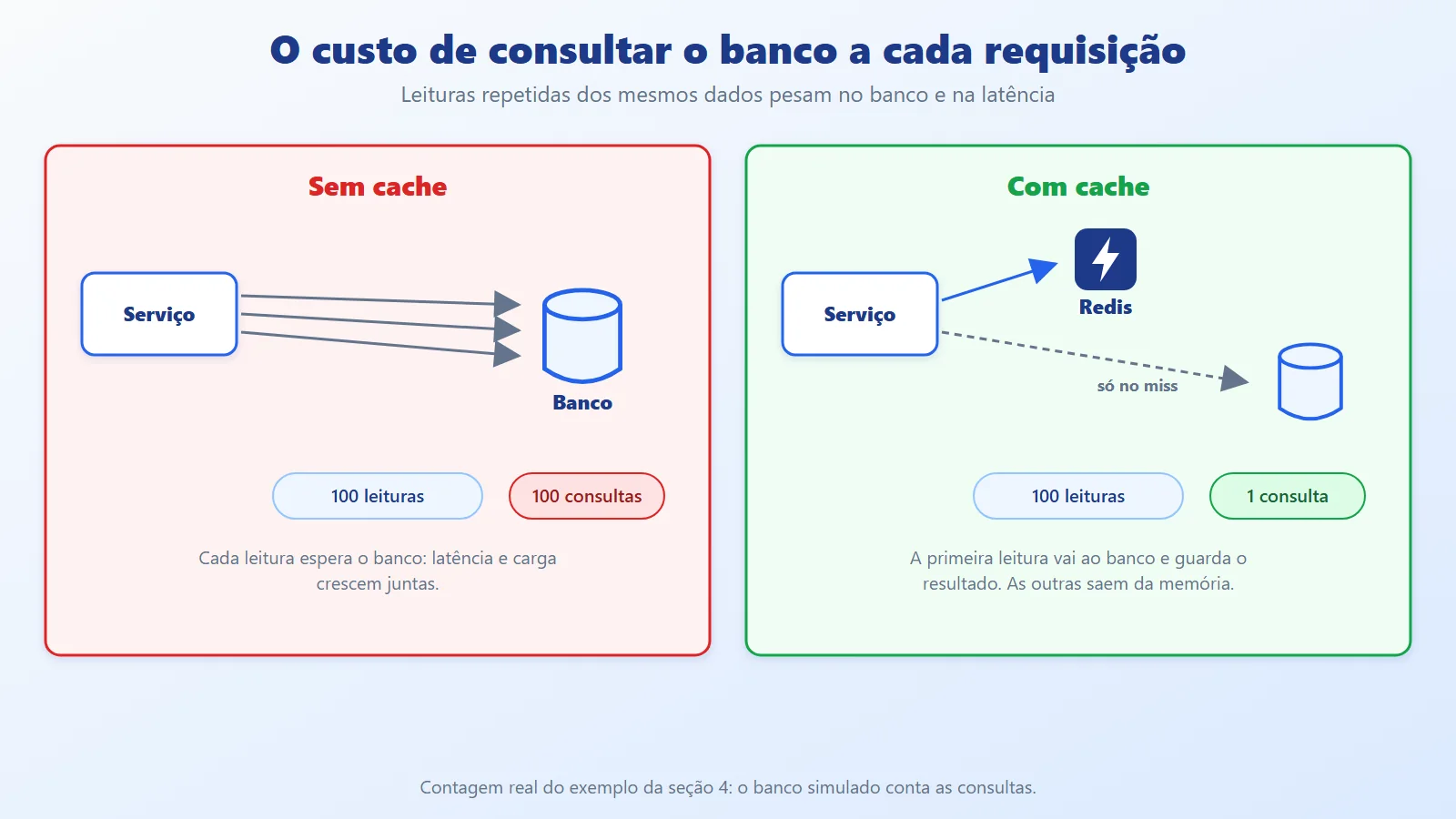
In a microservices architecture, performance does not depend only on efficient code. It also depends on how many times each service has to hit the database to answer the same question. An authentication service, for example, reads the same user's data on every request, and every read ties up a connection, burns CPU and adds latency. With a few users nobody notices; with many, the database becomes the bottleneck for every service that depends on identity.
Redis is an in-memory data store that works well as a cache for this kind of repeated read. This article continues API Gateway + BFF, Rate Limiting and Middleware Order. It covers the flow of an authentication service with Redis (the cache-aside pattern), a .NET 10 example with a real Redis that counts database queries in each scenario, and the pitfalls caching brings: stale data, security, concurrency and Redis itself going down.
Redis caching concepts: cache-aside and TTL
Redis stores key-value pairs in memory, with an optional expiration per key. In .NET, the simplest way to use it is through the IDistributedCache interface, which exposes GetStringAsync, SetStringAsync and RemoveAsync and does not tie the code to Redis: the implementation is swapped in configuration.
Four terms appear throughout the article:
- Hit and miss. A hit is when the data is in the cache and the response comes from it; a miss is when it is not and the service has to go to the database.
- TTL (time to live). The entry's expiration time. Once it passes, Redis removes the key and the next read is a miss.
- Invalidation. Removing the key before the TTL because the data changed in the database.
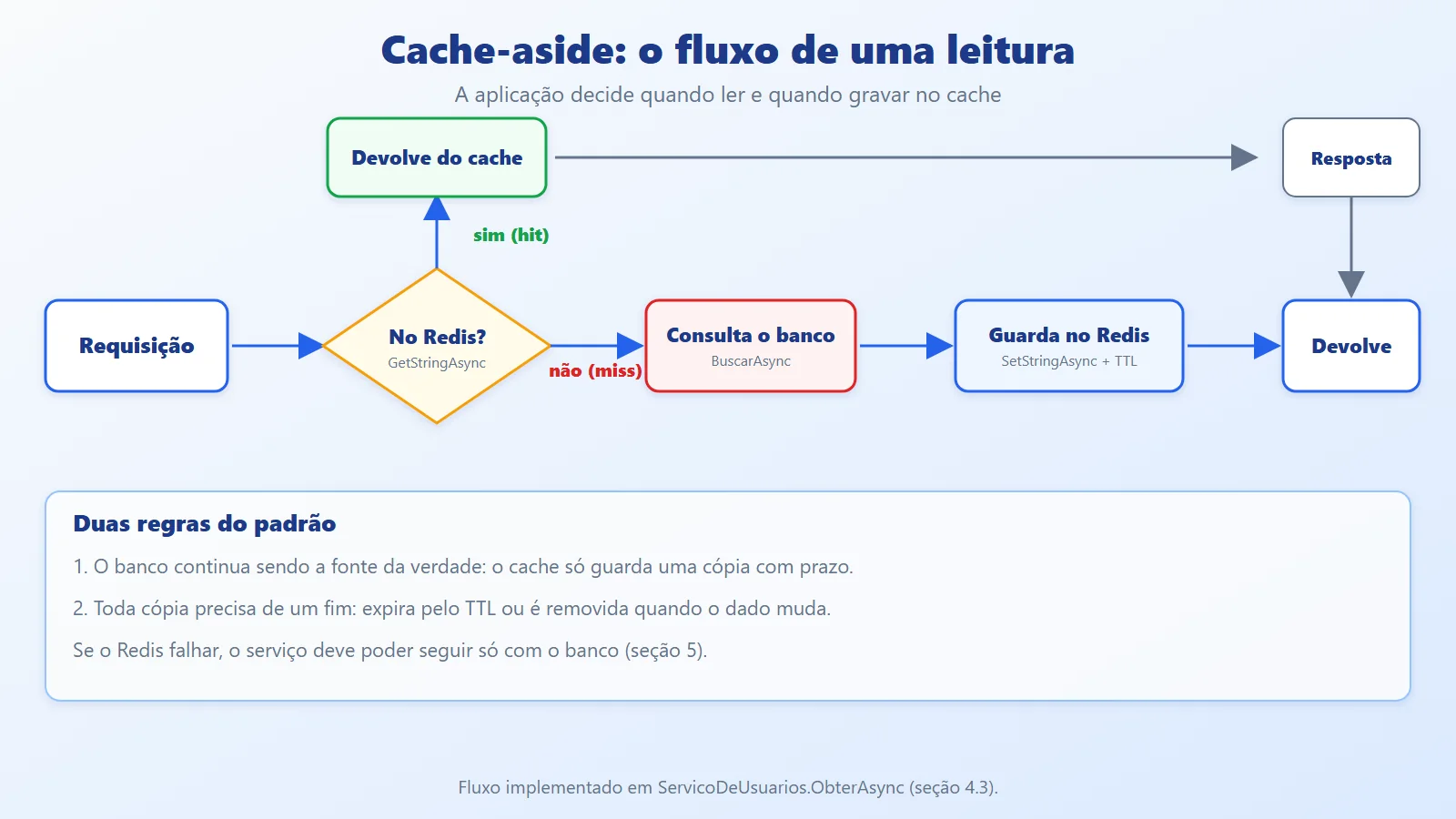
- Cache-aside. The pattern in which the application controls the cache: it reads from the cache, and only on a miss reads from the database and stores the result. The cache is never the source of truth.
In code, everything revolves around one key per entity. The example uses usuario:{id}:
static string Chave(int id) => $"usuario:{id}";With InstanceName set to demo:, the key stored in Redis is demo:usuario:1. The prefix avoids collisions when several services share the same Redis.
Redis cache architecture in .NET microservices
The flow is that of the authentication service: the client calls the gateway, which routes the request to the authentication service, and the service queries Redis before the database. The other services receive the identity and permissions already validated.
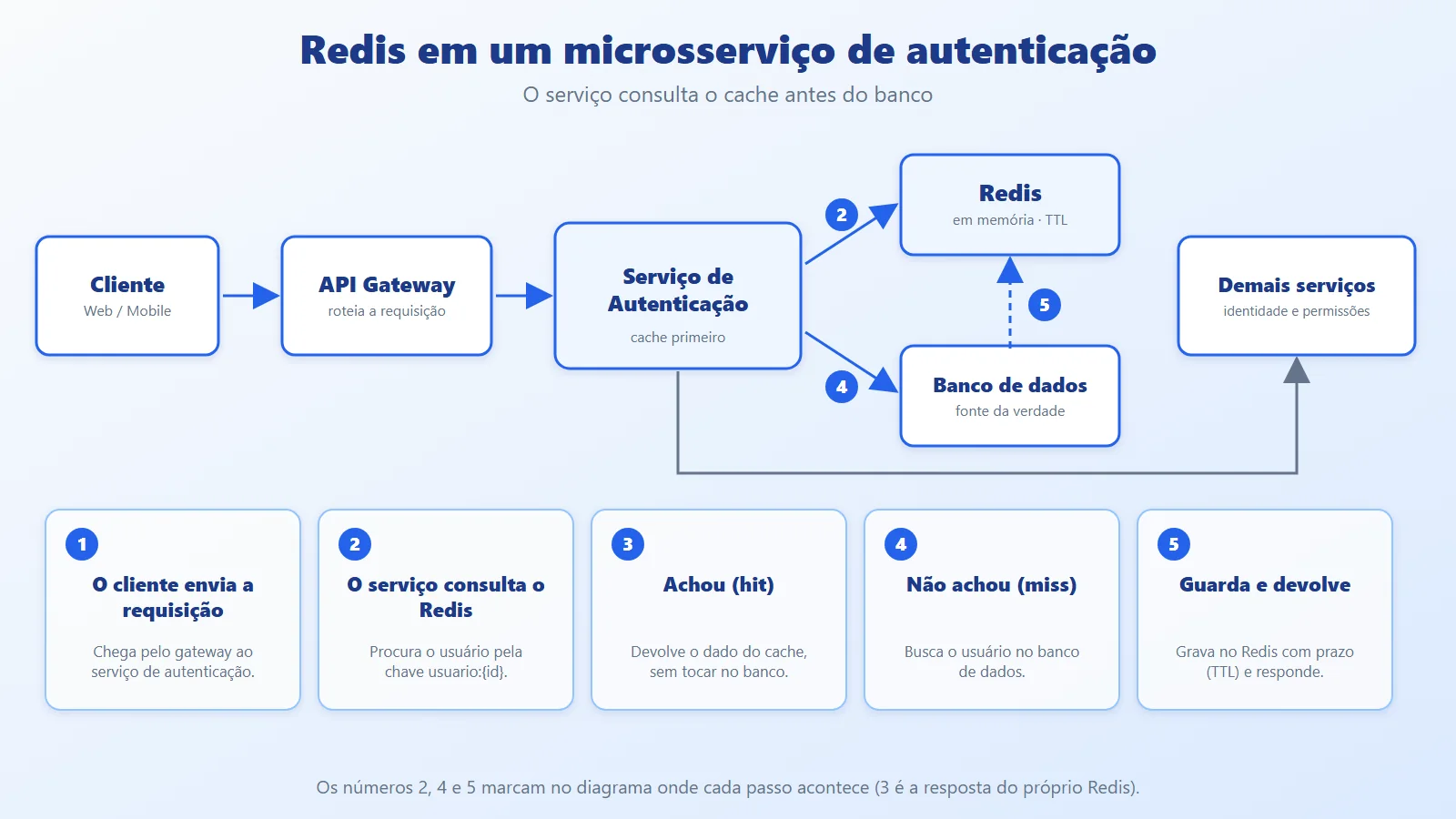
The five steps:
- The client sends the request.
- The service queries Redis by the user's key.
- If the data exists (hit), it returns the result from the cache.
- If it does not exist (miss), it fetches from the database.
- It stores the result in Redis with a TTL and returns the response. Subsequent requests reuse the data until it expires or is invalidated.
The same flow, seen as a decision in a single read:
The Redis setup in .NET is a single call (excerpt from the example's Program.cs):
servicos.AddStackExchangeRedisCache(o =>
{
    o.Configuration = $"{redis},abortConnect=false";
    o.InstanceName = "demo:";
});
The package is Microsoft.Extensions.Caching.StackExchangeRedis. abortConnect=false lets the application start even if Redis is not up yet; the error only appears when someone tries to use the cache.
One architectural decision the diagram does not show: each service has its own keys and its own TTLs. A Redis shared across services is convenient, but it couples the data format; per-service prefixes and clear owners for each key keep one service from reading or deleting what belongs to another.
Implementing cache-aside with Redis in .NET 10 step by step
The example is a single project, RedisCache: a console app that simulates the authentication service. The database is simulated (each query costs 50 ms and is counted), the cache is a real Redis in a container, and a demo runs five scenarios and prints the result of each.
The models
The cache stores Usuario; the database stores UsuarioRegistro, which has the password hash. Separating the two types guarantees the password never reaches Redis through a serialization slip:
namespace RedisCache;

// What goes into the cache: no password, no token.
public record Usuario(int Id, string Nome, string[] Papeis);

// What exists in the database: includes the password hash.
public record UsuarioRegistro(
    int Id, string Nome, string SenhaHash, string[] Papeis);
The simulated database
It counts queries and takes 50 ms on each one. AlterarPapeis simulates a permission change made by another service or by an administrator:
namespace RedisCache;

// Simulated database: each query costs 50 ms and is counted.
public class BancoDeUsuarios
{
    readonly Dictionary<int, UsuarioRegistro> _dados = new()
    {
        [1] = new(1, "ana", "hash-de-exemplo", ["leitor"]),
    };
    int _consultas;

    public int Consultas => _consultas;

    public async Task<Usuario?> BuscarAsync(int id)
    {
        Interlocked.Increment(ref _consultas);
        await Task.Delay(50);
        return _dados.TryGetValue(id, out var r)
            ? new Usuario(r.Id, r.Nome, r.Papeis)
            : null;
    }

    public void AlterarPapeis(int id, params string[] papeis) =>
        _dados[id] = _dados[id] with { Papeis = papeis };
}
The service with cache-aside
ObterAsync is the heart of the example. It reads Redis; if it finds the entry, it deserializes and returns it; if not, it queries the database, serializes the result to JSON, stores it with AbsoluteExpirationRelativeToNow (the TTL) and returns it. InvalidarAsync removes the key:
using System.Text.Json;
using Microsoft.Extensions.Caching.Distributed;

namespace RedisCache;

// Cache-aside: the service checks Redis before the database.
public class ServicoDeUsuarios(
    IDistributedCache cache,
    BancoDeUsuarios banco,
    TimeSpan ttl)
{
    static string Chave(int id) => $"usuario:{id}";

    public Task<Usuario?> ObterSemCacheAsync(int id) =>
        banco.BuscarAsync(id);

    public async Task<Usuario?> ObterAsync(int id)
    {
        var json = await cache.GetStringAsync(Chave(id));
        if (json is not null)
            return JsonSerializer.Deserialize<Usuario>(json);

        var usuario = await banco.BuscarAsync(id);
        if (usuario is null)
            return null;

        await cache.SetStringAsync(
            Chave(id),
            JsonSerializer.Serialize(usuario),
            new DistributedCacheEntryOptions
            {
                AbsoluteExpirationRelativeToNow = ttl,
            });
        return usuario;
    }

    // Always call this when the user changes in the database.
    public Task InvalidarAsync(int id) =>
        cache.RemoveAsync(Chave(id));

    public Task<string?> LerBrutoAsync(int id) =>
        cache.GetStringAsync(Chave(id));
}
The demo
Each scenario measures or shows one property of the cache: query count, expiration, stale data, invalidation and the content stored in Redis:
using System.Diagnostics;

namespace RedisCache;

public static class Demo
{
    const int Leituras = 100;

    public static async Task ExecutarAsync(
        ServicoDeUsuarios servico, BancoDeUsuarios banco)
    {
        await servico.InvalidarAsync(1);

        // 1. no cache: every read goes to the database
        var antes = banco.Consultas;
        var tempo = await Medir(
            () => servico.ObterSemCacheAsync(1));
        Console.WriteLine(
            $"no cache     {Leituras} reads  " +
            $"{banco.Consultas - antes} queries  " +
            $"{tempo} ms");

        // 2. with cache: only the first read goes to the database
        antes = banco.Consultas;
        tempo = await Medir(() => servico.ObterAsync(1));
        Console.WriteLine(
            $"with cache   {Leituras} reads  " +
            $"{banco.Consultas - antes} query   {tempo} ms");

        // 3. expiration: after the TTL, back to the database
        await Task.Delay(2500);
        antes = banco.Consultas;
        await servico.ObterAsync(1);
        Console.WriteLine(
            "after TTL    1 read       " +
            $"{banco.Consultas - antes} query");

        // 4. stale data: the database changed and the cache did not know
        banco.AlterarPapeis(1, "admin");
        var velho = await servico.ObterAsync(1);
        Console.WriteLine("not invalidated: roles = " +
            string.Join(",", velho!.Papeis));

        await servico.InvalidarAsync(1);
        var novo = await servico.ObterAsync(1);
        Console.WriteLine("invalidated:     roles = " +
            string.Join(",", novo!.Papeis));

        // 5. what is stored in Redis
        Console.WriteLine(
            $"in Redis: {await servico.LerBrutoAsync(1)}");
    }

    static async Task<long> Medir(Func<Task> leitura)
    {
        var relogio = Stopwatch.StartNew();
        for (var i = 0; i < Leituras; i++)
            await leitura();
        return relogio.ElapsedMilliseconds;
    }
}
Entry point
The Redis address comes from the REDIS variable (default localhost:6379). The example's TTL is 2 seconds, deliberately short so that expiration shows up in the demo. If Redis is not up, the program warns and exits (on the test machine, after about 18 seconds of retries):
using Microsoft.Extensions.Caching.Distributed;
using Microsoft.Extensions.DependencyInjection;
using RedisCache;

// REDIS = Redis address (default: localhost:6379)
var redis = Environment.GetEnvironmentVariable("REDIS")
    ?? "localhost:6379";

var servicos = new ServiceCollection();
servicos.AddStackExchangeRedisCache(o =>
{
    o.Configuration = $"{redis},abortConnect=false";
    o.InstanceName = "demo:";
});
await using var provedor = servicos.BuildServiceProvider();

var banco = new BancoDeUsuarios();
var servico = new ServicoDeUsuarios(
    provedor.GetRequiredService<IDistributedCache>(),
    banco,
    ttl: TimeSpan.FromSeconds(2));

try
{
    await Demo.ExecutarAsync(servico, banco);
}
catch (StackExchange.Redis.RedisConnectionException)
{
    Console.WriteLine($"Redis unavailable at {redis}.");
    Environment.ExitCode = 1;
}
How to run
Redis runs in a container. A minimal compose.yaml is enough:
services:
  redis:
    image: redis:7
    ports:
      - "6379:6379"
With it running, the example runs on .NET 10:
docker compose up -d
dotnet run --project src/RedisCache
Output
no cache     100 reads  100 queries  6574 ms
with cache   100 reads  1 query   442 ms
after TTL    1 read       1 query
not invalidated: roles = leitor
invalidated:     roles = admin
in Redis: {"Id":1,"Nome":"ana","Papeis":["admin"]}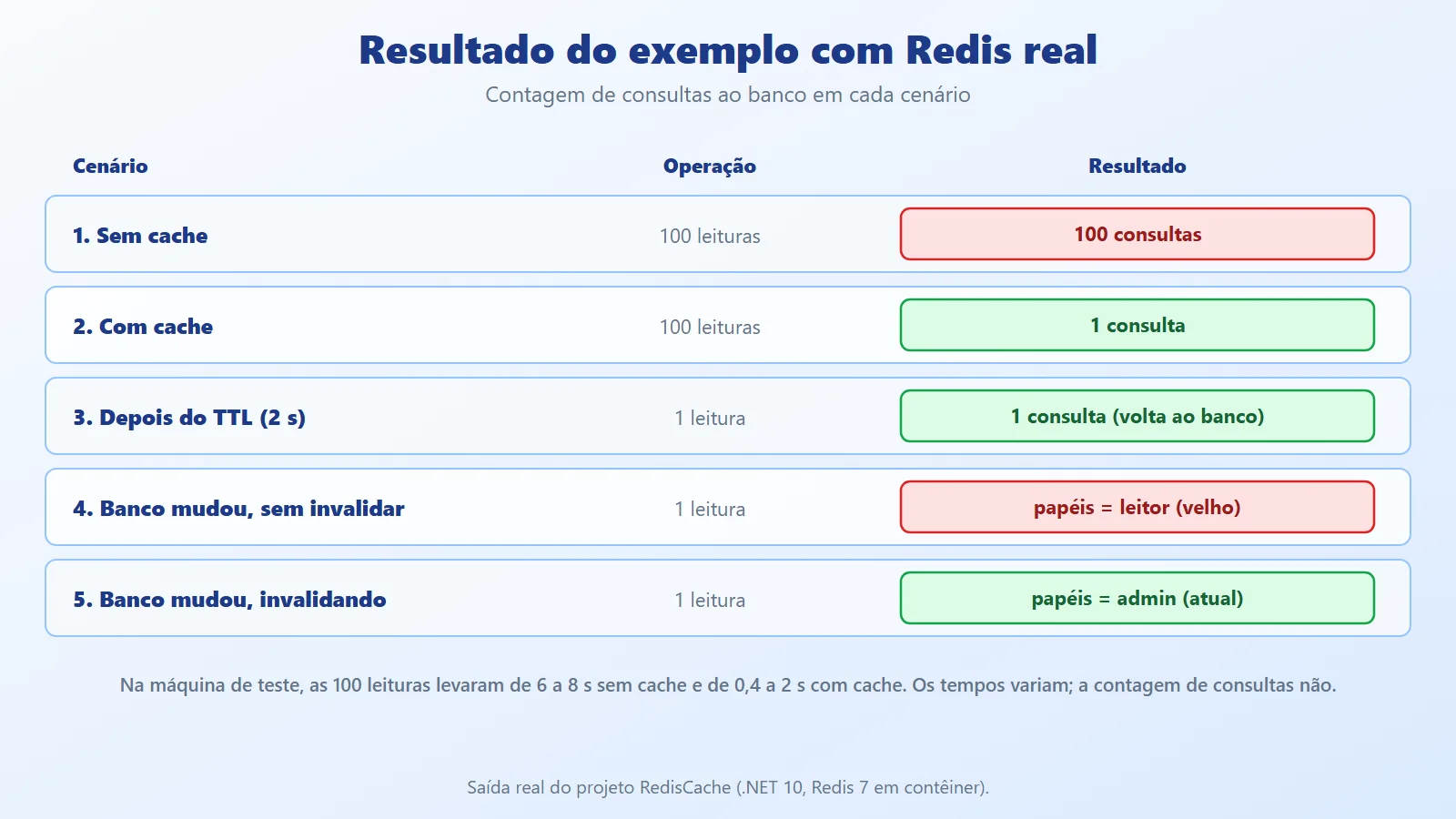
How to read the result:
- No cache: 100 reads of the same user generated 100 database queries.
- With cache: the same 100 reads generated 1 query, the one from the first miss. Timings vary with the machine (in the test runs, 6 to 8 seconds without cache and 0.4 to 2 seconds with cache); the query count is always the same.
- After the TTL: with the entry expired, the next read went back to the database.
- Not invalidated: the database changed the role to
admin, but the cache kept returningleitoruntil the TTL expired. That is stale data. - Invalidated: with
InvalidarAsyncright after the change, the next read already returnedadmin. - In Redis: the stored JSON has id, name and roles, with no password hash.
Redis caching best practices: pitfalls and measurements
The performance gain comes for free; the problems come later. The four below were reproduced in test projects (illustrative snippets, outside the example project, with measurements from a development machine).

Stale data and authorization. Cache and database only agree until the first UPDATE. For ordinary data, a few seconds of lag is acceptable; for permissions, it is not. Two defenses: a short TTL and explicit invalidation whenever a role or permission changes (as in the "invalidated" scenario). Even so, there is a window between the database write and the key removal, so critical authorization decisions may query the source of truth.
Security of cached data. Whatever goes into Redis sits in memory in another process, outside the database and its access rules.

Practical rules: do not store passwords or password hashes, access or refresh tokens, or session data containing secrets; store only what the service needs to respond (id, name, roles); protect Redis itself with a private network, authentication and TLS. The example handles the first part through the type: Usuario has no password field.
Many simultaneous reads with an empty cache. When the key expires (or Redis restarts), all concurrent requests see a miss and hit the database together, known as a cache stampede. In the test, 20 simultaneous reads with an empty cache generated 20 queries. A per-key lock solves it within a process: the first one fetches, the others wait and read from the cache (illustrative snippet, tested separately):
readonly SemaphoreSlim _trava = new(1, 1);

public async Task<Usuario?> ObterAsync(int id)
{
    var chave = $"usuario:{id}";
    if (await LerCacheAsync(chave) is { } achado)
        return achado;

    await _trava.WaitAsync();
    try
    {
        if (await LerCacheAsync(chave) is { } outro)
            return outro;   // another caller already filled it

        var usuario = await banco.BuscarAsync(id);
        // ... SetStringAsync as in the service from "The service with cache-aside"
        return usuario;
    }
    finally
    {
        _trava.Release();
    }
}
With the lock, the same 20 reads generated 1 query. It is per process: with several instances of the service, each one still makes its own query.
Redis being down. The cache should speed up the service, not take it down. The first step is to treat a cache failure as a miss (try/catch around the Redis calls, as in the LerCacheAsync of the snippet above). That alone is not enough: with Redis stopped and default timeouts, 5 consecutive reads took 92 seconds, because the client tries to reconnect on every operation. With the configuration below, the time dropped to 15.7 seconds, still very high:
o.Configuration = "localhost:6379,abortConnect=false," +
    "connectTimeout=500,syncTimeout=500,asyncTimeout=500," +
    "connectRetry=1";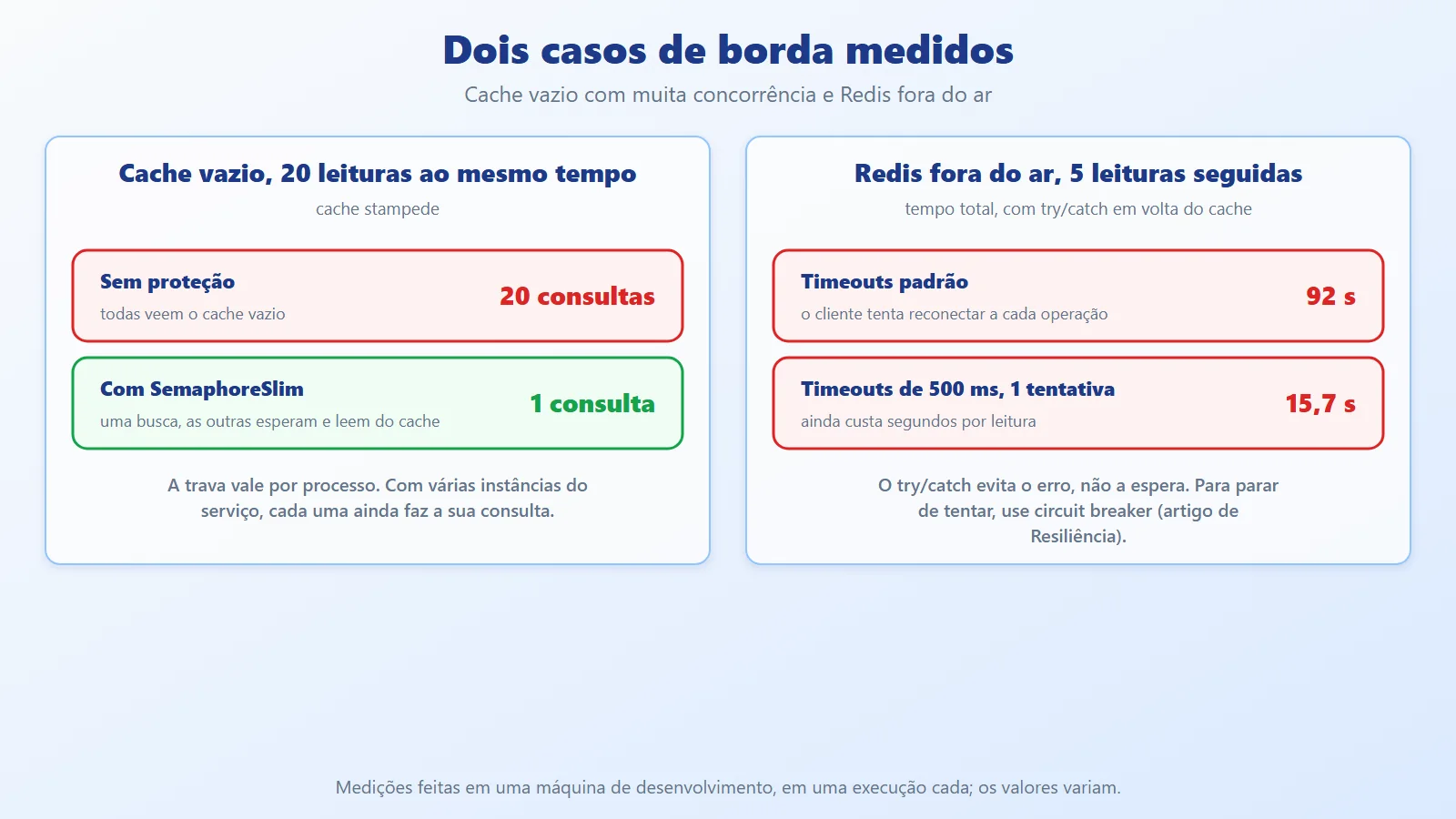
The try/catch avoids the error, not the wait. To stop trying while Redis is down, use a circuit breaker, as in the Fault Tolerance vs Resilience article, and test the service with Redis stopped before going to production.
Other tips:
- Set a TTL on every entry. A key with no expiration grows without bound and ends up pushing useful data out of Redis. The right TTL depends on how much lag each piece of data tolerates.
- Name keys predictably (
service:entity:id) and document who creates them and who invalidates them. - Measure the hit ratio. A cache with few hits only adds a network round trip and a point of failure.
- Serialize only what is needed. The example's JSON has three fields; large objects cost network and memory on every hit.
When to use Redis caching and when to avoid it
Use Redis caching when:
- The same data is read many times and changes little (profiles, roles, catalogs, settings).
- The database already shows up as a bottleneck, or read latency hurts the user experience.
- Several instances of the service need to see the same cache. This is where Redis beats a local in-memory cache (
IMemoryCache), which is per process.
Avoid or postpone it when:
- The data changes on every request or must always be exact (balance, stock at the moment of purchase): the cache serves lag, not precision.
- The read is already fast and infrequent: the cache adds complexity with no gain.
- You do not yet know what is slow. Measure first; a query with no index is fixed in the database, not in the cache.
- The team cannot operate one more component (monitoring, memory, persistence, Redis security).
Conclusion: what Redis caching changes in .NET microservices
Redis helps a microservice cut repeated queries: in the example, 100 reads of the same user generated 100 queries without a cache and 1 with it, with the same response. The cache-aside pattern keeps the database as the source of truth and puts Redis in as a copy with an expiry, which brings a golden rule: every entry needs an end, through the TTL or through invalidation.
The practical takeaway: a cache is not just an optimization, it is a second place where the data lives. That raises three questions the code must answer before going to production: what happens if the data is stale (especially permissions), what happens if the cache is empty or down, and what must not be stored in it. When all three have an answer, Redis speeds up the service without compromising security or data correctness.
References
- Microsoft Learn: Distributed caching in ASP.NET Core
- Microsoft Learn: Cache in-memory in ASP.NET Core overview
- Redis: Redis documentation
- StackExchange.Redis: Configuration options