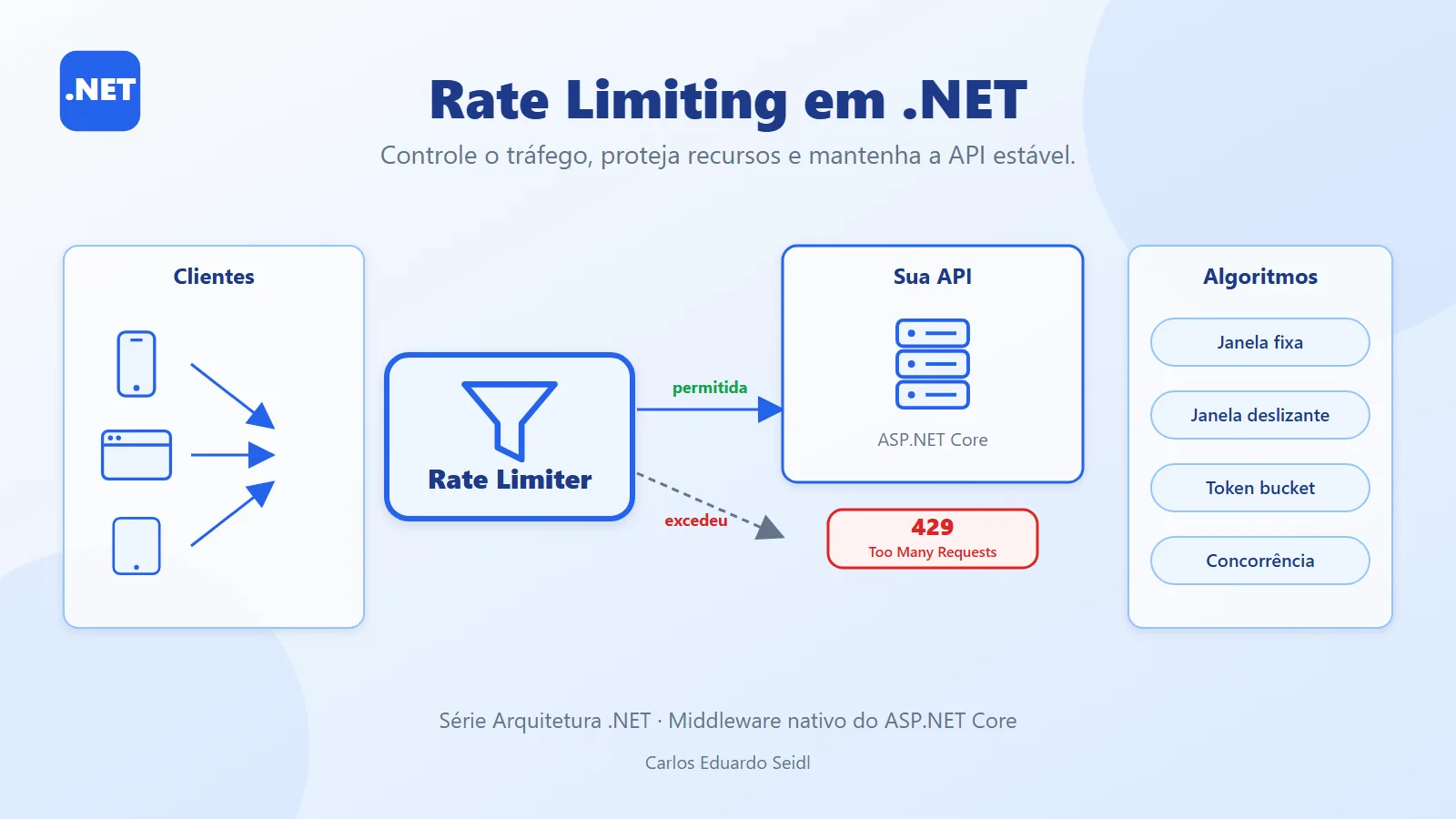
Rate limiting: how an API protects itself from callers
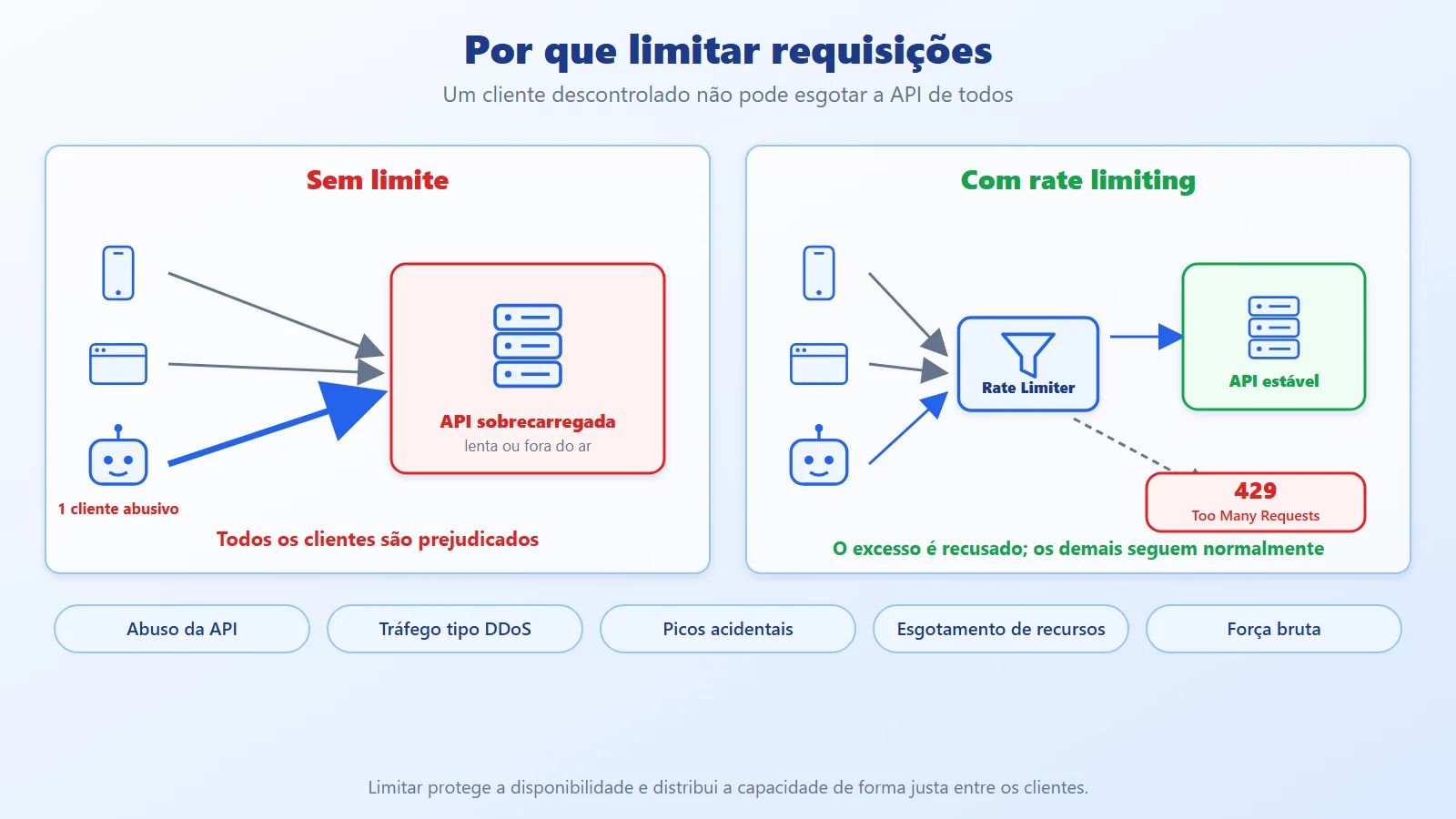
Every public or internal API has finite capacity. A client with a runaway loop, a brute-force script, or a spike of legitimate traffic can consume CPU, connections, and database capacity until the API slows down or goes down for every other client. In the previous article (Fault Tolerance vs Resilience) we saw how the caller protects itself from a misbehaving dependency. Here we look at the opposite side: how the server protects itself from whoever calls it.
Rate limiting controls how many requests a client can make in a time interval and rejects the excess, normally with HTTP 429 Too Many Requests. Since .NET 7, ASP.NET Core ships a native middleware for this, with the main algorithms ready to use. In this article we cover the concepts and build a .NET 10 API that uses all four algorithms, with per-client limits for different plans, a standardized 429 response, and a demo that shows each behavior.
Watch the video

Rate limiting concepts and built-in algorithms
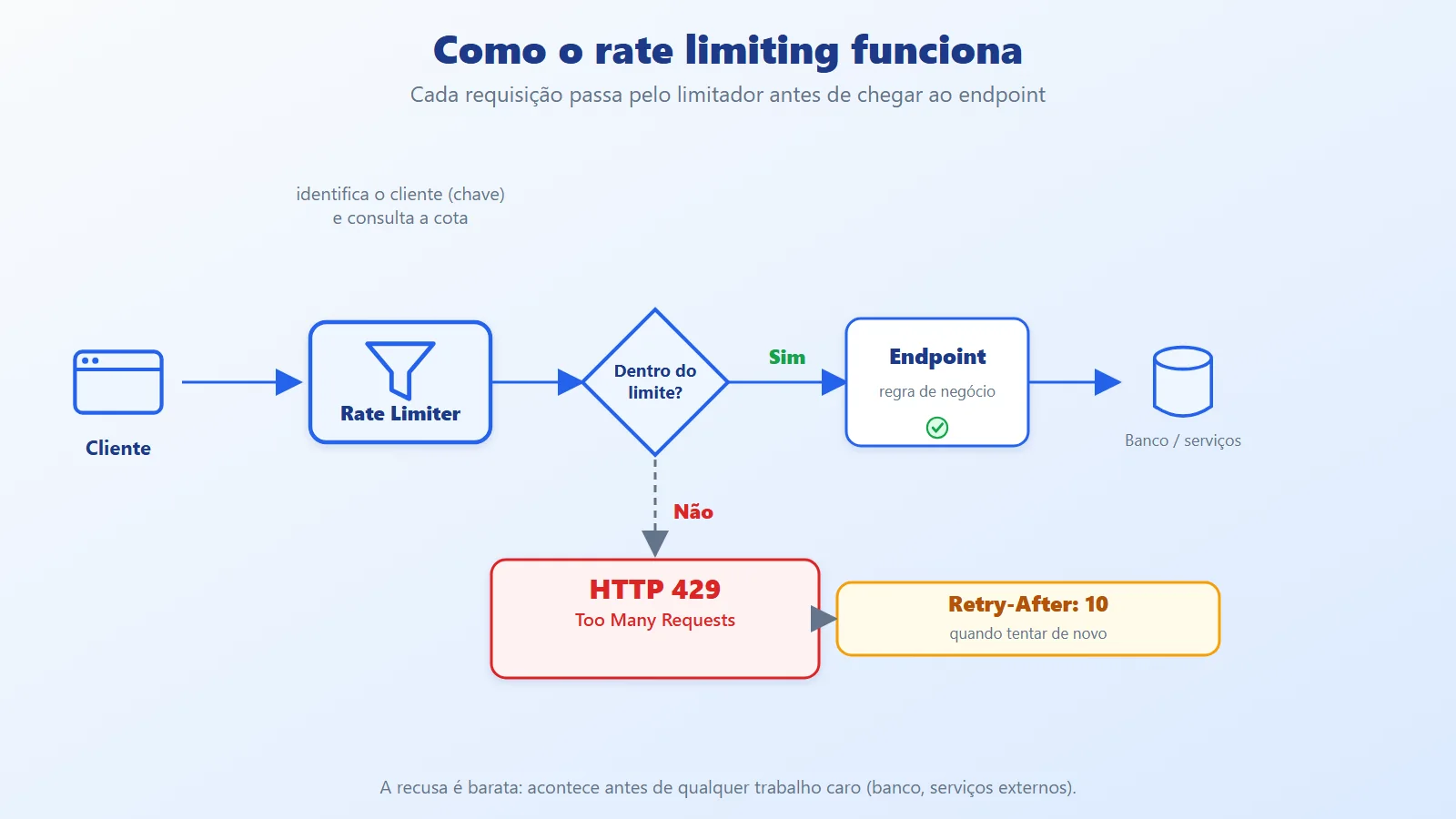
Rate limiting: limiting the number of requests a client (identified by a key) can make in a period. Once the limit is exceeded, the request is rejected before the business logic runs. It is a cheap decision, made at the edge.
Why we need it:
- API abuse: consumption far above normal usage.
- DDoS-like traffic: many requests from many origins (rate limiting helps, but does not replace network protection).
- Accidental spikes: a client with a bug or an uncontrolled retry.
- Resource exhaustion: database, connections, and CPU are finite.
- Brute force: repeated attempts to log in or guess tokens.
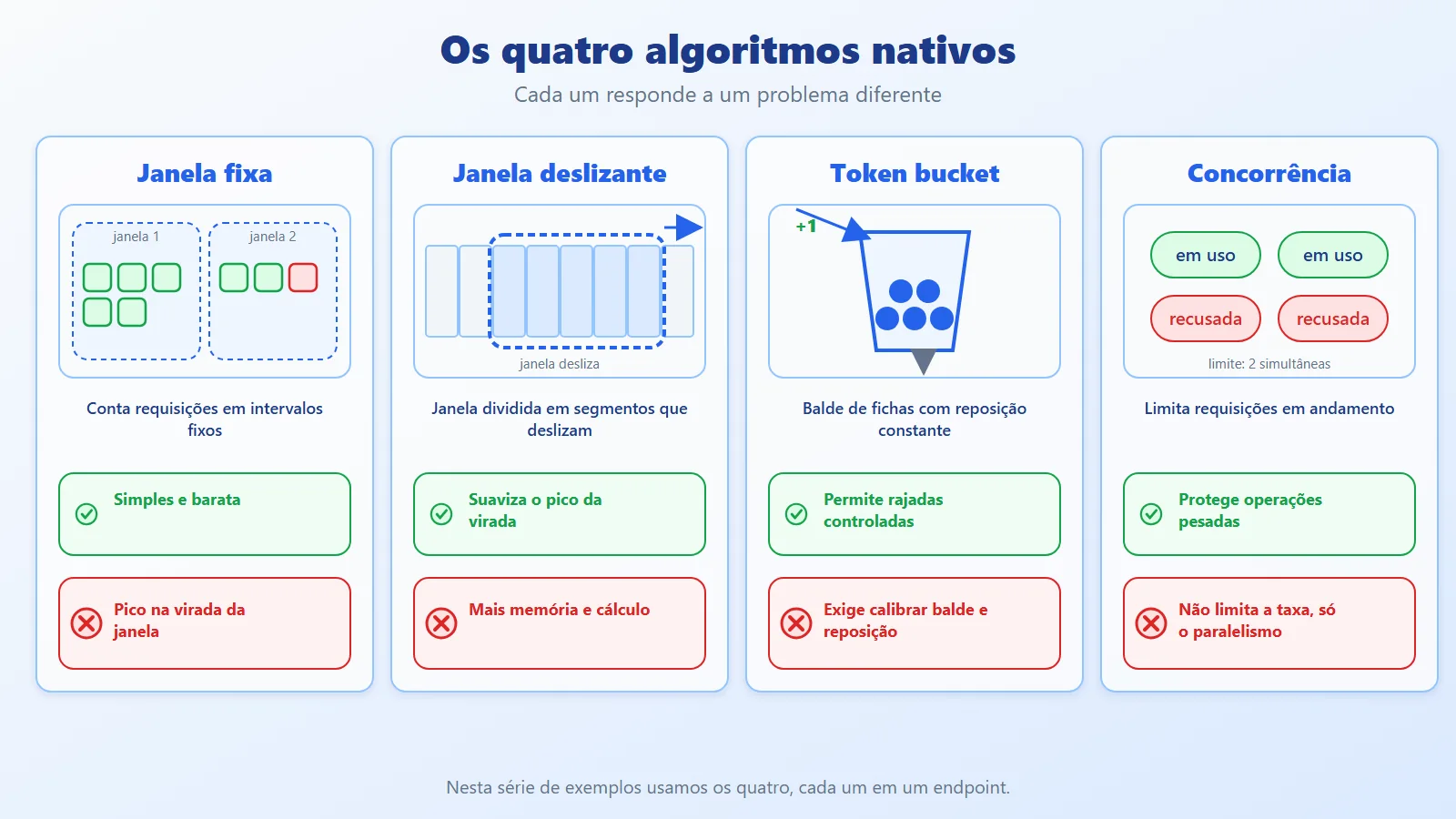
The four built-in algorithms
- Fixed window: counts requests in fixed intervals (for example, 5 every 10 s). Simple and cheap, but it allows a burst at the window boundary.
- Sliding window: splits the window into segments that "slide" over time, smoothing the boundary spike at the cost of a bit more memory.
- Token bucket: a bucket with a capacity of N tokens, refilled at a constant pace. Each request consumes one token. It allows controlled bursts (until the bucket is empty) and then enforces the average rate.
- Concurrency: limits how many requests are in flight at the same time, not the rate. It protects heavy operations such as reports and exports.
The fixed window problem deserves attention. If the limit is 5 every 10 s, a client can send 5 requests at 9 s and 5 more at 11 s: 10 requests in 2 seconds, double what was intended. The sliding window avoids this because it always looks at the last 10 s, whatever the instant.
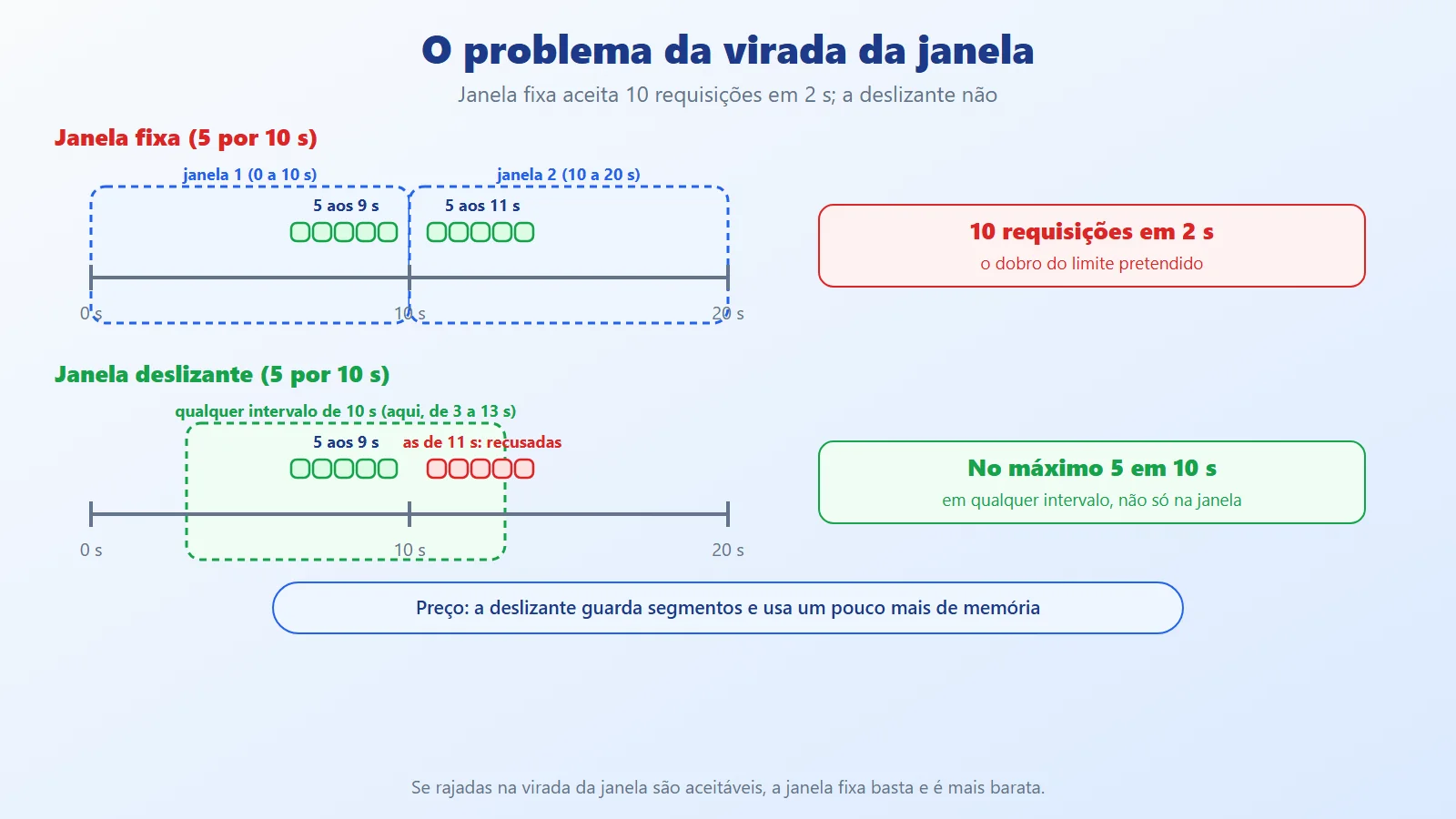
You can reproduce this directly with System.Threading.RateLimiting, without starting an API. The snippet below (illustrative, outside the repository) uses a 2 s window instead of 10 s just to keep the test fast: it fires 5 requests at the end of the first window and 5 at the start of the next, on both algorithms:
using System.Threading.RateLimiting;


var janela = TimeSpan.FromSeconds(2);


RateLimiter fixa = new FixedWindowRateLimiter(


    new FixedWindowRateLimiterOptions


    {


        PermitLimit = 5, Window = janela, QueueLimit = 0


    });


RateLimiter deslizante = new SlidingWindowRateLimiter(


    new SlidingWindowRateLimiterOptions


    {


        PermitLimit = 5, Window = janela,


        SegmentsPerWindow = 4, QueueLimit = 0


    });


static int Rajada(RateLimiter limitador) =>


    Enumerable.Range(0, 5)


        .Count(_ => limitador.AttemptAcquire().IsAcquired);


static void Mostrar(string t, RateLimiter f, RateLimiter d) =>


    Console.WriteLine($"t={t} s  fixa: {Rajada(f)}/5  "


        + $"deslizante: {Rajada(d)}/5");


await Task.Delay(1500);   // end of the first window


Mostrar("1,5", fixa, deslizante);


await Task.Delay(700);    // start of the next window


Mostrar("2,2", fixa, deslizante);
The output (the timings depend on the clock, but the pattern repeats):
t=1,5 s  fixa: 5/5  deslizante: 5/5


t=2,2 s  fixa: 5/5  deslizante: 0/5
The fixed window accepted 10 requests in 0.7 s (5/5 at both instants), because the counter reset at the boundary. The sliding window still saw the 5 from the previous instant inside the window and rejected all of them (0/5). AttemptAcquire neither waits nor queues: it returns immediately telling you whether the request got through, which is what the middleware does under the hood.
Limit by what: the partition key
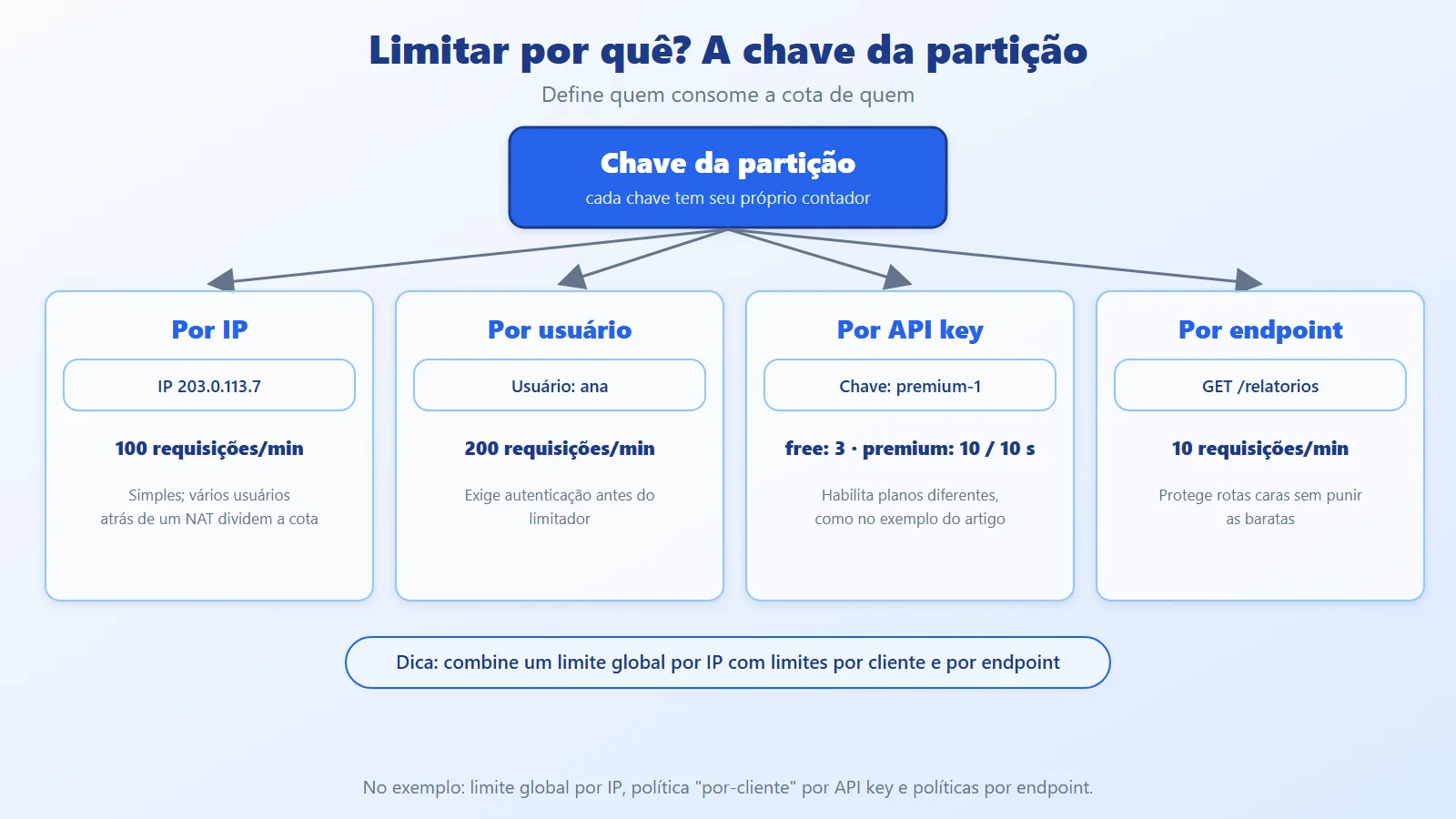
The limit applies per key: each key has its own counter. The choice of key defines the behavior:
- By IP: simple, but several users behind the same NAT share the quota.
- By user: fair, but requires authentication before the limiter.
- By API key: allows different plans (free and premium, for example).
- By endpoint: protects expensive routes without punishing the cheap ones.
In code, the key is just a string returned by the policy. Two variants (illustrative snippet, inside AddRateLimiter):
options.AddPolicy("por-ip", http =>


    RateLimitPartition.GetFixedWindowLimiter(


        http.Connection.RemoteIpAddress?.ToString()


            ?? "anonimo",


        _ => Cota()));


options.AddPolicy("por-usuario", http =>


    RateLimitPartition.GetFixedWindowLimiter(


        http.User.Identity?.Name


            ?? http.Connection.RemoteIpAddress?.ToString()


            ?? "anonimo",


        _ => Cota()));


static FixedWindowRateLimiterOptions Cota() => new()


{


    PermitLimit = 2,


    Window = TimeSpan.FromMinutes(1)


};
The first counts everything by IP; the second uses the authenticated user and falls back to the IP when there is no login. In a test with users ana and bia arriving from the same IP and a quota of 2: with the per-IP policy, ana, bia, and ana again made 3 requests and the third got a 429, because the two shared the quota; with the per-user policy, ana exhausted hers on the third call and bia still got through. For User.Identity to be populated, authentication must run before the limiter.
Response when the limit is exceeded
The standard is to respond with 429 Too Many Requests and the Retry-After header (in seconds), which tells the client when to try again. A well-behaved client respects that value, applying the same backoff idea we saw in the previous article.
Rate limiting, throttling, quota, and circuit breaker
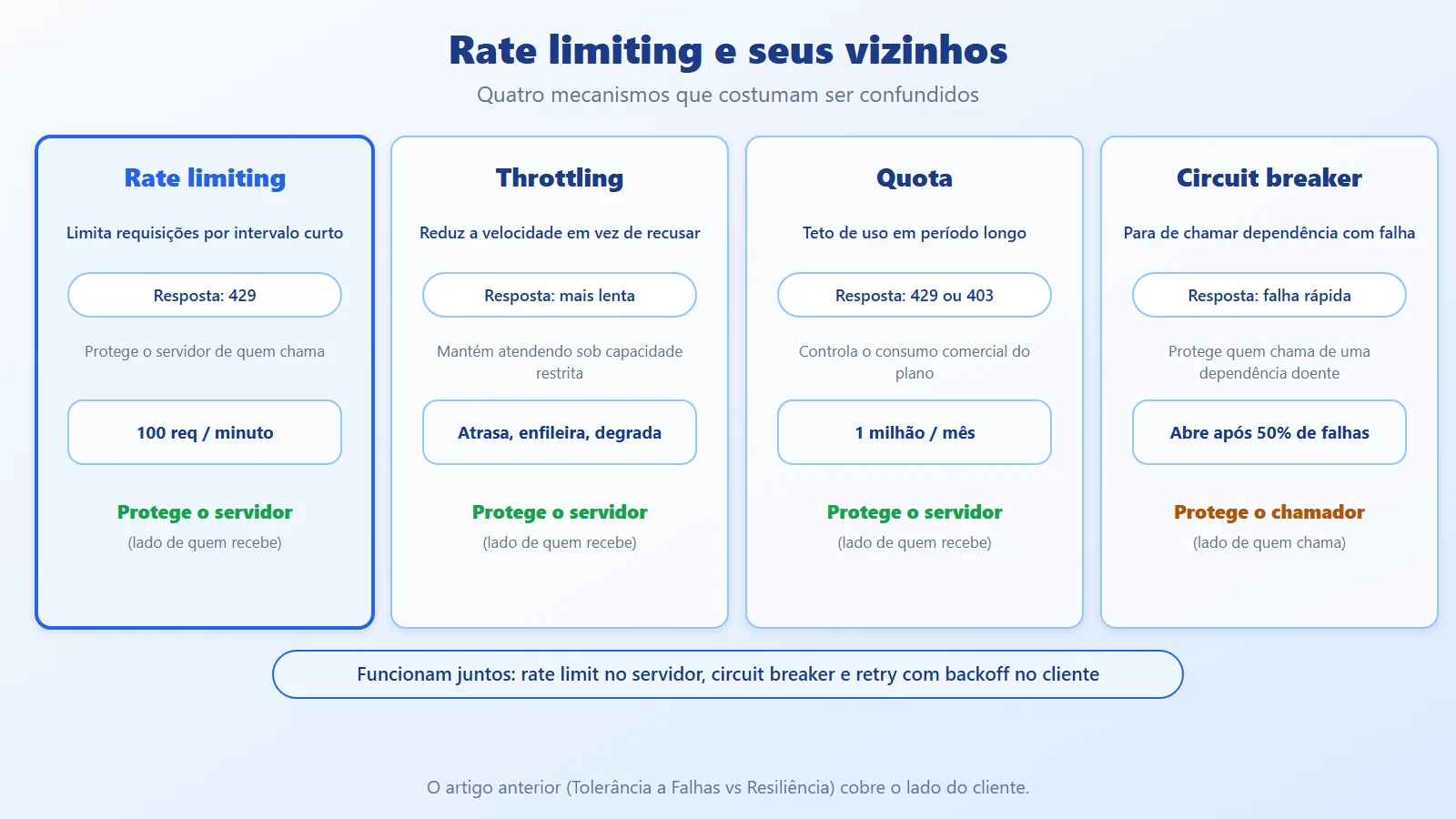
Four terms that are often mixed up:
- Rate limiting: limits the rate in a short interval and rejects the excess (429).
- Throttling: slows down (delays, queues, degrades) instead of rejecting, to keep serving with restricted capacity.
- Quota: a consumption cap over a long period (for example, 1 million requests per month), tied to the commercial plan. It can coexist with rate limiting: 100 per minute and 1 million per month.
- Circuit breaker: protects the caller from a failing dependency. Rate limiting protects the server from its callers.
Rate limiting middleware in ASP.NET Core
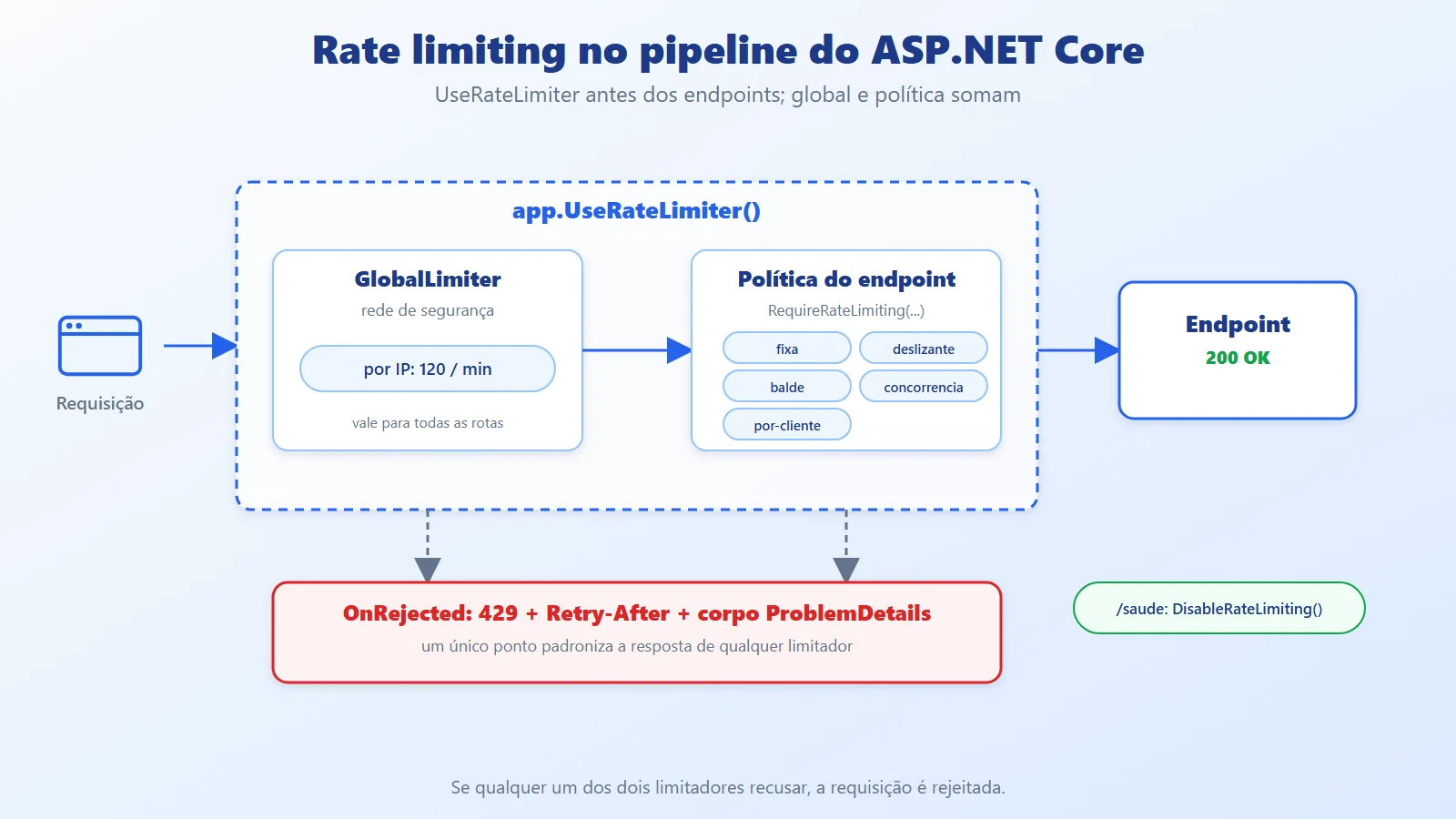
In ASP.NET Core, rate limiting is a middleware. You register the policies with AddRateLimiter, enable the middleware with UseRateLimiter, and attach the policy to endpoints with RequireRateLimiting. Order matters: UseRateLimiter must come before the endpoints.
Two levels of limits combine:
GlobalLimiter: runs for every request (for example, 120 per minute per IP). It is the general safety net.- Endpoint policy: applied to routes marked with
RequireRateLimiting.
If either of the two rejects, the request is rejected. A single point, OnRejected, standardizes the response (status, Retry-After, and body). Routes such as the health check can be excluded with DisableRateLimiting.
Watch the rejection status. If you configure nothing, the middleware responds 503 Service Unavailable on rejection. That is why the example sets status 429 explicitly in OnRejected.
The minimal setup, with the explicit status, the middleware, and a policy applied to a group of routes (illustrative snippet; the full example is in section 4):
builder.Services.AddRateLimiter(o =>


{


    // Without this line, rejection responds 503


    o.RejectionStatusCode =


        StatusCodes.Status429TooManyRequests;


    o.AddFixedWindowLimiter("api", l =>


    {


        l.PermitLimit = 2;


        l.Window = TimeSpan.FromMinutes(1);


    });


});


var app = builder.Build();


app.UseRateLimiter();


// The policy applies to the group; /saude is left out


var api = app.MapGroup("/api").RequireRateLimiting("api");


api.MapGet("/pedidos", () => "ok");


api.MapGet("/saude", () => "ok").DisableRateLimiting();
Calling /api/pedidos three times: 200, 200, and 429. /api/saude kept responding 200. Without the RejectionStatusCode line (and without an OnRejected that sets the status), the third call responded 503 Service Unavailable. Note also that RequireRateLimiting on the group avoids repeating the policy on every route.
Distributed environment
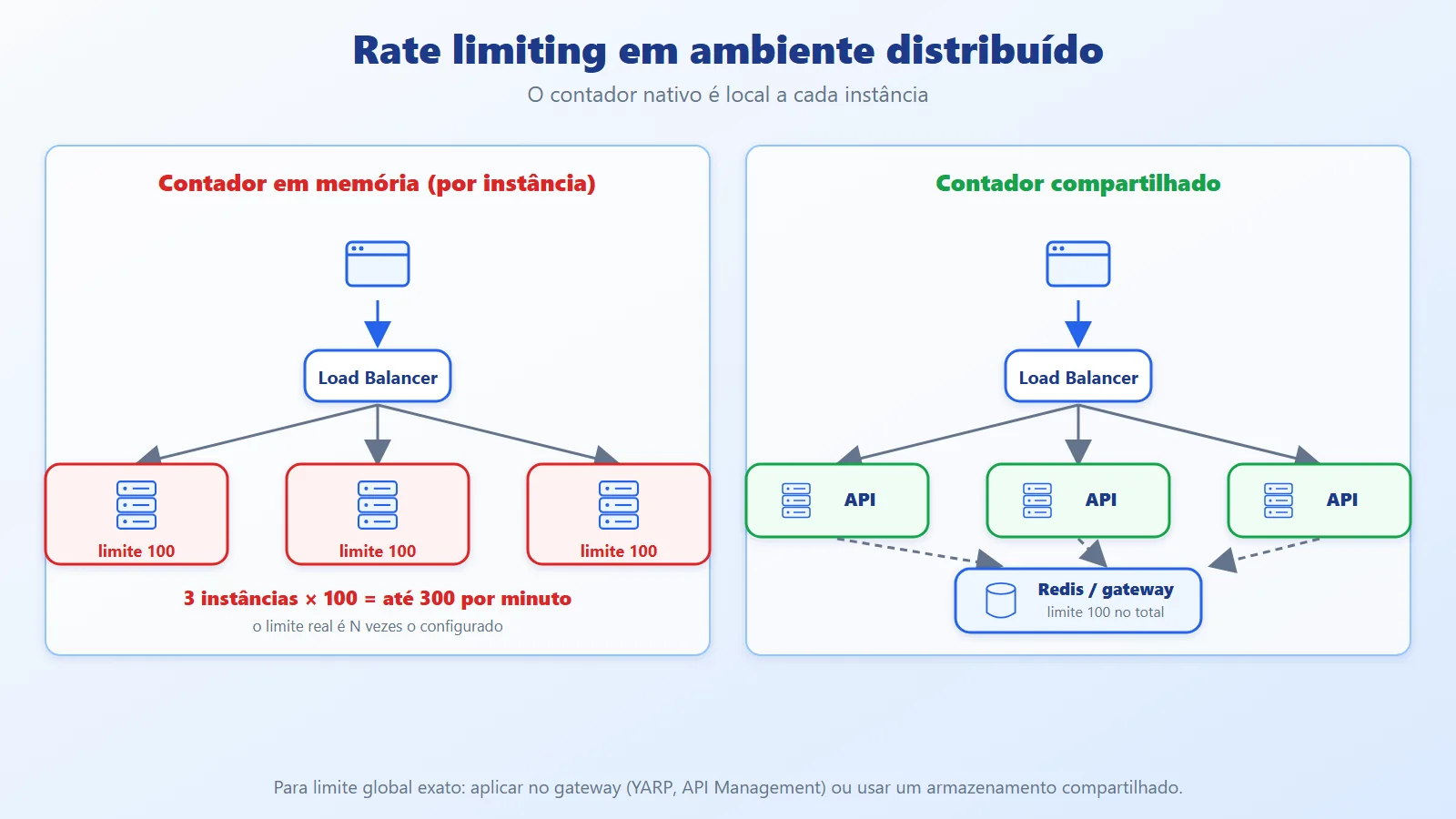
The built-in limiters keep the counter in memory, per instance. With 3 instances behind a load balancer and a limit of 100 per minute, the client can get up to 300 per minute, because each instance counts separately. For an exact global limit there are three paths:
- Apply the limit at the gateway (YARP, Azure API Management, Front Door/WAF), which sees all the traffic, as we saw in the API Gateway + BFF article.
- Use shared storage (for example, Redis) as the counter.
- Accept the approximate per-instance limit, when precision is not critical.
Rate limiting in C# with an API and a test client
The example has two projects: RateLimitApi (the API with the limiters) and RateLimitDemo (a client that fires requests and shows the result). The full code is in the repository (link in the References). We start with client identification, which defines who is limited and how much they can do:
namespace RateLimitApi;


public static class Clientes


{


    // Defines WHO is limited (the partition key) and


    // HOW MUCH they can do (the plan).


    public static (string Chave, int Limite) Identificar(


        HttpContext http)


    {


        var chave = http.Request.Headers["X-Api-Key"].ToString();


        if (chave.StartsWith("premium-"))


            return (chave, 10);


        if (chave.Length > 0)


            return (chave, 3);


        var ip = http.Connection.RemoteIpAddress?.ToString();


        return ($"ip:{ip ?? "anonimo"}", 3);


    }


}
Whoever sends a premium- key gets a limit of 10; any other key, 3; with no key, the limit is per IP. In a real system, the plan would come from the customer record, not from the key prefix.
Now the standard response when the limit is exceeded. It returns 429, the Retry-After (when the limiter provides it), and a ProblemDetails:
using System.Globalization;


using System.Threading.RateLimiting;


using Microsoft.AspNetCore.Mvc;


using Microsoft.AspNetCore.RateLimiting;


namespace RateLimitApi;


public static class Rejeicao


{


    // When the limit is exceeded: 429 + Retry-After.


    public static async ValueTask Responder(


        OnRejectedContext contexto, CancellationToken ct)


    {


        var resposta = contexto.HttpContext.Response;


        if (contexto.Lease.TryGetMetadata(


                MetadataName.RetryAfter, out var espera))


        {


            var s = Math.Ceiling(espera.TotalSeconds);


            resposta.Headers.RetryAfter =


                s.ToString(CultureInfo.InvariantCulture);


        }


        var codigo = StatusCodes.Status429TooManyRequests;


        resposta.StatusCode = codigo;


        await resposta.WriteAsJsonAsync(new ProblemDetails


        {


            Status = codigo,


            Title = "Too many requests / Muitas requisições",


            Detail = "Limit exceeded. Try again later. / "


                + "Limite excedido. Tente de novo mais tarde."


        }, ct);


    }


}
The policies bring together the four algorithms, the global limit, and the per-client policy:
using System.Threading.RateLimiting;


using Microsoft.AspNetCore.RateLimiting;


namespace RateLimitApi;


public static class Politicas


{


    public const string Fixa = "fixa";


    public const string Deslizante = "deslizante";


    public const string Balde = "balde";


    public const string Concorrencia = "concorrencia";


    public const string PorCliente = "por-cliente";


    public static IServiceCollection AddPoliticasDeLimite(


        this IServiceCollection services) =>


        services.AddRateLimiter(options =>


        {


            options.OnRejected = Rejeicao.Responder;


            // Global limit per IP: a general safety net.


            options.GlobalLimiter = PartitionedRateLimiter


                .Create<HttpContext, string>(LimitePorIp);


            // 1. Fixed window: 5 requests every 10 s.


            options.AddFixedWindowLimiter(Fixa, o =>


            {


                o.PermitLimit = 5;


                o.Window = TimeSpan.FromSeconds(10);


                o.QueueLimit = 0;


            });


            // 2. Sliding window: same quota, but the window


            //    is split into 5 segments that slide.


            options.AddSlidingWindowLimiter(Deslizante, o =>


            {


                o.PermitLimit = 5;


                o.Window = TimeSpan.FromSeconds(10);


                o.SegmentsPerWindow = 5;


                o.QueueLimit = 0;


            });


            // 3. Token bucket: burst of up to 5, refilled


            //    by 1 token every 2 s.


            options.AddTokenBucketLimiter(Balde, o =>


            {


                o.TokenLimit = 5;


                o.TokensPerPeriod = 1;


                o.ReplenishmentPeriod = TimeSpan.FromSeconds(2);


                o.QueueLimit = 0;


            });


            // 4. Concurrency: at most 2 in flight.


            options.AddConcurrencyLimiter(Concorrencia, o =>


            {


                o.PermitLimit = 2;


                o.QueueLimit = 0;


            });


            // 5. Per client: each key has its own quota.


            options.AddPolicy(PorCliente, http =>


            {


                var (chave, limite) = Clientes.Identificar(http);


                return RateLimitPartition.GetFixedWindowLimiter(


                    chave,


                    _ => new FixedWindowRateLimiterOptions


                    {


                        PermitLimit = limite,


                        Window = TimeSpan.FromSeconds(10),


                        QueueLimit = 0


                    });


            });


        });


    private static RateLimitPartition<string> LimitePorIp(


        HttpContext http)


    {


        var ip = http.Connection.RemoteIpAddress?.ToString();


        return RateLimitPartition.GetFixedWindowLimiter(


            ip ?? "anonimo",


            _ => new FixedWindowRateLimiterOptions


            {


                PermitLimit = 120,


                Window = TimeSpan.FromMinutes(1)


            });


    }


}
Key points:
- Fixed and sliding window: the same quota (5 per 10 s). The sliding window splits the window into 5 segments.
- Token bucket:
TokenLimit = 5allows a burst of 5;TokensPerPeriod = 1every 2 s restores the pace. - Concurrency: at most 2 requests in flight, with no queue (
QueueLimit = 0). QueueLimit = 0: rejects immediately. With a higher value, the excess requests wait in a queue, which comes close to throttling.- Per client:
AddPolicyreceives theHttpContextand returns a partition. Each key gets its own counter, with the limit of its plan. - Global limit: a
PartitionedRateLimiterper IP, 120 per minute, applies to all routes.
The API's Program.cs attaches each policy to an endpoint:
using Microsoft.AspNetCore.RateLimiting;


using RateLimitApi;


var builder = WebApplication.CreateBuilder(args);


builder.Services.AddPoliticasDeLimite();


var app = builder.Build();


// Order matters: the limiter must come before the


// endpoints.


app.UseRateLimiter();


static IResult Ok(string politica) => Results.Ok(new


{


    politica,


    atendidoEm = DateTime.UtcNow.ToString("HH:mm:ss.fff")


});


app.MapGet("/fixa", () => Ok(Politicas.Fixa))


    .RequireRateLimiting(Politicas.Fixa);


app.MapGet("/deslizante", () => Ok(Politicas.Deslizante))


    .RequireRateLimiting(Politicas.Deslizante);


app.MapGet("/balde", () => Ok(Politicas.Balde))


    .RequireRateLimiting(Politicas.Balde);


app.MapGet("/lento", async () =>


    {


        await Task.Delay(500);


        return Ok(Politicas.Concorrencia);


    })


    .RequireRateLimiting(Politicas.Concorrencia);


app.MapGet("/cliente", () => Ok(Politicas.PorCliente))


    .RequireRateLimiting(Politicas.PorCliente);


// Health check outside the global limit and the policies.


app.MapGet("/saude", () => Results.Ok("ok"))


    .DisableRateLimiting();


app.Run();
The /lento endpoint waits 500 ms so that requests overlap and the concurrency limit shows up. /saude uses DisableRateLimiting, since a health check must not be limited.
The demo client fires the sequences and prints the status codes:
using Resposta = (int Codigo, double? Espera);


// API address: first argument, then RATE_LIMIT_API_URL,


// then the default.


var baseUrl = args.FirstOrDefault()


    ?? Environment.GetEnvironmentVariable("RATE_LIMIT_API_URL")


    ?? "http://localhost:5080";


using var http = new HttpClient


{


    BaseAddress = new Uri(baseUrl)


};


async Task<Resposta> Chamar(string rota, string? chave = null)


{


    using var pedido = new HttpRequestMessage(


        HttpMethod.Get, rota);


    if (chave is not null)


        pedido.Headers.Add("X-Api-Key", chave);


    using var resposta = await http.SendAsync(pedido);


    var espera = resposta.Headers.RetryAfter?.Delta;


    return ((int)resposta.StatusCode, espera?.TotalSeconds);


}


async Task<Resposta[]> Sequencia(


    string rota, int vezes, string? chave = null)


{


    var resultados = new List<Resposta>();


    for (var i = 0; i < vezes; i++)


        resultados.Add(await Chamar(rota, chave));


    return [.. resultados];


}


void Mostrar(string titulo, Resposta[] respostas)


{


    var codigos = string.Join(


        ' ', respostas.Select(r => r.Codigo));


    Console.WriteLine($"{titulo,-62}{codigos}");


    var espera = respostas


        .FirstOrDefault(r => r.Espera > 0).Espera;


    if (espera is not null)


        Console.WriteLine($"{"",-62}Retry-After: {espera}s");


}


Console.WriteLine(


    "Waiting for the API at / "


    + $"Aguardando a API em {baseUrl} ...");


while (true)


{


    try { await Chamar("/saude"); break; }


    catch (HttpRequestException) { await Task.Delay(300); }


}


Console.WriteLine();


Mostrar("Fixed window / Janela fixa (5/10s) x7",


    await Sequencia("/fixa", 7));


Mostrar("Sliding window / Janela deslizante x7",


    await Sequencia("/deslizante", 7));


Mostrar("Token bucket x7", await Sequencia("/balde", 7));


await Task.Delay(TimeSpan.FromSeconds(4.5));


Mostrar("Token bucket after / após 4.5 s x3",


    await Sequencia("/balde", 3));


var paralelas = await Task.WhenAll(


    Enumerable.Range(0, 4).Select(_ => Chamar("/lento")));


Mostrar(


    "Concurrency / Concorrência (2), 4 parallel / paralelas",


    paralelas);


Mostrar("free-1 (3/10s) x5",


    await Sequencia("/cliente", 5, "free-1"));


Mostrar("free-2 (other client / outro cliente) x2",


    await Sequencia("/cliente", 2, "free-2"));


Mostrar("premium-1 (10/10s) x5",


    await Sequencia("/cliente", 5, "premium-1"));


Mostrar("/saude (no limit / sem limite) x3",


    await Sequencia("/saude", 3));
With the API running (dotnet run --project src/RateLimitApi), running dotnet run --project src/RateLimitDemo produces (output reformatted to fit the page; the repository uses messages in English and Portuguese):
Fixed window / Janela fixa (5/10s) x7


  200 200 200 200 200 429 429


  Retry-After: 10s


Sliding window / Janela deslizante x7


  200 200 200 200 200 429 429


Token bucket x7


  200 200 200 200 200 429 429


  Retry-After: 2s


Token bucket after / após 4.5 s x3


  200 200 429


  Retry-After: 2s


Concurrency / Concorrência (2), 4 parallel / paralelas


  200 429 200 429


free-1 (3/10s) x5


  200 200 200 429 429


  Retry-After: 10s


free-2 (other client / outro cliente) x2


  200 200


premium-1 (10/10s) x5


  200 200 200 200 200


/saude (no limit / sem limite) x3


  200 200 200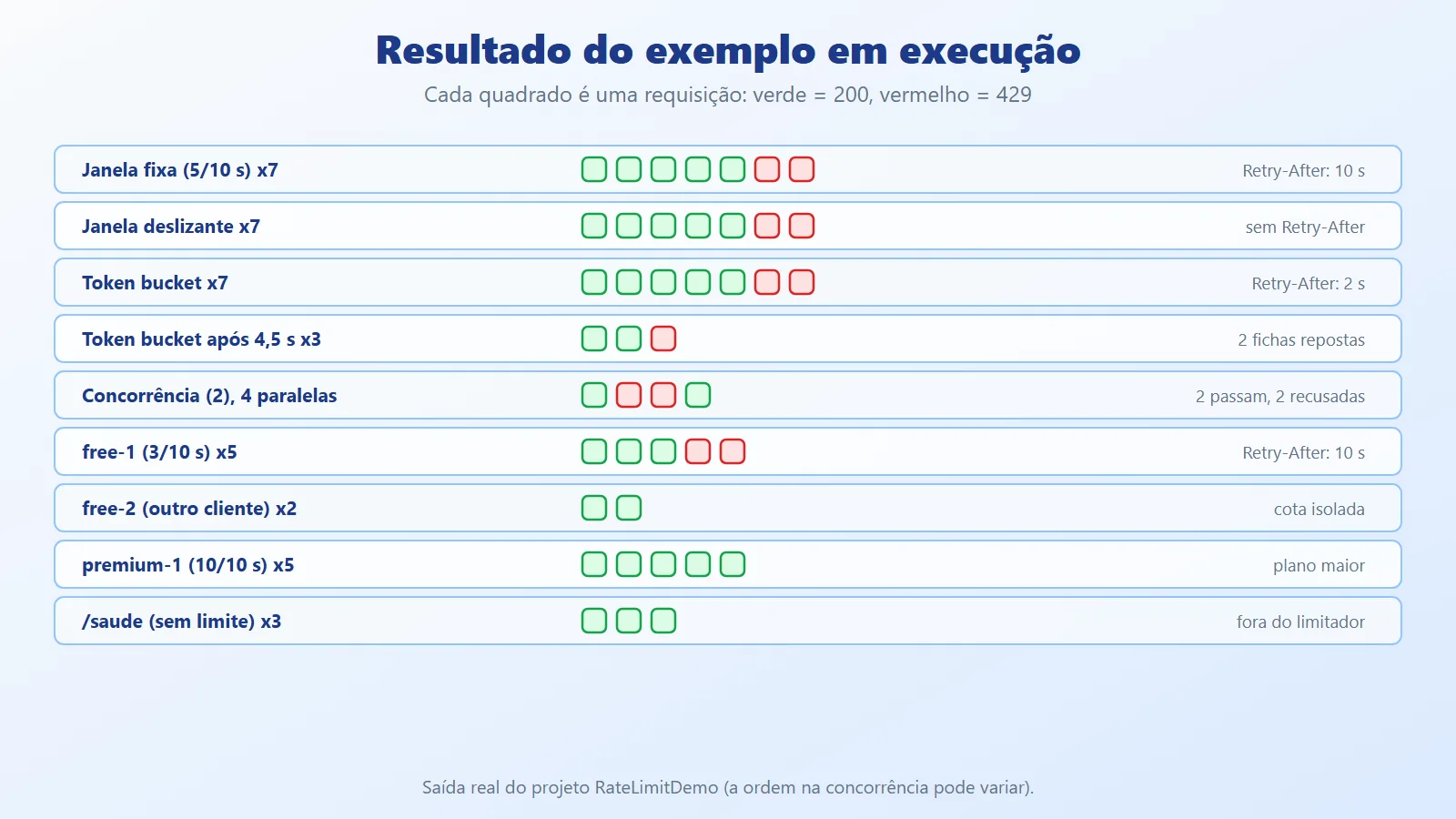
Reading the results:
- Fixed window: 5 get through, the next 2 receive 429 with
Retry-After: 10. - Sliding window: the same result on the burst. Note that, in this test, it did not return
Retry-After: the limiter only reports the wait time when it can compute it, and not every algorithm does. If the client depends on the header, set a default value inOnRejected. - Token bucket: the burst of 5 gets through and the next 2 are rejected. After 4.5 s, 2 tokens were replenished: 2 requests get through and the 3rd is rejected.
- Concurrency: of the 4 parallel calls, 2 get through and 2 are rejected, since there are only 2 slots.
- Per client:
free-1exhausts its quota of 3, butfree-2is not affected (isolated partition), andpremium-1has 10. /saude: outside the limiter.
Rate limiting best practices: 429 and Retry-After
- Configure status 429 explicitly: the middleware default is 503, which suggests a server failure rather than client excess.
- Send
Retry-After: without it, the client tends to retry immediately. Watch out for algorithms that do not report the time. - Choose the key carefully: limiting by IP alone penalizes users behind NAT; by user requires authentication before the limiter (
UseAuthenticationbeforeUseRateLimiter). - Combine levels: a global per-IP limit as a safety net, plus per-client and per-endpoint limits for expensive and sensitive routes (login, export).
- Tighter limits on sensitive routes: login and password recovery need much lower limits than ordinary queries, against brute force.
- Beware of a high
QueueLimit: the queue keeps connections open and can become the problem itself. In general, reject fast. - Behind a proxy or load balancer, the IP is different: configure the forwarded headers (
X-Forwarded-For) with the forwarded headers middleware, otherwise all clients appear to have the proxy's IP and share the same quota. - Multi-instance requires a decision: the built-in counter is local. For an exact global limit, apply it at the gateway or use shared storage.
- Do not confuse it with authorization: rate limiting controls volume, not permission.
- Observe: log and measure rejections (per policy and per client). Many 429s for the same client may indicate abuse, or a poorly calibrated limit.
- Test the limits: an automated client like the one in the example documents the expected behavior and catches regressions.
- Teach the clients: document the limits and guide them to respect
Retry-Afterwith backoff; a well-behaved client should never receive a 429.
Three pitfalls that show up in production, with the fix (illustrative snippets, validated separately and outside the repository).
Retry-After missing in some algorithms. The example's Rejeicao.cs only sends the header when the limiter reports the time, and the sliding window does not. The fix is a default value:
// With metadata, use the reported time; without it, the default


var segundos =


    contexto.Lease.TryGetMetadata(


        MetadataName.RetryAfter, out var espera)


        ? Math.Ceiling(espera.TotalSeconds)


        : 10;


resposta.Headers.RetryAfter =


    segundos.ToString(CultureInfo.InvariantCulture);
In the test, the fixed window returned Retry-After: 60 (the real time until the next window) and the sliding window returned 10, the default.
Proxy IP instead of client IP. Behind a load balancer or gateway, RemoteIpAddress is the proxy's, and all clients share the same quota. Restore the original IP before the limiter:
builder.Services.Configure<ForwardedHeadersOptions>(o =>


    o.ForwardedHeaders = ForwardedHeaders.XForwardedFor);


var app = builder.Build();


app.UseForwardedHeaders();   // before UseRateLimiter


app.UseRateLimiter();
With a quota of 2 per IP, three requests with X-Forwarded-For 1.1.1.1, 1.1.1.1, and 2.2.2.2: without UseForwardedHeaders the third received a 429 (they all appeared to come from the same address); with it, all three got through. The test came from localhost, which the middleware trusts by default; in production, specify the proxies or trusted networks in the options, so that an arbitrary client cannot forge the header.
A named limit is a single counter. AddFixedWindowLimiter("nome", ...) creates one counter for all clients: in the test, with a limit of 1, a second client (another IP) already received a 429 after the first. To limit each client, use AddPolicy with a partition, as in this per-IP login limit:
options.AddPolicy("login", http =>


    RateLimitPartition.GetFixedWindowLimiter(


        http.Connection.RemoteIpAddress?.ToString()


            ?? "anonimo",


        _ => new FixedWindowRateLimiterOptions


        {


            PermitLimit = 5,


            Window = TimeSpan.FromMinutes(1)


        }));


app.MapPost("/login", () => "ok").RequireRateLimiting("login");
On the sixth attempt from 1.1.1.1 within a minute, a 429 came back with Retry-After: 60, and 2.2.2.2 kept getting through. The first four policies in the section 4 example (fixed window, sliding window, token bucket, and concurrency) are global on purpose, for the demonstration; only por-cliente is partitioned.
When to use rate limiting and which algorithm to pick
Use rate limiting when:
- The API is exposed to the internet or to many consumers.
- There are expensive endpoints (reports, searches) or sensitive ones (login, sending email).
- You need to distribute capacity fairly among clients or sell plans.
- You want to reduce the impact of client bugs with uncontrolled retry.
Choose the algorithm according to the case:
- Fixed window: the simplest case, when the burst at the boundary is acceptable.
- Sliding window: when the limit must hold over any interval.
- Token bucket: when short bursts are legitimate and you want to control the average rate.
- Concurrency: when the problem is parallelism, not rate (heavy operations).
Avoid, or revisit, when:
- The service is internal, low-volume, and has few known consumers: the cost of calibrating and operating it may outweigh the benefit.
- You expect the built-in rate limiting to solve a volumetric DDoS attack: it acts in the application, after the traffic has already arrived. Network protection and a WAF are another layer.
- You need an exact global limit across several instances and only have an in-memory counter.
- The limits were not calibrated with real data: limits that are too low block legitimate users.
Conclusion: choosing the key and the algorithm
Rate limiting is server-side protection: before spending resources on a request, you decide whether the client is still entitled to it. ASP.NET Core delivers the four built-in algorithms (fixed window, sliding window, token bucket, and concurrency), key-based partitions to give each client its own quota, and a single point to standardize the 429 response.
The practical takeaway: choosing the right key and algorithm matters more than the limit number. Define who will be limited, what happens on a burst, how the client is informed (429 and Retry-After), and where the counter lives when there are several instances. Combined with what we saw about client-side resilience (timeout, retry with backoff, and circuit breaker), the server limits and the client complies, and the system stays stable on both sides.
Rate limiting in .NET references
- Article code on GitHub: ceseidl/rate-limiting-dotnet
- Microsoft Learn: Rate limiting middleware in ASP.NET Core
- Microsoft Learn: System.Threading.RateLimiting
- Microsoft Learn: Azure API Management rate limit policy
- IETF: RFC 6585, status 429 Too Many Requests
Keep reading
- API Gateway + BFF in .NET: shows how to centralize request limits at the edge, with YARP.
- Fault Tolerance vs Resilience in .NET: covers the client side: retry, timeout and circuit breaker in the face of failures.
- Minimal APIs in ASP.NET Core: see how to build the endpoints that receive this limiting policy.
Want an architecture review of your .NET backend? See the backend and .NET architecture service.