DTO mapping: blind copy or explicit mapping
In the earlier parts of the series we saw why you should separate the DTO from the domain and how to do basic mapping without a library. But real-world mapping is rarely just "copying properties": the client sends a blank name, the order comes with a list of items, the screen only wants to change the email and everything else must stay as it is.
In this third part we go beyond copying. We structure manual mappings for real scenarios: invariants and normalization, nested objects and collections, partial updates (PATCH), response DTOs, feature-based organization and tests. The complete code, with the tests, is in the repository (link in the References) and runs with a single dotnet test.
Watch the video

DTO mapping concepts: DTO, domain and invariants
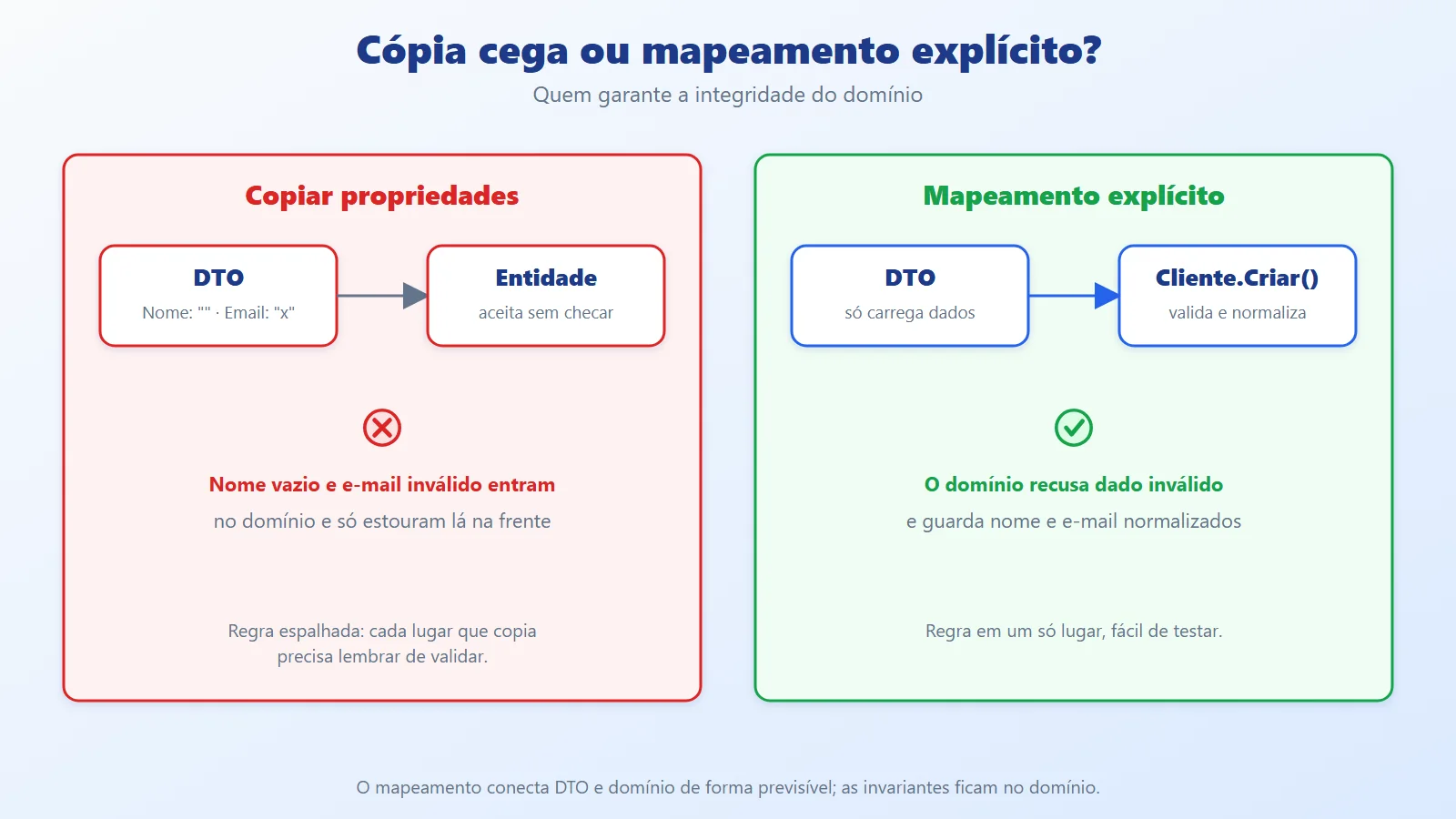
DTO (Data Transfer Object): the shape of the data that enters and leaves through the edge of the system (API, screen, message). It describes the external contract and carries no business rules, at most simple format validations.
Domain and invariants: the domain holds the essential rules, the invariants, which must always be true. In the example: the customer has a name and the email is valid. The domain itself guarantees this, not whoever calls it.
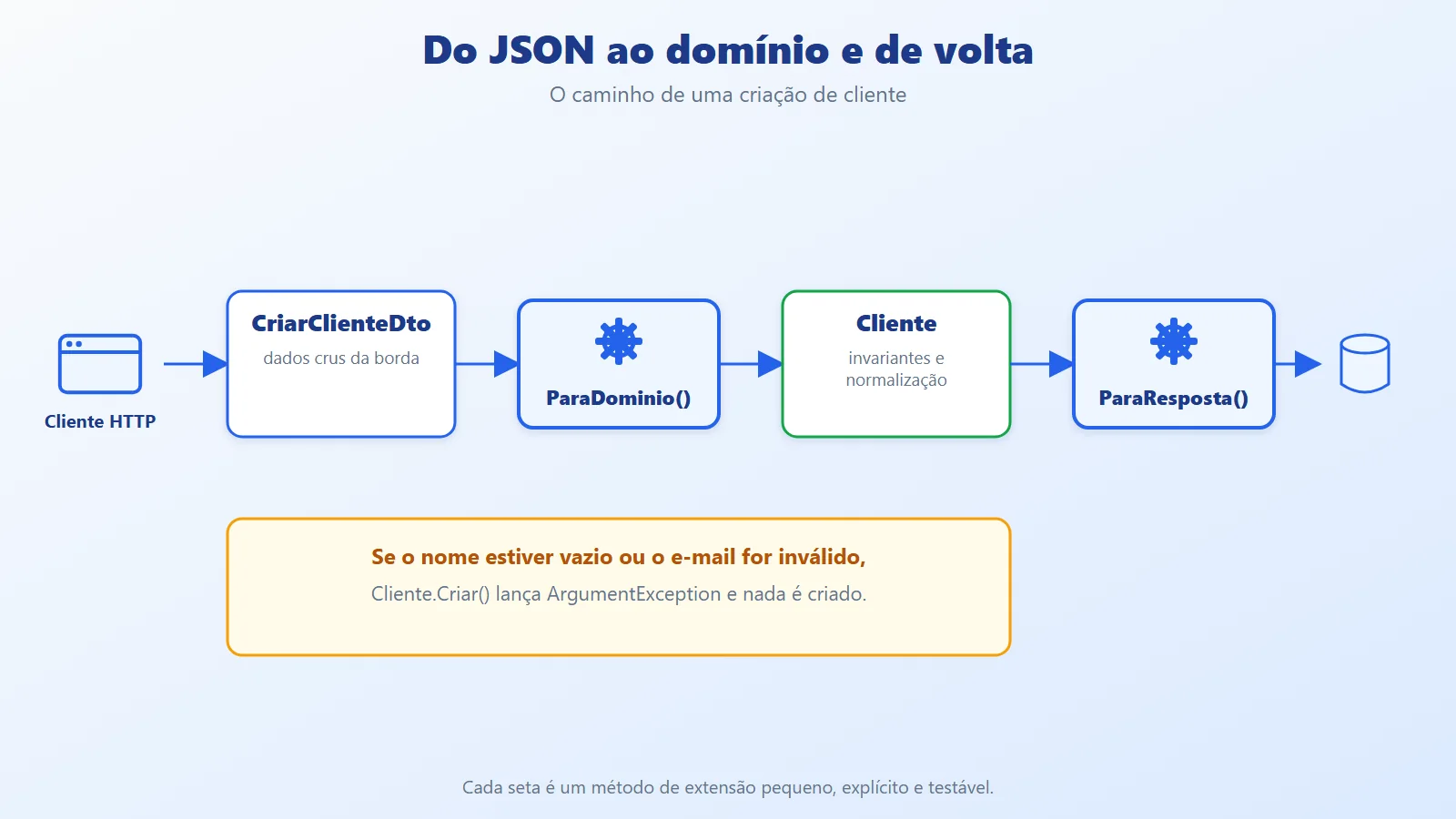
Mapping: the code that converts a DTO into a domain object and a domain object into a DTO. With manual mapping it is explicit, small and visible: extension methods that you read, debug and test like any other code.
Manual mapping or a library?
- Manual: no magic, no runtime surprises, easy to debug and optimize. The cost is writing and maintaining the code for each conversion.
- Library (AutoMapper, Mapster): less repetitive code, but the configuration becomes one more thing to maintain and errors show up late, at runtime.
In this series we take the manual route for control, clarity and predictability.
Partial update (PATCH)
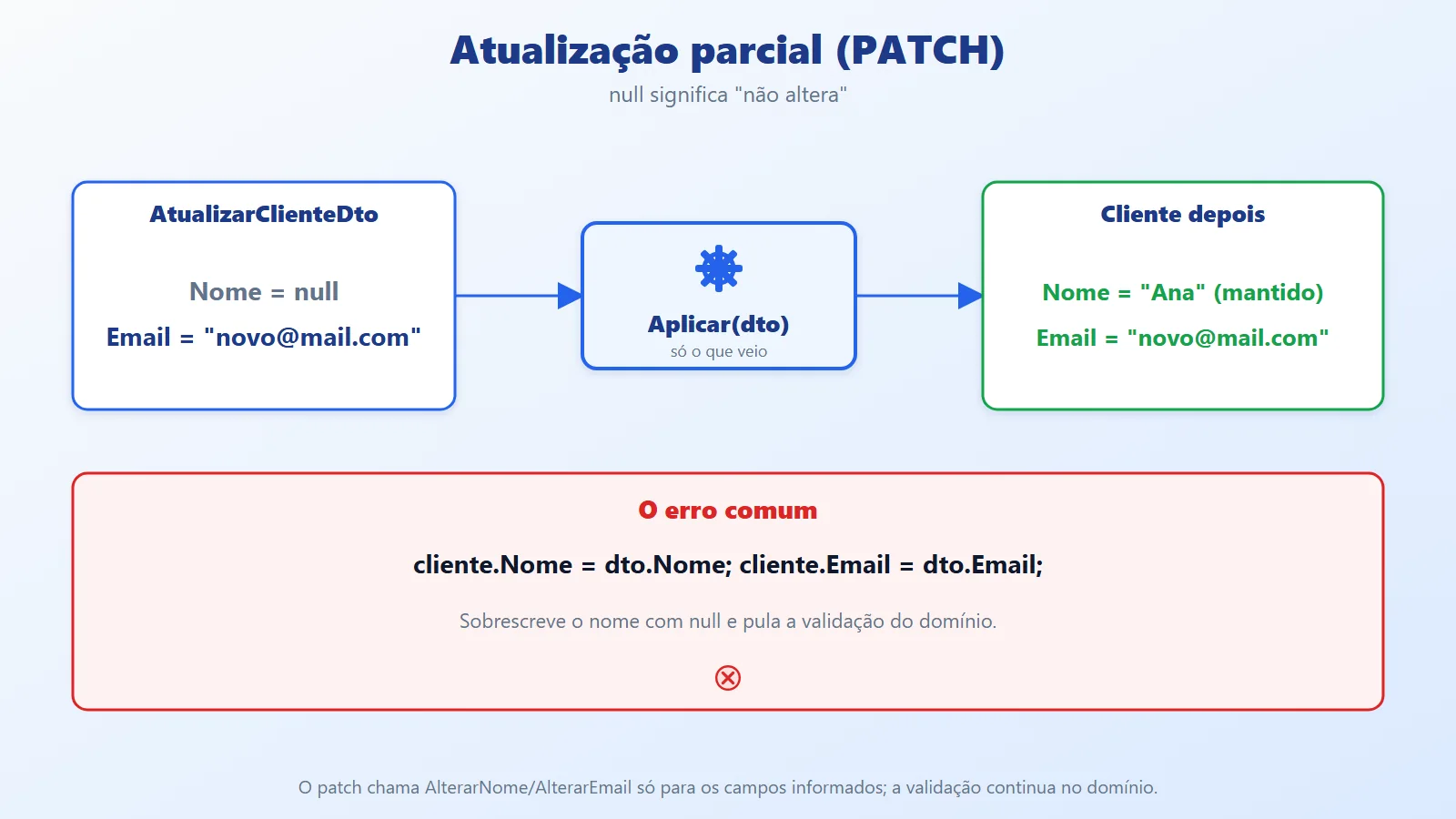
In a PATCH, the client sends only what it wants to change. A common mistake is copying every field from the DTO to the entity: whatever didn't come in (null) wipes out the existing value. The solution is a partial apply method, where null means "don't change".
Manual DTO mapping architecture organized by feature
The approach boils down to three rules:
- The DTO represents what came in from or goes back out to the edge and decides nothing.
- The domain maintains the invariants and normalizes values.
- The mapping connects the two explicitly, in small extension methods.
On the inbound path, the mapping calls the domain's factories and methods (Cliente.Criar, AlterarNome), so validation is never skipped. On the outbound path (domain to response), the conversion is usually direct and easy to optimize, especially when combined with projection in the query.
Organization by feature
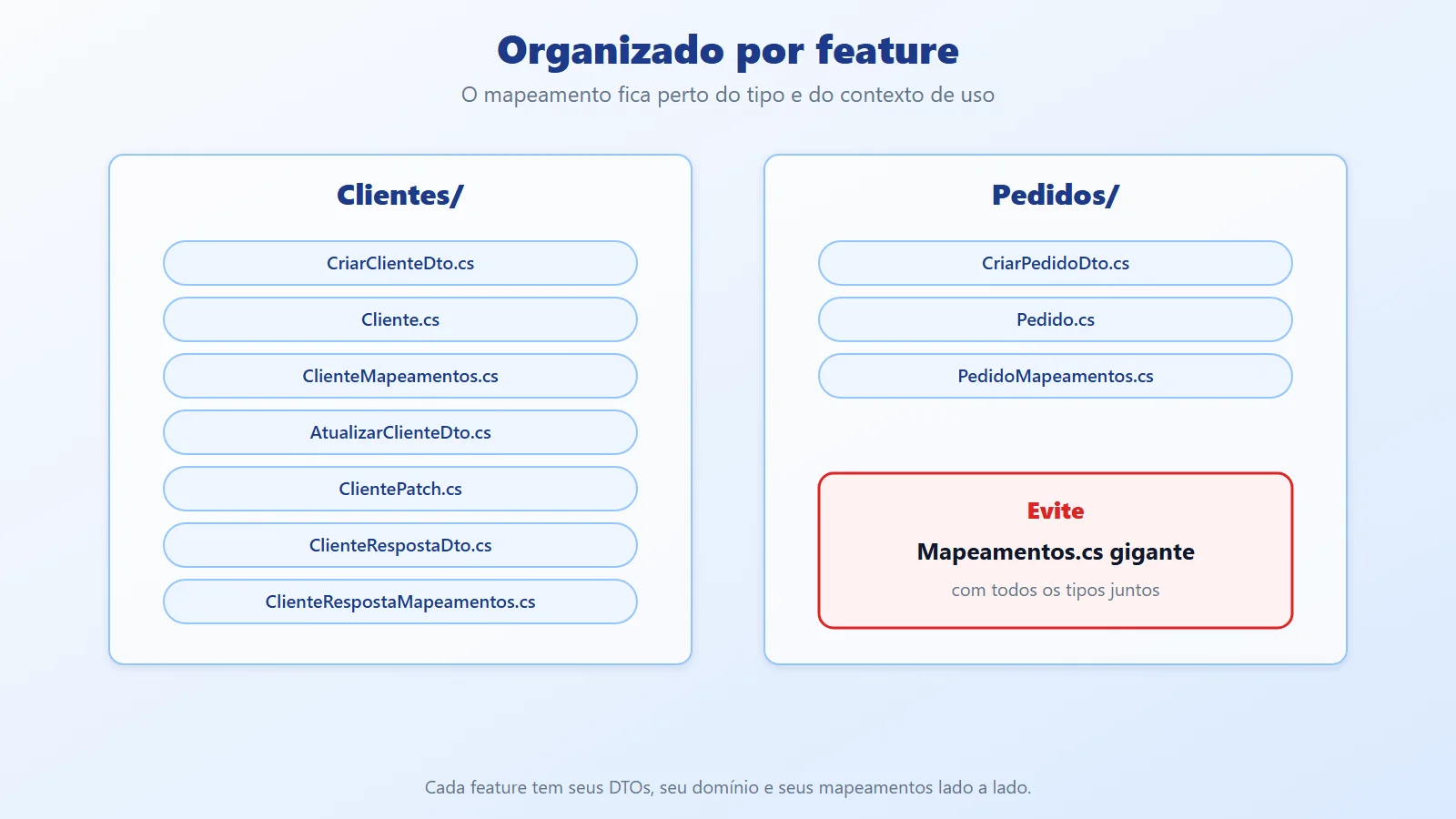
Mapping should live close to the type and its context of use. Instead of a giant Mapeamentos.cs, each feature has its own folder, with its DTOs, its domain and its mappings side by side.
Manual DTO mapping in .NET: example with tests
The example is a library (MapeamentoDtos) with the Clientes and Pedidos features, plus an xUnit test project. The complete code is in the repository (link in the References). We start with the input DTO, which only carries data:
namespace MapeamentoDtos.Clientes;


// Input DTO: what came in from the edge (API, UI, message).


// It only carries data, with no business rules.


public sealed record CriarClienteDto(string? Nome, string? Email);
The Cliente entity guarantees the invariants (name required, valid email) and normalizes the values:
namespace MapeamentoDtos.Clientes;


// Entity (mutable, for clarity) that guarantees the invariants:


// name required and email valid.


// Values are also normalized here.


public sealed class Cliente


{


    public Guid Id { get; private set; } = Guid.NewGuid();


    public string Nome { get; private set; } = default!;


    public string Email { get; private set; } = default!;


    public static Cliente Criar(string? nome, string? email)


    {


        var c = new Cliente();


        c.AlterarNome(nome);


        c.AlterarEmail(email);


        return c;


    }


    public void AlterarNome(string? nome)


    {


        if (string.IsNullOrWhiteSpace(nome))


            throw new ArgumentException("Name is required.");


        Nome = nome.Trim();


    }


    public void AlterarEmail(string? email)


    {


        if (string.IsNullOrWhiteSpace(email)


            || !email.Contains('@'))


            throw new ArgumentException("Invalid email.");


        Email = email.Trim().ToLowerInvariant();


    }


}
The DTO-to-domain mapping stays small, because the rule lives in the domain:
namespace MapeamentoDtos.Clientes;


// DTO -> Domain: the DTO only supplies data;


// the domain guarantees integrity.


public static class ClienteMapeamentos


{


    public static Cliente ParaDominio(this CriarClienteDto dto)


        => Cliente.Criar(dto.Nome, dto.Email);


}
Nested objects and collections: Order with Items
Real systems have structure: Pedido with Itens. The creation DTOs:
namespace MapeamentoDtos.Pedidos;


public sealed record CriarPedidoDto(


    Guid ClienteId,


    List<CriarItemDto> Itens);


public sealed record CriarItemDto(


    string Produto,


    int Quantidade,


    decimal PrecoUnitario);
The domain protects the rule that an order has at least one item and calculates the total:
namespace MapeamentoDtos.Pedidos;


public sealed class Pedido


{


    private readonly List<ItemPedido> _itens = new();


    public Guid Id { get; } = Guid.NewGuid();


    public Guid ClienteId { get; }


    public IReadOnlyList<ItemPedido> Itens => _itens;


    public decimal Total => _itens.Sum(i => i.Subtotal);


    public Pedido(Guid clienteId, IEnumerable<ItemPedido> itens)


    {


        ClienteId = clienteId;


        _itens.AddRange(itens);


        if (_itens.Count == 0)


            throw new ArgumentException("Order without items.");


    }


}


public sealed record ItemPedido(


    string Produto, int Quantidade, decimal PrecoUnitario)


{


    public decimal Subtotal => Quantidade * PrecoUnitario;


}
Each type knows how to map its own piece, which keeps the code clean and easy to test:
namespace MapeamentoDtos.Pedidos;


// Nested objects and collections:


// each type knows how to map its own piece.


public static class PedidoMapeamentos


{


    public static ItemPedido ParaDominio(this CriarItemDto dto)


    {


        if (dto.Quantidade <= 0)


            throw new ArgumentException("Invalid quantity.");


        return new ItemPedido(


            dto.Produto.Trim(),


            dto.Quantidade,


            dto.PrecoUnitario);


    }


    public static Pedido ParaDominio(this CriarPedidoDto dto)


        => new(dto.ClienteId,


               dto.Itens.Select(i => i.ParaDominio()));


}
Partial update (PATCH)
The update DTO has all fields optional, and null means "don't change":
namespace MapeamentoDtos.Clientes;


// Partial update (PATCH) DTO:


// null means "don't change".


public sealed record AtualizarClienteDto(


    string? Nome,


    string? Email);
The patch applies only what came in, calling the domain methods, so validation stays centralized:
namespace MapeamentoDtos.Clientes;


public static class ClientePatch


{


    // Applies only what came in; validation stays in the domain.


    public static void Aplicar(


        this Cliente cliente, AtualizarClienteDto dto)


    {


        if (dto.Nome is not null)


            cliente.AlterarNome(dto.Nome);


        if (dto.Email is not null)


            cliente.AlterarEmail(dto.Email);


    }


}
Domain to response DTO
For responses, the mapping is usually extremely straightforward:
namespace MapeamentoDtos.Clientes;


public sealed record ClienteRespostaDto(


Guid Id, string Nome, string Email);namespace MapeamentoDtos.Clientes;
// Domain -> response DTO: simple, explicit and fast.
public static class ClienteRespostaMapeamentos
{
public static ClienteRespostaDto ParaResposta(this Cliente c)
=> new(c.Id, c.Nome, c.Email);
public static List<ClienteRespostaDto> ParaResposta(
this IEnumerable<Cliente> clientes)
=> clientes.Select(c => c.ParaResposta()).ToList();
}Mapping tests
Manual mapping is code, and code has bugs. The tests cover normalization, validation, patch and response:
using MapeamentoDtos.Clientes;


namespace MapeamentoDtos.Tests;


public class ClienteMapeamentosTests


{


    [Fact]


    public void Deve_normalizar_nome_e_email()


    {


        var dto = new CriarClienteDto(


            "  Ana Souza ", " ANA@Mail.com ");


        var cliente = dto.ParaDominio();


        Assert.Equal("Ana Souza", cliente.Nome);


        Assert.Equal("ana@mail.com", cliente.Email);


    }


    [Fact]


    public void Deve_falhar_sem_nome()


    {


        var dto = new CriarClienteDto(" ", "ana@mail.com");


        Assert.Throws<ArgumentException>(() => dto.ParaDominio());


    }


    [Fact]


    public void Deve_falhar_com_email_invalido()


    {


        var dto = new CriarClienteDto("Ana", "ana.mail.com");


        Assert.Throws<ArgumentException>(() => dto.ParaDominio());


    }


    [Fact]


    public void Patch_com_null_nao_altera()


    {


        var cliente = Cliente.Criar("Ana", "ana@mail.com");


        cliente.Aplicar(new AtualizarClienteDto(null, null));


        Assert.Equal("Ana", cliente.Nome);


        Assert.Equal("ana@mail.com", cliente.Email);


    }


    [Fact]


    public void Patch_altera_somente_o_que_veio()


    {


        var cliente = Cliente.Criar("Ana", "ana@mail.com");


        cliente.Aplicar(


            new AtualizarClienteDto("Ana Souza", null));


        Assert.Equal("Ana Souza", cliente.Nome);


        Assert.Equal("ana@mail.com", cliente.Email);


    }


    [Fact]


    public void Resposta_espelha_o_dominio()


    {


        var cliente = Cliente.Criar("Ana", "ana@mail.com");


        var resposta = cliente.ParaResposta();


        Assert.Equal(cliente.Id, resposta.Id);


        Assert.Equal("Ana", resposta.Nome);


    }


}
To run everything:
dotnet test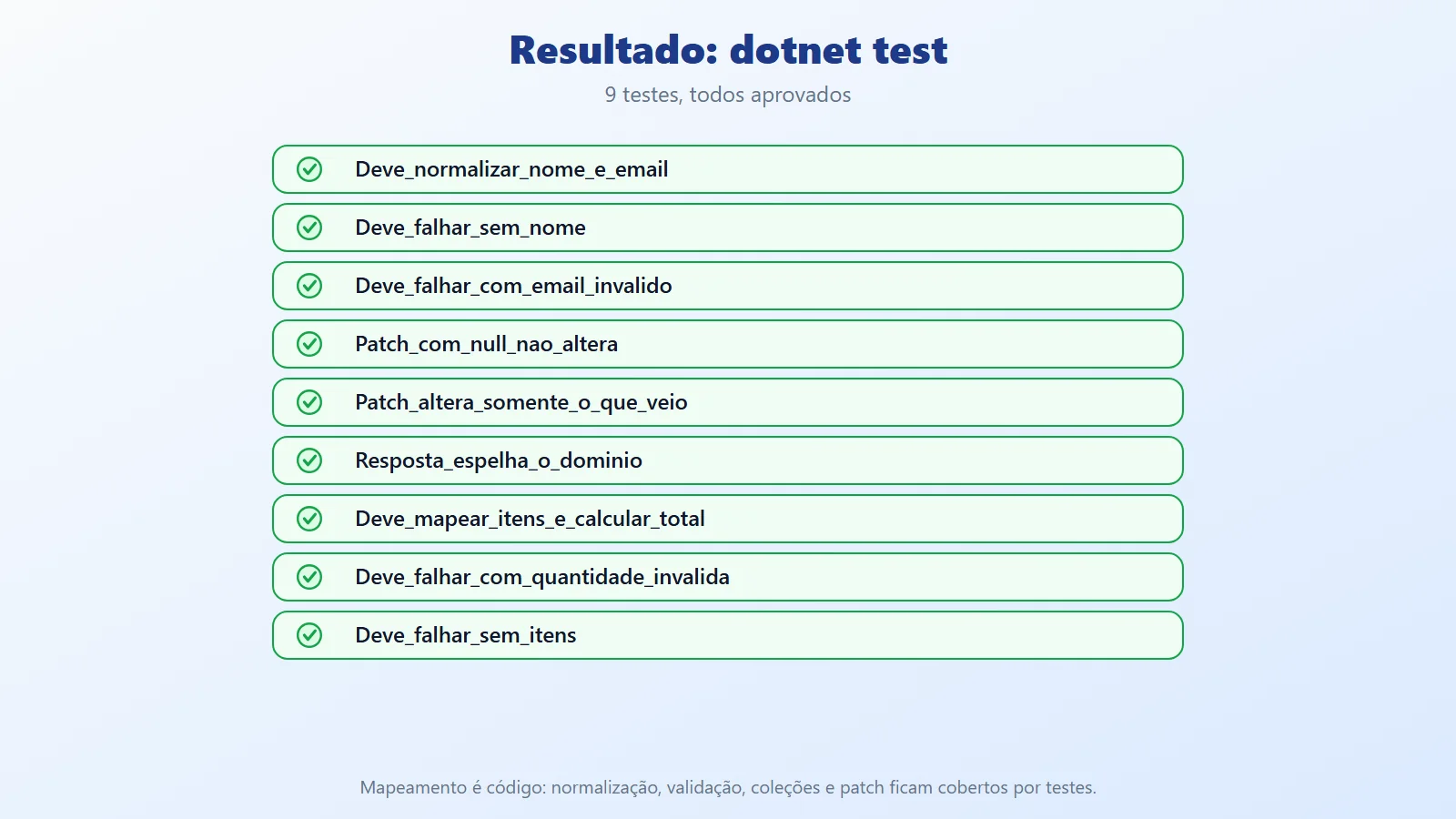
The result is 9 passing tests: name and email normalization, failure with no name and with an invalid email, a patch that changes nothing when null comes in, a partial patch, a response mirroring the domain, an order with items and a total, and failures for invalid quantity and an order without items.
Best practices for manual DTO mapping
- The DTO doesn't rule the domain: it only supplies data. The domain guarantees integrity.
- Don't overwrite with
null: in a partial update, apply only the fields provided and keep validation in the domain. - Organize by feature: avoid the giant
Mapeamentos.cs; keep the mapping close to the type and its context of use. - Small, explicit mappings: if a mapping grows too large, it's a sign that there is business logic in the wrong place.
- Test your mappings: normalizations, default values, collections and patch deserve tests. They are cheap and catch regressions.
- Immutable domain? The example uses a mutable entity for clarity. With a fully immutable domain, the patch returns a new customer instead of changing the existing one.
- Large listings: combine the response mapping with projection in the query (
Select) so you don't load the whole entity. - Email validation: the example uses only
Contains('@')to keep the code small. In production, use a proper validator. - Don't mix it with authorization: mapping converts format and validates rules; permission is another layer.
Checklist before calling it "done":
- The DTO contains no business rules (at most simple format validations).
- The domain (or the application layer) guarantees the invariants.
- Mappings are organized by feature or entity.
- The partial update doesn't accidentally overwrite with
null. - There are tests for normalizations, default values and collections.
- The mapping code is small and explicit.
When to use manual DTO mapping and when to avoid it
Use manual mapping when:
- The domain has invariants that must be preserved.
- DTOs change frequently and you want to see exactly what changes with each modification.
- You value simple debugging and no runtime magic.
- The number of conversions is moderate and each one has some rule (normalization, validation, aggregation).
Consider a library or code generation when:
- There are hundreds of types with purely one-to-one conversion, with no rules at all: manual code becomes mere repetition.
- The team prefers configuration over code and has the discipline to test the generated mappings.
Avoid it, or review it, when:
- The mapping starts to contain business rules: move the rule into the domain.
- There is a giant
Mapeamentos.cs: split it by feature. - The mappings have no tests: untested manual code hides bugs just as much as a poorly configured library.
Manual DTO mapping: control and predictability
Manual mapping is not "extra work": it is control, clarity and predictability. The DTO carries data, the domain guarantees the invariants and the mapping connects the two explicitly, in small methods that you read and test.
The practical takeaway: before adopting a library, ask where the rules live and who tests them. With nested objects, collections, safe PATCH and tests, manual mapping avoids magic and lets you evolve the project safely, especially when DTOs change frequently and the domain needs to stay solid.
References and links on DTO mapping
- Article code on GitHub: ceseidl/mapeamento-dtos-dotnet
- Microsoft Learn: Extension methods (C#)
- Microsoft Learn: Record types (C#)
- Microsoft Learn: Unit testing with xUnit in .NET
- Microsoft Learn: Create minimal APIs and DTOs in ASP.NET Core
Keep reading
- Records in C#: Less Boilerplate, More Meaning!: details records, a good fit for immutable DTOs with value equality.
- Clean Architecture in .NET: places the DTO and the domain within the structure of a layered solution.
- Vertical Slices in .NET: shows the feature-based layout that also guides where mappings live.
Does your .NET API need to scale safely? See the backend and .NET architecture service.