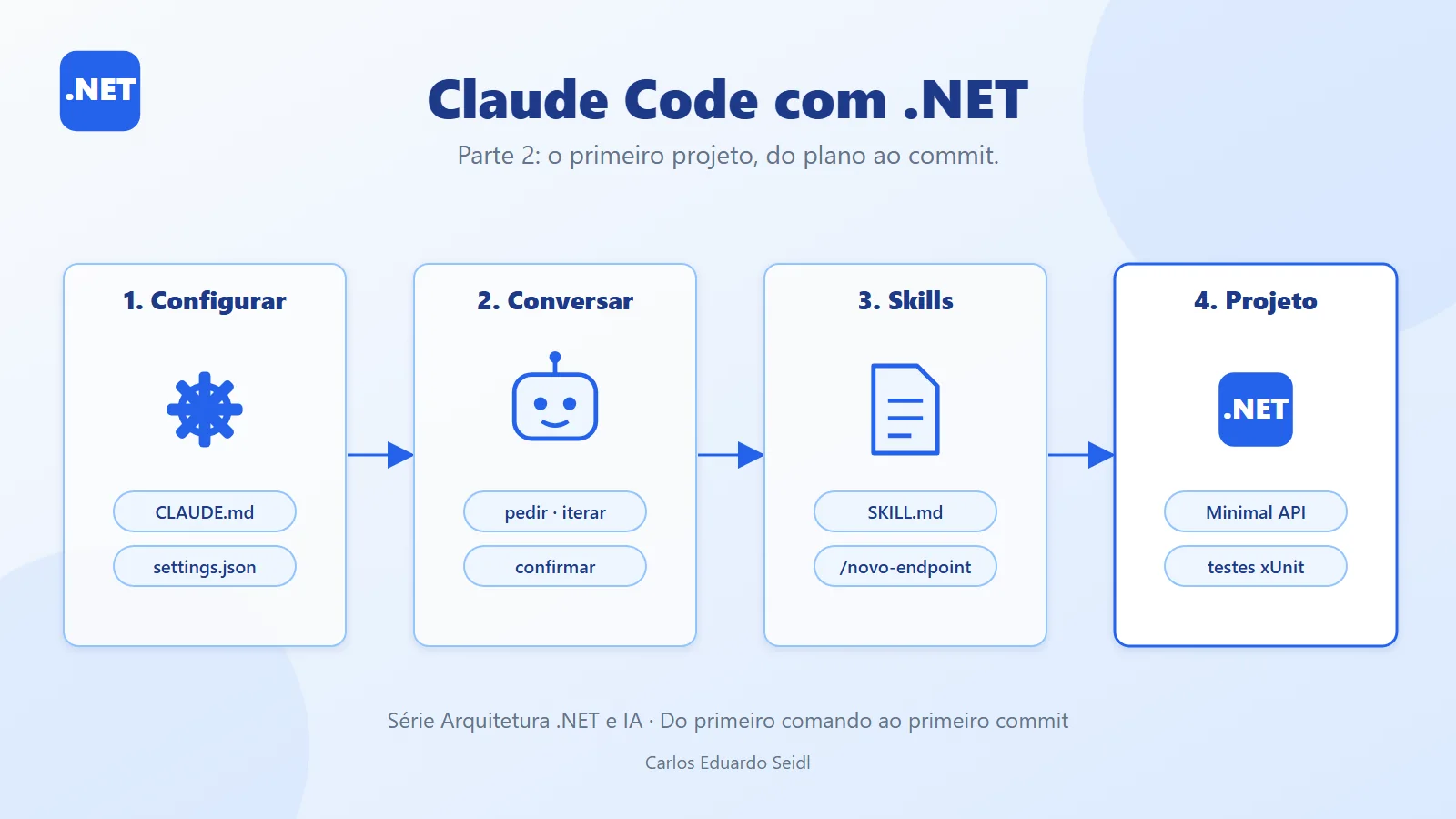
This is Part 2. In Part 1 we covered the setup: the CLAUDE.md, the settings.json with permission rules, the permission modes, and skills. Here we apply it all to the kickoff of a Minimal API in .NET 10 with tests, and we close with best practices, when to use it, and when to avoid it.
Tarefas API: Claude Code on a .NET project in practice
The project is the Tarefas API: a Minimal API with an in-memory task list. The repository shows each step as a commit.
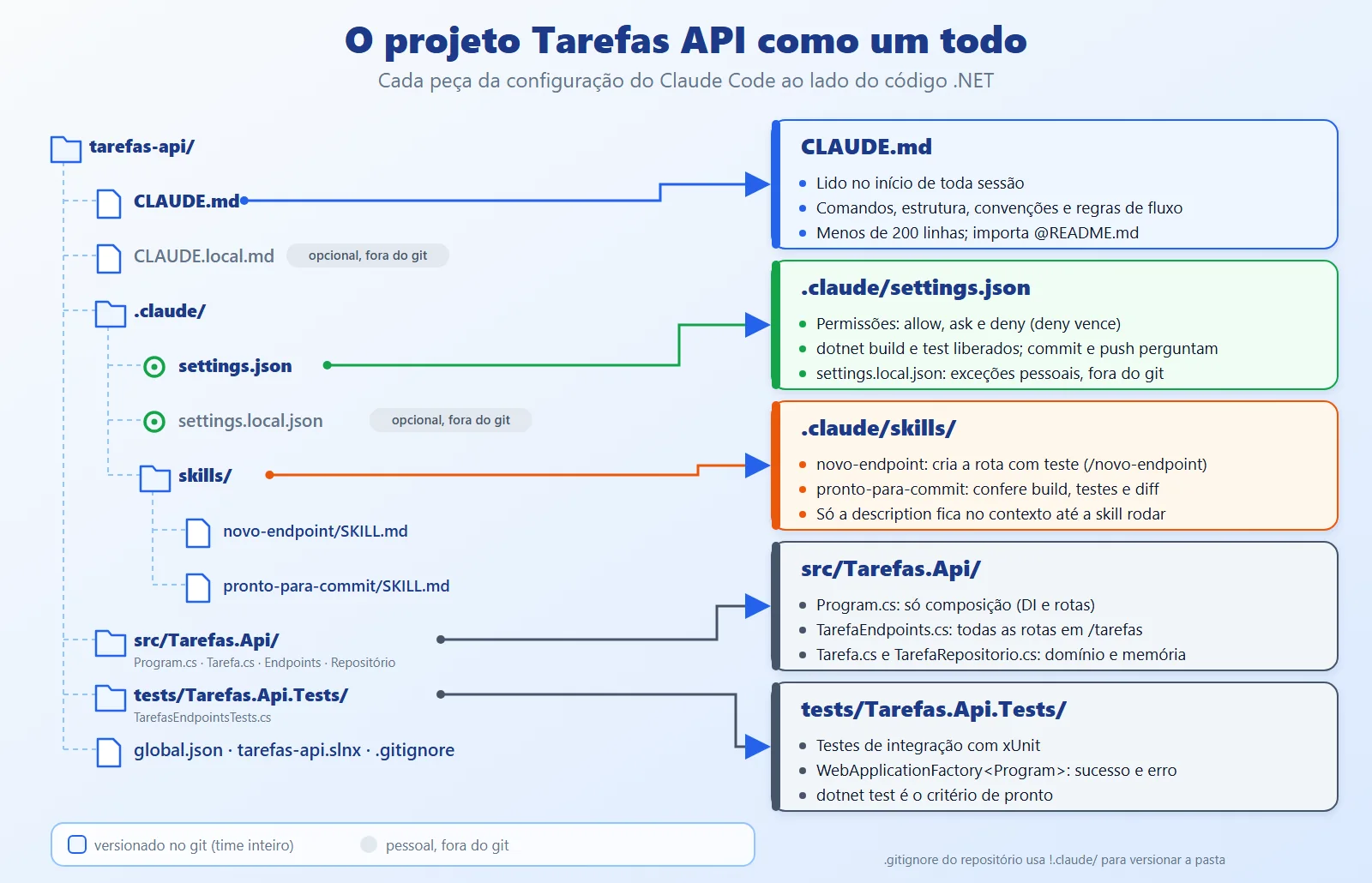
Step 1: the repository. Create the solution and the git repo, and open Claude at the root:
mkdir tarefas-api && cd tarefas-api


git init


dotnet new web -n Tarefas.Api -o src/Tarefas.Api


dotnet new xunit -n Tarefas.Api.Tests -o tests/Tarefas.Api.Tests


claude
Step 2: the CLAUDE.md. Run /init for the draft and then trim it down. What remains is short, with commands, structure, conventions, and workflow rules (ideally under 200 lines):
# Tarefas API


Minimal API in ASP.NET Core (.NET 10) with an in-memory task


list. Overview and how to run: @README.md


## Commands


- Build: `dotnet build`


- Tests: `dotnet test`


- Run the API: `dotnet run --project src/Tarefas.Api`


- NuGet packages: always with


  `--source https://api.nuget.org/v3/index.json`


## Structure


- `src/Tarefas.Api/Program.cs`: composition only (DI and routes)


- `src/Tarefas.Api/TarefaEndpoints.cs`: all the routes


- `src/Tarefas.Api/TarefaRepositorio.cs`: storage


- `tests/Tarefas.Api.Tests/`: integration tests (xUnit)


## Conventions


- C# 14, `Nullable` enabled, file-scoped namespaces.


- Code lines at most 66 columns wide.


- Routes under `/tarefas`, domain names in Portuguese.


- No business logic in `Program.cs`.


- Validation errors come back as `ValidationProblem` (400).


- Every new endpoint ships with at least one success test


  and one error test.


## Workflow


- Before changing more than one file, propose a short plan.


- Run `dotnet build` and `dotnet test` before saying you are


  done.


- Do not commit or push unless I ask.


- Never read or write `.env` files.
Step 3: permissions. The project's .claude/settings.json allows what is safe, asks on commits, and blocks .env. (You can add the SchemaStore $schema line at the top for editor autocompletion.)
{


  "permissions": {


    "allow": [


      "Bash(dotnet build *)",


      "Bash(dotnet test *)",


      "Bash(dotnet run *)",


      "Bash(git status *)",


      "Bash(git diff *)"


    ],


    "ask": [


      "Bash(git commit *)",


      "Bash(git push *)"


    ],


    "deny": [


      "Read(./.env)",


      "Read(./.env.*)",


      "Bash(git push --force *)"


    ]


  }


}
Step 4: skills. The first one, novo-endpoint, describes the routine for a new endpoint. $ARGUMENTS receives whatever you type after the name (/novo-endpoint DELETE /tarefas/{id} removes a task):
---


name: novo-endpoint


description: >-


  Adds an endpoint to the Tarefas API following the project


  conventions (route in TarefaEndpoints.cs, test in tests/). Use


  when asked for a new endpoint, route, or HTTP resource.


argument-hint: "[verb] [route] [description]"


allowed-tools:


  - Bash(dotnet build *)


  - Bash(dotnet test *)


---


# New endpoint


Request: $ARGUMENTS


Follow these steps, in this order:


1. Read `src/Tarefas.Api/TarefaEndpoints.cs` and copy the style


   of the existing routes (`/tarefas` group, `Results.*`).


2. If you need new storage, change only


   `TarefaRepositorio.cs`. Do not put logic in `Program.cs`.


3. Validate the input. A validation error returns


   `Results.ValidationProblem` (400).


4. Write the tests in `tests/Tarefas.Api.Tests/`: one success


   and one error, using `WebApplicationFactory<Program>`.


5. Run `dotnet build` and `dotnet test`. Fix until they pass.


6. Reply with the list of changed files and the test


   results. Do not commit.


Code lines at most 66 columns wide.
The second one only runs when you call it, because of disable-model-invocation: true. The line with ! runs the command before Claude reads the skill and injects the output into the text:
---


name: pronto-para-commit


description: >-


  Checks whether the current changes are ready to commit and


  suggests the message.


disable-model-invocation: true


allowed-tools:


  - Bash(dotnet build *)


  - Bash(dotnet test *)


  - Bash(git diff *)


  - Bash(git status *)


---


# Ready to commit?


## Changed files


!`git status --short`


## Instructions


1. Run `dotnet build` and `dotnet test`.


2. Look at `git diff` and flag: lines wider than 66 columns,


   an endpoint without a test, a secret or `.env` in the diff.


3. If everything checks out, suggest a one-line commit message


   (imperative mood, up to 72 characters).


4. Do not run `git commit`. The developer decides.
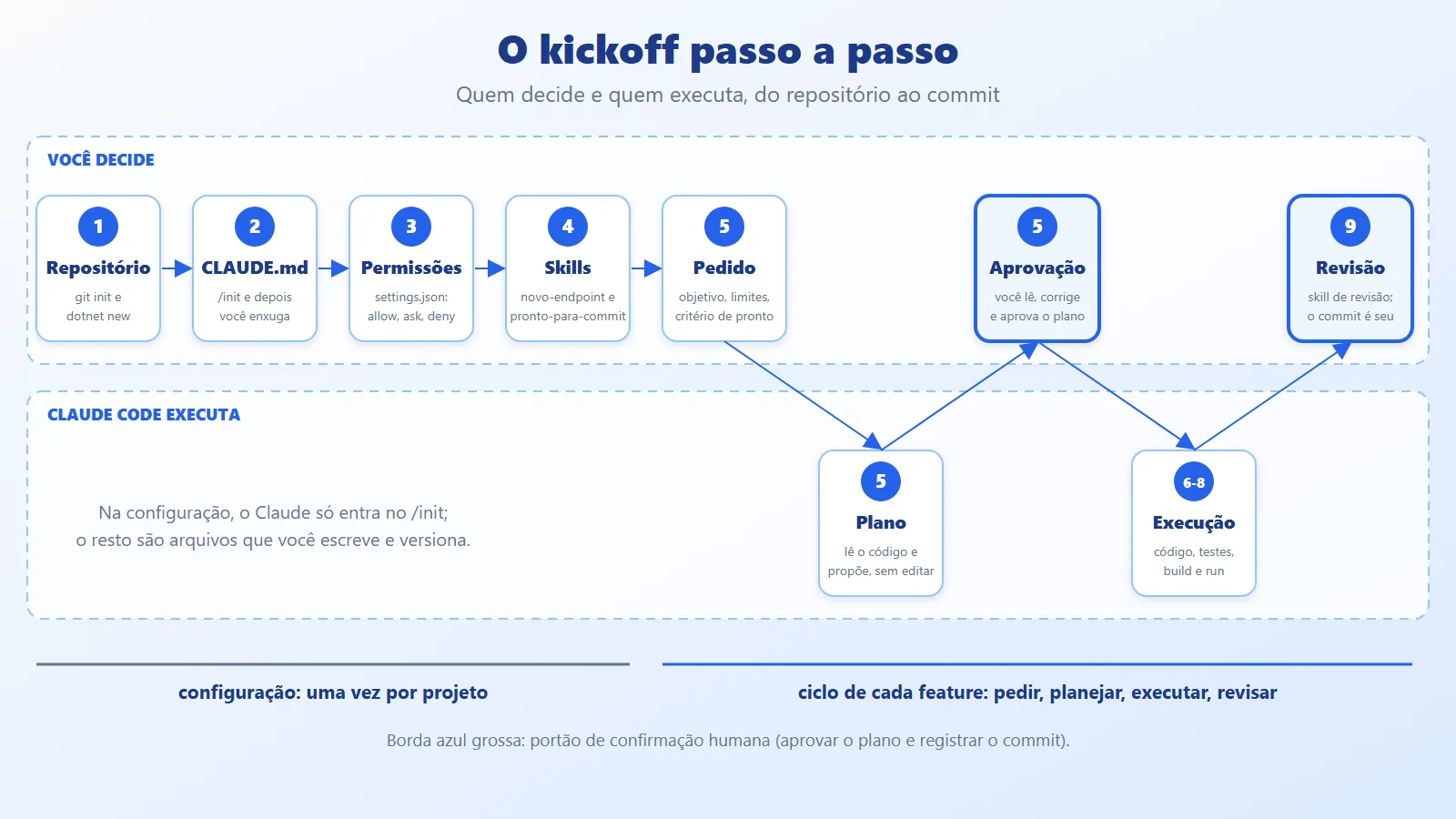
Step 5: the kickoff in plan mode. With the setup ready, start with claude --permission-mode plan and make the request with a goal, constraints, and a definition of done:
Let's start the Tarefas API. Read the CLAUDE.md and propose a


plan before editing any file.


Goal: Minimal API in .NET 10 with in-memory tasks: create,


get by id, list with a completed filter, and complete.


Constraints: no database; test packages only.


Done when: dotnet build and dotnet test pass.
The expected plan looks like this (file names taken from the CLAUDE.md): 1) the Tarefa and NovaTarefa types; 2) an in-memory TarefaRepositorio; 3) routes in TarefaEndpoints; 4) composition in Program.cs; 5) integration tests; 6) build and tests. You read it, correct what you disagree with (for example, "Concluir should return 404 if the id does not exist"), and approve with Yes, manually approve edits the first time, so you can see each edit.
Step 6: the resulting code. The domain types:
namespace Tarefas.Api;


public record Tarefa(int Id, string Titulo, bool Concluida);


public record NovaTarefa(string? Titulo);
The in-memory repository, safe for concurrency (ConcurrentDictionary and Interlocked):
using System.Collections.Concurrent;


namespace Tarefas.Api;


public class TarefaRepositorio


{


    private readonly ConcurrentDictionary<int, Tarefa> _itens =


        new();


    private int _ultimoId;


    public IReadOnlyList<Tarefa> Listar(bool? concluida = null) =>


        _itens.Values


            .Where(t => concluida is null


                || t.Concluida == concluida)


            .OrderBy(t => t.Id)


            .ToList();


    public Tarefa? Obter(int id) => _itens.GetValueOrDefault(id);


    public Tarefa Criar(string titulo)


    {


        var id = Interlocked.Increment(ref _ultimoId);


        var tarefa = new Tarefa(id, titulo, false);


        _itens[id] = tarefa;


        return tarefa;


    }


    public Tarefa? Concluir(int id) =>


        _itens.TryGetValue(id, out var atual)


            ? _itens[id] = atual with { Concluida = true }


            : null;


}
The routes live in an extension method, as the CLAUDE.md dictates, and validation returns ValidationProblem (400):
namespace Tarefas.Api;


public static class TarefaEndpoints


{


    public static IEndpointRouteBuilder MapTarefas(


        this IEndpointRouteBuilder app)


    {


        var grupo = app.MapGroup("/tarefas");


        grupo.MapGet("/",


            (TarefaRepositorio repo, bool? concluida) =>


                repo.Listar(concluida));


        grupo.MapGet("/{id:int}",


            (int id, TarefaRepositorio repo) =>


                repo.Obter(id) is { } t


                    ? Results.Ok(t)


                    : Results.NotFound());


        grupo.MapPost("/",


            (NovaTarefa nova, TarefaRepositorio repo) =>


        {


            if (string.IsNullOrWhiteSpace(nova.Titulo))


            {


                return Results.ValidationProblem(


                    new Dictionary<string, string[]>


                    {


                        ["titulo"] = ["Enter a title."]


                    });


            }


            var tarefa = repo.Criar(nova.Titulo.Trim());


            return Results.Created(


                $"/tarefas/{tarefa.Id}", tarefa);


        });


        grupo.MapPost("/{id:int}/concluir",


            (int id, TarefaRepositorio repo) =>


                repo.Concluir(id) is { } t


                    ? Results.Ok(t)


                    : Results.NotFound());


        return app;


    }


}
Program.cs only composes. The last line exposes Program to the integration tests:
using Tarefas.Api;


var builder = WebApplication.CreateBuilder(args);


builder.Services.AddSingleton<TarefaRepositorio>();


var app = builder.Build();


app.MapTarefas();


app.Run();


public partial class Program;
Step 7: the tests. WebApplicationFactory<Program> spins up the API in memory, with no network port. The Microsoft.AspNetCore.Mvc.Testing package goes into the test project:
using System.Net;


using System.Net.Http.Json;


using Microsoft.AspNetCore.Mvc.Testing;


using Tarefas.Api;


namespace Tarefas.Api.Tests;


public class TarefasEndpointsTests(


    WebApplicationFactory<Program> fabrica)


    : IClassFixture<WebApplicationFactory<Program>>


{


    private readonly HttpClient _http = fabrica.CreateClient();


    private async Task<Tarefa> CriarAsync(string titulo)


    {


        var resp = await _http.PostAsJsonAsync(


            "/tarefas", new NovaTarefa(titulo));


        resp.EnsureSuccessStatusCode();


        return (await resp.Content.ReadFromJsonAsync<Tarefa>())!;


    }


    [Fact]


    public async Task Criar_com_titulo_valido_retorna_201()


    {


        var resp = await _http.PostAsJsonAsync(


            "/tarefas", new NovaTarefa("Ler a documentação"));


        Assert.Equal(HttpStatusCode.Created, resp.StatusCode);


        var tarefa = await resp.Content


            .ReadFromJsonAsync<Tarefa>();


        Assert.Equal("Ler a documentação", tarefa!.Titulo);


        Assert.False(tarefa.Concluida);


        Assert.Equal($"/tarefas/{tarefa.Id}",


            resp.Headers.Location!.OriginalString);


    }


    [Fact]


    public async Task Criar_com_titulo_vazio_retorna_400()


    {


        var resp = await _http.PostAsJsonAsync(


            "/tarefas", new NovaTarefa("   "));


        Assert.Equal(HttpStatusCode.BadRequest, resp.StatusCode);


    }


    [Fact]


    public async Task Obter_inexistente_retorna_404()


    {


        var resp = await _http.GetAsync("/tarefas/999999");


        Assert.Equal(HttpStatusCode.NotFound, resp.StatusCode);


    }


    [Fact]


    public async Task Concluir_marca_a_tarefa_como_concluida()


    {


        var criada = await CriarAsync("Rodar os testes");


        var resp = await _http.PostAsync(


            $"/tarefas/{criada.Id}/concluir", null);


        Assert.Equal(HttpStatusCode.OK, resp.StatusCode);


        var tarefa = await resp.Content


            .ReadFromJsonAsync<Tarefa>();


        Assert.True(tarefa!.Concluida);


    }


    [Fact]


    public async Task Listar_filtra_por_concluida()


    {


        var aberta = await CriarAsync("Aberta");


        var feita = await CriarAsync("Feita");


        await _http.PostAsync(


            $"/tarefas/{feita.Id}/concluir", null);


        var abertas = await _http.GetFromJsonAsync<List<Tarefa>>(


            "/tarefas?concluida=false");


        Assert.Contains(abertas!, t => t.Id == aberta.Id);


        Assert.DoesNotContain(abertas!, t => t.Id == feita.Id);


    }


}
Step 8: build, tests, and run.
dotnet build


dotnet test


dotnet run --project src/Tarefas.Api
The tests finish with Passed! - Failed: 0, Passed: 5. With the API running, the POST with a valid title and the POST with an empty title respond:
HTTP/1.1 201 Created


Location: /tarefas/1


{"id":1,"titulo":"Ler a documentação","concluida":false}


HTTP/1.1 400 Bad Request


Content-Type: application/problem+json


{"title":"One or more validation errors occurred.",


 "status":400,"errors":{"titulo":["Enter a title."]}}
Step 9: review and record. Call /pronto-para-commit. The skill runs build and tests, flags long lines and endpoints without tests, and suggests the message; the git commit is still yours, protected by the ask rule.
Best practices for CLAUDE.md, permissions and secrets
- Lean CLAUDE.md: a giant file dilutes the instructions. Aim for under 200 lines; anything that applies to only part of the code goes into path-scoped rules in
.claude/rules/. Write what Claude can't figure out on its own: commands, conventions, and prohibitions. - Specific permissions, not broad ones: allow exact commands.
"allow": ["Bash(*)"]


"allow": ["Bash(dotnet test *)", "Bash(git diff *)"]
The first line allows any command; the second, only what is needed. deny rules apply in every mode.
- Secrets stay out of the repository: no keys in CLAUDE.md or .claude/settings.json (both versioned). Use settings.local.json and CLAUDE.local.md, both in .gitignore. On machines with a global .gitignore that ignores .claude/, the repository needs !.claude/ to version the team configuration.
- Instructions are not guarantees: CLAUDE.md is context, not an enforced rule. To actually block something, use deny or a hook.
- A skill with side effects is manual: deploy, commit, and migration skills get disable-model-invocation: true, so they only run when you call them.
- Specific skill descriptions: "helps with endpoints" is vague; "Adds an endpoint to the Tarefas API (route in TarefaEndpoints.cs, test in tests/)" says when to use it.
- One goal per conversation: use /clear when switching tasks and /rewind when the direction went wrong, instead of stacking corrections.
- Always review the diff: the agent runs the tests, but that doesn't replace reading. Ask for error tests, not just success tests.
- Don't confuse autonomy with trust: looser modes (auto, acceptEdits) fit code covered by tests in a repository with a clean git state.
When to use Claude Code on .NET projects and when to avoid it
Use Claude Code when:
- The task involves several files and commands: building a feature with tests, migrating a pattern, investigating a build error.
- The project has reliable build and test commands, which provide the definition of done.
- You repeat routines (new endpoint, review, release) and can turn them into skills.
Avoid it (or reduce autonomy) when:
- There are no tests or automated build: the agent has no way to know whether it got it right, and you will review everything by hand.
- The work requires an architecture decision that hasn't been made yet: talk it through and decide first, then ask for the execution.
- Sensitive data, production, or credentials are within reach: isolate the environment and use
denyrules. - It is a one-line edit: the editor is faster.
If you need to give the model access to external systems (a database, an internal API), the path is the MCP from the earlier article: an MCP server is registered in Claude Code with claude mcp add.
claude mcp add --transport stdio pedidos -- \


  dotnet run --project src/PedidosMcpServer --no-build
Conclusion: context, limits, rhythm and skills in Claude Code
The journey has an order. First the context (CLAUDE.md), then the limits (settings.json and permission modes), then the rhythm (ask with a goal and a definition of done, plan, iterate in short steps, confirm what matters), and finally the shortcuts (skills). Each step left a file in the repository, and the example project came out compiling, with all five tests passing.
The practical takeaway: what separates a good session from a bad one has less to do with the model and more to do with what you wrote before asking. Treat the CLAUDE.md, the rules, and the skills as project code: version them, review them in a pull request, and improve them every time Claude gets something wrong for lack of context.
Part 2 references: Claude Code docs and repository
- Article code on GitHub: ceseidl/claude-code-dotnet
- Claude Code: Quickstart
- Claude Code: How Claude remembers your project (CLAUDE.md)
- Claude Code: Skills
- Claude Code: Settings and Permissions
- Claude Code: Permission modes
- Claude Code: Commands reference and MCP
- Series: MCP in .NET: Connecting AI Models to Tools and Data (ceseidl/mcp-dotnet)
Keep reading
- Claude Code with .NET, Part 1: covers the series foundation: setup, permissions, working rhythm and skills.
- Structure of a Claude Code Project: shows where each configuration file used in the project should live.
- Minimal APIs in ASP.NET Core: goes deeper into Minimal APIs, the kind of API used in the example project.
Want to bring AI and Claude Code into your .NET team workflow? See the backend and .NET architecture service.