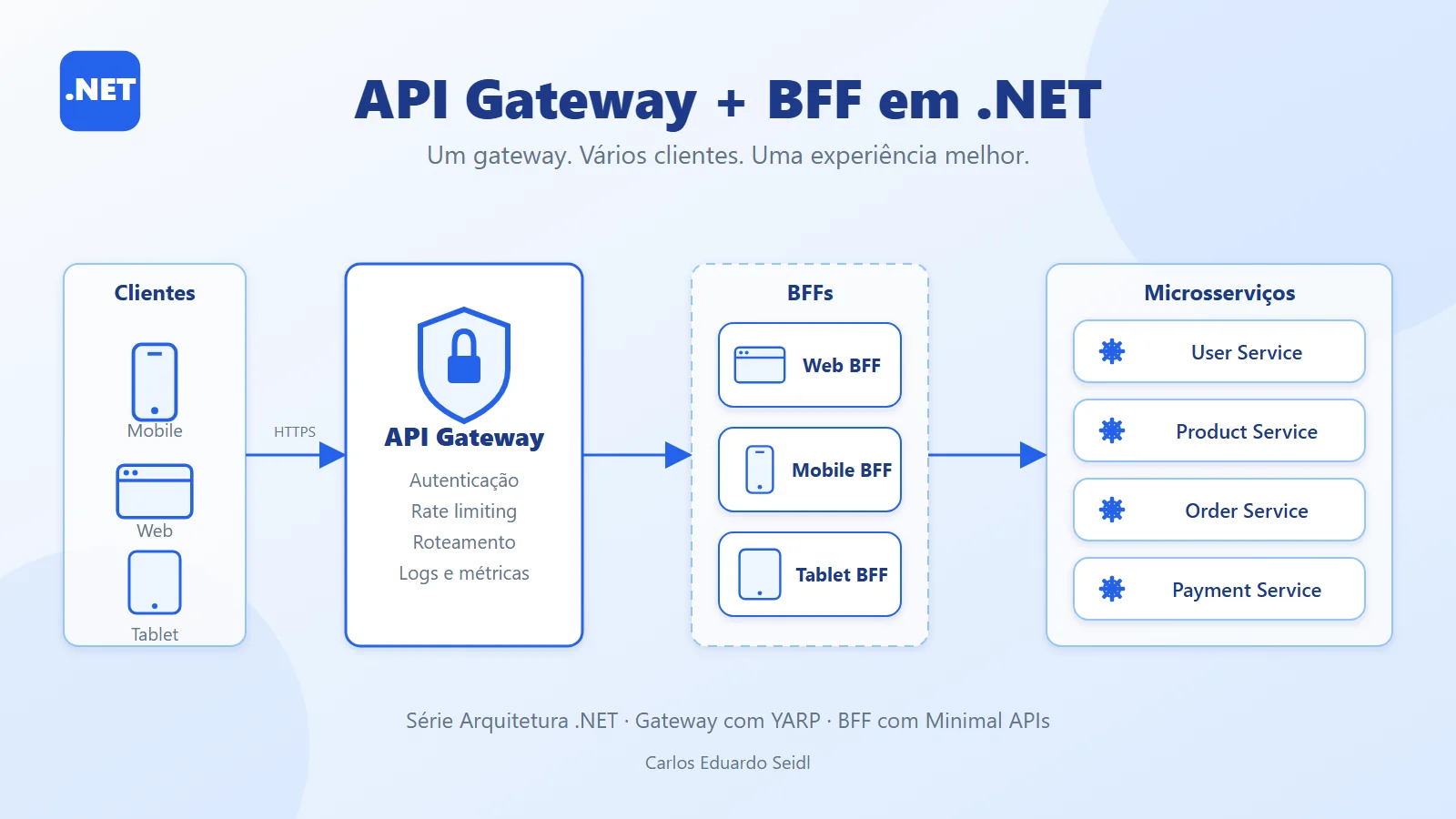
Why use an API Gateway and BFF with microservices
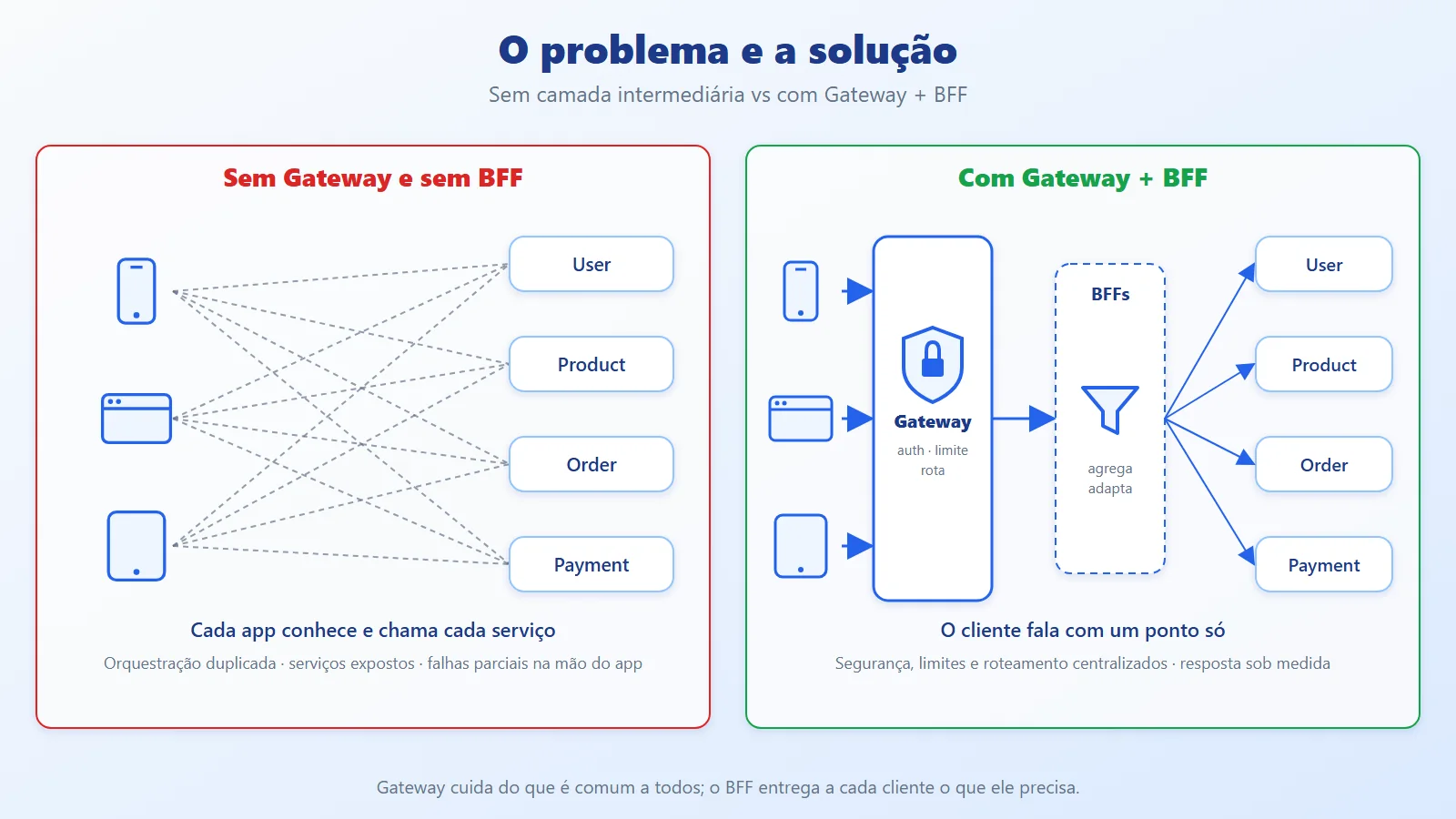
When a system stops being a monolith, the front end starts talking to several services: user, product, order, payment. Without an intermediate layer, every client (web, mobile, tablet) has to know the address of each service, authenticate against all of them, merge responses, and deal with partial failures. The result is orchestration logic duplicated in every app and internal services exposed to the internet.
In this article, a continuation of the series (in the Monolith vs Microservices article we saw why to split; here we see how the client consumes that split), we combine two patterns: the API Gateway, which handles what is common to everyone, and the BFF (Backend for Frontend), which gives each client exactly the data it needs.
API Gateway and BFF concepts and who does what
API Gateway: a single entry point. It handles cross-cutting concerns, with no business rules:
- Authentication and authorization
- Rate limiting
- Routing
- Logging, metrics, and tracing
BFF (Backend for Frontend): one backend per client type (Web BFF, Mobile BFF, Tablet BFF). It:
- Aggregates calls to several microservices into a single response
- Shapes the payload to fit the screen's needs
- Scales independently, according to that client's demand
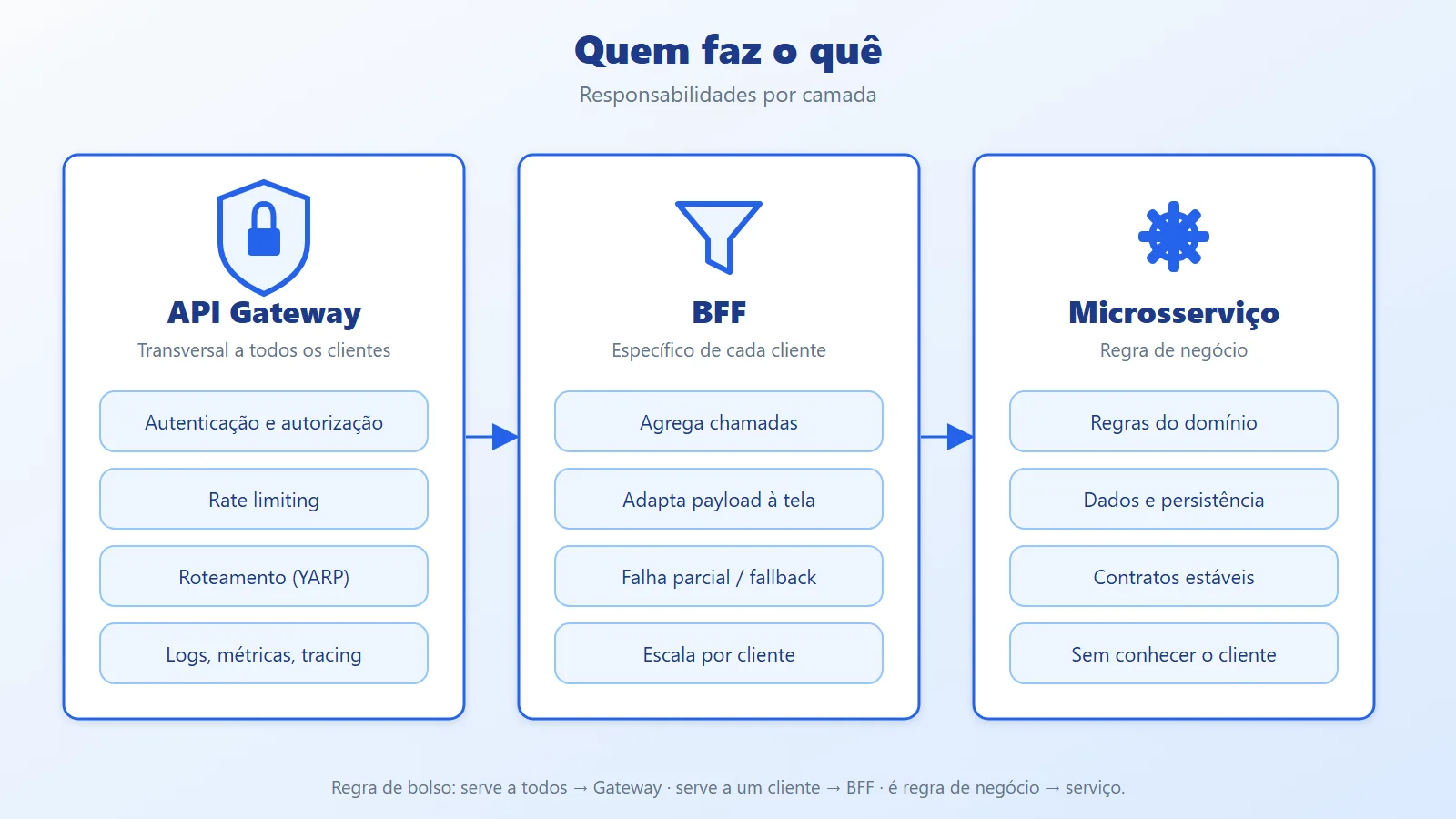
Who does what
- Authentication and rate limiting: Gateway
- Per-client routing: Gateway
- Aggregating data from services: BFF
- Adapting the format to the client: BFF
- Business rules: neither of them; they live in the microservices
Rule of thumb: if the logic serves all clients, it belongs to the Gateway; if it serves one specific client, it belongs to the BFF; if it is a business rule, it belongs to the microservice.
In code, the difference between the two roles shows up right away:
// Gateway: knows nothing about the domain; authenticates, rate-limits, and forwards


app.UseAuthentication();


app.UseAuthorization();


app.UseRateLimiter();


app.MapReverseProxy();// BFF: knows the screen; aggregates and returns a tailored response
app.MapGet("/order/{id}", async (
string id,
IOrderClient orders,
ITrackingClient tracking,
CancellationToken ct) =>
{
var orderTask = orders.GetOrderAsync(id, ct);
var trackingTask = tracking.GetTrackingAsync(id, ct);
await Task.WhenAll(orderTask, trackingTask);
return Results.Ok(new
{
Order = orderTask.Result,
Tracking = trackingTask.Result
});
});The Gateway ends at MapReverseProxy(): not a single line of it knows what an order is. The BFF is the opposite: only it builds the screen's response.
YARP (Yet Another Reverse Proxy): a Microsoft library, built on ASP.NET Core, for creating reverse proxies and gateways in .NET. Instead of a closed product, it is a set of building blocks that you configure (or extend in C#) inside an ordinary web application.
A reverse proxy sits between the client and the internal servers: it receives the request, decides where it goes, and returns the response. The client never learns the internal addresses. YARP has only a few concepts:
- Route: an inbound rule. It defines what matches (path, host, method, headers, query) and which cluster to send it to. It also takes per-route policies: authorization, CORS, rate limiting, timeout.
- Cluster: a logical group of destinations (instances) that serve a route. This is where load balancing, health checks, and session affinity live.
- Destination: the address of an instance (for example,
http://mobile-bff:8080/). - Transform: an adjustment made to the proxied request or response (rewrite the path, add a header, forward the original IP). The original request is not changed.
- Dynamic configuration: the
ReverseProxysection can be reloaded when the file changes, without restarting the gateway. You can also load it from several sources (file, memory, your own provider).
In practice, a minimal route and cluster are just this:
"ReverseProxy": {


  "Routes": {


    "orders": {


      "ClusterId": "orders-cluster",


      "Match": { "Path": "/orders/{**catch-all}" }


    }


  },


  "Clusters": {


    "orders-cluster": {


      "Destinations": {


        "d1": { "Address": "http://orders:8080/" }


      }


    }


  }


}
Every request that matches /orders/... goes to the orders-cluster cluster, and the cluster decides which destination serves it.
Why YARP and not another proxy: it runs on the same .NET stack as the team, uses the ASP.NET Core pipeline and policies (authentication, rate limiter, CORS), and allows custom logic in C#, without learning another configuration language.
Key capabilities
- Routing by path, host, method, header, or query
- Load balancing across destinations, with health checks
- URL and header transforms
- Integration with ASP.NET Core authentication, authorization, CORS, and rate limiting
- Hot reload of the route configuration, without restarting
- Extensible in C# (load balancing policies, transforms, configuration providers)
- Open source, maintained by Microsoft
When YARP is a good choice
- Entry gateway for .NET microservices
- Single entry point with route and URL rewriting
- A lightweight alternative integrated with the stack, without operating a separate gateway
- The foundation of a BFF that needs a proxy plus its own logic
Heads up: YARP forwards and rewrites requests; it does not aggregate responses from several services. Aggregating (one screen, several services) is the BFF's job, as in example 5.2. YARP in the Gateway with a BFF behind it is exactly the combination in this article.
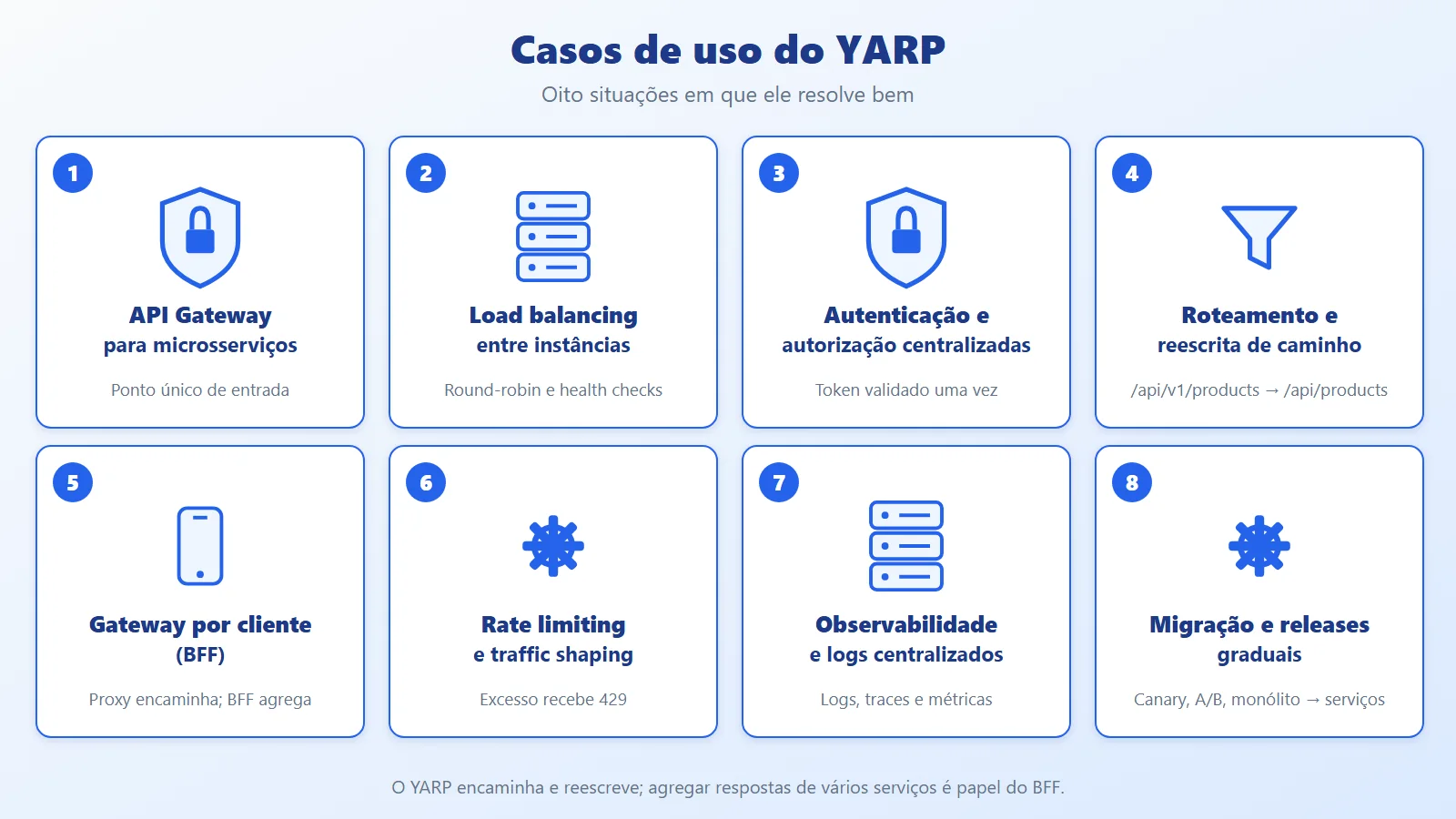
YARP use cases
- API Gateway for microservices: a single entry point that routes each request to the right service (example 5.1).
- Load balancing across instances: distributes requests among several instances of the same service, for example in round-robin (5.1.1).
- Centralized authentication and authorization: the token is validated once at the Gateway and only authenticated requests reach the services (5.1).
- Routing and path rewriting: transforms URLs, query strings, and headers before forwarding, such as exposing
/api/v1/productsand calling/api/productsinternally (5.1.2). - Gateway per client type (BFF): a specialized entry point per client. The proxy forwards; aggregation is BFF code (5.2).
- Traffic shaping and rate limiting: limits requests per client and rejects the excess with 429 Too Many Requests (5.1).
- Centralized observability and logging: logs, traces, and metrics collected in a single place (section 5).
- Gradual migration and releases: migrating from the monolith to microservices route by route, canary releases, gradual rollouts, and A/B testing. YARP has no built-in percentage-based traffic splitting; that requires header/cookie routing or your own load balancing policy (
ILoadBalancingPolicy).
Request flow architecture with Gateway and BFF
Flow of a request:
Client (Mobile/Web/Tablet)


        │  HTTPS


        ▼


   API Gateway  ── authenticates, rate-limits, routes, logs


        │


        ├── /web/**    → Web BFF


        ├── /mobile/** → Mobile BFF


        └── /tablet/** → Tablet BFF


                              │


                              ├── Order Service


                              ├── Tracking Service


                              └── Notification Service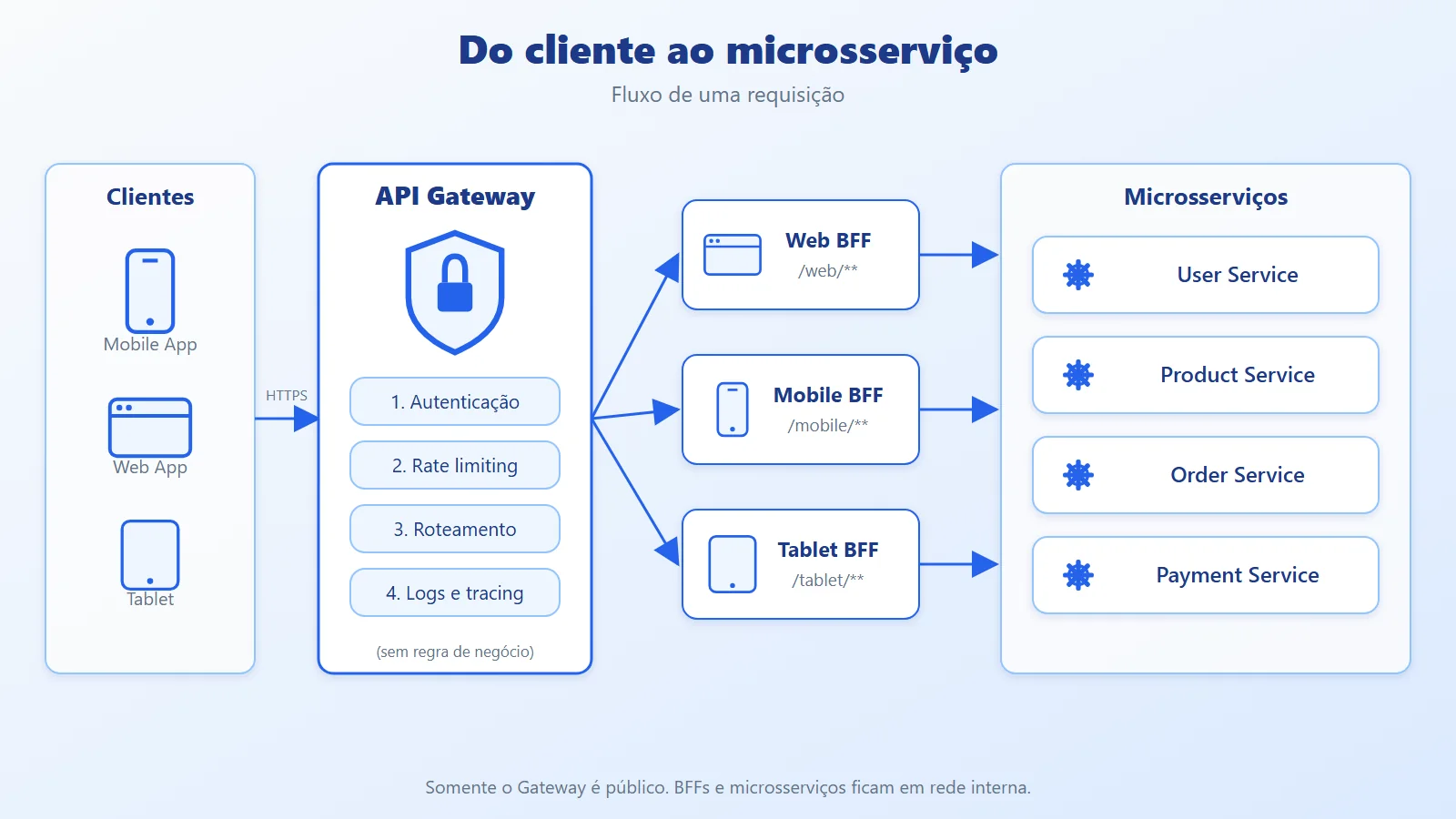
Design points:
- Internal network: only the Gateway is public. BFFs and microservices sit behind it.
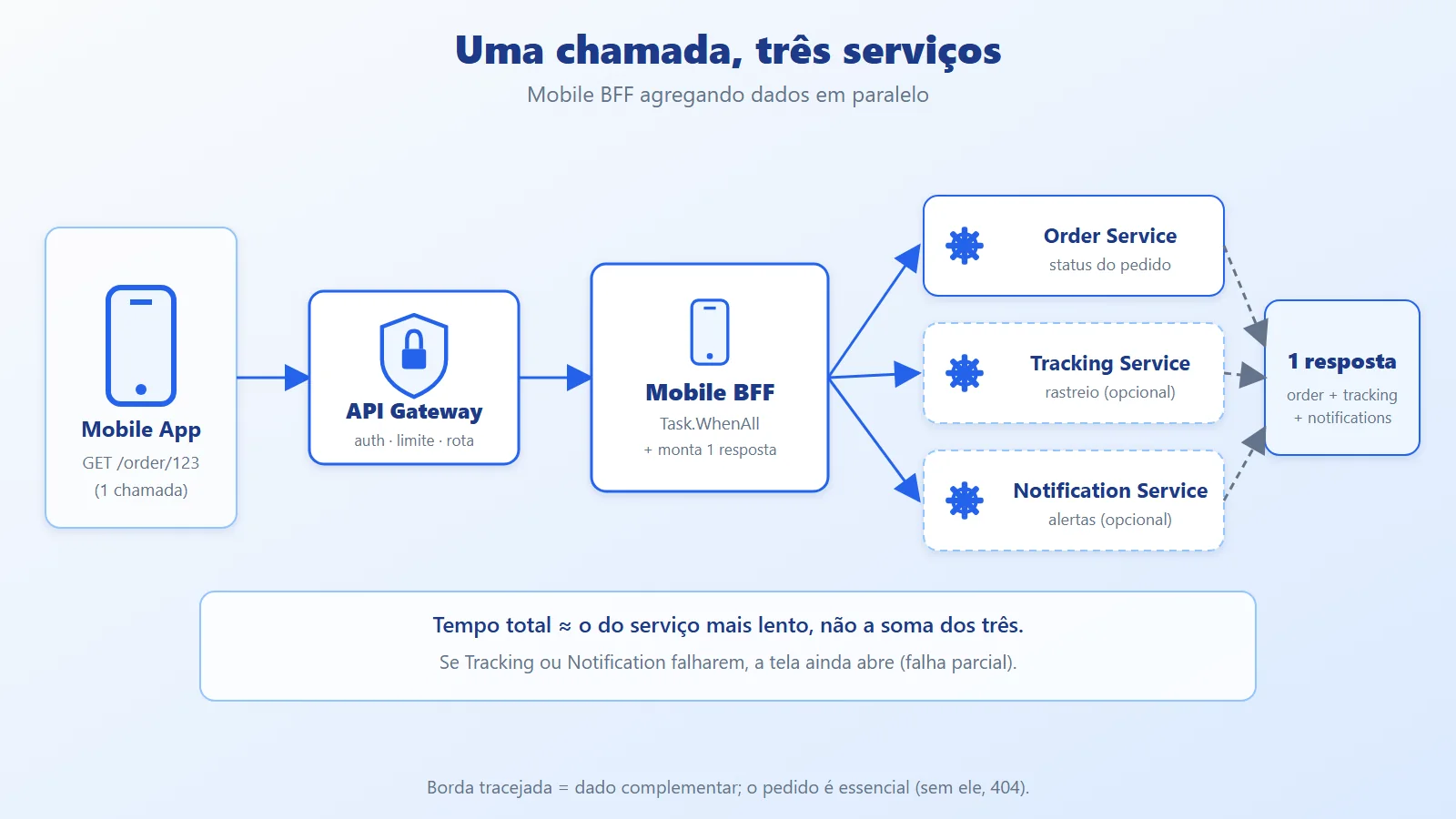
- Parallel calls: the BFF fires the calls to the services at the same time, not in sequence.
- Partial failure: if the notifications service goes down, the order screen should still load.
- Per-client contract: each BFF evolves its contract without affecting the other clients.
In .NET, the natural choice for the Gateway is YARP (Yet Another Reverse Proxy), and for the BFF, a Minimal API or controllers with a typed HttpClient.
Hands-on API Gateway with YARP and a BFF in .NET
The complete code for this article is on GitHub: https://github.com/ceseidl/api-gateway-bff-dotnet
4.1. Gateway with YARP
// Gateway/Program.cs


using System.Threading.RateLimiting;


using Microsoft.AspNetCore.Authentication.JwtBearer;


using Yarp.ReverseProxy.Transforms;


var builder = WebApplication.CreateBuilder(args);


builder.Services


    .AddAuthentication(JwtBearerDefaults.AuthenticationScheme)


    .AddJwtBearer();


builder.Services.AddAuthorization();


builder.Services.AddRateLimiter(options =>


{


    options.RejectionStatusCode =


        StatusCodes.Status429TooManyRequests;


    options.AddPolicy("per-user", httpContext =>


    {


        var key = httpContext.User.Identity?.Name


            ?? httpContext.Connection.RemoteIpAddress?.ToString()


            ?? "anon";


        return RateLimitPartition.GetFixedWindowLimiter(


            key,


            _ => new FixedWindowRateLimiterOptions


            {


                PermitLimit = 100,


                Window = TimeSpan.FromMinutes(1)


            });


    });


});


builder.Services


    .AddReverseProxy()


    .LoadFromConfig(


        builder.Configuration.GetSection("ReverseProxy"));


var app = builder.Build();


app.UseAuthentication();


app.UseAuthorization();


app.UseRateLimiter();


app.MapReverseProxy();


app.Run();// Gateway/appsettings.json
{
"ReverseProxy": {
"Routes": {
"mobile": {
"ClusterId": "mobile-bff",
"AuthorizationPolicy": "default",
"RateLimiterPolicy": "per-user",
"Match": { "Path": "/mobile/{**catch-all}" },
"Transforms": [ { "PathRemovePrefix": "/mobile" } ]
},
"web": {
"ClusterId": "web-bff",
"AuthorizationPolicy": "default",
"RateLimiterPolicy": "per-user",
"Match": { "Path": "/web/{**catch-all}" },
"Transforms": [ { "PathRemovePrefix": "/web" } ]
}
},
"Clusters": {
"mobile-bff": {
"Destinations": {
"d1": { "Address": "http://mobile-bff:8080/" }
}
},
"web-bff": {
"Destinations": {
"d1": { "Address": "http://web-bff:8080/" }
}
}
}
}
}The Gateway knows nothing about orders, tracking, or notifications. It only authenticates, rate-limits, and forwards.
4.1.1. Cluster with load balancing and health checks
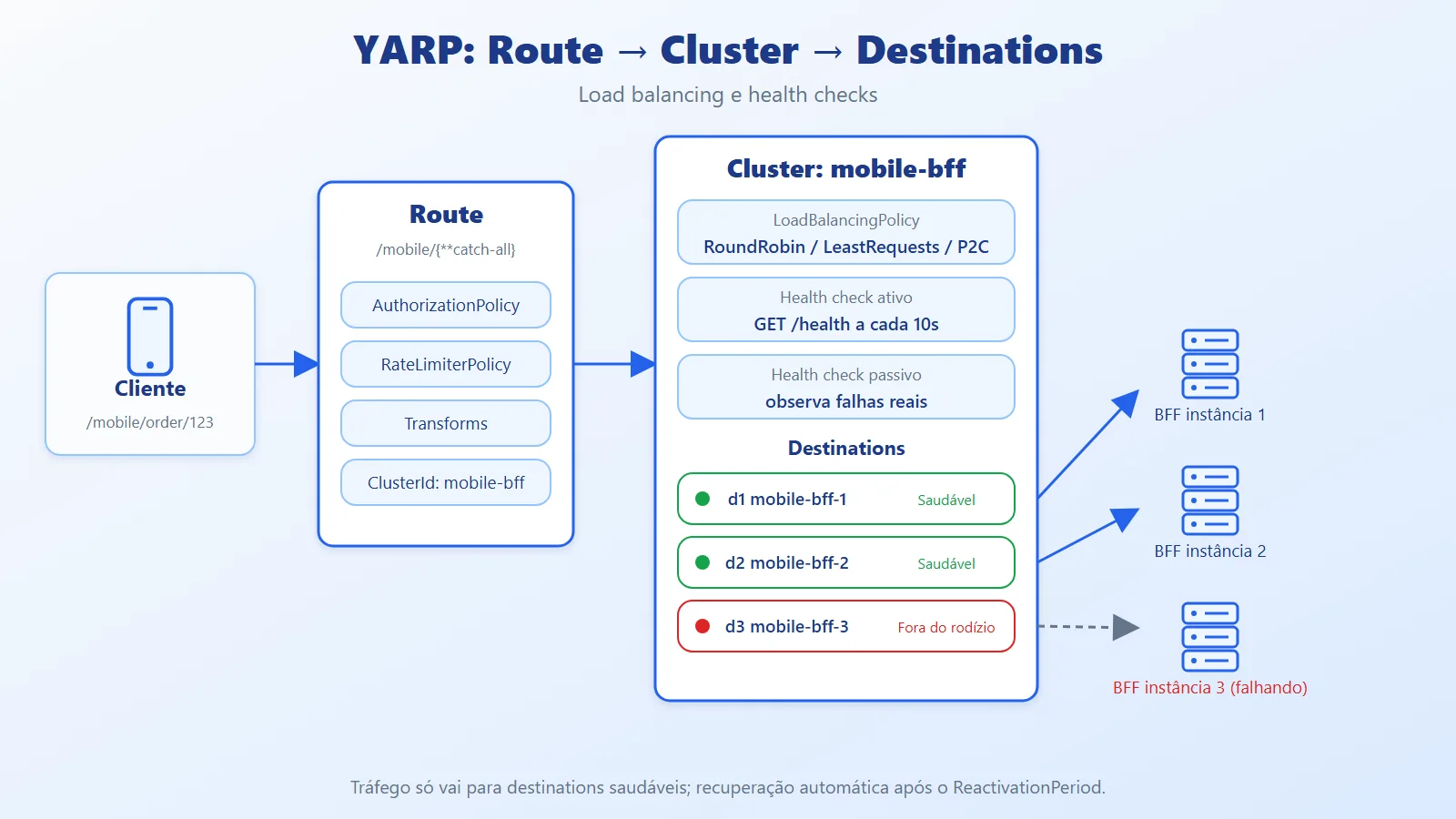
When the BFF runs on more than one instance, the cluster gets several destinations and YARP chooses which one to send to:
"Clusters": {


  "mobile-bff": {


    "LoadBalancingPolicy": "RoundRobin",


    "HealthCheck": {


      "Active": {


        "Enabled": true,


        "Interval": "00:00:10",


        "Timeout": "00:00:05",


        "Policy": "ConsecutiveFailures",


        "Path": "/health"


      },


      "Passive": {


        "Enabled": true,


        "Policy": "TransportFailureRate",


        "ReactivationPeriod": "00:00:30"


      }


    },


    "Destinations": {


      "d1": { "Address": "http://mobile-bff-1:8080/" },


      "d2": { "Address": "http://mobile-bff-2:8080/" }


    }


  }


}- Built-in load balancing policies:
PowerOfTwoChoices(default),RoundRobin,LeastRequests,Random, andFirstAlphabetical(useful for failover between two destinations). You can create your own by implementingILoadBalancingPolicy. - Active health check: YARP periodically calls the health endpoint (
/health) of each destination and removes the failing ones from rotation. - Passive health check: watches real responses and temporarily disables a destination that is failing, reactivating it after the
ReactivationPeriod. - Session affinity (
SessionAffinity) keeps the same client on the same instance, when the BFF holds local state. Prefer stateless BFFs.
4.1.2. Transforms: rewriting the request
In the previous example, PathRemovePrefix already strips /mobile before calling the BFF. Other common uses:
"Transforms": [


  { "PathRemovePrefix": "/mobile" },


  { "RequestHeader": "X-Client", "Set": "mobile-app" },


  { "X-Forwarded": "Append" }


]
By default, YARP already sends X-Forwarded-For, X-Forwarded-Proto, and X-Forwarded-Host, so the BFF knows the client's original IP and host. Body transforms do not exist in YARP; if you need one, use a middleware. In this article's repository, the Gateway's appsettings.json already combines the routes and the cluster from sections 4.1, 4.1.1, and 4.1.2.
4.1.3. Extending in C#
Transforms can also be added in code, for example to propagate the user identity already validated at the Gateway:
builder.Services


    .AddReverseProxy()


    .LoadFromConfig(


        builder.Configuration.GetSection("ReverseProxy"))


    .AddTransforms(context =>


    {


        // Only for routes that require authentication


        var policy = context.Route.AuthorizationPolicy;


        if (string.IsNullOrEmpty(policy))


            return;


        context.AddRequestTransform(transform =>


        {


            var userId = transform.HttpContext.User


                .FindFirst("sub")?.Value;


            var headers = transform.ProxyRequest.Headers;


            if (userId is not null)


                headers.TryAddWithoutValidation(


                    "X-User-Id", userId);


            return ValueTask.CompletedTask;


        });


    });
Important: the BFF should only trust
X-User-Idif it sits on a network where only the Gateway can call it. Otherwise, validate the token in the BFF as well.
In the repository, this snippet is already integrated into the Gateway's Program.cs, chained onto AddReverseProxy.
4.2. Mobile BFF: aggregating services
// MobileBff/Contracts/OrderDetailsResponse.cs


public sealed record OrderDetailsResponse(


    OrderDto Order,


    TrackingDto? Tracking,


IReadOnlyList<NotificationDto> Notifications);// MobileBff/Endpoints/OrderEndpoints.cs
public static class OrderEndpoints
{
public static IEndpointRouteBuilder MapOrderEndpoints(
this IEndpointRouteBuilder app)
{
app.MapGet("/order/{orderId}", GetOrderDetails);
return app;
}
private static async Task<IResult> GetOrderDetails(
string orderId,
IOrderClient orders,
ITrackingClient tracking,
INotificationClient notifications,
ILogger<Program> logger,
CancellationToken ct)
{
var orderTask = orders.GetOrderAsync(orderId, ct);
var trackingTask = tracking.GetTrackingAsync(orderId, ct);
var notificationsTask =
notifications.GetNotificationsAsync(orderId, ct);
var order = await orderTask;
if (order is null)
return Results.NotFound();
// Secondary data: a partial failure doesn't bring down the screen
var trackingResult = await SafeAsync(
trackingTask, logger, "tracking");
var notificationsResult = await SafeAsync(
notificationsTask, logger, "notifications")
?? Array.Empty<NotificationDto>();
return Results.Ok(new OrderDetailsResponse(
order, trackingResult, notificationsResult));
}
private static async Task<T?> SafeAsync<T>(
Task<T> task, ILogger logger, string source)
{
try { return await task; }
catch (Exception ex) when (
ex is HttpRequestException or TaskCanceledException)
{
logger.LogWarning(ex,
"Partial failure while querying {Source}", source);
return default;
}
}
}4.3. Registering the typed clients
// MobileBff/Program.cs


var builder = WebApplication.CreateBuilder(args);


var services = builder.Configuration.GetSection("Services");


builder.Services


    .AddHttpClient<IOrderClient, OrderClient>(c =>


        c.BaseAddress = new Uri(services["Order"]!))


    .AddStandardResilienceHandler();


builder.Services


    .AddHttpClient<ITrackingClient, TrackingClient>(c =>


        c.BaseAddress = new Uri(services["Tracking"]!))


    .AddStandardResilienceHandler();


builder.Services


    .AddHttpClient<INotificationClient, NotificationClient>(c =>


        c.BaseAddress = new Uri(services["Notification"]!))


    .AddStandardResilienceHandler();


var app = builder.Build();


app.MapOrderEndpoints();


app.Run();
Key points in the code
- The three calls start together; the total time is that of the slowest one, not the sum.
- The order is essential (without it, 404). Tracking and notifications are complementary and degrade gracefully.
CancellationTokenis propagated: if the mobile app abandons the request, the internal calls are canceled.AddStandardResilienceHandler(Microsoft.Extensions.Http.Resilience) adds retry, circuit breaker, and timeout per client.
4.4. Contracts and supporting clients
The previous examples use the types below. They complete the BFF so it compiles and runs.
// MobileBff/Contracts/Dtos.cs


public sealed record OrderDto(


    string Id, string Status, decimal Total);


public sealed record TrackingDto(string Status, string Location);


public sealed record NotificationDto(string Text);// MobileBff/Clients/Clients.cs
using System.Net;
public interface IOrderClient
{
Task<OrderDto?> GetOrderAsync(
string orderId, CancellationToken ct);
}
public interface ITrackingClient
{
Task<TrackingDto?> GetTrackingAsync(
string orderId, CancellationToken ct);
}
public interface INotificationClient
{
Task<IReadOnlyList<NotificationDto>> GetNotificationsAsync(
string orderId, CancellationToken ct);
}
public sealed class OrderClient(HttpClient http)
: IOrderClient
{
public async Task<OrderDto?> GetOrderAsync(
string orderId, CancellationToken ct)
{
using var response =
await http.GetAsync($"orders/{orderId}", ct);
if (response.StatusCode == HttpStatusCode.NotFound)
return null;
response.EnsureSuccessStatusCode();
return await response.Content
.ReadFromJsonAsync<OrderDto>(ct);
}
}
public sealed class TrackingClient(HttpClient http)
: ITrackingClient
{
public Task<TrackingDto?> GetTrackingAsync(
string orderId, CancellationToken ct) =>
http.GetFromJsonAsync<TrackingDto>(
$"tracking/{orderId}", ct);
}
public sealed class NotificationClient(HttpClient http)
: INotificationClient
{
public async Task<IReadOnlyList<NotificationDto>>
GetNotificationsAsync(
string orderId, CancellationToken ct) =>
await http.GetFromJsonAsync<List<NotificationDto>>(
$"notifications/{orderId}", ct) ?? [];
}// MobileBff/appsettings.json
{
"Services": {
"Order": "http://order-service:8080/",
"Tracking": "http://tracking-service:8080/",
"Notification": "http://notification-service:8080/"
}
}OrderClient handles the service's 404 by returning null, which lets the endpoint answer 404 to the app. In the other two, a failure becomes an HttpRequestException and lands in the SafeAsync from example 5.2.
Best practices and common API Gateway and BFF mistakes
Common mistakes
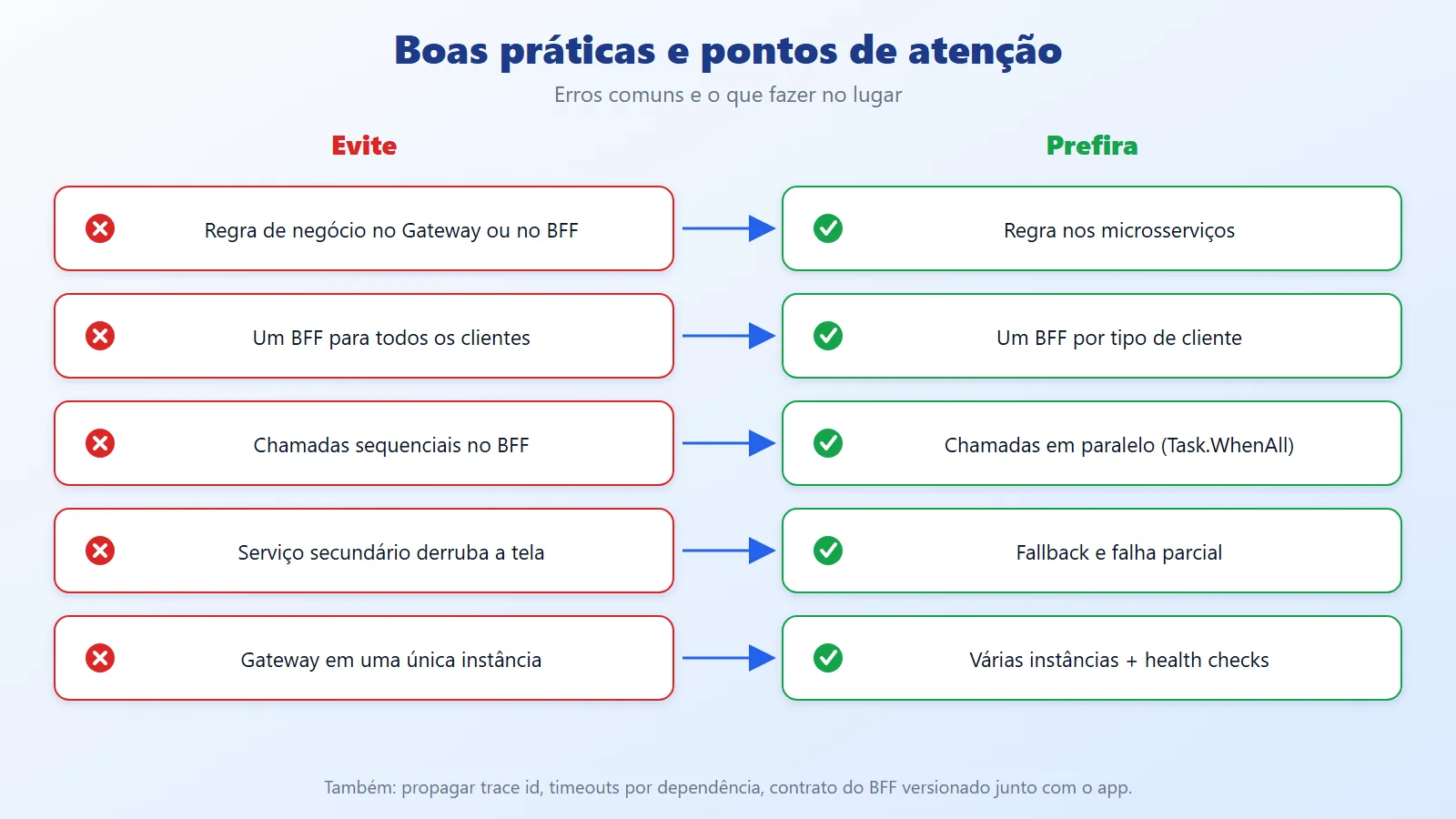
- Business rules in the BFF or the Gateway: they turn into a "mini monolith." Rules belong in the services.
- A single BFF for all clients: it becomes a God Gateway, coupled to every screen.
- Gateway as a single point of failure: without multiple instances and health checks, one outage takes everything down.
- Sequential calls in the BFF, adding up latencies.
- Propagating an exception from a secondary service and breaking the whole screen.
An example of the sequential-calls mistake, with the fix:
// Avoid: latencies add up (time = order + tracking)


var order = await orders.GetOrderAsync(id, ct);


var tracking = await trackingClient.GetTrackingAsync(id, ct);


// Prefer: the calls start together (time = the slowest one)


var orderTask = orders.GetOrderAsync(id, ct);


var trackingTask = trackingClient.GetTrackingAsync(id, ct);


await Task.WhenAll(orderTask, trackingTask);
Production tips
- Propagate
traceparent/correlation id from the Gateway down to the services (OpenTelemetry). - Validate the token at the Gateway, but forward the identity; sensitive services should still authorize.
- Define timeouts per dependency, shorter for secondary data.
- Version the BFF contract together with the app (old mobile apps stay in use for months).
- A BFF should belong to the team that maintains the front end it serves.
- Cache aggregated responses when the data allows it (
HybridCachein .NET 9+).
A short timeout for secondary data, per dependency:
builder.Services


    .AddHttpClient<INotificationClient, NotificationClient>(c =>


        c.BaseAddress = new Uri(services["Notification"]!))


    .AddStandardResilienceHandler(options =>


    {


        options.AttemptTimeout.Timeout =


            TimeSpan.FromSeconds(1);


        options.TotalRequestTimeout.Timeout =


            TimeSpan.FromSeconds(3);


        options.CircuitBreaker.SamplingDuration =


            TimeSpan.FromSeconds(2);


    });
The circuit breaker's SamplingDuration must be at least twice the AttemptTimeout; the handler rejects the configuration otherwise.
And distributed tracing, to follow a request from the app all the way to the service:
builder.Services.AddOpenTelemetry()


    .WithTracing(tracing => tracing


        .AddAspNetCoreInstrumentation()


        .AddHttpClientInstrumentation());
Enable the same in the Gateway, the BFF, and the services: the trace context (traceparent) follows the outgoing HTTP calls.
YARP-specific
- Keep the Gateway free of business logic: routes, policies, and transforms. Body transformation and aggregation belong to the BFF.
- Use
Orderon routes when paths overlap; the lowest value takes priority. - Enable health checks (active and passive) before putting more than one instance behind the cluster.
- Avoid
DangerousAcceptAnyServerCertificateoutside development. - Treat route configuration as code: versioned, reviewed, and going through the same deploy pipeline. Dynamic reload is convenient, but a wrong route affects every client.
- If the Gateway sits behind another proxy/load balancer, configure
ForwardedHeadersso you don't lose the client's real IP (important for per-IP rate limiting). - Treat the Gateway as a critical component: multiple instances, body size limits (
MaxRequestBodySize), and per-route timeouts.
The cluster's active health check (section 4.1.1) needs a health endpoint in the BFF:
builder.Services.AddHealthChecks();


var app = builder.Build();


app.MapHealthChecks("/health");
Without it, the response won't be 2xx and YARP takes the destination out of rotation.
When to use an API Gateway and BFF and when to avoid them
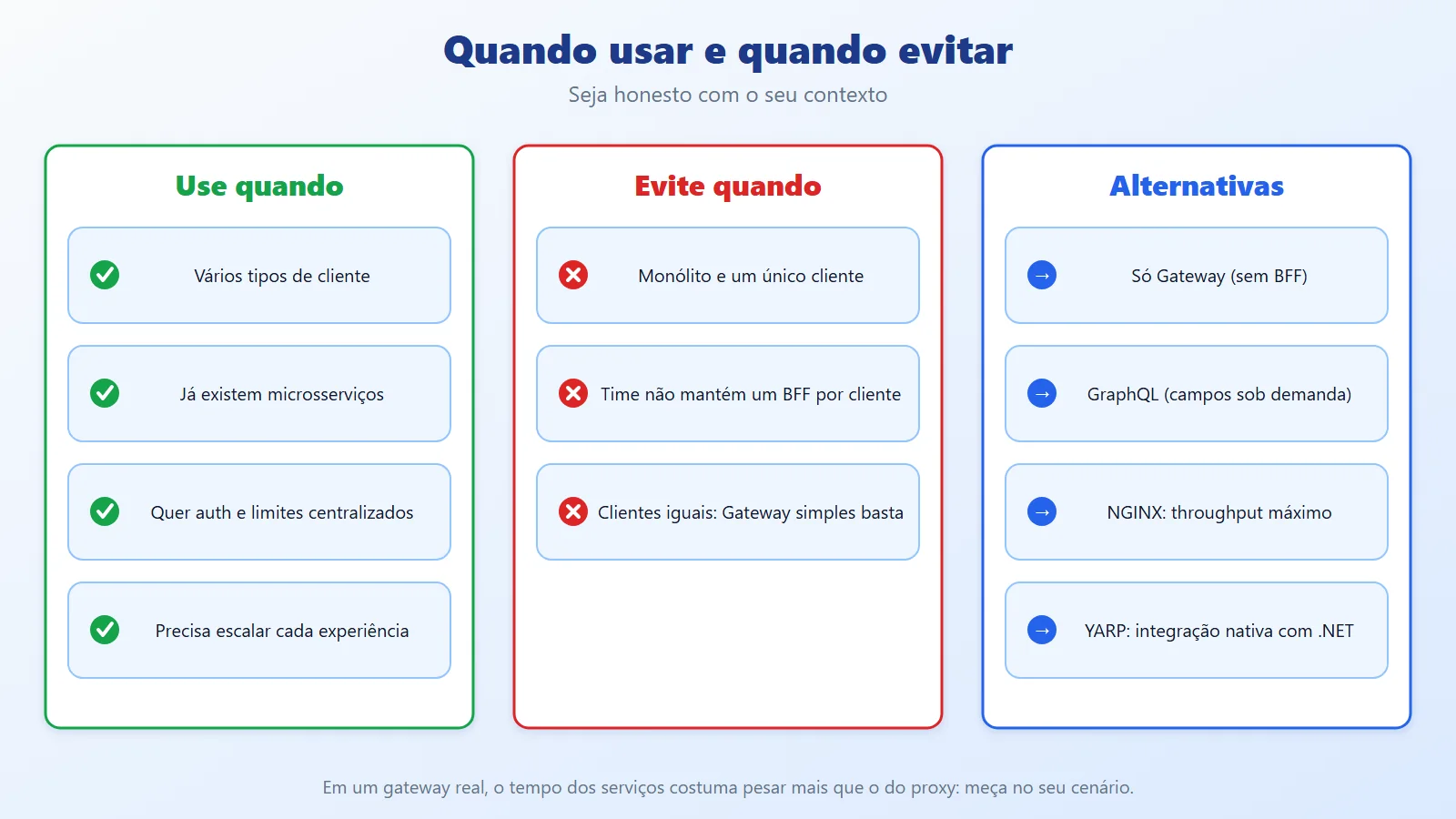
Use it when
- There are several client types with different data needs.
- You already have microservices and the client makes many calls to build a screen.
- You want to centralize authentication, rate limiting, and observability.
- You need to scale and evolve each experience independently.
Avoid (or postpone) when
- You have a monolith and a single client: the extra layer only adds latency and deployment overhead.
- The team is small and can't maintain one BFF per client.
- The clients consume exactly the same data: a simple Gateway is enough.
Alternatives
- Gateway only: when there is no need to adapt the payload per client.
- GraphQL: when clients need to choose the fields; you swap the BFF for a flexible schema, with its own complexity cost.
- Client-side composition: acceptable in small apps, but you lose security and performance.
6.1. YARP vs NGINX: what about performance?
A common question is whether it is worth swapping YARP for a dedicated proxy such as NGINX. A public benchmark compared the two using a minimal /hello API and load generated by k6:
- NGINX with the default configuration: about 10.2 thousand requests per second (RPS) and a p90 of 21.23 ms. YARP (about 36.7 thousand RPS and a p90 of 7.77 ms) seemed to win by a wide margin.
- Tuned NGINX: about 46.9 thousand RPS and a p90 of 6.34 ms. After tuning, NGINX surpassed YARP in raw performance.
The tuning used in the test was this:
worker_processes auto;


events {


    worker_connections 65536;


    multi_accept on;


    use epoll;


}


upstream backend {


    keepalive 512;


}


# in the proxy block: proxy_http_version 1.1;
How to read this result
- Default configuration skews a benchmark: only compare after tuning both sides.
- NGINX is the choice for maximum throughput; YARP is the choice for native .NET integration (authentication, policies, extension in C#, the same pipeline and the same deployment as the team).
- The numbers come from a specific test, with an API that has no business logic. In a real gateway, the time spent in the services behind it usually weighs more than the proxy's. Measure in your own scenario, with your own payloads.
Conclusion: Gateway and BFF, each in its own role
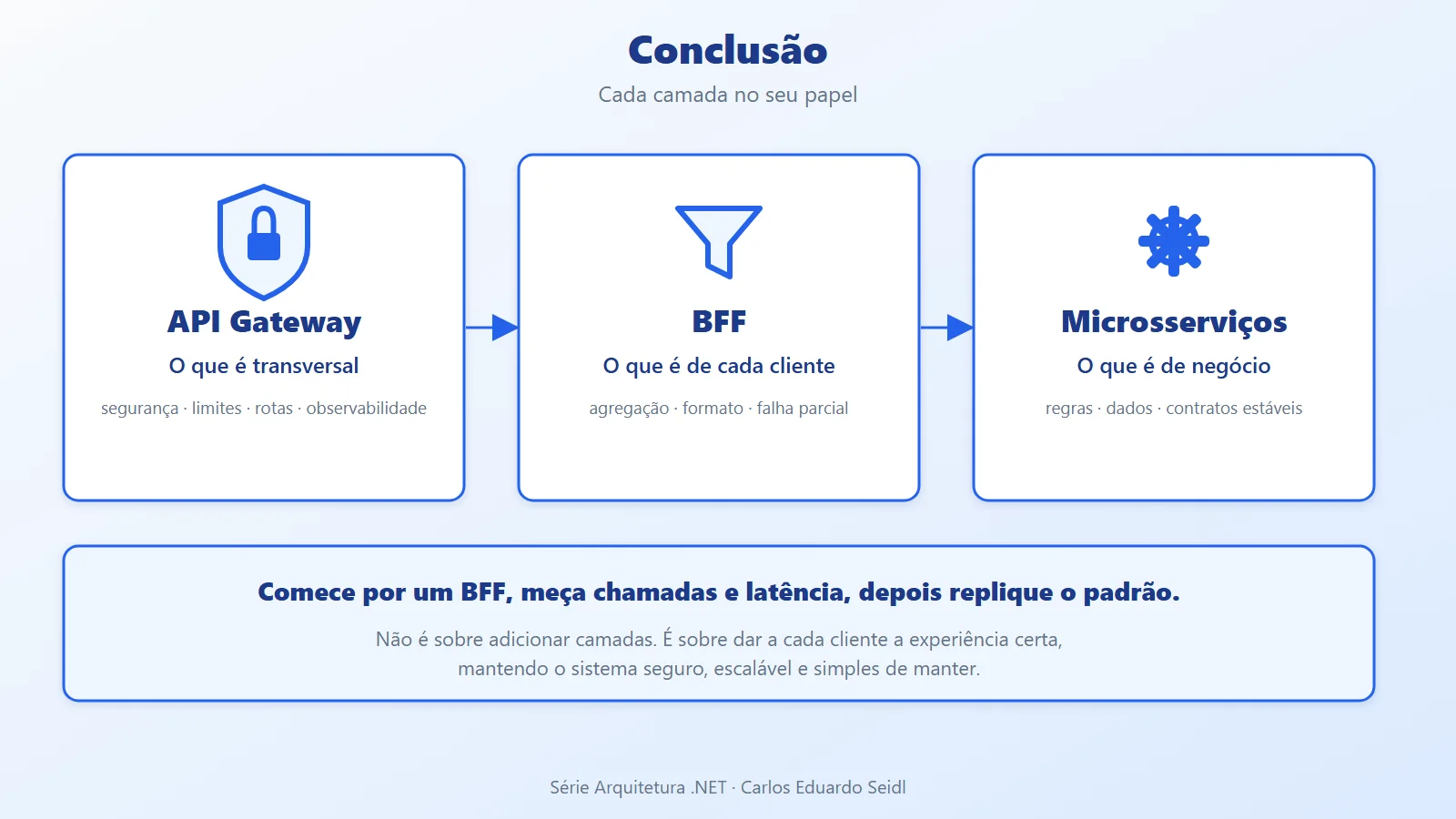
The API Gateway concentrates what is cross-cutting (security, limits, routing, observability) and the BFF concentrates what is specific to each experience (aggregation and format). Together, they reduce network calls, hide the internal services, and let each client evolve without dragging the others along.
A practical takeaway: start with the client that suffers most from multiple calls, create one BFF for it, and measure the reduction in requests and latency before replicating the pattern. This isn't about adding layers; it's about giving each client the right experience while keeping the system secure, scalable, and easy to maintain.
References on YARP and API Gateway in .NET
- Article code on GitHub: ceseidl/api-gateway-bff-dotnet
- Microsoft Learn: Overview of YARP
- Microsoft Learn: YARP Configuration Files
- Microsoft Learn: YARP Load Balancing
- Microsoft Learn: YARP Request and Response Transforms
- Simform Engineering: Implementing a YARP API Gateway in .NET for Microservices
- Repository: dotnet/yarp
Keep reading
- Rate Limiting in .NET: details the traffic limits that the gateway can centralize.
- Fault Tolerance vs Resilience in .NET: covers timeout, retry and circuit breaker for calls between services.
- Monolith vs Microservices: gives context on when having several services behind a gateway makes sense.
Want an architecture review of your .NET backend? See the backend and .NET architecture service.