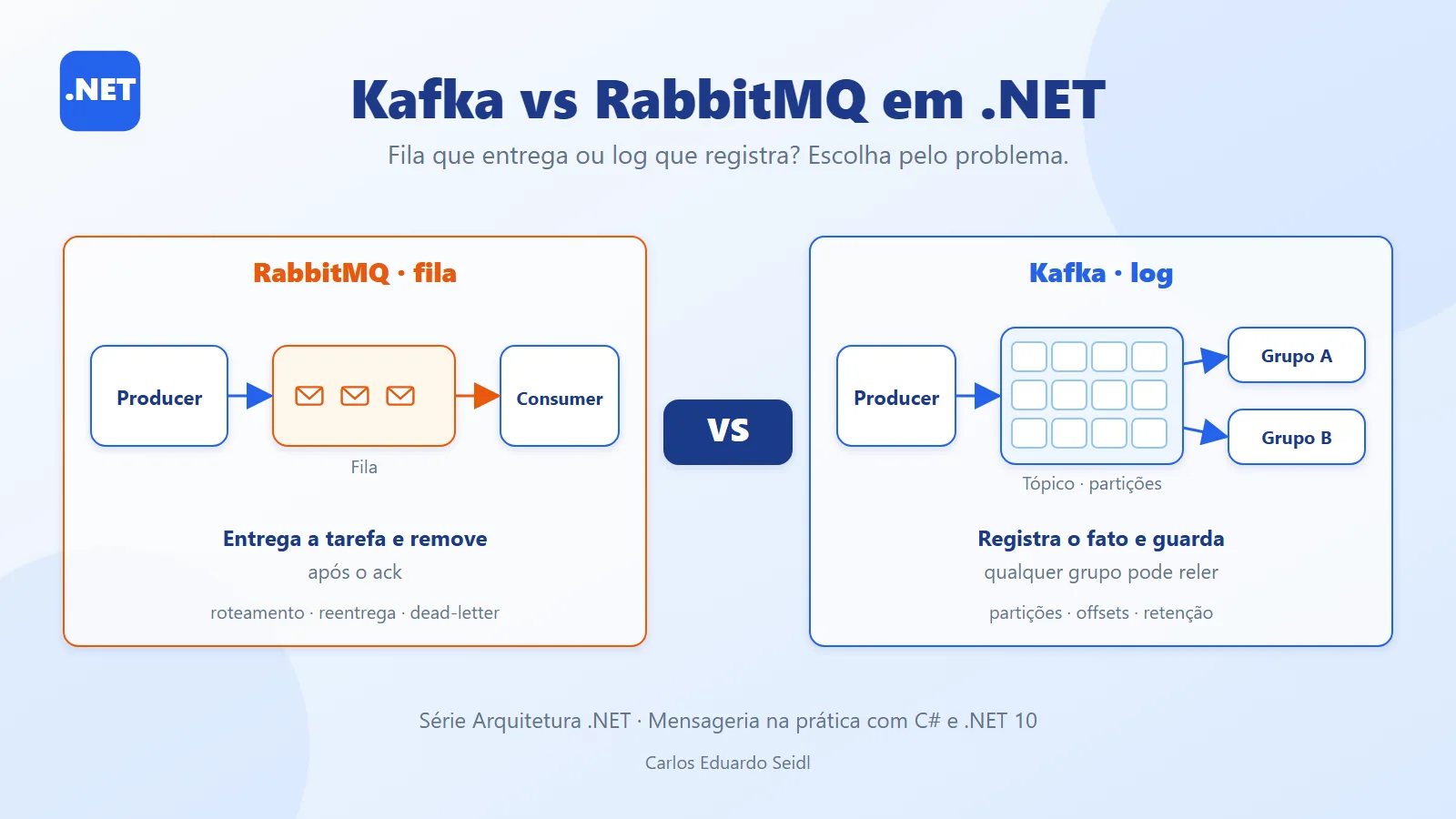
Kafka or RabbitMQ: how services talk to each other
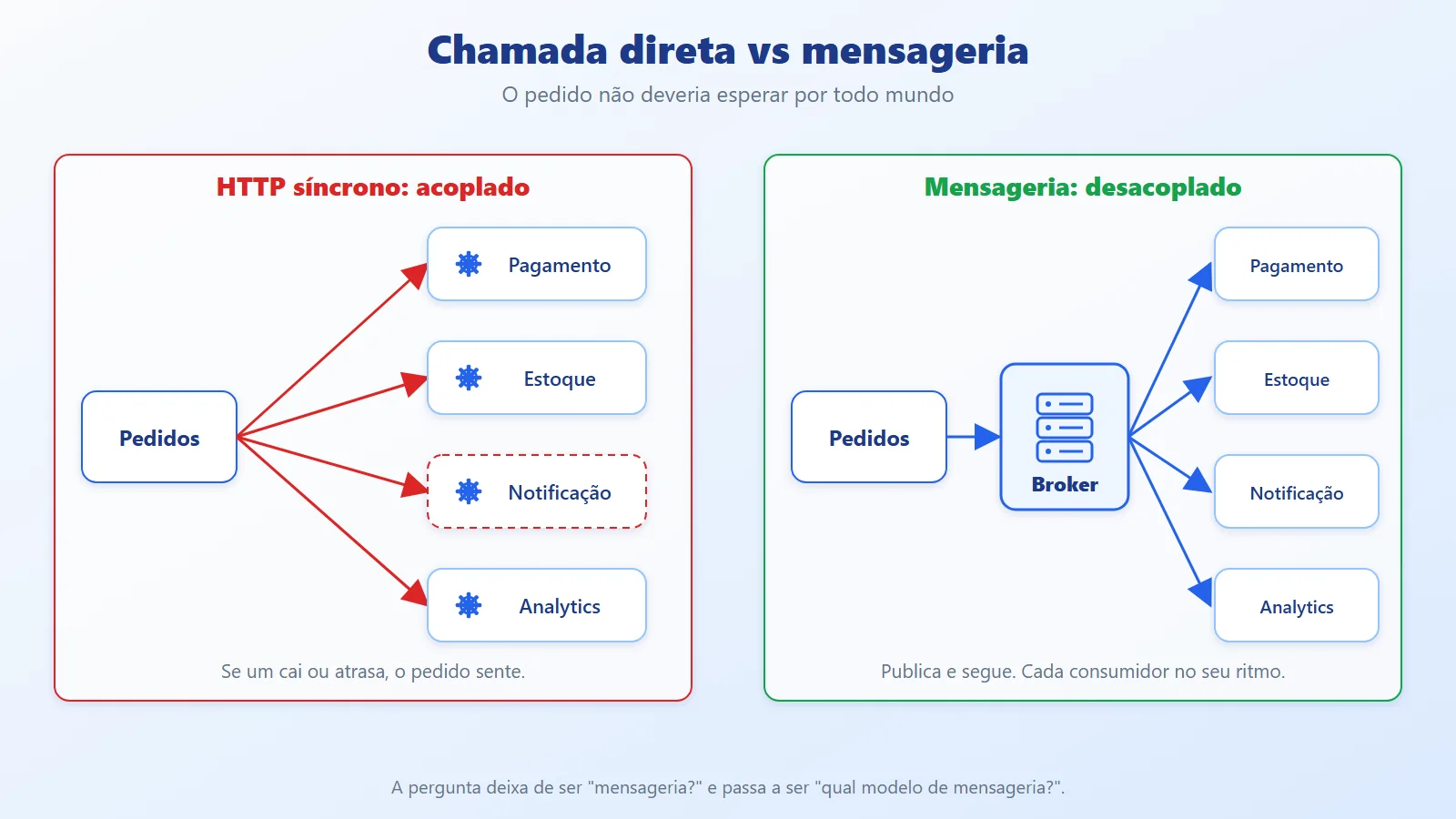
When an order is created, the Orders service needs to notify Payment, Inventory, Notification and Analytics. If it calls each one over HTTP, it becomes coupled to all of them: if one is down, the order fails or slows down. The way out is asynchronous communication through messaging, and that is where every team asks the same question: Kafka or RabbitMQ?
Both move messages between services, but they start from different models. RabbitMQ is a queue-based message broker; Kafka is a log-based event streaming platform. Choosing by the more famous name is an expensive mistake. This article continues the series after the Saga Pattern (which used messages to coordinate transactions), and looks at the two side by side in .NET: from the environment to running code, and then when each one is worth it.
RabbitMQ queues versus the Kafka event log
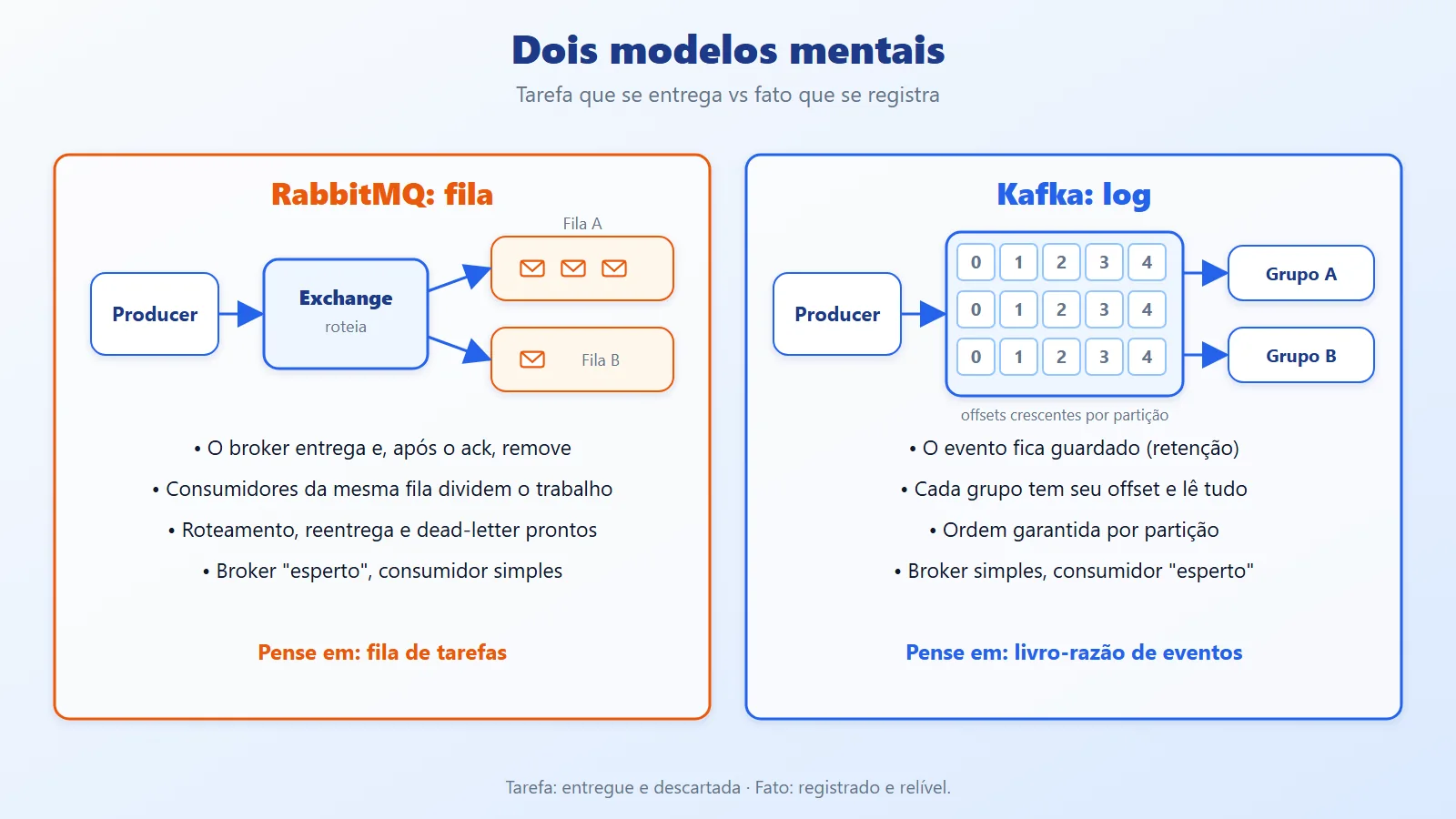
RabbitMQ: message queue
- The producer publishes to an exchange, which routes to queues according to rules (
direct,topic,fanout,headers). - The broker delivers the message to the consumer and, after the ack, removes the message from the queue.
- Several consumers on the same queue share the work (competing consumers).
- The broker is "smart": it handles routing, redelivery, priority, TTL and dead-lettering.
Kafka: event log
- The producer writes events to a topic, split into partitions (ordered, append-only logs).
- The event is not removed when it is read: it is kept for the configured retention period.
- Each consumer keeps its own offset (read position). Each consumer group reads the entire topic, independently.
- The broker is "simple" and the consumer is "smart": the reader decides where to read from and when to acknowledge.
The difference in one sentence: in RabbitMQ the message is a task to be delivered and discarded; in Kafka the event is a recorded fact that can be re-read.
In .NET, the most widely used clients are the RabbitMQ.Client package (from version 7 on, with an async API) and Confluent.Kafka. Both can be used directly, as in this article, or behind a library such as MassTransit, Wolverine or NServiceBus.
The key Kafka uses to preserve ordering is just a property of the message:
// Same key -> same partition -> order preserved


var message = new Message<string, byte[]>


{


    Key = order.CustomerId,


    Value = payload


};
And in RabbitMQ, the acknowledgement is an explicit choice made by the consumer:
// autoAck: false -> the message only leaves the queue after BasicAck


await channel.BasicConsumeAsync(


    "orders.process", autoAck: false, consumer);
Both snippets are explained in the complete example, in section 4.
RabbitMQ exchanges and queues, Kafka partitions
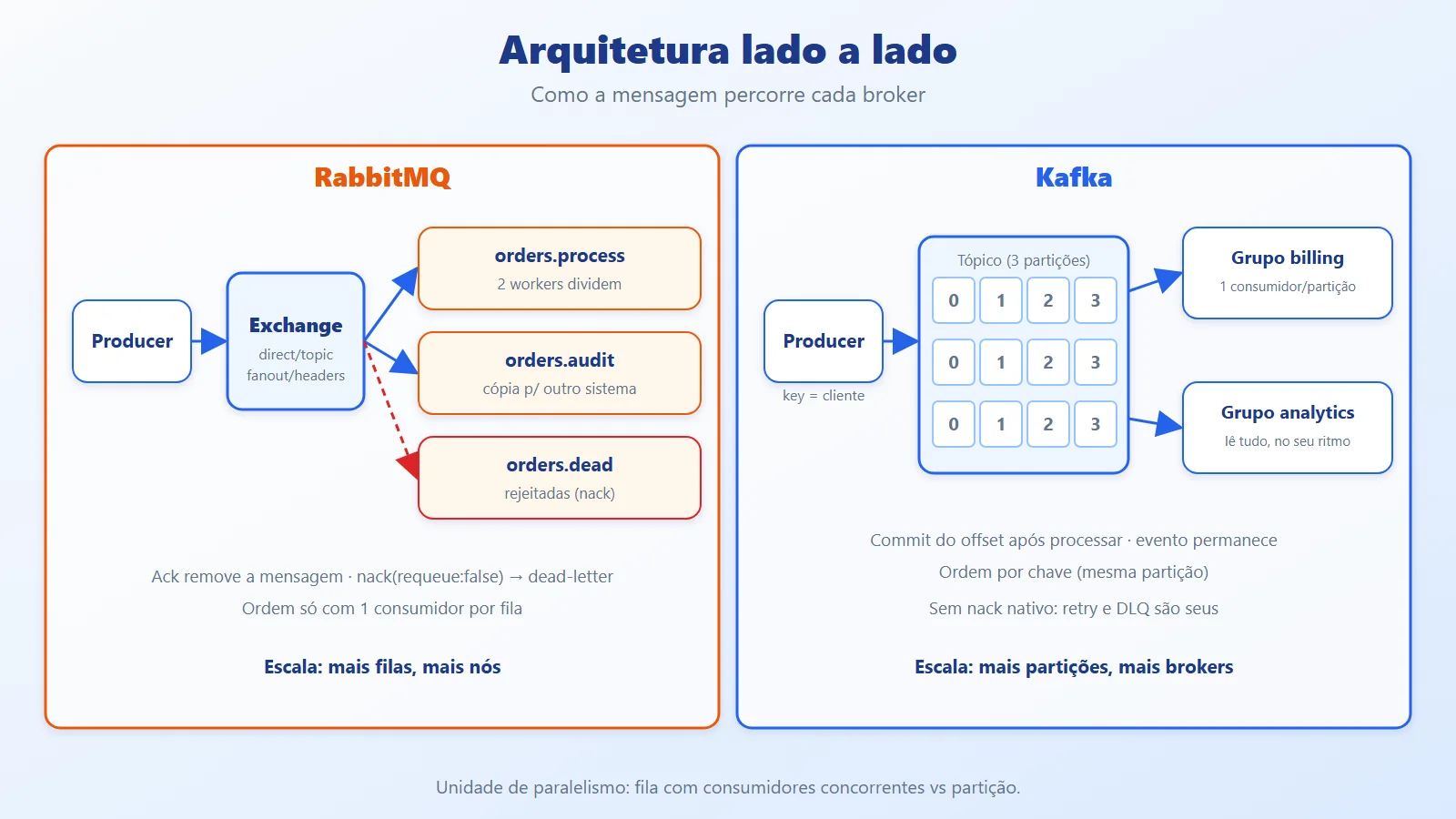
RabbitMQ
Producer ─► Exchange ──(routing key)──► Queue A ─┬─► Consumer 1


                  │                              └─► Consumer 2


                  └──(routing key)──► Queue B ───► Consumer 3


Consumers 1 and 2 share Queue A; consumer 3 receives its own copy.
The exchange decides which queues the message goes to. Each queue delivers each message to one consumer. For several systems to receive the same event, you create one queue per system bound to the same exchange. In the example, there are two bindings with the same key (excerpt from RabbitMqDemo.Topology.cs):
await channel.QueueBindAsync(


    Process, Exchange, RoutingKey, cancellationToken: ct);


await channel.QueueBindAsync(


    Audit, Exchange, RoutingKey, cancellationToken: ct);
Each QueueBindAsync binds a queue to the exchange: orders.process and orders.audit each receive a copy of every message published with order.placed.
Kafka
Producer ──(key)──► Topic: Partition 0 | 1 | 2


                          ├─► Group "billing"


                          │   (1 consumer per partition)


                          └─► Group "analytics"


                              (reads everything again, at its own pace)
The partition is the unit of parallelism and ordering: ordering is only guaranteed within a partition, and within a group each partition is read by one consumer. So the number of partitions is the parallelism ceiling for the group. In the example, the topic is created with three partitions (excerpt from KafkaDemo.cs):
new TopicSpecification


{


    Name = topic,


    NumPartitions = 3,


    ReplicationFactor = 1


}
NumPartitions = 3 limits the group to three active consumers; ReplicationFactor = 1 is only for the local environment.
Comparing the two approaches, dimension by dimension
- Consumption model: RabbitMQ pushes the message to the consumer (push) and discards it after the ack; in Kafka, the consumer pulls (pull) from an offset and the message stays there.
- Re-reading the past (replay): in Kafka it is native (just position the offset or use a new group). In RabbitMQ it does not exist with regular queues; the closest feature is RabbitMQ Streams, which are also a log with non-destructive reads.
- Routing: RabbitMQ has exchanges and several ready-made rules. Kafka routes by topic and key; filtering happens in the consumer.
- Ordering: RabbitMQ preserves order in a queue with one consumer; with competing consumers and redeliveries, ordering is lost. Kafka guarantees ordering per partition.
- Failures and redelivery: RabbitMQ has native
nack, requeue and dead-letter exchange. In Kafka there is no per-message ack: you advance the offset, and retry and dead-letter topic are patterns you implement yourself. - Scale: Kafka scales by partitions and brokers and is built for very high volume; RabbitMQ handles moderate to high volumes very well and grows with queues and nodes, but retaining large amounts of history is not its strength.
- Operations: RabbitMQ is simpler to bring up and understand. Kafka requires thinking about partitions, replication, retention and rebalancing. Starting with Kafka 4.0, ZooKeeper is gone and the cluster runs in KRaft mode, which simplified operations.
In .NET, the choice is between using the client directly (more control, more code) or a library with abstractions for retry, outbox and sagas. The example below uses the client directly, so the mechanics stay visible.
Kafka and RabbitMQ in C#: the same flow in both
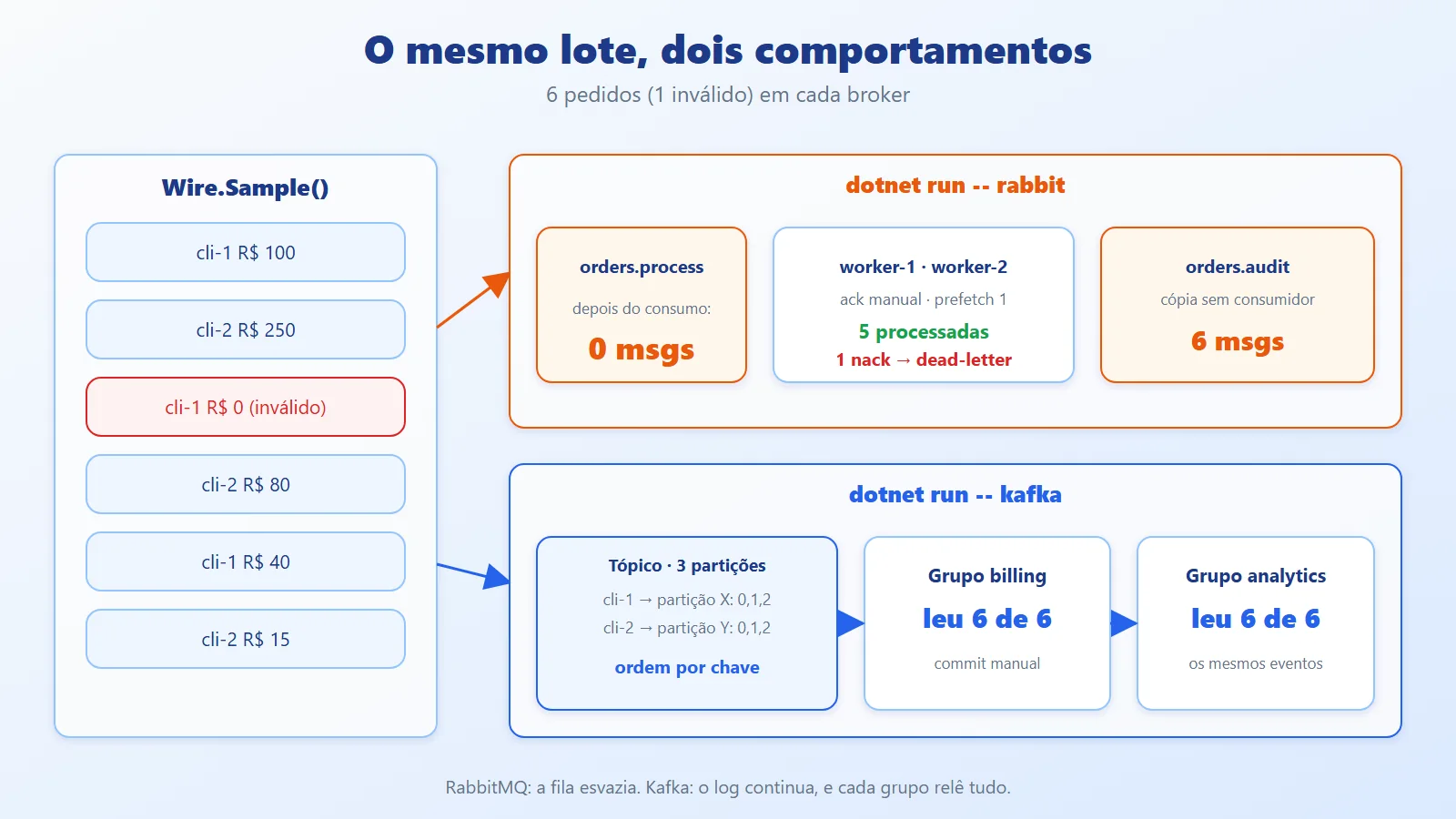
The example publishes the same six orders (one of them invalid) to both brokers and shows the difference in what happens afterwards: in RabbitMQ the queue empties and the invalid order goes to the dead-letter; in Kafka two groups read the same events, with per-customer ordering.
Complete code, with instructions to run it (with and without Docker): github.com/ceseidl/kafka-vs-rabbitmq-dotnet. All of it is also in this article, file by file.
4.1. Environment
Prerequisites: .NET 10 SDK and Docker. Both brokers start from a docker-compose.yml; Kafka uses the official apache/kafka image in KRaft mode (no ZooKeeper).
File docker-compose.yml. The ports are bound to the loopback (127.0.0.1 and ::1), so the brokers (RabbitMQ uses guest/guest) are not reachable from the network, and the healthcheck entries allow docker compose up -d --wait.
services:


  rabbitmq:


    image: rabbitmq:4.3-management


    ports:


      # EN: Loopback only (IPv4 and IPv6: "localhost" may be


      # EN: ::1): the broker (guest/guest) is not reachable


      # EN: from the network.


      # PT: Só no loopback (IPv4 e IPv6: "localhost" pode ser


      # PT: ::1): o broker (guest/guest) não fica acessível


      # PT: pela rede.


      - "127.0.0.1:5672:5672" # AMQP


      - "[::1]:5672:5672"


      # EN: management UI (guest/guest).


      # PT: painel de administração (guest/guest).


      - "127.0.0.1:15672:15672"


      - "[::1]:15672:15672"


    healthcheck:


      test: ["CMD", "rabbitmq-diagnostics", "-q", "ping"]


      interval: 5s


      timeout: 10s


      retries: 20


  kafka:


    # EN: KRaft mode: no ZooKeeper.


    # PT: modo KRaft: sem ZooKeeper.


    image: apache/kafka:4.0.0


    ports:


      - "127.0.0.1:9092:9092"


      - "[::1]:9092:9092"


    healthcheck:


      test:


        - CMD-SHELL


        - >-


          /opt/kafka/bin/kafka-broker-api-versions.sh


          --bootstrap-server localhost:9092


          > /dev/null 2>&1


      interval: 5s


      timeout: 15s


      retries: 30


      start_period: 10s
The project (MensageriaDemo.csproj) is a console app with the two client packages:
<Project Sdk="Microsoft.NET.Sdk">


  <PropertyGroup>


    <OutputType>Exe</OutputType>


    <TargetFramework>net10.0</TargetFramework>


    <ImplicitUsings>enable</ImplicitUsings>


    <Nullable>enable</Nullable>


  </PropertyGroup>


  <ItemGroup>


    <PackageReference Include="Confluent.Kafka"


                      Version="2.15.1" />


    <PackageReference Include="RabbitMQ.Client"


                      Version="7.2.2" />


  </ItemGroup>


</Project>docker compose up -d --wait
dotnet run -- rabbit
dotnet run -- kafkaWithout Docker
The example only needs a RabbitMQ at localhost:5672 (user and password guest) and a Kafka at localhost:9092. How they are started does not matter to the code. If you do not use Docker, there are three paths:
- Native RabbitMQ installation. Install Erlang/OTP and then RabbitMQ (installers at rabbitmq.com/docs/install-windows, or through your Linux/macOS packages). Enable the management plugin and check the service:
rabbitmq-plugins enable rabbitmq_management


rabbitmqctl status- Native Kafka installation (KRaft mode). Install Java 17 or later, download the
.tgzfrom kafka.apache.org/downloads, extract it and, inside the folder, format the storage once and start the broker. On Windows, use WSL 2 (Ubuntu), which is the simplest way to run the.shscripts:
KAFKA_CLUSTER_ID="$(bin/kafka-storage.sh random-uuid)"


bin/kafka-storage.sh format --standalone \


  -t $KAFKA_CLUSTER_ID -c config/server.properties


bin/kafka-server-start.sh config/server.properties- Managed service. A free tier of a managed RabbitMQ (such as CloudAMQP) and a managed Kafka cluster (such as Confluent Cloud) mean you do not need to install anything. In that case, change the host, port and credentials in the code (
HostName/Urifor RabbitMQ andBootstrapServersfor Kafka) and add the TLS and authentication parameters the provider specifies.
With the environment up, dotnet run is the same. If Kafka is on another machine or port, adjust BootstrapServers; for RabbitMQ, the host and the credential.
4.2. Contract and entry point
The blocks in this section are the repository files, uncut; that is why messages and comments appear in both English and Portuguese. First Contracts.cs, then Program.cs.
using System.Text.Json;


namespace MensageriaDemo;


public sealed record OrderPlaced(


    Guid OrderId, string CustomerId, decimal Total);


public static class Wire


{


    public static byte[] Serialize(OrderPlaced order) =>


        JsonSerializer.SerializeToUtf8Bytes(order);


    public static OrderPlaced Deserialize(


        ReadOnlySpan<byte> body) =>


        JsonSerializer.Deserialize<OrderPlaced>(body)


        ?? throw new InvalidOperationException(


            "Empty message / Mensagem vazia");


    // EN: Sample orders: two customers, plus one invalid order


    // (Total <= 0).


    // PT: Pedidos de exemplo: dois clientes, e um pedido


    // inválido (Total <= 0).


    public static IReadOnlyList<OrderPlaced> Sample() =>


    [


        new(Guid.NewGuid(), "cli-1", 100m),


        new(Guid.NewGuid(), "cli-2", 250m),


        new(Guid.NewGuid(), "cli-1", 0m),


        new(Guid.NewGuid(), "cli-2", 80m),


        new(Guid.NewGuid(), "cli-1", 40m),


        new(Guid.NewGuid(), "cli-2", 15m),


    ];


}using MensageriaDemo;
using var cts = new CancellationTokenSource(
TimeSpan.FromSeconds(60));
switch (args.FirstOrDefault())
{
case "rabbit":
await RabbitMqDemo.RunAsync(cts.Token);
break;
case "kafka":
await KafkaDemo.RunAsync(cts.Token);
break;
default:
Console.WriteLine(
"usage / uso: dotnet run -- rabbit|kafka");
break;
}The contract is the same for both brokers; what changes is how each one transports it.
4.3. RabbitMQ: topology, publishing and consuming
First the topology, in RabbitMqDemo.Topology.cs: a direct exchange, the main queue as a quorum queue (the recommended replicated, durable queue), an audit queue bound to the same key and a dead-letter exchange for anything that gets rejected.
using RabbitMQ.Client;


using RabbitMQ.Client.Events;


namespace MensageriaDemo;


public static partial class RabbitMqDemo


{


    private const string Exchange = "orders";


    private const string RoutingKey = "order.placed";


    private const string Process = "orders.process";


    private const string Audit = "orders.audit";


    private const string Dead = "orders.dead";


    private static async Task DeclareTopologyAsync(


        IChannel channel, CancellationToken ct)


    {


        await channel.ExchangeDeclareAsync(


            Exchange, ExchangeType.Direct,


            durable: true, cancellationToken: ct);


        await channel.ExchangeDeclareAsync(


            "orders.dlx", ExchangeType.Fanout,


            durable: true, cancellationToken: ct);


        // EN: Main queue: quorum queue, with dead-letter for


        // rejected messages.


        // PT: Fila principal: quorum queue, com dead-letter


        // para mensagens rejeitadas.


        var args = new Dictionary<string, object?>


        {


            ["x-queue-type"] = "quorum",


            ["x-dead-letter-exchange"] = "orders.dlx",


        };


        await channel.QueueDeclareAsync(


            Process, durable: true, exclusive: false,


            autoDelete: false, args, cancellationToken: ct);


        await channel.QueueDeclareAsync(


            Audit, durable: true, exclusive: false,


            autoDelete: false, cancellationToken: ct);


        await channel.QueueDeclareAsync(


            Dead, durable: true, exclusive: false,


            autoDelete: false, cancellationToken: ct);


        // EN: Two queues bound to the same key: each one


        // receives a copy of the message.


        // PT: Duas filas ligadas à mesma chave: cada uma


        // recebe uma cópia da mensagem.


        await channel.QueueBindAsync(


            Process, Exchange, RoutingKey, cancellationToken: ct);


        await channel.QueueBindAsync(


            Audit, Exchange, RoutingKey, cancellationToken: ct);


        await channel.QueueBindAsync(


            Dead, "orders.dlx", "", cancellationToken: ct);


        foreach (var queue in new[] { Process, Audit, Dead })


            // EN: Repeatable demo.


            // PT: Demo repetível.


            await channel.QueuePurgeAsync(queue, ct);


    }


    private static async Task<uint> Count(


        IChannel channel, string queue, CancellationToken ct) =>


        (await channel.QueueDeclarePassiveAsync(queue, ct))


            .MessageCount;


}
Then, in RabbitMqDemo.cs, the main flow: publish with broker confirmation and consume with two concurrent workers, manual ack and rejection without requeueing.
using RabbitMQ.Client;


using RabbitMQ.Client.Events;


namespace MensageriaDemo;


public static partial class RabbitMqDemo


{


    public static async Task RunAsync(CancellationToken ct)


    {


        // EN: Default credentials: guest/guest.


        // PT: Credenciais padrão: guest/guest.


        var factory = new ConnectionFactory


        {


            HostName = "localhost"


        };


        await using var connection =


            await factory.CreateConnectionAsync(ct);


        // EN: Publisher confirms: publish only returns after the


        // broker has accepted the message.


        // PT: Confirmações do broker: o publish só retorna


        // depois que o broker aceitou a mensagem.


        var options = new CreateChannelOptions(


            publisherConfirmationsEnabled: true,


            publisherConfirmationTrackingEnabled: true);


        await using var channel =


            await connection.CreateChannelAsync(options, ct);


        await DeclareTopologyAsync(channel, ct);


        var orders = Wire.Sample();


        var handled = 0;


        var done = new TaskCompletionSource();


        // EN: Prefetch 1: each worker gets one message at a time


        // (fair dispatch).


        // PT: Prefetch 1: cada worker recebe uma mensagem por


        // vez (distribuição justa).


        await channel.BasicQosAsync(


            0, prefetchCount: 1, global: false, ct);


        async Task StartWorker(string name)


        {


            var consumer =


                new AsyncEventingBasicConsumer(channel);


            consumer.ReceivedAsync += async (_, ea) =>


            {


                try


                {


                    var order = Wire.Deserialize(ea.Body.Span);


                    if (order.Total <= 0)


                        throw new InvalidOperationException(


                            "Invalid total / Total inválido");


                    Console.WriteLine(


                        $"[{name}] processed / processou "


                        + $"{order.CustomerId} R$ {order.Total}");


                    await channel.BasicAckAsync(


                        ea.DeliveryTag, multiple: false);


                }


                catch (Exception ex)


                {


                    Console.WriteLine(


                        $"[{name}] failed / falhou "


                        + $"({ex.Message})");


                    await channel.BasicNackAsync(


                        ea.DeliveryTag,


                        multiple: false,


                        requeue: false);


                }


                finally


                {


                    if (Interlocked.Increment(ref handled)


                        == orders.Count)


                        done.TrySetResult();


                }


            };


            // EN: autoAck: false -> the message only leaves the


            // queue after BasicAck.


            // PT: autoAck: false -> a mensagem só sai da fila


            // após o BasicAck.


            await channel.BasicConsumeAsync(


                Process, autoAck: false, consumer, ct);


        }


        await StartWorker("worker-1");


        await StartWorker("worker-2");


        foreach (var order in orders)


        {


            var props = new BasicProperties


            {


                Persistent = true,


                MessageId = order.OrderId.ToString(),


            };


            await channel.BasicPublishAsync(


                Exchange, RoutingKey, mandatory: true, props,


                Wire.Serialize(order), ct);


        }


        await done.Task.WaitAsync(ct);


        // EN: Lets the broker update its counters.


        // PT: Deixa o broker atualizar os contadores.


        await Task.Delay(500, ct);


        var process = await Count(channel, Process, ct);


        var audit = await Count(channel, Audit, ct);


        var dead = await Count(channel, Dead, ct);


        Console.WriteLine(


            "orders.process (after consumption / "


            + $"após consumo): {process} msgs");


        Console.WriteLine(


            "orders.audit (copy, no consumer / "


            + $"cópia sem consumidor): {audit} msgs");


        Console.WriteLine(


            $"orders.dead (dead-letter): {dead} msgs");


    }


}
Execution output (the order between workers may vary):
[worker-1] processed / processou cli-1 R$ 100


[worker-2] processed / processou cli-2 R$ 250


[worker-1] failed / falhou (Invalid total / Total inválido)


[worker-2] processed / processou cli-2 R$ 80


[worker-1] processed / processou cli-1 R$ 40


[worker-2] processed / processou cli-2 R$ 15


orders.process (after consumption / após consumo): 0 msgs


orders.audit (copy, no consumer / cópia sem consumidor): 6 msgs


orders.dead (dead-letter): 1 msgs
Key points in the code (RabbitMQ)
- Publisher confirms: with confirmation enabled on the channel,
BasicPublishAsynconly completes when the broker accepts the message; if it rejects it, the call throws. Without this, "published" does not mean "arrived". - Manual ack (
autoAck: false): the message only leaves the queue afterBasicAckAsync. If the worker dies midway, the broker redelivers. BasicNackAsyncwithrequeue: falsesends the message to the dead-letter exchange. Requeueing a message that always fails creates an infinite loop.prefetchCount: 1** prevents one worker from accumulating messages while the other sits idle.- The
orders.auditqueue received all 6 messages with nobody consuming: that is exchange routing delivering one copy per queue. - The main queue ended up empty. The processed message no longer exists, and this is the main difference from Kafka.
- The order between
cli-1andcli-2in the output is not guaranteed, because two workers compete for the same queue.
4.4. Kafka: keyed producer and consumer groups
Kafka lives in three files of the same partial class. First KafkaDemo.cs, which creates the topic and coordinates the run:
using Confluent.Kafka;


using Confluent.Kafka.Admin;


namespace MensageriaDemo;


public static partial class KafkaDemo


{


    private const string Bootstrap = "localhost:9092";


    public static async Task RunAsync(CancellationToken ct)


    {


        // EN: Fresh topic on every run: no dependence on old


        // offsets.


        // PT: Tópico novo a cada execução: sem depender de


        // offsets antigos.


        var topic = $"orders-{Guid.NewGuid():N}"[..14];


        await CreateTopicAsync(topic);


        var orders = Wire.Sample();


        await ProduceAsync(topic, orders, ct);


        // EN: Two groups read the SAME events, each at its own


        // pace.


        // PT: Dois grupos leem os MESMOS eventos, cada um no seu


        // ritmo.


        Consume("billing", topic, orders.Count, ct);


        Consume("analytics", topic, orders.Count, ct);


    }


    private static async Task CreateTopicAsync(string topic)


    {


        using var admin = new AdminClientBuilder(


            new AdminClientConfig


            {


                BootstrapServers = Bootstrap


            }).Build();


        await admin.CreateTopicsAsync(


        [


            new TopicSpecification


            {


                Name = topic,


                NumPartitions = 3,


                ReplicationFactor = 1


            }


        ]);


    }


}
In KafkaDemo.Producer.cs, the keyed producer:
using Confluent.Kafka;


namespace MensageriaDemo;


public static partial class KafkaDemo


{


    private static async Task ProduceAsync(


        string topic,


        IReadOnlyList<OrderPlaced> orders,


        CancellationToken ct)


    {


        var config = new ProducerConfig


        {


            BootstrapServers = Bootstrap,


            // EN: Waits for the in-sync replicas.


            // PT: Espera as réplicas em sincronia.


            Acks = Acks.All,


            // EN: Retries without duplicating.


            // PT: Retry sem duplicar.


            EnableIdempotence = true,


        };


        using var producer =


            new ProducerBuilder<string, byte[]>(config).Build();


        foreach (var order in orders)


        {


            // EN: The key defines the partition: same customer


            // -> same partition -> order preserved.


            // PT: A chave define a partição: mesmo cliente ->


            // mesma partição -> ordem preservada.


            var message = new Message<string, byte[]>


            {


                Key = order.CustomerId,


                Value = Wire.Serialize(order),


            };


            var result =


                await producer.ProduceAsync(topic, message, ct);


            Console.WriteLine(


                $"produced / produziu {order.CustomerId} -> "


                + "partition / partição "


                + $"{result.Partition.Value}, "


                + $"offset {result.Offset.Value}");


        }


    }


}
And in KafkaDemo.Consumer.cs, the consumer groups:
using Confluent.Kafka;


namespace MensageriaDemo;


public static partial class KafkaDemo


{


    private static void Consume(


        string group, string topic, int expected,


        CancellationToken ct)


    {


        var config = new ConsumerConfig


        {


            BootstrapServers = Bootstrap,


            GroupId = group,


            // EN: A new group reads from the beginning.


            // PT: Grupo novo lê desde o início.


            AutoOffsetReset = AutoOffsetReset.Earliest,


            // EN: Commit only after processing.


            // PT: Commit só após processar.


            EnableAutoCommit = false,


        };


        using var consumer =


            new ConsumerBuilder<string, byte[]>(config).Build();


        consumer.Subscribe(topic);


        // EN: The first poll on a fresh broker can wait for the


        // group join and the offsets topic, so keep polling


        // until a deadline instead of giving up on the first


        // empty poll.


        // PT: O primeiro poll em um broker novo pode esperar o


        // group join e o tópico de offsets; por isso continua


        // tentando até um prazo, em vez de desistir no primeiro


        // poll vazio.


        var deadline = DateTime.UtcNow.AddSeconds(25);


        var seen = 0;


        while (seen < expected


               && DateTime.UtcNow < deadline


               && !ct.IsCancellationRequested)


        {


            var result =


                consumer.Consume(TimeSpan.FromSeconds(2));


            if (result is null) continue;


            var order = Wire.Deserialize(result.Message.Value);


            Console.WriteLine(


                $"[{group}] {order.CustomerId} R$ {order.Total} "


                + "(partition / partição "


                + $"{result.Partition.Value}, "


                + $"offset {result.Offset.Value})");


            // EN: At-least-once: confirm after the side effect.


            // PT: At-least-once: confirma depois do efeito.


            consumer.Commit(result);


            seen++;


        }


        Console.WriteLine(


            $"[{group}] read {seen} of {expected} events / "


            + $"leu {seen} de {expected} eventos");


        consumer.Close();


    }


}
Abridged output (partition numbers vary from run to run):
produced / produziu cli-1 -> partition / partição 2, offset 0


produced / produziu cli-2 -> partition / partição 1, offset 0


produced / produziu cli-1 -> partition / partição 2, offset 1


...


[billing] cli-1 R$ 100 (partition / partição 2, offset 0)


[billing] cli-1 R$ 0 (partition / partição 2, offset 1)


[billing] cli-1 R$ 40 (partition / partição 2, offset 2)


[billing] cli-2 R$ 250 (partition / partição 1, offset 0)


...


[billing] read 6 of 6 events / leu 6 de 6 eventos


[analytics] cli-1 R$ 100 (partition / partição 2, offset 0)


...


[analytics] read 6 of 6 events / leu 6 de 6 eventos
Key points in the code (Kafka)
- The key decides the partition: the three
cli-1orders landed on the same partition, with offsets 0, 1 and 2, and were read in that order. This is the per-entity ordering guarantee. Acks.All+EnableIdempotence: the producer waits for the in-sync replicas to confirm and, if it has to resend, the broker discards the duplicate within that producer session.- Two groups, same content:
billingandanalyticsread all 6 events, each with its own offset. The event did not disappear when the first group finished. This is the point RabbitMQ does not offer with regular queues. EnableAutoCommit = falseandCommitafter processing: this gives at-least-once semantics. If the process dies before the commit, the event is read again, so the consumer must be idempotent.- The invalid order (
R$ 0) was read normally: Kafka has no nativenackor dead-letter. Failure handling is your code's job (for example, publishing to anorders.deadtopic). - The demo commits on every message to keep things clear. In production, commit in batches, so you do not pay a round trip to the broker per event.
- A topic with
ReplicationFactor = 1is only for the local environment; in production, use a factor of 3 (and amin.insync.replicasconsistent withAcks.All).
Common mistakes and best practices with Kafka and RabbitMQ
5.1. Common mistakes
- Automatic ack in RabbitMQ: with
autoAck: true, the broker considers the message delivered the instant it is sent; if the consumer dies, the message is lost.
// Common mistake: loses the message if the process dies midway


await channel.BasicConsumeAsync(


    "orders.process", autoAck: true, consumer);


// Fix: acknowledge only after processing


// (BasicAckAsync in the handler)


await channel.BasicConsumeAsync(


"orders.process", autoAck: false, consumer);- Infinite requeue:
nackwithrequeue: trueon a "poison" message requeues it forever. Use dead-lettering and, if you need another attempt, a delay queue. - Auto-commit in Kafka: the client default commits offsets in the background, before your code finishes its work. A failure midway means a silently lost event.
// Common mistake: the offset is committed in the background,


// without waiting for your processing


// (EnableAutoCommit default = true)


var perigoso = new ConsumerConfig { GroupId = "billing" };


// Fix: explicit commit after the business effect


var seguro = new ConsumerConfig


{


    GroupId = "billing",


    EnableAutoCommit = false


};- Too few partitions: a group's parallelism never exceeds the number of partitions, and increasing it later changes the key-to-partition mapping, breaking ordering for existing keys. Plan with headroom.
- Bad key: a key with little variety (or one very dominant customer) creates "hot" partitions, where one consumer works and the others wait.
- Unversioned message: both queues and topics need to evolve the contract without breaking old consumers. Include a version in the event and only add optional fields.
- Assuming "exactly once": neither one delivers that end to end when there is an external effect (database, email, billing). What exists is at-least-once delivery plus an idempotent consumer.
5.2. Production tips
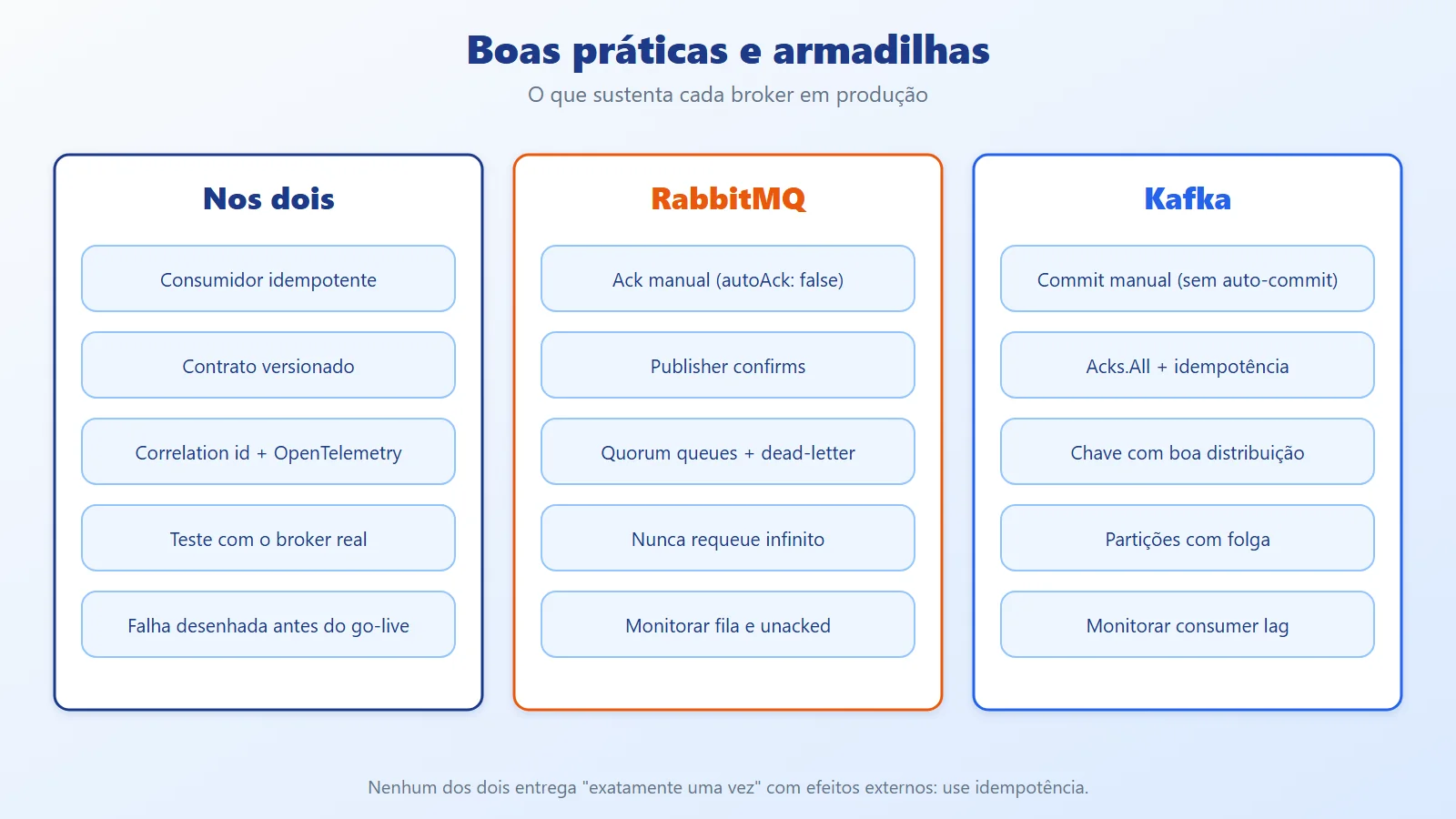
- Consumer idempotency in both cases: store the key of the processed message (a table with a unique constraint, written in the same transaction as the effect). The Inbox pattern and the Transactional Outbox for publishing safely are covered in the Saga Pattern article.
- RabbitMQ: use quorum queues for data that cannot be lost, publisher confirms, manual ack, a tuned
prefetchand a configured dead-letter. Monitor queue size and unacknowledged messages. - Kafka:
Acks.All, producer idempotence, a consistentmin.insync.replicas, manual commit, and monitoring of consumer lag (the distance between the end of the log and the group's offset). Growing lag is the main alarm. - Failures in Kafka: decide before going to production what happens to an event that fails (how many retries, which error topic to send it to, who looks at it).
- Serialization: JSON simplifies the start; when many teams consume the same topic, consider a schema-based format (Avro, Protobuf) and a schema registry.
- Observability: propagate the correlation identifier in the message headers and use OpenTelemetry to link producer and consumer in the same trace.
- Test with the real broker: what sets the two apart lies in behavior (redelivery, rebalancing, ordering), and that does not show up in tests with mocks. Start the broker in a container for the integration test.
- Validate the code and configuration in your own environment before copying: client and broker versions change parameter names and default values.
5.3. Day to day: running locally and using it for real
Bringing up the broker is the easy part. The value shows up when you can look inside it during development and know which kind of feature each one fits. The commands below use the example's docker compose exec. Without Docker, run the same tool directly: rabbitmqctl ... for RabbitMQ, and bin/kafka-topics.sh, bin/kafka-console-consumer.sh and bin/kafka-consumer-groups.sh (inside the Kafka folder) with the same parameters.
5.3.1. Looking at RabbitMQ
The management UI is at http://localhost:15672 (user and password guest). In the Queues tab you see, for each queue, how many messages are ready, how many were delivered and not yet acknowledged, and how many consumers are attached. On that same screen you can publish a message manually and read (Get messages) what is sitting in orders.dead. From the terminal:
# queues, messages and consumers


docker compose exec rabbitmq \


  rabbitmqctl list_queues name messages consumers


# empty a test queue


docker compose exec rabbitmq \


  rabbitmqctl purge_queue orders.dead
5.3.2. Looking at Kafka
Kafka does not ship with a UI. Day-to-day work is done with the command-line tools that already come in the image (in /opt/kafka/bin):
# list topics


docker compose exec kafka \


  /opt/kafka/bin/kafka-topics.sh \


  --bootstrap-server localhost:9092 --list


# read a topic from the beginning, showing the key


docker compose exec kafka \


  /opt/kafka/bin/kafka-console-consumer.sh \


  --bootstrap-server localhost:9092 --topic <nome-do-topico> \


  --from-beginning --property print.key=true


# state of a group: offset, end of log and lag per partition


docker compose exec kafka \


  /opt/kafka/bin/kafka-consumer-groups.sh \


  --bootstrap-server localhost:9092 --describe --group billing
If you prefer a UI, there are open-source dashboards that run in a container and connect to the same localhost:9092 (for example, Kafka UI or AKHQ). The LAG column from --describe is the one you will watch the most: if the number only grows, the consumer is not keeping up.
5.3.3. A development afternoon, step by step
docker compose up -dand open the RabbitMQ management UI.- Run the producer and watch the message appear in the queue; kill the consumer midway through processing and confirm that, with manual ack, the message goes back to the queue.
- Deliberately publish an invalid message and check that it landed in
orders.dead, with the reason, instead of looping. - In Kafka, run two consumers in the same group and watch the partitions get split between them; run a third group and see that it receives everything again.
- Reset the environment whenever you want to start over:
docker compose down -v.
5.3.4. Where each one shows up in real systems
Think of an online store. A single order generates both kinds of work:
- Tasks (RabbitMQ): send the confirmation email, generate the invoice PDF, resize the product photos, call the payment gateway with retry if it is down. Each one has an owner, should happen once, and if it fails it goes to the dead-letter for someone to look at.
- Facts (Kafka): "order created", "payment approved", "item shipped". Those who need them are billing, the sales dashboard, the recommendation engine, auditing, and another team six months from now that does not even exist yet. Because the event stays in the log, that new consumer reads the history without asking anything of the orders team.
More everyday examples:
- Sending email or SMS: RabbitMQ — a one-off task, with retry and a failure queue.
- Generating a heavy report on user request: RabbitMQ — the user does not wait; the worker processes at its own pace.
- Sending a webhook to a partner: RabbitMQ — delayed redelivery when the partner is down.
- Tracking clicks and telemetry: Kafka — high volume, read by several consumers.
- Feeding a data lake or search (Elasticsearch): Kafka — each destination reads the stream at its own pace and can re-read.
- Syncing data between services (CDC): Kafka — the log is the source; a new service starts from the beginning.
- Audit trail: Kafka — long retention and non-destructive reads.
5.3.5. A common pattern: both together
The orders service publishes the "order created" fact to Kafka. A consumer of that topic, in the notifications service, turns the fact into tasks and puts them in RabbitMQ (email, invoice, shipping label). That way Kafka keeps the history and RabbitMQ handles the execution, each doing what it does best.
5.3.6. Habits that save you headaches
- Give queues, topics and groups predictable names (
service.entity.action), because you will be looking for them in the UI or on the command line. - Keep the
docker-compose.ymlin the repository, so anyone can bring up the environment with one command. - To test failure handling, make the consumer fail on purpose (an order with zero value, as in the demo) instead of waiting for it to happen in production.
- Validate the commands above against the image versions you use: tool paths and parameters change between versions.
When to choose Kafka and when to choose RabbitMQ
Choose RabbitMQ when
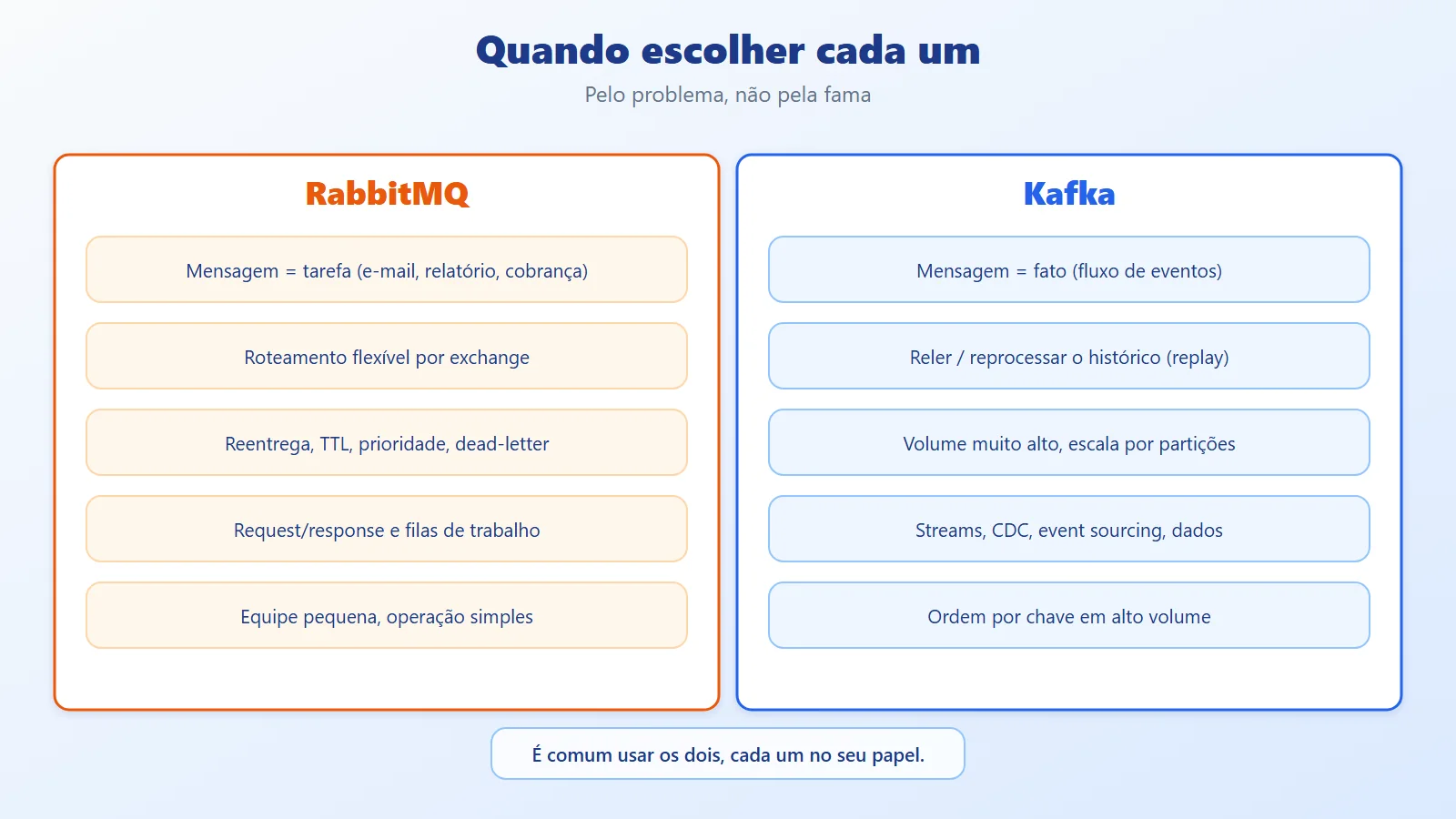
- The message is a task: send an email, generate a report, process an image, charge an order.
- You need flexible routing (by type, by topic, by header) without writing routing code.
- You need redelivery, priority, TTL and dead-lettering out of the box, and request/reply patterns.
- The volume is moderate to high, and operational simplicity matters more than history.
- The team is small and wants something in production quickly.
Choose Kafka when
- The data is an event stream that several systems consume and that needs to be re-read (a new feature, a bug fix, a new consumer that needs the history).
- The volume is very high and growth demands horizontal scaling by partitions.
- There is stream processing (aggregations, windows, joins) or integration with data tools (Kafka Streams, Flink, Spark, Kafka Connect).
- You want the log as the source of truth (auditing, event sourcing, CDC).
- Ordering by key at high volume is a requirement.
Avoid Kafka when
- The problem is a simple task queue: you would pay the complexity of partitions, rebalancing and manual retry for nothing.
- You need complex routing, message priority or per-message delay, which RabbitMQ provides out of the box.
- The team cannot operate a cluster (or hire a managed service).
Avoid RabbitMQ when
- Consumers need to re-read old events or be added later with history (consider RabbitMQ Streams or Kafka).
- You need a very high data-streaming volume with long retention.
- Global per-entity ordering with many competing consumers is essential.
Alternatives
- RabbitMQ Streams: a non-destructive-read log inside RabbitMQ itself, a bridge when you want a little replay without switching brokers.
- Azure Service Bus, Amazon SQS/SNS: managed services in the queue and topic model, with dead-letter and sessions built in; less operational work, in exchange for coupling to the cloud.
- Azure Event Hubs, Amazon Kinesis or managed Kafka: the log model without operating the cluster.
- Messaging libraries (MassTransit, Wolverine, NServiceBus): they abstract the transport and bring retry, outbox and sagas, and several support both brokers. Check the license before adopting: according to the official documentation, MassTransit v9 is commercial.
- Both together: it is common to use Kafka as the event backbone and RabbitMQ for the services' work queues. You do not have to pick just one.
- Neither: a modular monolith with in-process calls, or an outbox table with a simple processor, may solve it without a broker. Adopt messaging when there is a real coupling or scale problem.
Kafka vs RabbitMQ: task or fact, which to choose
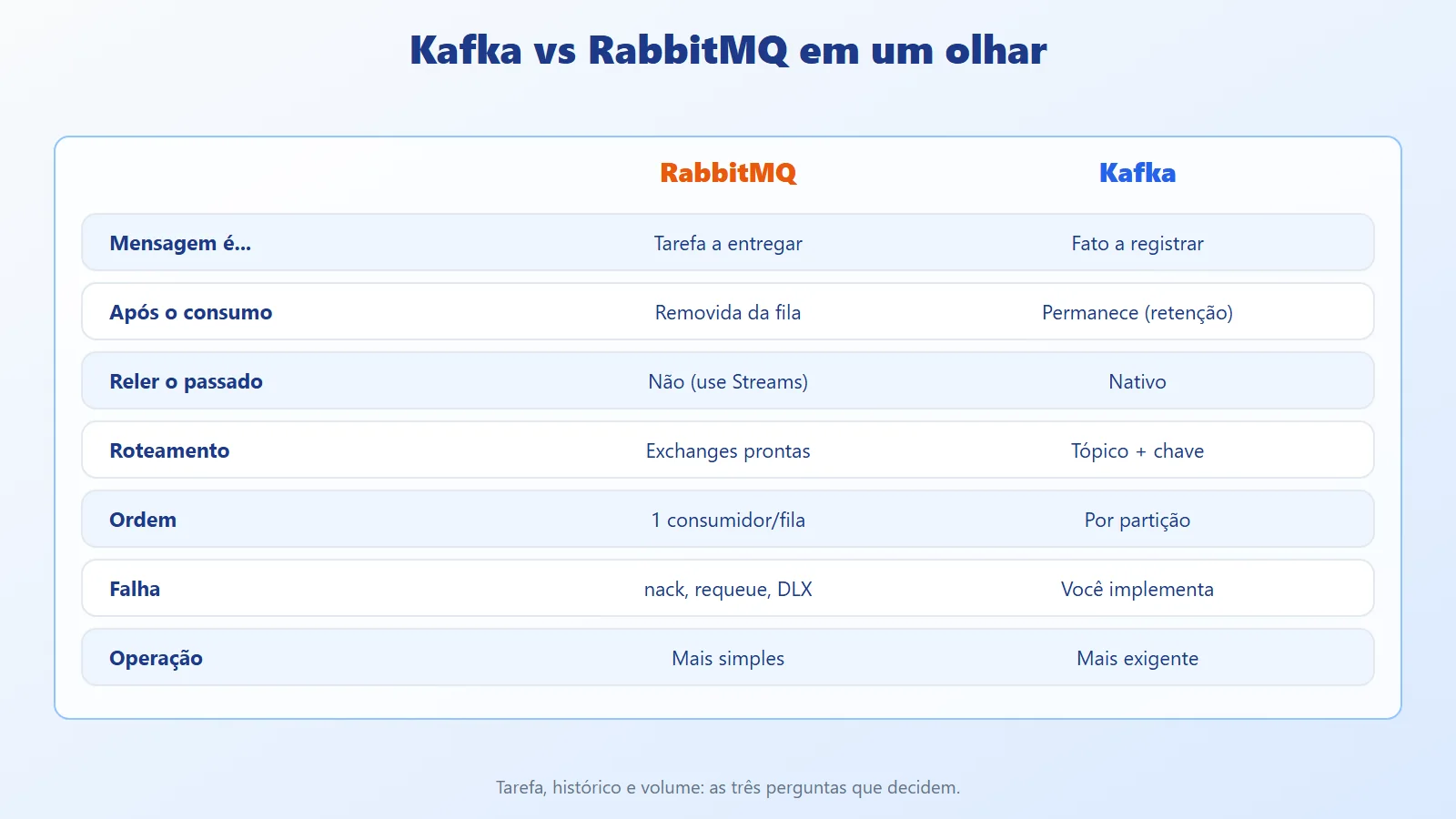
RabbitMQ and Kafka are not direct competitors: one delivers tasks to whoever will execute them; the other records facts that anyone can read, including later. In the example, the same order load left the RabbitMQ queue empty and sent the invalid order to the dead-letter; in Kafka, the events stayed in the topic, read by two groups, with each customer's ordering preserved.
In either one, what holds the system up in production is similar: explicit acknowledgement, an idempotent consumer, designed failure handling, a versioned contract and monitoring (queue size or lag).
A practical reflection: before choosing, answer three questions about your flow. Is the message a task or a fact? Will anyone need to re-read it later? What is the expected volume in two years? If the answers are "task", "no" and "moderate", RabbitMQ comes out ahead at much lower cost. If they are "fact", "yes" and "high", Kafka's log pays for itself.
Kafka and RabbitMQ references
- Article code on GitHub: ceseidl/kafka-vs-rabbitmq-dotnet
- RabbitMQ: Tutorials for .NET
- RabbitMQ: Consumer Acknowledgements and Publisher Confirms
- RabbitMQ: Quorum Queues
- RabbitMQ: Dead Letter Exchanges
- RabbitMQ: Streams
- Apache Kafka: Documentation
- Confluent: Confluent.Kafka for .NET (repository)
- Microsoft Learn: Idempotent Consumer pattern
- Microsoft Learn: Choose between Azure messaging services
Keep reading
- Saga Pattern in .NET: shows a real use of messaging: coordinating transactions between services.
- Monolith vs Microservices: explains the architecture scenario that usually calls for a broker.
- Modular Monolith in .NET: see how modules exchange events in-process before adopting a broker.
Need highly available .NET APIs? See the backend and .NET architecture service.